1
Troubleshooting (cont.)
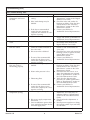
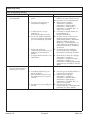
Music Troubleshooting Table
Symptoms
5.
I have a wireless network
but my Media Module is
unable to connect to the
network.
Probable Cause
F. The incorrect Wi-Fi region was
selected.
A. Ethernet cable is plugged in.
B. Media Module is not within
Wi-Fi range.
C. A WEP or WPA key was not
entered for your secured
network.
D. The router is not set up for
802.11b.
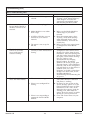
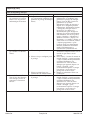
6.
The Media Module cannot A. The firewall is not configured
connect to an iTunes
correctly to allow iTunes music
server with firewall
sharing.
software running.
7.
The Media Module cannot A. iTunes is not running.
access the iTunes library.
B. iTunes is not configured for
sharing.
C. iTunes is not responding to
commands from the Media
Module.
1093174-5-B
10
Recommended Action
F. Enter the settings menu, select
″System,″ select ″Music Software,″
select ″Region″ and select the
appropriate geographical region
that matches your Wi-Fi router.
A. Unplug the Ethernet cable.
B. Make sure the Media Module is
within range of your Wi-Fi
network.
C. Enter the settings menu, select
″System,″ select ″WiFi Security,″
select ″Network Name,″ select
″WEP/WPA Key″ and enter the
security key.
D. Make sure the access point/router
is configured to allow 802.11b
clients.
A. Make sure your firewall software is
configured to allow iTunes music
sharing. For a Mac: Open System
Preferences. Select the Sharing icon
and click on the firewall tab. Select
the option ″iTunes Music Sharing.″
For a PC: Refer to your
documentation for changing
firewall settings. If running
Windows XP service pack 2, open
″Security Center,″ select ″Windows
Firewall,″ click on the ″Exceptions″
tab, and check to see that iTunes is
enabled. If not, use ″Add
Programs″ to enable it. After these
changes have been made, restart
the Media Module by
disconnecting and reconnecting the
AC power.
A. Make sure the computer containing
your iTunes library is turned on
and iTunes is running.
B. In iTunes, be sure to turn on the
″music sharing″ option. Go to the
iTunes>Preferences menu or Edit>
Preferences for PC users. In the
dialog box that appears, click the
″Sharing″ icon, then check the
option ″Share my music″ to enable
sharing on your local network.
C. Close and restart iTunes on your
computer.
Kohler Co.