1
Programming Backwash Controls
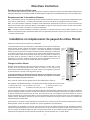
Setting the 24-Hour Timer
Press and hold the red button in to disengage the drive gear. Turn the
large dial until the actual time of day is opposite the time of day pointer.
Release the red button to re-engage the drive gear.
Service
Position
Indicator
Dot
Determining The Backwash Frequency
24 Hour
Gear
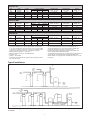
The following table can be used to help determine the frequency of
regeneration. Use this table as a guide - individual circumstances will
require more or less frequent regenerations.
Manual
Regeneration
Knob
To set a neutralizing filter follow the table under mild conditions.
NOTE: add one person if you have a dishwasher.
RED
POINTER
MMF
FILTER
ACF
FILTERS
SEDIMENT
TURBIDITY
TASTE
ODOR
No. of Persons
2
3
4
5
6
7
8
9
10
MILD
AVERAGE
EXTREME
MILD
AVERAGE
EXTREME
Calendar Clock Regeneration Frequency - No. of Tabs Pushed outwards
1
1
1
2
2
2
2
3
3
1
1
2
2
2
3
3
3
4
1
2
2
3
3
3
3
4
4
1
2
2
3
3
4
4
4
6
1
3
3
4
4
4
6
6
6
2
3
3
4
4
6
6
6
12
2
3
3
4
4
6
6
12
12
2
3
4
4
6
6
6
12
12
2
3
4
6
6
12
12
12
12
2
3
4
6
6
12
12
12
12
3
4
6
6
6
12
12
12
12
3
4
6
6
12
12
12
12
12
3
4
6
12
12
12
12
12
12
3
4
6
12
12
12
12
12
12
3
4
6
12
12
12
12
12
12
TAB
3
4
6
12
12
12
12
12
12
TRIP
FINGER
Red Time
Set Button
SKIPPER WHEEL
(SHOWS EVERY OTHER
DAY REGENERATION)
Setting The Backwash Frequency
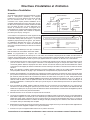
The filter control features a skipper wheel with twelve
numbered tabs and trip fingers. Each represents one
day of a twelve day schedule. By adjusting the
Skipper wheel tabs, the control can be programmed
to backwash every second, third, fourth, sixth or
twelfth day, according to your requirements.
The control is shipped with the skipper wheel tabs
pushed outwards. You must push the tabs in toward
the center of the wheel (retracting the trip finger) for
each day that backwashing is not required.
No. of backwashes
required in
12 days
Skipper Wheel Tab Settings
1
2
3
4
5
6
7
8
9
10
11
12
1
Out In
In
In
In
In
In
In
In
In
In
In
2
Out In
In
In
In
In
In
In
In
In
In
In
3
Out In
In
In Out
In
In
In
Out
In
In
In
4
Out In
In Out In
In
Out
In
In
Out
In
In
6
Out In Out In Out
In
Out
In
Out
In
Out
In
Rotate the skipper wheel until number “1” is at the pointer, leave this tab out. Moving clockwise round the skipper wheel adjust the
remaining tabs using the following table as a guide.
Manual Regeneration
Turn the manual regeneration knob clockwise. This slight movement of the manual regeneration knob engages the program wheel
and starts the regeneration process. The back center knob will make one revolution in approximately three hours and stop in the
position shown in the drawing. Actual backwash time is 14 minutes. In any event, treated water may be drawn after rinse water
stops flowing from the filter’s drain line.
4