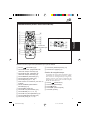
1
ENGLISH
DEUTSCH
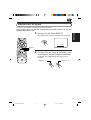
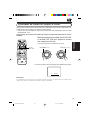
MOBILE TV TUNER SYSTEM
FRANÇAIS
TRAGBARER TV-TUNER
SYSTEME DE TUNER DE TELEVISION MOBILE
MOBIEL TV-TUNERSYSTEEM
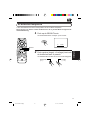
1
2
R AUDIO L
HEADPHONE
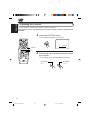
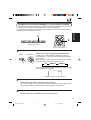
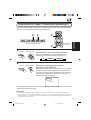
For installation and connections, refer to
the separate manual.
Für den Einbau und die Anschlüsse siehe
das eigenständige Handbuch.
Pour l’installation et les raccordements,
se référer au manuel séparé.
Bijzonderheden over de installatie en
aansluiting van het apparaat vindt u in
de desbetreffende handleiding.
2
TO DISPLAY
VOCAL
POWER
SUPPLY
OUTPUT
ANTENNA INPUT
1
VIDEO
NEDERLANDS
KV-C10
3
INPUT 1
INPUT 2
4
L AUDIO R
VIDEO
VIDEO
CONT
VIDEO
L AUDIO R
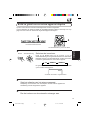
* This system is designed to enjoy TV programs by connecting JVC mobile
color monitor system KV-M700 (sold separately). All operations and functions
of the system including KV-M700 connected are explained in this
instructions.
* Dieses System wurde entwickelt, um mit dem tragbaren JVC-Farbmonitor
KV-M700 (separat erhältlich) Fernsehprogramme betrachten zu können.
Alle Funktionen und die Bedienung des Systems, einschl. Anschluss an
den KV-M700, sind in diesem Handbuch erklärt.
* Ce système est conçu pour vous permettre de regarder des émissions de
télévision en connectant le système de moniteur couleur mobile KV-M700
de JVC (vendu séparément). Le fonctionnement et les fonctions du système
avec le KV-M700 connecté sont expliqués dans ce manuel d’instructions.
* Het systeem is ontwor pen om op een aangesloten mobiel
kleurenmonitorsysteem van JVC (de KV-M700, apart leverbaar) naar TVprogramma’s te kijken en luisteren. Alle bediening en alle functies en
voorzieningen van het systeem, met inbegrip van de aangesloten KV-M700,
worden in deze handleiding besproken.
INSTRUCTIONS
BEDIENUNGSANLEITUNG
MANUEL D’INSTRUCTIONS
GEBRUIKSAANWIJZING
3351398B01-0
[E]
COVER.KV-C10_3351398B01-0
3
01.1.17, 10:04 AM
ENGLISH
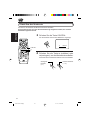
Safety points (Be sure to follow these points)
CAUTIONS
CAUTION
RISK OF ELECTRIC SHOCK
DO NOT OPEN
CAUTION:
TO REDUCE THE RISK OF ELECTRIC SHOCK.
DO NOT REMOVE COVER (OR BACK).
NO USER-SERVICEABLE PARTS INSIDE.
REFER SERVICING TO QUALIFIED SERVICE PERSONNEL.
The lightning flash with arrowhead symbol, within an equilateral
triangle, is intended to alert the user to the presence of
uninsulated "dangerous voltage" within the product's enclosure
that may be of sufficient magnitude to constitute a risk of electric
shock to persons.
The exclamation point within an equilateral triangle is intended to
alert the user to the presence of important operating and
maintenance (servicing) instructions in the literature
accompanying the appliance.
WARNING:
TO PREVENT FIRE OR SHOCK
HAZARD, DO NOT EXPOSE THIS
UNIT TO RAIN OR MOISTURE.
CAUTION:
This TV tuner unit or system should be used with DC 12 V
only.
To prevent electric shocks and fire hazards, DO NOT use
any other power source.
WARNINGS
• BE SURE TO INSTALL THE MONITOR ON TOP OF
THE DASHBOARD TO PREVENT IT FROM
OBSTRUCTING VISIBILITY.
• IF THE MONITOR HAS BEEN INSTALLED FOR THE
REAR SEAT PASSENGERS, THEY MUST BE
CAREFUL NOT TO BE INJURED BY HITTING THEIR
HEAD ON THE MONITOR IN CASE OF AN ACCIDENT.
• DO NOT INSTALL THE TV TUNER SYSTEM IN A
LOCATION WHICH OBSTRUCTS DRIVING,
VISIBILITY OR WHICH IS PROHIBITED BY
APPLICABLE LAWS AND REGULATIONS.
• THERE MAY BE LEGAL REGULATIONS DEFINING
THE PERMISSIBLE INSTALLATION LOCATIONS FOR
THE MONITOR SYSTEM WHICH DIFFER BY
COUNTRY OR BY STATE, BE SURE TO INSTALL THE
MONITOR SYSTEM IN A CORRECT LOCATION
ACCORDING TO SUCH LAWS.
• DO NOT INSTALL THE TV TUNER SYSTEM IN A
LOCATION WHICH OBSTRUCTS THE OPERATION
OF AN AIR BAG.
• THE DRIVER MUST NOT OPERATE THE TV TUNER
SYSTEM WHILE DRIVING.
OPERATING THE TV TUNER SYSTEM WHILE
DRIVING MAY LEAD TO CARELESSNESS AND
CAUSE AN ACCIDENT.
2
• THE DRIVER MUST NOT WATCH THE TELEVISION
OR VIDEOS WHILE DRIVING.
IF THE DRIVER WATCHES THE TELEVISION OR A
VIDEO WHILE DRIVING, IT MAY LEAD TO
CARELESSNESS AND CAUSE AN ACCIDENT.
• DO NOT USE THE TV TUNER SYSTEM WHEN THERE
IS A PROBLEM OR MALFUNCTION.
IF THE TV TUNER SYSTEM IS USED IN AN
ABNORMAL CONDITION SUCH AS WHEN THE TV
TUNER SYSTEM IS EMITTING SMOKE OR AN
UNUSUAL SMELL, IT MAY CAUSE A FIRE OR SOME
OTHER PROBLEM.
* IMMEDIATELY STOP USING THE TUNER SYSTEM AND
CONSULT THE SALES OUTLET WHERE YOU PURCHASED
THE TUNER SYSTEM.
• DO NOT DISASSEMBLE THE TV TUNER SYSTEM OR
MAKE ANY CHANGES.
IF THE TUNER SYSTEM IS DISASSEMBLED OR
MODIFIED, IT MAY CAUSE MALFUNCTIONS OR A
FIRE OR OTHER ACCIDENTS.
• DO NOT PUT YOUR EYES OR FACE NEAR THE
ANTENNA ELEMENT.
IF YOU PUT YOUR EYES OR FACE NEAR THE
ANTENNA ELEMENT, YOU COULD BE INJURED.
• WHEN LIGHTNING OCCURS, DO NOT TOUCH THE
ANTENNA WIRE OR THE TV TUNER SYSTEM.
TOUCHING THE ANTENNA WIRE OR THE TV TUNER
SYSTEM UNDER SUCH CONDITIONS MAY CAUSE
ELECTROCUTION.
• KEEP THE TV TUNER SYSTEM AT AN APPROPRIATE
SOUND LEVEL WHILE DRIVING.
DRIVING WITH THE SOUND AT A LEVEL WHICH
PREVENTS YOU FROM HEARING SOUNDS OUTSIDE
OF AND AROUND THE VEHICLE MAY CAUSE AN
ACCIDENT.
• ASK A TRAINED TECHNICIAN TO INSTALL THE TV
TUNER SYSTEM.
INSTALLATION AND WIRING REQUIRE TRAINING
AND EXPERIENCE.
* TO BE SAFE, ASK THE SALES OUTLET WHERE YOU
PURCHASED THE TV TUNER SYSTEM TO PERFORM THE
INSTALLATION.
• DO NOT LET THE TV TUNER SYSTEM FALL OR BE
STRONGLY IMPACTED.
BE SURE NOT TO LET THE TV TUNER SYSTEM FALL
OR BE STRONGLY IMPACTED SINCE THIS MAY
CAUSE A MALFUNCTION OR FIRE.
• DO NOT WATCH THE MONITOR WITH THE ENGINE
OFF.
WATCHING THE MONITOR WITH THE ENGINE OFF
WILL CONSUME BATTERY POWER AND MAY
PREVENT THE ENGINE FROM STARTING.
* STOP YOUR VEHICLE IN A SAFE LOCATION WHEN
OPERATING THE TV TUNER SYSTEM.
EN02-08.KV-C10[E]f
2
01.1.17, 10:05 AM
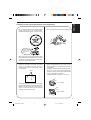
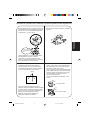
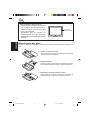
• Do not leave the liquid crystal panel surface
facing upwards on top of the dashboard.
(storage temperature range: –20°C to +80°C)
ENGLISH
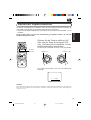
Cautions for the liquid crystal panel (sold separately)
• Do not strongly impact the liquid crystal panel.
+80°C
–20°C
–20°C to +80°C
During the summer,
temperatures can
reach as high as
100°C.
When the liquid crystal panel reaches high
temperatures or low temperatures, chemical
changes occur within the liquid crystal panel
which may cause malfunctions.
• There are red spots, blue spots and green
spots on the panel surface. This is a
characteristic of liquid crystal panels and is
not a problem.
Spots
The liquid crystal panel is built with very high
precision technology and has at least 99.99%
effective image pixels. Be aware that on
0.01% of the panel there may be missing
pixels or constantly light pixels.
• When the temperature is very cold or very
hot, the image may not appear clearly or may
move slowly.
In addition, movement of the image may seem
to be out of sync or the image quality may
decline in such environments. Note that this
is not a malfunction or problem.
(usage temperature range: 0°C to +40°C)
0°C or colder
40°C or hotter
3
EN02-08.KV-C10[E]f
3
01.1.17, 10:05 AM
ENGLISH
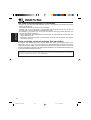
Thank you for purchasing a JVC product. Please read all instructions carefully before operation, to
ensure your complete understanding and to obtain the best possible performance from the unit.
CONTENTS
CONTROLS AND FEATURES ......................................... 5
TV tuner unit .................................................................................. 5
Color monitor (KV-M700, sold separately) .................................. 6
Remote controller (supplied with KV-M700) ............................... 7
Installing the batteries ................................................................. 8
BASIC OPERATIONS .................................................... 9
Watching television ......................................................................... 9
Storing channels in memory (Auto memory) ............................. 11
Setting the channel selection ........................................................ 12
Watching playback of external component ................................ 13
OTHER FUNCTIONS .................................................. 15
Setting the RF input ..................................................................... 15
ADJUSTMENTS ......................................................... 16
Adjusting the color ....................................................................... 16
Adjusting the brightness .............................................................. 17
Adjusting the contrast .................................................................. 18
Adjusting the headphone volume ................................................ 19
MAINTENANCE ......................................................... 20
TROUBLESHOOTING ................................................. 21
SPECIFICATIONS ....................................................... 23
4
BEFORE USE
* For safety....
• Do not raise the volume level too much, as this
will block outside sounds, making driving
dangerous.
• Stop the car before performing any complicated
operations.
EN02-08.KV-C10[E]f
4
* Temperature inside the car....
If you have parked the car for a long time in hot
or cold weather, wait until the temperature in the
car becomes normal before operating the unit.
01.1.17, 10:05 AM
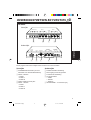
CONTROLS AND FEATURES
ENGLISH
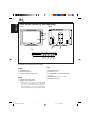
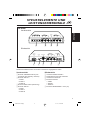
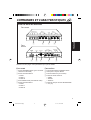
TV tuner unit
Front
ANTENNA INPUT
1
2
3
INPUT 2
4
VIDEO
1
INPUT 1
VIDEO
CONT VIDEO
L AUDIO R
L AUDIO R
3
2
4
Back
OUTPUT
R AUDIO L
VIDEO
8
2
POWER
SUPPLY
VOCAL
TO DISPLAY
7
HEADPHONE
6
1
5
9
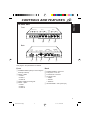
See pages in the parentheses for details.
Front
Back
1 ANTENNA INPUT jacks (for connecting the
diversity antenna)
2 INPUT 2 jacks
• VIDEO
• AUDIO L
• AUDIO R
3 VIDEO CONT (Control) jack
4 INPUT 1 jacks
• VIDEO
• AUDIO L
• AUDIO R
5
6
7
8
POWER SUPPLY connector
This jack is not in use.
TO DISPLAY connector
OUTPUT jacks
• VIDEO
• AUDIO L
• AUDIO R
9 HEADPHONE 1 and 2 jacks (19)
5
EN02-08.KV-C10[E]f
5
01.1.17, 10:05 AM
ENGLISH
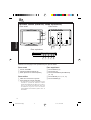
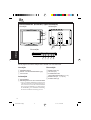
Color monitor (KV-M700, sold separately)
Front
Back
1
2
3
4
5
Top
DOWN
UP
AUTO/MANU
MODE
POWER
6 7 8 9 p
See pages in the parentheses for details.
Front
Top
1 STANDBY lamp
2 Remote sensor (8)
3 Screen (Liquid crystal panel)
6 DOWN button (10)
7 UP button (10)
8 AUTO/MANU (Auto/Manual) button
(11, 12)
9 MODE button (10, 11, 12, 13)
p POWER button (9)
Back
4 System connection cable
5 Monitor stand guide slot
• When you use the monitor stand to install
JVC mobile color monitor system KV-M700
in your car, attach the monitor stand here.
For installation, refer to the Installation/
Connection Manual supplied with KV-M700.
6
EN02-08.KV-C10[E]f
6
01.1.17, 10:05 AM
1
MONI
p
CH
2
3
4
5
6
ENGLISH
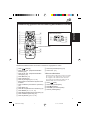
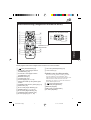
Remote controller (supplied with KV-M700)
H/P
VOL
MODE
H/P
VOL
q
w
e
r
CH
COLOR
BRIGHT
CONTRA
VCR section
u
VCR
i
VCR
;
a
VCR section
7
8
9
VOCAL
SKIP
A.MEMO
o
t
y
RF
CALL
RM-RK37
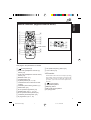
See pages in the parentheses for details.
1
(Power) button (9)
2 3 H/P VOL (Headphone volume up)
button (19)
3 2 H/P VOL (Headphone volume down)
button (19)
4 BRIGHT button (17)
5 COLOR button (16)
6 2 (Down) button (16, 17, 18)
7 This button does not function for this
system.
8 A.MEMO (Auto memory) button (11)
9 SKIP button (12)
p 5 CH (Channel up) button (10)
q MODE button (10, 11, 12, 13)
w ∞ CH (Channel down) button (10)
e CONTRA (Contrast) button (18)
r 3 (Up) button (16, 17, 18)
t RF (Radio frequency) button (15)
y CALL button (14)
VCR section
The buttons in this section are used for operating
JVC mobile video cassette player KV-V8 or JVC
mobile video cassette recorder KV-V10. For the
operation, refer to the instructions of KV-V8 or
KV-V10.
u
i
o
;
a
(Power) button
1 (Rewind) button
7 (Stop) button
¡ (Fast-forward) button
3 (Play) button
7
EN02-08.KV-C10[E]f
7
01.1.17, 10:05 AM
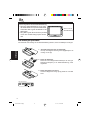
ENGLISH
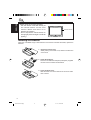
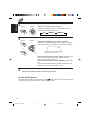
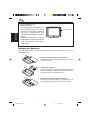
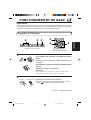
Before using the remote controller:
• Aim the remote controller directly at
the remote sensor on the color
monitor. Make sure there is no
obstacle in between.
• Do not expose the remote sensor to
strong light (direct sunlight or artificial
lighting).
Remote sensor
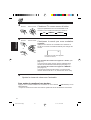
Installing the batteries
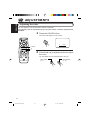
When the controllable range or effectiveness of the remote controller decreases, replace the
batteries.
1. Remove the back cover.
While pushing on the back cover, slide it in the direction
of the arrow.
2. Install the batteries.
Place the two batteries R03(UM-4)/AAA(24F) supplied
into the remote controller as illustrated.
3. Close the back cover.
Slide the back cover in the direction of the arrow until a
click is heard.
8
EN02-08.KV-C10[E]f
8
01.1.17, 10:05 AM
BASIC OPERATIONS
ENGLISH
Preparation
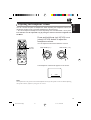
Before operating the system, make sure that all external components are correctly
connected and installed. For connecting the external components, refer to the
instructions and the installations supplied with the external components.
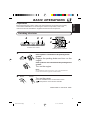
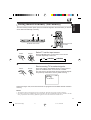
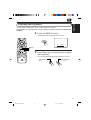
Watching television
4
3 2
2
3
DOWN
UP
AUTO/MANU
MODE
MONI
CH
H/P
VOL
MODE
H/P
VOL
4
CH
POWER
COLOR
KV-M700 color monitor
BRIGHT
CONTRA
KV-M700 remote controller
1
If the system is connected to the parking brake
system:
ACC
ON
Engage the parking brake and turn on the
engine.
If the system is not connected to the parking brake
system:
ACC
ON
Turn on the engine.
Note:
For installation and connections, refer to the Installation/
Connection Manual supplied with KV-M700.
2
Monitor
Remote
Turn on the power.
Press the POWER button on the monitor or the
(power) button on the remote controller.
POWER
CONTINUED TO THE NEXT PAGE
9
EN09-15.KV-C10[E]f
9
01.1.17, 10:05 AM
ENGLISH
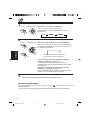
3
Monitor
Select TV as the input source.
Remote
Press the MODE button on the monitor or the remote
controller repeatedly to select TV.
CH
H/P
VOL
MODE
MODE
4
H/P
VOL
TV
CH
Monitor
Remote
VIDEO 1
VIDEO 2
Select the channel you want to watch.
Press the UP or DOWN button on the monitor or the 5 CH
or ∞ CH on the remote controller to change the channels.
CH
UP
or
H/P
VOL
MODE
08
H/P
VOL
CH
Selected channel number appears
on the screen for a while.
DOWN
If the channel selection is set to “AUTO” (See page 12.)
You can select only the channels preset by the auto
memory function. (See page 11.)
If the channel selection is set to “MANUAL” (See page
12.)
You can select all the channels. (Channel coverage: VHF
channels 1 to 12, UHF channels 21 to 69)
5
Adjust the volume level on the car receiver.
To turn off the power
Press the POWER button on the monitor or the
(power) button on the remote controller.
• Turning off the engine will also turn off the TV tuner system.
10
EN09-15.KV-C10[E]f
10
01.1.17, 10:05 AM
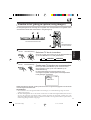
The auto memory function picks up the TV broadcast signals in the area where you are and
stores them automatically in memory.
ENGLISH
Storing channels in memory (Auto memory)
MONI
CH
2
1
1
MODE
H/P
VOL
H/P
VOL
CH
COLOR
DOWN
UP
AUTO/MANU
MODE
CONTRA
BRIGHT
VCR
POWER
KV-M700 color monitor
2
1
Monitor
KV-M700 remote
controller
CALL
Press the MODE button on the monitor or the remote
controller repeatedly to select TV.
CH
MODE
A.MEMO
RF
SKIP
Select TV as the input source.
Remote
H/P
VOL
VOCAL
H/P
VOL
TV
MODE
VIDEO 1
VIDEO 2
CH
2
Start scanning TV broadcast signals.
Monitor
Press and hold the AUTO/MANU button on the monitor or
press the A.MEMO button on the remote controller.
The auto memory function starts and TV broadcast signals
are picked up and stored in memory while scanning.
Remote
A.MEMO
AUTO/MANU
SCAN
22
AUTO MEMORY
When scanning is over, the screen shows the TV program of the smallest channel number in
memory.
Notes:
• TV stations with weak signals are not be picked up, therefore not being stored in memory.
• If you drive from one broadcasting area to another, the stored channels will not be tuned in. In this
case, perform the auto memory function again to store the stations in another area.
11
EN09-15.KV-C10[E]f
11
01.1.17, 10:05 AM
ENGLISH
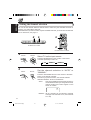
Setting the channel selection
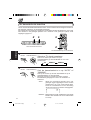
You can set the channel selection method either to select only the receivable channels in
memory or to select all the channels.
Remember that if you want to select only the receivable channels, you must store the channels
first. To store them, see page 11.
MONI
2
1
CH
1
H/P
VOL
MODE
H/P
VOL
CH
COLOR
DOWN
UP
AUTO/MANU
MODE
BRIGHT
POWER
CONTRA
VCR
KV-M700 color monitor
2
VOCAL
SKIP
A.MEMO
RF
CALL
KV-M700 remote controller
1
Monitor
Remote
Select TV as the input source.
CH
H/P
VOL
MODE
H/P
VOL
Press the MODE button on the monitor or the remote
controller repeatedly to select TV.
MODE
TV
CH
2
Monitor
VIDEO 1
VIDEO 2
Set the channel selection to “AUTO” or
“MANUAL.”
Remote
Press the AUTO/MANU button on the monitor or the SKIP
button on the remote controller.
Each time you press the button, the channel selection
alternates between “AUTO” and “MANUAL.”
SKIP
AUTO/MANU
AUTO:
Only the receivable channels stored in memory
can be selected. When you change the channel,
channel number and “AUTO” appear on the
screen for a while.
08
AUTO
MANUAL: All the channels can be selected. (Channel
coverage: VHF channels 1 to 12, UHF channels
21 to 69)
12
EN09-15.KV-C10[E]f
12
01.1.17, 10:05 AM
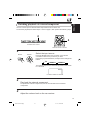
You can connect up to 2 external video components to the TV tuner unit.
To watch the playback, first follow steps 1 and 2 on page 9, then perform the following steps.
1
ENGLISH
Watching playback of external component
MONI
CH
H/P
VOL
DOWN
UP
AUTO/MANU
MODE
MODE
H/P
VOL
1
POWER
CH
KV-M700 color monitor
COLOR
BRIGHT
CONTRA
KV-M700 remote controller
1
Monitor
Select the input source.
Remote
Press the MODE button on the monitor or the remote
controller to select the input source you want.
Each time you press the button, the input source changes as
follows:
CH
H/P
VOL
MODE
MODE
H/P
VOL
CH
TV
VIDEO 1
VIDEO 2
The selected input source name also appears on the screen
for 3 seconds.
VIDEO1
EX: When VIDEO1 is selected.
2
Play back the external component.
To operate the external components, refer to the manuals of the connected
components.
3
Adjust the volume level on the car receiver.
13
EN09-15.KV-C10[E]f
13
01.1.17, 10:05 AM
ENGLISH
To check the current input source
Press the CALL button on the remote controller.
The current input source name appears on the screen for
3 seconds.
VOCAL
SKIP
A.MEMO
RF
CALL
CALL
RM-RK37
KV-M700 remote controller
To turn off the power
Press the POWER button on the monitor or the
(power) button on the remote controller.
• Turning off the engine will also turn off the TV tuner system.
Notes:
• When you watch the screen aslant, the picture might not be clear. This is not a malfunction. The
finest picture can be seen when you watch the screen straight.
• When JVC mobile video cassette player KV-V8 or JVC mobile video cassette recorder KV-V10 is
connected to the system, you can also operate it by using the remote controller supplied with this
system. For the operation, refer to the instructions of KV-V8 or KV-V10.
14
EN09-15.KV-C10[E]f
14
01.1.17, 10:05 AM
Setting the RF input
This system provides RF input selector. When you use JVC FM modulator KS-IF200, you can
listen to the sounds from the system through the receiver equipped with no line input. For
connecting and setting KS-IF200, refer to the instructions of KS-IF200.
VOCAL
SKIP
A.MEMO
RF
ENGLISH
OTHER FUNCTIONS
RF
CALL
RM-RK37
KV-M700 remote controller
RF
Press the RF button on the remote controller. Each time you press
the button, “RF ON” and “RF OFF” alternate, and the selected setting
appears on the screen.
RF ON: When reproducing the sound from the system through the
receiver equipped with no line input. (When using KSIF200)
RF OFF: Select this when you listen to the radio using the receiver
connected to this unit. (When using KS-IF200)
RF ON
RF OFF
15
EN09-15.KV-C10[E]f
15
01.1.17, 10:05 AM
ENGLISH
ADJUSTMENTS
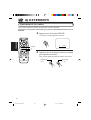
Adjusting the color
You can adjust the color of the monitor system of KV-M700.
This function can be operated only by using the remote controller supplied with
KV-M700.
1
Press the COLOR button.
The color level appears on the screen.
MONI
CH
COLOR
H/P
VOL
MODE
H/P
VOL
08
COLOR
CH
COLOR
BRIGHT
CONTRA
COLOR
2
3
2
VCR
VOCAL
SKIP
Press the 3 (up) or 2 (down) button to adjust
the color.
RF
You can adjust the color level between 0 and 15.
A.MEMO
CALL
RM-RK37
Gets softer
Gets deeper
(0 +)
(= 15)
16
EN16-19.KV-C10[E]f
16
01.1.17, 10:05 AM
You can adjust the brightness of the monitor system of KV-M700.
This function can be operated only by using the remote controller supplied with
KV-M700.
1
ENGLISH
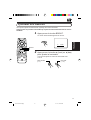
Adjusting the brightness
Press the BRIGHT button.
The brightness level appears on the screen.
MONI
CH
BRIGHT
H/P
VOL
MODE
H/P
VOL
08
BRIGHT
CH
COLOR
BRIGHT
CONTRA
VCR
VOCAL
SKIP
A.MEMO
BRIGHT
2
3
2
RF
Press the 3 (up) or 2 (down) button to adjust
the brightness.
You can adjust the brightness level between 0 and 15.
CALL
RM-RK37
Gets darker
Gets brighter
(0 +)
(= 15)
17
EN16-19.KV-C10[E]f
17
01.1.17, 10:05 AM
ENGLISH
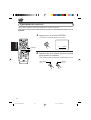
Adjusting the contrast
You can adjust the contrast of the monitor system of KV-M700.
This function can be operated only by using the remote controller supplied with
KV-M700.
1
Press the CONTRA button.
The contrast level appears on the screen.
MONI
CH
H/P
VOL
MODE
CONTRA
H/P
VOL
08
CH
COLOR
BRIGHT
CONTRA
CONTRA
2
3
VCR
VOCAL
SKIP
A.MEMO
CONTRAST
2
RF
Press the 3 (up) or 2 (down) button to adjust
the contrast.
You can adjust the contrast level between 0 and 15.
CALL
RM-RK37
Gets lower
Gets higher
(0 +)
(= 15)
18
EN16-19.KV-C10[E]f
18
01.1.17, 10:05 AM
You can connect two pairs of headphones. When adjusting the headphone volume, the
adjustment applies to both connected headphones at the same time.
• You cannot adjust the headphone volume separately for the HEADPHONE 1 and 2 jacks.
This function can be operated only by using the remote controller supplied with
KV-M700.
ENGLISH
Adjusting the headphone volume
Press and hold the 3 (up) H/P VOL or 2
(down) H/P VOL button to adjust the
headphone volume.
MONI
CH
You can adjust the volume level between 0 and 35.
H/P
VOL
MODE
H/P
VOL
CH
COLOR
BRIGHT
CONTRA
Gets smaller (0 +)
2 and 3
H/P VOL
Gets louder (= 35)
CH
CH
VCR
H/P
VOL
VOCAL
SKIP
MODE
H/P
VOL
H/P
VOL
H/P
VOL
RF
CH
CH
A.MEMO
MODE
CALL
RM-RK37
The headphone volume level appears on the screen.
15
VOLUME
Note:
This adjustment is only for the connected headphones but not for the speakers in the car. When adjusting
the speaker volume, adjust it by using the car receiver.
19
EN16-19.KV-C10[E]f
19
01.1.17, 10:05 AM
MAINTENANCE
ENGLISH
To prevent damage to the system exterior
• Do not apply pesticides, benzine, thinner or other volatile substances to the unit.
The cabinet surface primarily consists of plastic materials.
• Do not wipe with benzine, thinner or similar substances because this will result in discoloration
or removal of the paint.
• When a cloth with a cleansing chemical is used, follow the caution points:
– Do not leave the unit in contact with rubber or vinyl products for long periods of time.
– Do not use cleansers which have polishing granules because this could damage the surface
of the unit.
Clean dirt by wiping lightly with a soft cloth
When the unit is very dirty, wipe with a well-wrung cloth dipped in a kitchen cleanser (neutral)
thinned by water and then go over the same surface with a dry cloth.
(Since there is the possibility of water drops getting inside of the unit, do not directly apply
cleanser to the surface.)
Caution:
If water drops or similar wet substances get inside of the monitor via the liquid crystal panel surface,
it may cause a malfunction.
20
EN20-23.KV-C10[E]f
20
01.1.17, 10:05 AM
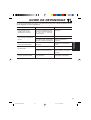
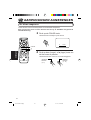
What appears to be trouble is not always serious. Check the following points before calling a
service center.
Symptoms
Causes
Remedies
• Colored spots (red, blue and
green) appear on the screen.
This is a characteristic of liquid
crystal panels and is not a
malfunction.
See page 3.
• Sound can be heard but no
picture appears on the screen.
The parking brake has been
disengaged.
Engage the parking break.
The parking brake connection wire
(gray) is not connected correctly.
Check the connection and
correct it.
• No picture appears and sound
is not heard.
Correct input mode is not
selected.
Select the correct input mode.
• Remote controller does not
work.
The batteries have lost their
charge.
Install new batteries.
Remote sensor is exposed to
strong light.
Do not expose the remote
sensor to strong light.
You have driven to another
broadcasting area.
Perform the auto memory
function again.
• The preset channels cannot
be tuned in.
ENGLISH
TROUBLESHOOTING
21
EN20-23.KV-C10[E]f
21
01.1.17, 10:05 AM
ENGLISH
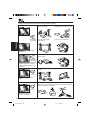
In the following environments, the image quality may be impaired.
Between buildings
A plane flies overhead
A train passes close by
Near electricity
transmission wires
Mountain shadow
Mountain or tree shadow
Distance from the broadcast
station
Movement
Interference
occurs
Doubling and tripling of
images (ghosts)
Interference
occurs
Image quality gradually
worsens and color instability
(displayed and then disappear)
Near an automobile, motor bike, high-voltage wires or a neon sign
Normal
sound
Spots appear on the screen
Near the transmission antenna of a radio station or an amateur
wireless station, or when a wireless device is being used in a
vehicle
Normal
sound
Color patterns appear on the
screen; colors are lost
22
EN20-23.KV-C10[E]f
22
01.1.17, 10:05 AM
TV TUNER UNIT
GENERAL
Input
Antenna:
Mini-jack × 4
Video: RCA pin × 2 circuits
1 V(p-p), 75 Ω
Audio: RCA pin × 2 circuits
0.5 V(rms)
Vocal: Mono mini-jack × 1
Video Control:
Mono mini-jack × 1
Output
Display:
8-pin DIN connector
Video: RCA pin × 1 circuit
1 V(p-p), 75 Ω
Audio: RCA pin × 1 circuit
0.5 V(rms)
Headphone:
Stereo mini-jack × 2
0 mW to 15 mW per channel
output into 32 Ω
Dimensions (W × H × D):
163 mm × 28.5 mm × 120 mm
Mass: 0.6 kg
Channel coverage:
VHF: ch 1 – 12
UHF: ch 21 – 69
Power Requirement
Operating Voltage:
DC 14.4 V (11 V to 16 V allowance)
Grounding System: Negative ground
Allowable Operating Temperature:
0°C to +40°C
Allowable Storage Temperature:
–20°C to +80°C
ENGLISH
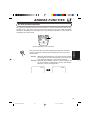
SPECIFICATIONS
Design and specifications subject to change
without notice.
DIVERSITY ANTENNA
Output impedance:
75 Ω × 4 (with mini plug)
Cable length: 4 m
Dimensions (approx.) (W × H × D):
460 mm × 460 mm × 18 mm
(without the cable)
Mass (each unit) (approx.):
165 g (including the cable)
23
EN20-23.KV-C10[E]f
23
01.1.17, 10:05 AM
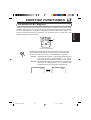
Sicherheitshinweise (Unbedingt beachten)
VORSICHT
CAUTION
DEUTSCH
RISK OF ELECTRIC SHOCK
DO NOT OPEN
CAUTION:
TO REDUCE THE RISK OF ELECTRIC SHOCK.
DO NOT REMOVE COVER (OR BACK).
NO USER-SERVICEABLE PARTS INSIDE.
REFER SERVICING TO QUALIFIED SERVICE PERSONNEL.
The lightning flash with arrowhead symbol, within an equilateral
triangle, is intended to alert the user to the presence of
uninsulated "dangerous voltage" within the product's enclosure
that may be of sufficient magnitude to constitute a risk of electric
shock to persons.
The exclamation point within an equilateral triangle is intended to
alert the user to the presence of important operating and
maintenance (servicing) instructions in the literature
accompanying the appliance.
WARNUNG:
SCHÜTZEN SIE DIESES GERÄT VOR
NÄSSE UND FEUCHTIGKEIT, UM
DIE GEFAHR VON BRAND ODER
ELEKTRISCHEM SCHLAG ZU
VERHÜTEN.
VORSICHT:
Die Betriebsspannung für dieses TV-Tuner oder system
beträgt 12 V Gleichstrom.
Betreiben Sie es nicht mit anderen Spannungen, um
elektrischen Schlag und Brand zu verhüten.
WARNUNGEN
• DEN MONITOR AUF DEM ARMATURENBRETT
INSTALLIEREN, UM EINE EINENGUNG DES
SICHTFELDES ZU VERMEIDEN.
• WIRD DER MONITOR ZUM BETRACHTEN DURCH
DIE BEIFAHRER AUF DEM RÜCKWÄRTIGEN SITZ
INSTALLIERT, MÜSSEN DIESE DARAUF ACHTEN,
DASS SIE SICH BEI EINEM UNFALL NICHT DEN KOPF
DARAN STOSSEN.
• INSTALLIEREN SIE DEN TV-TUNER NICHT AN EINEM
ORT, AN DEM DAS FÜHREN DES FAHRZEUGS ODER
DIE SICHT BEEINTRÄCHTIGT WIRD ODER DER
AUFGRUND GELTENDER GESETZE UND
VERORDNUNGEN UNZULÄSSIG IST.
• ES GIBT MÖGLICHERWEISE GESETZLICHE
VORSCHRIFTEN
IN
BEZUG
AUF
DIE
INSTALLATIONSSTELLE DES MONITORS, DIE VON
LAND ZU LAND ODER BUNDESLAND ZU
BUNDESLAND UNTERSCHIEDLICH SEIN KÖNNEN.
VERGEWISSERN SIE SICH ALSO AUS DIESEM
GRUND, DASS SIE DEN MONITOR AN EINEM PLATZ
INSTALLIEREN, DER DEN GESETZLICHEN
VORSCHRIFTEN ENTSPRICHT.
• BAUEN SIE DAS TV-TUNERSYSTEM NICHT AN
EINER STELLE EIN, WO ES EINE AIRBAG
BEHINDERN KÖNNTE.
2
GE02-08.KV-C10[E]f
2
• DEM FAHRER EINES FAHRZEUGS IST DIE
BEDIENUNG DES TV-TUNERSYSTEMS WÄHREND
DER FAHRT UNTERSAGT.
DIES KÖNNTE DEN FAHRER ABLENKEN UND ZU
UNFÄlLEN FÜHREN.
* HALTEN SIE IHREN WAGEN AN EINER SICHEREN STELLE
AN, BEVOR SIE DAS TV-TUNERSYSTEM BEDIENEN.
• DEM FAHRER EINES FAHRZEUGS IST DAS
BETRACHTEN VON VIDEOS WÄHREND DER FAHRT
UNTERSAGT.
DIES KÖNNTE DEN FAHRER ABLENKEN UND ZU
UNFÄlLEN FÜHREN.
• BENUTZEN SIE DEN TV-TUNER NICHT, WENN EIN
PROBLEM AUFGETRETEN IST ODER DAS SYSTEM
FEHLERHAFT IST.
WENN DER TV-TUNER IN EINEM UNNORMALEN
ZUSTAND BENUTZT WIRD, Z. B. WENN RAUCH
ODER EIN UNGEWÖHNLICHER GERUCH AUS DEM
GERÄT KOMMT, KANN DIES ZU EINEM BRAND
ODER EINEM ANDEREN PROBLEM FÜHREN.
* STELLEN SIE SOFORT DIE BENUTZUNG DES GERÄTS EIN
UND KONTAKTIEREN SIE DAS GESCHÄFT, IN DEM SIE DEN
TUNER GEKAUFT HABEN.
• ZERLEGEN SIE DEN TV-TUNER NICHT UND NEHMEN
SIE KEINE ÄNDERUNGEN AM GERÄT VOR.
WENN DAS SYSTEM ZERLEGT ODER VERÄNDERT
WURDE, KANN ES ZU FEHLFUNKTIONEN KOMMEN
ODER EIN FEUER ODER ANDERE UNFÄLLE
VERURSACHT WERDEN.
• HALTEN SIE DIE ANTENNE VON DEN AUGEN UND
DEM GESICHT FERN, DA DIES ZU VERLETZUNGEN
FÜHREN KANN.
• BERÜHREN SIE DEN ANTENNENDRAHT ODER DEN
TV-TUNER NICHT BEI BLITZEN.
WENN SIE DEN ANTENNENDRAHT ODER DEN
TV-TUNER BEI BLITZEN BERÜHREN, BESTEHT DIE
GEFAHR EINES ELEKTRISCHEN SCHLAGS.
• DIE LAUTSTÄRKE DES TV-TUNERSYSTEMS WÄHREND
DER FAHRT ANGEMESSEN NIEDRIG HALTEN.
BEI ZU HOHER LAUTSTÄRKE WERDEN
GERÄUSCHE AUS DER UMGEBUNG ÜBERTÖNT,
WAS ZU UNFÄLLEN FÜHREN KANN.
• DAS TV-TUNERSYSTEM VON EINEM TECHNIKER
MIT GRÜNDLICHEN FACHKENNTNISSEN EINBAUEN
LASSEN.
INSTALLATION UND ANSCHLUSS ERFORDERN
FACHKENNTNISSE UND ERFAHRUNG.
* AM SICHERSTEN IST ES, WENN SIE DEN EINZELHÄNDLER,
BEI DEM SIE DAS TV-TUNERSYSTEM GEKAUFT HABEN,
MIT DER INSTALLATION BEAUFTRAGEN.
• DAS TV-TUNERSYSTEM NICHT FALLEN LASSEN
ODER HART ANSTOSSEN.
SCHÜTZEN SIE DAS TV-TUNERSYSTEM VOR FALL
UND HARTEN STÖSSEN, DA DIES ZU STÖRUNGEN
ODER BRÄNDEN FÜHREN KANN.
• DAS MONITORSYSTEM NICHT BEI
ABGESCHALTETEM MOTOR BETREIBEN.
BETREIBEN DES MONITORS BEI
ABGESCHALTETEM MOTOR VERBRAUCHT
BATTERIELEISTUNG, SO DASS DER MOTOR
SPÄTER UNTER UMSTÄNDEN NICHT ANSPRINGT.
01.1.17, 11:08 AM
Sicherheitshinweise zur Flüssigkristallanzeige (separat erhältlich)
• Versetzen Sie der LCD-Anzeige keine harten
Schläge.
DEUTSCH
• Lassen Sie die Flüssigkristallanzeige (LCDAnzeige) nicht mit der Anzeigefläche nach
oben zeigend auf dem Armaturenbrett liegen.
(Lagertemperaturbereich: –20°C bis +80°C)
+80°C
–20°C
–20°C bis +80°C
Im Sommer kann
die Temperatur im
Wageninneren
100°C erreichen.
Bei sehr hohen oder niedrigen Temperaturen
treten in der LCD-Anzeige chemische
Veränderungen ein, die zu Störungen führen
können.
• Auf der Anzeigefläche sind rote, blaue und
grüne Flecken sichtbar. Diese sind
charakteristisch für LCD-Anzeigen und sind
kein Anzeichen von Störungen.
Puntjes
• Bei sehr niedrigen oder hohen Temperaturen
kann das Bild unklar werden oder sich
langsam bewegen.
Unter diesen Umständen kann auch die
Bildsynchronisation oder -qualität absinken.
Dies weist jedoch nicht auf eine Störung des
Geräts hin.
(Betriebstemperaturbereich: 0°C bis +40°C)
0°C oder kälter
Die LCD-Anzeige ist ein
Hochpräzisionserzeugnis und besitzt
mindestens 99,99% effektive Bildelemente.
Beachten Sie jedoch, daß 0,01% der
Bildelemente fehlen oder als bleibend helle
Punkte vorhanden sein können.
40°C oder heißer
3
GE02-08.KV-C10[E]f
3
01.1.17, 11:08 AM
Wir danken Ihnen für den Kauf eines JVC Produkts. Bitte lesen Sie die Anleitung vollständig durch,
bevor Sie das Gerät in Betrieb nehmen, um sicherzustellen, daß Sie alles vollständig verstehen und die
bestmögliche Leistung des Geräts erhalten.
DEUTSCH
INHALTSVERZEICHNIS
STEUERELEMENTE UND LEISTUNGSMERKMALE ............. 5
TV-Tuner ......................................................................................... 5
Farbmonitor (KV-M700, separat erhältlich) ............................... 6
Fernsteuerung
(gehört zum Lieferumfang des Modells KV-M700) ..................... 7
Einlegen der Batterien ................................................................. 8
GRUNDBETRIEB .......................................................... 9
Fernsehen ........................................................................................ 9
Speichern von Kanälen (Auto-Memory) .................................... 11
Einstellung der Kanalauswahl ..................................................... 12
Abspielen von Aufzeichnungen von externen Geräten .............. 13
SONSTIGE FUNKTIONEN ........................................... 15
Auswählen des RF-Eingangs ....................................................... 15
EINSTELLUNGEN ....................................................... 16
Einstellen der Farbe ..................................................................... 16
Einstellen der Helligkeit ............................................................... 17
Einstellen des Kontrasts ............................................................... 18
Einstellen der Kopfhörerlautstärke ............................................ 19
WARTUNG ............................................................... 20
FEHLERSUCHE ........................................................... 21
TECHNISCHE DATEN .................................................. 23
VOR DEM GEBRAUCH
* Für die Sicherheit....
• Die Lautstärke nicht zu laut stellen, da dadurch
Außengeräusche überdeckt und das Autofahren
gefährlich wird.
• Das Auto vor dem Durchführen von
komplizierten Bedienschritten anhalten.
* Temperatur im Auto....
Wenn Sie das Auto für lange Zeit in heißem oder
kaltem Wetter parken, bitte warten, bis sich die
Temperatur im Auto sich normalisiert hat, bevor
Sie das Gerät einschalten.
4
GE02-08.KV-C10[E]f
4
01.1.17, 11:09 AM
STEUERELEMENTE UND
LEISTUNGSMERKMALE
TV-Tuner
ANTENNA INPUT
1
2
3
INPUT 2
4
VIDEO
1
DEUTSCH
Vorderansicht
INPUT 1
VIDEO
CONT VIDEO
L AUDIO R
L AUDIO R
3
2
4
Rückansicht
OUTPUT
R AUDIO L
VIDEO
POWER
SUPPLY
VOCAL
TO DISPLAY
8
2
7
HEADPHONE
6
1
5
9
Weitere Einzelheiten finden Sie auf den in Klammern angegebenen Seiten.
Vorderansicht
Rückansicht
1 Buchsen ANTENNA INPUT (zum
Anschluss der “Diversity”-Antenne)
2 Buchsen INPUT 2
• VIDEO
• AUDIO L
• AUDIO R
3 Buchse VIDEO CONT (Steuerung)
4 Buchsen INPUT 1
• VIDEO
• AUDIO L
• AUDIO R
5
6
7
8
Anschluß POWER SUPPLY
Diese Buchse wird nicht verwendet.
Anschluß TO DISPLAY
Buchsen OUTPUT
• VIDEO
• AUDIO L
• AUDIO R
9 Buchsen HEADPHONE 1 und 2 (19)
5
GE02-08.KV-C10[E]f
5
01.1.17, 11:09 AM
Farbmonitor (KV-M700, separat erhältlich)
Vorderansicht
Rückansicht
DEUTSCH
1
2
3
4
5
Draufsicht
DOWN
UP
AUTO/MANU
MODE
POWER
6 7 8 9 p
Weitere Einzelheiten finden Sie auf den in Klammern angegebenen Seiten.
Vorderansicht
Draufsicht
1 Anzeigeleuchte STANDBY
2 Fernbedienungssensor (8)
3 Bildschirm (Flüssigkristallbildschirm)
6 Taste DOWN (10)
7 Taste UP (10)
8 Taste AUTO/MANU (Automatik/Manual)
(11, 12)
9 Taste MODE (10, 11, 12, 13)
p Taste POWER (9)
Rückansicht
4 Systemanschlußkabel
5 Führungsschlitz des Monitorfußes
• Befestigen Sie den Monitorhalter hier,
wenn Sie zur Installation des tragbaren
JVC-Farbmonitors KV-M700 in Ihren
Fahrzeug den Monitorhalter verwenden.
Informationen zur Installation finden Sie
im Einbau/Anschlußanleitung, das mit dem
KV-M700 mitgeliefert wird.
6
GE02-08.KV-C10[E]f
6
01.1.17, 11:09 AM
Fernsteuerung (gehört zum Lieferumfang des Modells KV-M700)
MONI
2
3
4
5
6
H/P
VOL
MODE
H/P
VOL
BRIGHT
CONTRA
VCR
u
q
w
e
r
CH
COLOR
Videorecordertasten
p
CH
i
DEUTSCH
1
o
;
a
VCR
Videorecordertasten
7
8
9
VOCAL
SKIP
A.MEMO
t
y
RF
CALL
RM-RK37
Weitere Einzelheiten finden Sie auf den in Klammern angegebenen Seiten.
(Netz) (9)
1 Taste
2 Taste 3 H/P VOL (Kopfhörerlautstärke
erhöhen) (19)
3 Taste 2 H/P VOL (Kopfhörerlautstärke
verringern) (19)
4 Taste BRIGHT (17)
5 Taste COLOR (16)
6 Taste 2 (verringern) (16, 17, 18)
7 Diese Taste hat bei diesem System keine
Funktion.
8 Taste A.MEMO (automatisch speichern)
(11)
9 Taste SKIP (12)
p Taste 5 CH (Kanalnummer erhöhen) (10)
q Taste MODE (10, 11, 12, 13)
w Taste ∞ CH (Kanalnummer verringern) (10)
e Taste CONTRA (Kontrast) (18)
r Taste 3 (erhöhen) (16, 17, 18)
t Taste RF (Radiofrequenz) (15)
y Taste CALL (14)
Videorecordertasten
Die Tasten dieses Bereichs werden verwendet,
der tragbare JVC-Videospieler KV-V8 oder
der tragbare JVC-Videorecorder KV-V10.
Anweisungen zur Bedienung finden Sie im
Handbuch des KV-V8 oder KV-V10.
u
i
o
;
a
Taste
(Netz)
Taste 1 (zurückspulen)
Taste 7 (anhalten)
Taste ¡ (schnell vorspulen)
Taste 3 (wiedergeben)
7
GE02-08.KV-C10[E]f
7
01.1.17, 11:09 AM
DEUTSCH
Vor dem Gebrauch der
Fernbedieneinheit:
• Die Fernbedieneinheit direkt auf
den Fernbediensensor am Gerät
ausrichten. Sicherstellen, daß keine
störenden Gegenstände den
Fernbediensignalpfad behindern
können.
• Den Fernbediensensor niemals
einer starken Lichtquelle aussetzen
(z.B. Sonnenlicht oder starke
Lampe etc.).
Fernbediensensor
Einlegen der Batterien
Wenn der Steuerbereich oder die Wirksamkeit der Fernbedienung nachläßt, tauschen Sie
die Batterien aus.
1. Abnehmen des Deckels auf der Rückseite.
Drücken Sie auf den Deckel, und ziehen Sie den Deckel
in Pfeilrichtung ab.
2. Einlegen der Batterien.
Legen Sie die beiden mitgelieferten Batterien des Typs
R03(UM-4)/AAA(24F) entsprechend der Darstellung in
der Abbildung in die Fernbedienung ein.
3. Einsetzen des Deckels auf der Rückseite.
Setzen Sie den Deckel wieder ein, und schieben Sie
ihn in Pfeilrichtung, bis Sie hören, daß er einrastet.
8
GE02-08.KV-C10[E]f
8
01.1.17, 11:09 AM
GRUNDBETRIEB
Vorbereitung
DEUTSCH
Bevor Sie das System bedienen, vergewissern Sie sich, daß alle externen Komponenten
ordnungsgemäß angeschlossen und installiert sind. In den Bedienungsanleitungen, die
zum Lieferumfang der externen Komponenten gehören, finden Sie Informationen, wie
diese Komponenten angeschlossen werden.
Fernsehen
4
3 2
2
MONI
CH
3
DOWN
UP
AUTO/MANU
MODE
H/P
VOL
MODE
H/P
VOL
4
CH
POWER
COLOR
BRIGHT
CONTRA
KV-M700 Farbmonitor
KV-M700 Fernbedienung
1
Wenn das System an die Handbremse
angeschlossen ist:
ACC
ON
Ziehen Sie die Handbremse an, und zünden
Sie den Motor.
Wenn das System nicht an die Handbremse
angeschlossen ist:
ACC
ON
Zünden Sie den Motor.
Hinweis:
Informationen zur Installation finden Sie im Einbau/
Anschlußanleitung, das mit dem KV-M700 mitgeliefert wird.
2
Monitor
Fernbedienung
Schalten Sie die Stromversorgung ein.
Drücken Sie die Taste POWER am Monitor oder die Taste
(Netz) auf der Fernbedienung.
POWER
FORTSETZUNG AUF DER NÄCHSTEN SEITE
9
GE09-15.KV-C10[E]f
9
01.1.17, 11:09 AM
3
Monitor
Fernbedienung
DEUTSCH
H/P
VOL
MODE
MODE
4
Monitor
oder
H/P
VOL
TV
CH
Fernbedienung
H/P
VOL
MODE
VIDEO 1
VIDEO 2
Wählen Sie den Kanal, den Sie sehen
möchten.
Drücken Sie die UP- oder DOWN-Taste am Monitor oder
5 CH oder ∞ CH auf der Fernbedienung, um den Kanal zu
wechseln.
CH
UP
Wählen Sie TV als Eingangsquelle.
Drücken Sie wiederholt die MODE-Taste am Monitor oder
auf der Fernbedienung, um TV auszuwählen.
CH
H/P
VOL
CH
08
DOWN
Die Nummer des gewählten Kanals erscheint
für eine kurze Zeit auf dem Bildschirm.
Wenn die Kanalwahl auf “AUTO” steht (siehe Seite 12)
können Sie nur die durch die Auto-Memory-Funktion
voreingestellten Kanäle wählen (siehe Seite 11).
Wenn die Kanalwahl auf “MANUAL” steht (siehe Seite 12)
können Sie alle Kanäle wählen. (Kanalbereich: VHF-Kanäle
1 bis 12, UHF-Kanäle 21 bis 69)
5
Stellen Sie die Lautstärke am Autoreceiver ein.
So schalten Sie die Stromversorgung aus
Drücken Sie die Taste POWER am Monitor oder die Taste
(Netz) auf der Fernbedienung.
• Beim Abschalten des Motors wird auch der TV-Tuner abgeschaltet.
10
GE09-15.KV-C10[E]f
10
01.1.17, 11:09 AM
Speichern von Kanälen (Auto-Memory)
Die Auto-Memory-Funktion empfängt die Fernsehsignale in der Gegend, in der Sie sich
befinden, und speichert diese automatisch.
DEUTSCH
MONI
CH
2
1
1
MODE
H/P
VOL
H/P
VOL
CH
COLOR
DOWN
UP
AUTO/MANU
MODE
BRIGHT
CONTRA
VCR
POWER
KV-M700 Farbmonitor
2
1
Monitor
Fernbedienung
CH
H/P
VOL
MODE
H/P
VOL
A.MEMO
SKIP
RF
KV-M700
Fernbedienung
CALL
Wählen Sie TV als Eingangsquelle.
Drücken Sie wiederholt die MODE-Taste am Monitor oder
auf der Fernbedienung, um TV auszuwählen.
TV
MODE
VOCAL
VIDEO 1
VIDEO 2
CH
2
Monitor
Abtasten von Fernsehsignalen.
Fernbedienung
Halten Sie die AUTO/MANU-Taste an dem Monitor
gedrückt oder drücken Sie die Taste A.MEMO auf der
Fernbedienung.
Die Auto-Memory-Funktion beginnt, die TV-Signale werden
empfangen und gleichzeitig gespeichert.
A.MEMO
AUTO/MANU
SCAN
22
AUTO MEMORY
Wenn die Erkennung beendet ist, zeigt der Bildschirm das Fernsehprogramm der niedrigsten
Kanalnummer im Speicher.
Hinweise:
• Fernsehsender mit schwachen Signalen werden nicht erkannt und daher auch nicht gespeichert.
• Wenn Sie von einem Sendebereich in einen anderen fahren, werden die gespeicherten Kanäle nicht
mehr gefunden. In diesem Fall müssen Sie Auto-Memory-Funktion wiederholen, um die Sender in
der neuen Gegend zu speichern.
11
GE09-15.KV-C10[E]f
11
01.1.17, 11:09 AM
DEUTSCH
Einstellung der Kanalauswahl
Sie können die Kanalauswahl so einstellen, dass entweder nur die zu empfangenen Kanäle
gewählt werden oder dass alle Kanäle gewählt werden.
Denken Sie daran, dass Sie die Kanäle erst einspeichern müssen, wenn Sie nur die zu
empfangenen Kanäle auswählen wollen. Informationen zur Speicherung finden Sie auf Seite 11.
2
MONI
1
CH
1
H/P
VOL
MODE
H/P
VOL
CH
COLOR
DOWN
UP
AUTO/MANU
MODE
BRIGHT
CONTRA
POWER
VCR
KV-M700 Farbmonitor
2
VOCAL
SKIP
A.MEMO
RF
CALL
KV-M700 Fernbedienung
1
Monitor
Fernbedienung
CH
H/P
VOL
MODE
H/P
VOL
Wählen Sie TV als Eingangsquelle.
Drücken Sie wiederholt die MODE-Taste am Monitor oder
auf der Fernbedienung, um TV auszuwählen.
MODE
TV
CH
2
Monitor
Fernbedienung
SKIP
VIDEO 1
VIDEO 2
Stellen Sie die Kanalauswahl auf “AUTO”
oder “MANUAL”.
Drücken Sie die AUTO/MANU-Taste am Monitor oder die
SKIP-Taste auf der Fernbedienung.
Jedesmal, wenn Sie die Taste drücken, schaltet die
Kanalauswahl zwischen “AUTO” und “MANUAL” hin und her.
AUTO/MANU
AUTO:
Es können nur die Kanäle ausgewählt werden,
die empfangen werden können und im Speicher
gesichert sind. Wenn Sie den Kanal wechseln,
werden die Kanalnummer und “AUTO” kurze Zeit
auf dem Bildschirm angezeigt.
08
AUTO
MANUAL: Alle Kanäle können ausgewählt werden.
(Kanalbereich: VHF Kanal 1 bis 12, UHF Kanal
21 bis 69)
12
GE09-15.KV-C10[E]f
12
01.1.17, 11:09 AM
Abspielen von Aufzeichnungen von externen Geräten
1
MONI
CH
MODE
H/P
VOL
DOWN
UP
AUTO/MANU
MODE
H/P
VOL
1
DEUTSCH
Sie können bis zu 2 externe Videogeräte an dem TV-Tuner anschließen.
Führen Sie zum betrachten der Videos zuerst die Schritte 1 und 2 auf Seite 9 aus und dann
die nachfolgend beschriebenen Schritte.
POWER
CH
KV-M700 Farbmonitor
COLOR
BRIGHT
CONTRA
KV-M700 Fernbedienung
1
Monitor
Wählen Sie die Eingangssignalquelle aus.
Fernbedienung
Drücken Sie die Taste MODE am Monitor oder auf der
Fernbedienung, um die gewünschte Eingangssignalquelle
auszuwählen.
Wenn Sie diese Taste mehrfach hintereinander drücken,
ändert sich die Eingangssignalquelle wie folgt:
CH
H/P
VOL
MODE
MODE
H/P
VOL
CH
TV
VIDEO 1
VIDEO 2
Die ausgewählte Eingangssignalquelle wird 3 Sekunden lang
auf dem Bildschirm angezeigt.
VIDEO1
BEISPIEL: VIDEO1 wurde ausgewählt.
2
Geben Sie die externe Komponente wieder.
Informationen darüber, wie die externen Komponenten bedient werden, finden Sie in
der jeweiligen Bedienungsanleitung der angeschlossenen Komponenten.
3
Stellen Sie die Lautstärke am Autoreceiver ein.
13
GE09-15.KV-C10[E]f
13
01.1.17, 11:09 AM
So prüfen Sie die aktuelle Eingangssignalquelle
Drücken Sie die Taste CALL auf der Fernbedienung.
Die aktuelle Eingangssignalquelle wird 3 Sekunden lang auf
dem Bildschirm angezeigt.
VOCAL
SKIP
A.MEMO
RF
CALL
CALL
DEUTSCH
RM-RK37
KV-M700 Fernbedienung
So schalten Sie die Stromversorgung aus
Drücken Sie die Taste POWER am Monitor oder die Taste
(Netz) auf der Fernbedienung.
• Beim Abschalten des Motors wird auch der TV-Tuner abgeschaltet.
Hinweise:
• Wenn Sie den Bildschirm unter einem Winkel betrachten, kann es sein, dass das Bild nicht klar ist.
Hierbei handelt es sich nicht um eine Fehlfunktion. Das beste Bild haben Sie, wenn Sie im rechten
Winkel auf den Bildschirm blicken.
• Wenn der tragbare JVC-Videospieler KV-V8 oder der tragbare JVC-Videorecorder KV-V10 am System
angeschlossen ist, kann dieses Gerät auch mit der Fernbedienung des Systems bedient werden.
Anweisungen zur Bedienung finden Sie im Handbuch des KV-V8 oder KV-V10.
14
GE09-15.KV-C10[E]f
14
01.1.17, 11:09 AM
SONSTIGE FUNKTIONEN
In diesem System ist ein Wahlschalter für den RF-Eingang vorgesehen. Wenn Sie den UKWModulator KS-IF200 von JVC verwenden, können Sie die Tonsignale des Systems über den
Receiver wiedergegeben, der keinen Leitungseingang besitzt. Informationen darüber, wie
Sie den Modulator KS-IF200 anschließen und einstellen können, finden Sie in der
Bedienungsanleitung des KS-IF200.
VOCAL
SKIP
A.MEMO
RF
RF
DEUTSCH
Auswählen des RF-Eingangs
CALL
RM-RK37
KV-M700 Fernbedienung
RF
Drücken Sie die Taste RF auf der Fernbedienung. Wenn Sie diese
Taste mehrfach hintereinander drücken, werden abwechselnd die
Optionen “RF ON” und “RF OFF” auf dem Bildschirm angezeigt.
RF ON: Wählen Sie diese Option, um die Tonsignale des Systems
über den Receiver wiederzugeben, der keinen
Leitungseingang besitzt (bei Verwenden des KS-IF200).
RF OFF: Wählen Sie diese Option, wenn Sie Radiosendungen über
den Receiver wiedergegeben, der an dieses Gerät
angeschlossen ist (bei Verwenden des KS-IF200).
RF ON
RF OFF
15
GE09-15.KV-C10[E]f
15
01.1.17, 11:09 AM
EINSTELLUNGEN
Einstellen der Farbe
Sie können die Farbe des Monitors KV-M700 einstellen.
Diese Funktion kann nur über die Fernbedienung ausgeführt werden, die mit dem
KV-M700 mitgeliefert wurde.
DEUTSCH
1
Drücken Sie die Taste COLOR.
Die Farbintensität wird auf dem Bildschirm angezeigt.
MONI
CH
COLOR
H/P
VOL
MODE
H/P
VOL
08
COLOR
CH
COLOR
BRIGHT
CONTRA
COLOR
2
3
2
VCR
VOCAL
SKIP
RF
Drücken Sie die Taste 3 (erhöhen) oder
2 (verringern), um die Farbe einzustellen.
Sie können die Farbintensität zwischen 0 und 15 einstellen.
A.MEMO
CALL
RM-RK37
Weichere
Farben
Kräftigere Farben
(= 15)
(0 +)
16
GE16-19.KV-C10[E]f
16
01.1.17, 11:09 AM
Einstellen der Helligkeit
1
Drücken Sie die Taste BRIGHT.
Der Helligkeitswert wird auf dem Bildschirm angezeigt.
MONI
DEUTSCH
Sie können die Helligkeit des Monitors KV-M700 einstellen.
Diese Funktion kann nur über die Fernbedienung ausgeführt werden, die mit dem
KV-M700 mitgeliefert wurde.
CH
BRIGHT
H/P
VOL
MODE
H/P
VOL
08
BRIGHT
CH
COLOR
CONTRA
BRIGHT
VCR
VOCAL
2
RF
SKIP
A.MEMO
BRIGHT
2
3
Drücken Sie die Taste 3 (erhöhen) oder
2 (verringern), um die Helligkeit einzustellen.
Sie können den Helligkeitswert zwischen 0 und 15
einstellen.
CALL
RM-RK37
Dunkler (0 +)
Heller (= 15)
17
GE16-19.KV-C10[E]f
17
01.1.17, 11:09 AM
Einstellen des Kontrasts
DEUTSCH
Sie können den Kontrast des Monitors KV-M700 einstellen.
Diese Funktion kann nur über die Fernbedienung ausgeführt werden, die mit dem
KV-M700 mitgeliefert wurde.
1
Drücken Sie die Taste CONTRA.
Der Kontrastwert wird auf dem Bildschirm angezeigt.
MONI
CH
H/P
VOL
MODE
CONTRA
H/P
VOL
08
CH
COLOR
BRIGHT
CONTRA
CONTRA
2
3
VCR
VOCAL
SKIP
A.MEMO
CONTRAST
2
RF
Drücken Sie die Taste 3 (erhöhen) oder
2 (verringern), um den Kontrast einzustellen.
CALL
Sie können den Kontrastwert zwischen 0 und 15 einstellen.
RM-RK37
Geringerer
Kontrast
Höherer Kontrast
(= 15)
(0 +)
18
GE16-19.KV-C10[E]f
18
01.1.17, 11:09 AM
Sie können zwei Kopfhörer anschließen. Wenn Sie die Kopfhörerlautstärke einstellen, gilt
die Einstellung gleichzeitig für die beiden angeschlossenen Kopfhörer.
• Sie können die Kopfhörerlautstärke nicht separat für die Buchsen HEADPHONE 1 und 2
einstellen.
Diese Funktion kann nur über die Fernbedienung ausgeführt werden, die mit dem
KV-M700 mitgeliefert wurde.
Drücken Sie die Taste 3 (erhöhen) H/P
VOL oder die Taste 2 (verringern) H/P
VOL, und halten Sie sie gedrückt, um die
Kopfhörerlautstärke einzustellen.
MONI
CH
H/P
VOL
MODE
H/P
VOL
CH
COLOR
CONTRA
BRIGHT
Sie können die Lautstärke zwischen 0 und 35 einstellen.
2 und 3
H/P VOL
Leiser (0 +)
CH
H/P
VOL
MODE
H/P
VOL
H/P
VOL
MODE
H/P
VOL
RF
SKIP
A.MEMO
Lauter (= 35)
CH
VCR
VOCAL
DEUTSCH
Einstellen der Kopfhörerlautstärke
CALL
CH
CH
RM-RK37
Die Kopfhörerlautstärke wird auf dem Bildschirm
angezeigt.
15
VOLUME
Hinweis:
Diese Einstellung gilt nur für angeschlossene Kopfhörer und nicht für die Lautsprecher des Fahrzeugs.
Wenn Sie die Lautstärke der Lautsprecher einstellen möchten, nehmen Sie diese Einstellung am
Autoreceiver vor.
19
GE16-19.KV-C10[E]f
19
01.1.17, 11:09 AM
WARTUNG
DEUTSCH
Um äußere Beschädigungen zu vermeiden
• Bringen Sie das Gerät nicht mit Pestiziden, Benzin, Lösungsmittel oder anderen flüchtigen
Stoffen in Berührung.
Das Gehäuse besteht vorwiegend aus Kunststoff.
• Wischen Sie es nicht mit Benzin, Lösungsmittel oder ähnlichen Stoffen ab, da dies zu
Verfärbungen oder zum Entfernen der Farbschicht führt.
• Bei Reinigung mit einem Tuch und einem chemischen Reinigungsmittel beachten Sie
folgende Sicherheitsmaßregeln:
– Achten Sie darauf, daß das Gerät nicht längere Zeit mit Gegenständen aus Gummi oder
Vinyl in Berührung ist.
– Verwenden Sie keine körnigen Scheuermittel, da diese die Oberfläche des Geräts
beschädigen können.
Gerät vorsichtig mit einem weichen Tuch abwischen
Bei starker Verschmutzung können Sie das Gerät mit einem gut ausgewrungenen Tuch
abwischen, das sie vorher mit einer Lösung aus Haushaltsreiniger (neutral) und Wasser
angefeuchtet haben. Wischen Sie die Fläche anschließend mit einem trockenen Tuch nach.
(Bringen Sie Reinigungsmittel nicht direkt auf die Oberfläche auf, da dabei Wassertropfen ins
Innere des Geräts gelangen könnten.)
Achtung:
Wenn Wassertropfen ohne ähnliche Flüssigkeiten über den Flüssigkristallbildschirm in den Monitor
gelangen, entsteht möglicherweise eine Fehlfunktion.
20
GE20-23.KV-C10[E]f
20
01.1.17, 11:09 AM
FEHLERSUCHE
Was wie ein Problem aussieht, muß nicht immer eines sein. Die folgenden Punkte vor einem
Anruf bei einer Kundendienststelle überprüfen.
Ursachen
Abhilfen
Hierbei handelt es sich um
eine Eigenschaft von
Flüssigkristallbildschirmen, die
keine Fehlfunktion darstellt.
siehe Seite 3.
• Die Tonsignale werden
wiedergegeben, aber es
erscheint kein Bild auf dem
Monitor.
Die Handbremse wurde gelöst.
Ziehen Sie die Handbremse an.
Der (graue) Anschlußdraht der
Handbremse
ist
nicht
ordnungsgemäß angeschlossen.
Überprüfen Sie die Verbindung,
und korrigieren Sie sie
entsprechend.
• Es wird weder ein Bild
angezeigt, noch werden
Tonsignale wiedergegeben.
Der falsche Eingangsmodus
wurde ausgewählt.
Wählen Sie den richtigen
Eingangsmodus.
• Die Fernbedienung
funktioniert nicht.
Die Batterien sind verbraucht.
Legen Sie neue Batterien ein.
Der Fernbedienungssensor ist
starkem Lichteinfall ausgesetzt.
Setzen Sie den
Fernbedienungssensor nicht
starkem Lichteinfall aus.
• Der vorgewählte Kanal kann
nicht eingestellt werden.
Sie sind in einen anderen
Sendebereich gefahren.
Führen Sie erneut die AutoMemory-Funktion durch.
DEUTSCH
Symptome
• Auf dem Bildschirm
erscheinen (rote, blaue und
grüne) Farbpunkte.
21
GE20-23.KV-C10[E]f
21
01.1.17, 11:09 AM
DEUTSCH
In den folgenden Umgebungen kann die Bildqualität beeinträchtigt sein.
Zwischen Gebäuden
Ein Flugzeug fliegt
über das Fahrzeug
In der Nähe von
Überlandleitungen
Im Funkschatten von Bergen
Im Funkschatten von Bergen
oder Bäumen
Große Entfernung zur
Sendestation
Bewegung
Störungen
treten auf
Doppelt- oder Dreifachbilder
Störungen
treten auf
Die Bildqualität wird langsam
schlechter und die Farbe ist
instabil (Wechsel zwischen
schwarz/weiß und Farbe)
In der Nähe eines Autos, Motorrades, einer
Hochspannungsleitungen oder Neonbeleuchtung
Normaler
Ton
Schnee auf dem Bildschirm
In der Nähe eines Sendemastes einer Rundfunkstation oder eines
Amateurfunkers, oder wenn ein Funkgerät im Fahrzeug benutzt
wird
Normaler
Ton
Farbmuster erscheinen auf
dem Bildschirm; Bild wird
schwarz/weiß
22
GE20-23.KV-C10[E]f
22
01.1.17, 11:09 AM
TV-TUNER
ALLGEMEIN
Eingang
Antenne:
Minibuchse × 4
Video: 2 RCA-Buchsen
1 V(p-p), 75 Ω
Audio: 2 RCA-Buchsen
0,5 V(eff.)
Sprache:
1 Mono-Minibuchse
Videosteuerung:
1 Mono-Minibuchse
Ausgang
Bildschirm:
8-poliger DIN-Anschluß
Video: 1 RCA-Buchse
1 V(p-p), 75 Ω
Audio: 1 RCA-Buchse
0,5 V(eff.)
Kopfhörer:
2 Stereo-Minibuchsen
0 mW bis 15 mW pro Kanal
Ausgang an 32 Ω
Abmessungen (B × H × T):
163 mm × 28,5 mm × 120 mm
Gewicht: 0,6 kg
Kanarbereich:
VHF: Kanal 1 – 12
UHF: Kanal 21 – 69
Anschlußwerte
Betriebsspannung:
14,4 V DC (Toleranz: 11 V bis 16 V)
Erdungssystem: Negative Erdung
Zulässige Betriebstemperatur:
0°C bis +40°C
Zulässige Lagertemperatur:
–20°C bis +80°C
DEUTSCH
TECHNISCHE DATEN
Änderungen der Konstruktion und technischen
Daten ohne Vorankündigung möglich.
“DIVERSITY”-ANTENNE
Ausgangswiderstand:
75 Ω × 4 (mit Mini-Stecker)
Kabellänge: 4 m
Maße (ca.) (B × H × T):
460 mm × 460 mm × 18 mm
(ohne Kabel)
Gewicht (pro Gerät) (ca.):
165 g (einschl. Kabel)
23
GE20-23.KV-C10[E]f
23
01.1.17, 11:09 AM
Consignes de Sécurité (A observer impérativement)
AVERTISSEMENTS
CAUTION
RISK OF ELECTRIC SHOCK
DO NOT OPEN
CAUTION:
TO REDUCE THE RISK OF ELECTRIC SHOCK.
DO NOT REMOVE COVER (OR BACK).
NO USER-SERVICEABLE PARTS INSIDE.
REFER SERVICING TO QUALIFIED SERVICE PERSONNEL.
FRANÇAIS
The lightning flash with arrowhead symbol, within an equilateral
triangle, is intended to alert the user to the presence of
uninsulated "dangerous voltage" within the product's enclosure
that may be of sufficient magnitude to constitute a risk of electric
shock to persons.
The exclamation point within an equilateral triangle is intended to
alert the user to the presence of important operating and
maintenance (servicing) instructions in the literature
accompanying the appliance.
MISES EN GARDE:
POUR EVITER LES RISQUES
D’INCENDIE OU DE COMMOTION, NE
PAS EXPOSER CET APPAREIL A LA
PLUIE OU A L’HUMIDITE.
AVERTISSEMENT:
Ce unité de tuner de télévision ou système ne peut être
utilisé seulement que sur du 12 V CC.
Pour éviter les risques de commotions électriques et
d’incendie, NE JAMAIS utiliser d’autre source
d’alimentation quelle qu’elle soit.
MISES EN GARDE
• INSTALLER LE MONITEUR SUR LE DESSUS DU
TABLEAU DE BORD DE MANIÈRE À CE QU’IL NE
GÊNE PAS LA VISIBILITÉ.
• SI LE MONITEUR EST INSTALLÉ POUR LES
PASSAGERS ARRIÈRE, PRENDRE SOIN QUE CEUX-CI
NE RISQUENT PAS DE SE BLESSER EN SE COGNANT
CONTRE LE MONITEUR EN CAS D’ACCIDENT.
• N’INSTALLEZ PAS LE SYSTEME DE TUNER DE
TELEVISION DANS UN ENDROIT QUI GENE LA
CONDUITE, LA VISIBILITE OU QUI EST INTERDIT PAR
LE CODE DE LA ROUTE ET LES REGLEMENTS.
• IL PEUT EXISTER DES REGLEMENTS LEGAUX
REGISSANT LES EMPLACEMENTS AUTORISES
POUR L’INSTALLATION DU SYSTEME DE
MONITEUR, QUI DIFFERENT SELON LE PAYS OU
LA REGION, INSTALLER LE SYSTEME DE
MONITEUR DANS UN EMPLACEMENT CORRECT
EN ACCORD AVEC CES REGLEMENTS.
• NE PAS INSTALLER LE SYSTEME DE TUNER DE
TELEVISION A UN EMPLACEMENT QUI
GENERAIT LE DEPLOIEMENT DU SAC A AIR.
• LE CONDUCTEUR NE DOIT JAMAIS FAIRE
FONCTIONNER CE SYSTEME DE TUNER DE
TELEVISION LORSQU’IL CONDUIT SON VEHICULE.
FAIRE FONCTIONNER LE SYSTEME DE TUNER DE
TELEVISION LORSQU’ON EST AU VOLANT REDUIT
CONSIDERABLEMENT LA VIGILANCE DU
CONDUCTEUR ET MULTIPLIE LES RISQUES
D’ACCIDENT.
2
• LE CONDUCTEUR NE DOIT JAMAIS REGARDER LA
TELEVISION OU UNE VIDEO LORSQU’IL CONDUIT.
REGARDER LA TELEVISION OU UNE VIDEO
LORSQU’ON EST AU VOLANT REDUIT
CONSIDERABLEMENT LA VIGILANCE DU
CONDUCTEUR ET MULTIPLIE LES RISQUES
D’ACCIDENT.
• NE PAS UTILISER LE SYSTEME DE TUNER DE
TELEVISION LORSQU’IL Y A UN PROBLEME OU
QU’IL NE FONCTIONNE PAS CORRECTEMENT.
SI LE SYSTEME DE TUNER DE TELEVISION EST
UTILISE DANS DES CONDITIONS ANORMALES (P.
EXEMPLE S’IL FUME OU DEGAGE UNE ODEUR
INHABITUELLE) CELA PEUT DECLENCHER UN
INCENDIE, OU TOUT AUTRE ACCIDENT.
* ARRETER IMMEDIATEMENT L’APPAREIL ET
CONTACTER LE REVENDEUR.
• NE PAS DEMONTER CE SYSTEME DE TUNER DE
TELEVISION NI Y APPORTER DES
MODIFICATIONS, QUELLES QU’ELLES SOIENT.
DEMONTER OU MODIFIER CE SYSTEME DE
TUNER DE QUELQUE FAÇON QUE CE SOIT NUIT
AU FONCTIONNEMENT, RISQUE DE PROVOQUER
UN INCENDIE OU TOUT AUTRE ACCIDENT.
• NE PAS APPROCHER LES YEUX NI LE VISAGE DE
L’ELEMENT D’ANTENNE, SOUS RISQUE DE
BLESSURE.
• LORSQU’IL Y A DE LA FOUDRE DANS L’AIR, NE
PAS TOUCHER LE CABLE D’ANTENNE NI LA
SYSTEME DE TUNER DE TELEVISION. TOUCHER
LE CABLE D’ANTENNE OU LA SYSTEME DE TUNER
DE TELEVISION DANS CES CONDITIONS D’ORAGE,
RISQUE DE CAUSER UNE ELECTROCUTION.
• MAINTENIR LE SYSTEME DE TUNER DE TELEVISION
A UN NIVEAU SONORE APPROPRIE EN CONDUISANT.
CONDUIRE SOUS UN NIVEAU SONORE
ASSOURDISSANT QUI EMPECHERAIT
D’ENTENDRE LES BRUITS ENVIRONNANTS PEUT
CAUSER DES ACCIDENTS.
• DEMANDER A UN TECHNICIEN EXPERIMENTE
D’INSTALLER LE SYSTEME DE TUNER DE
TELEVISION.
L’INSTALLATION ET LE CABLAGE REQUIERT
FORMATION ET EXPERIENCE.
* POUR PLUS DE SURETE, DEMANDER AU REVENDEUR
QUI VOUS AURA FOURNI LE SYSTEME DE TUNER DE
TELEVISION DE PROCEDER A SON INSTALLATION.
• NE PAS LAISSER TOMBER LE SYSTEME DE TUNER
DE TELEVISION, LUI EVITER LES CHOCS BRUTAUX.
VEILLER A NE JAMAIS LAISSER TOMBER NI
HEURTER VIOLEMMENT LE SYSTEME DE TUNER
DE TELEVISION CAR CELA RISQUE DE
PROVOQUER DES PANNES OU UN INCENDIE.
• NE PAS REGARDER LE MONITEUR LORSQUE LE
MOTEUR EST ARRETE.
REGARDER LE MONITEUR AVEC LE CONTACT
MOTEUR COUPE CONSOMME BEAUCOUP DE
BATTERIE CE QUI POURRAIT EMPECHER LE
MOTEUR DE REPARTIR.
* ARRETEZ VOTRE VEHICULE DANS UN ENDROIT SUR
AVANT D’OPERER VOTRE SYSTEME DE TUNER DE
TELEVISION.
FR02-08.KV-C10[E]f
2
01.1.17, 10:41 AM
Précautions à prendre avec l’afficheur à cristaux liq uides (vendu séparément)
• Ne pas abandonner sur la plage du tableau de
bord l’afficheur à cristaux liquides avec la face
tournée vers le haut. (latitude de température
de rangement : –20˚C à +80˚C)
• Ne pas heurter trop fort l’afficheur à cristaux
liquides.
+80°C
FRANÇAIS
–20°C
–20˚C à +80˚C
En été la température peut atteindre
100˚C.
Lorsque l’afficheur à cristaux liquides atteint
des températures, hautes ou basses,
excessives, les cristaux liquides peuvent
devenir le siège de transformations chimiques
qui en altèrent le bon fonctionnement.
• Des taches rouges, bleues et vertes se
manifestent à la surface de l’afficheur à
cristaux liquides; ceci est une particularité
intrinsèque des afficheurs à cristaux liquides
et non un signe de dysfonctionnement.
Taches
• Si la température est trop élevée ou trop
basse, l’image peut ne pas apparaître tout à
fait nettement ou se mouvoir avec lenteur.
De même, l’image peut sembler
désynchronisée ou encore la qualité d’image
peut se détériorer dans ces environnements
extrêmes. Notez simplement qu’il ne s’agit
pas d’un défaut de conception ni d’un
mauvais fonctionnement.
(limites de température d’utilisation: 0˚C à
+40˚C)
0˚C ou plus froid
Conçu par une technologie de très haute
précision, l’afficheur à cristaux liquides possède
au moins 99,99% d’éléments d’image (pixels)
qui sont effectifs. L’on doit donc s’attendre à ce
que sur 0,01% de surface d’écran des
éléments d’image soient défaillants ou
demeurent constamment allumés.
40˚C ou plus chaud
3
FR02-08.KV-C10[E]f
3
01.1.17, 10:41 AM
Merci pour avoir acheté un produit JVC. Veuillez lire attentivement toutes les instructions de ce mode
d’emploi pour bien comprendre le fonctionnement de l’appareil et obtenir les meilleures performances.
TABLE DES MATIERES
COMMANDES ET CARACTERISTIQUES .......................... 5
Unité de tuner de télévision ........................................................... 5
Moniteur couleur (KV-M700, vendu séparément) ...................... 6
Télécommande (fourni avec le KV-M700) .................................... 7
FRANÇAIS
Mise en place des piles ............................................................... 8
FONCTIONNEMENT DE BASE ....................................... 9
Regarder la Télévision .................................................................... 9
Mémorisation des canaux (Mémorisation automatique) .......... 11
Réglage de la sélection des canaux .............................................. 12
Visualisation de l’image de lecture d’un appareil extérieur ..... 13
AUTRES FONCTIONS ................................................. 15
Réglage de l’entrée RF ................................................................. 15
AJUSTEMENTS .......................................................... 16
Ajustement de la couleur ............................................................. 16
Ajustement de la luminosité ........................................................ 17
Ajustement du contraste .............................................................. 18
Ajustement du volume des casques d’écoute ............................. 19
ENTRETIEN ............................................................... 20
GUIDE DE DEPANNAGE ............................................. 21
SPECIFICATIONS ....................................................... 23
AVANT D’UTILISER L’APPAREIL
* Par sécurité....
• N’augmentez pas trop le volume car cela
bloquerait les sons de l’extérieur rendant la
conduite dangereuse.
• Arrêtez la voiture avant de réaliser toute
opération compliquée.
* Température à l’intérieur de la voiture....
Si votre voiture est restée garée pendant longtemps
dans un climat chaud ou froid, attendez que la
température à l’intérieur de la voiture redevienne
normale avant d’utiliser l’appareil.
4
FR02-08.KV-C10[E]f
4
01.1.17, 10:41 AM
COMMANDES ET CARACTERISTIQUES
Unité de tuner de télévision
Face avant
2
3
INPUT 2
4
VIDEO
1
INPUT 1
VIDEO
CONT VIDEO
L AUDIO R
L AUDIO R
3
2
FRANÇAIS
ANTENNA INPUT
1
4
Face
arrière
2
OUTPUT
R AUDIO L
VIDEO
POWER
SUPPLY
VOCAL
TO DISPLAY
7
HEADPHONE
6
8
1
5
9
Référez-vouz aux pages entre parenthèses pour plus de détails.
Face avant
Face arrière
1 Prises ANTENNA INPUT (pour connecter
l’antenne en diversité)
2 Prises d’entrée INPUT 2
• VIDEO
• AUDIO L
• AUDIO R
3 Prise VIDEO CONT (Commande vidéo)
4 Prises d’entrée INPUT 1
• VIDEO
• AUDIO L
• AUDIO R
5
6
7
8
Prise d’alimentation POWER SUPPLY
Cette prise n’est pas utilisée.
Prise TO DISPLAY (au moniteur)
Prises de sortie OUTPUT
• VIDEO
• AUDIO L
• AUDIO R
9 Prises de casque d’écoute HEADPHONE
1 et 2 (19)
5
FR02-08.KV-C10[E]f
5
01.1.17, 10:41 AM
Moniteur couleur (KV-M700, vendu séparément)
Face avant
Face arrière
1
2
FRANÇAIS
3
4
5
Face supérieure
DOWN
UP
AUTO/MANU
MODE
POWER
6 7 8 9 p
Référez-vouz aux pages entre parenthèses pour plus de détails.
Face avant
Face supérieure
1 Témoin STANDBY
2 Capteur de télécommande (8)
3 Ecran (Panneau à cristaux liquides)
6 Touche DOWN (10)
7 Touche UP (10)
8 Touche AUTO/MANU (Auto/Manuel)
(11, 12)
9 Touche MODE (10, 11, 12, 13)
p Touche POWER (9)
Face arrière
4 Câble de connexion du système
5 Fente-guide du socle du moniteur
• Si vous utilisez le support du moniteur pour
installer le système de moniteur couleur
mobile KV-M700 de JVC dans votre voiture,
fixez ici le support du moniteur. Pour son
installation, reportez-vous au manuel
d’installation/raccordement fourni avec le
KV-M700.
6
FR02-08.KV-C10[E]f
6
01.1.17, 10:41 AM
Télécommande (fourni avec le KV-M700)
1
MONI
p
2
3
4
5
6
H/P
VOL
MODE
H/P
VOL
q
w
e
r
CH
COLOR
BRIGHT
CONTRA
VCR
7
8
9
VOCAL
SKIP
A.MEMO
Section du magnétoscope
u
Section du
magnétoscope
VCR
i
FRANÇAIS
CH
o
;
a
t
y
RF
CALL
RM-RK37
Référez-vouz aux pages entre parenthèses pour plus de détails.
(alimentation) (9)
1 Touche
2 Touche 3 H/P VOL (augmentation du
volume du casque d’écoute) (19)
3 Touche 2 H/P VOL (diminution du
volume du casque d’écoute) (19)
4 Touche BRIGHT (luminosité) (17)
5 Touche COLOR (couleur) (16)
6 Touche 2 (bas) (16, 17, 18)
7 Cette touche ne fonctionne pas avec ce
système.
8 Touche A.MEMO (mémorisation
automatique) (11)
9 Touche SKIP (saut) (12)
p Touche 5 CH (canal suivant) (10)
q Touche MODE (10, 11, 12, 13)
w Touche ∞ CH (canal précédant) (10)
e Touche CONTRA (contraste) (18)
r Touche 3 (haut) (16, 17, 18)
t Touche RF (Radiofréquence) (15)
y Touche CALL (appel) (14)
Section du magnétoscope
Les touches de cette section sont utilisées pour
commander le magnétoscope-lecteur mobile
JVC KV-V8 ou le magnétoscope-enregistreur
mobile JVC KV-V10. Pour l’utilisation du
magnétoscope, référez-vous au mode d’emploi
du KV-V8 ou du KV-V10.
u
i
o
;
a
Touche
(alimentation)
Touche 1 (rebobinage)
Touche 7 (arrêt)
Touche ¡ (avance rapide)
Touche 3 (lecture)
7
FR02-08.KV-C10[E]f
7
01.1.17, 10:41 AM
FRANÇAIS
Avant d’utiliser la télécommande:
• Dirigez la télécommande directement
sur le capteur de télécommande du
moniteur couleur. Assurez-vous qu’il
n’y a pas d’obstacle.
• N’exposez pas le capteur de
télécommande à un fort éclairage
(lumière directe du soleil ou éclairage
artificiel).
Capteur de
télécommande
Mise en place des piles
Lorsque l a plage de commande ou l’efficacité de la télécommande diminue, remplacez les
piles.
1. Retirez le couvercle arrière.
Tout en poussant sur le couvercle arrière, faites-le glisser
dans la direction de la flèche.
2. Installez les piles.
Insérez les deux piles R03(UM-4)/AAA(24F) fournies
dans la télécommande comme le montre l’illustration.
3. Remettez le couvercle arrière en place.
Faites glisser le couvercle arrière dans la direction de
la flèche jusqu’à ce que vous entendiez un déclic.
8
FR02-08.KV-C10[E]f
8
01.1.17, 10:41 AM
FONCTIONNEMENT DE BASE
Préparation
Avant d’utiliser le système, assurez-vous que tous les appareils extérieurs sont connectés
et installés correctement. Pour la connexion d’un appareil extérieur, référez-vous au mode
d’emploi et aux instructions d’installation fournis avec l’appareil extérieur.
Regarder la Télévision
3
2
2
3
DOWN
UP
AUTO/MANU
MODE
MONI
CH
H/P
VOL
MODE
H/P
VOL
FRANÇAIS
4
4
CH
POWER
COLOR
BRIGHT
CONTRA
Moniteur couleur KV-M700
Télécommande du KV-M700
1
Si le système est connecté au système de frein à
main:
ACC
ON
Serrez le frein à main et mettez le moteur en
marche.
Si le système n’est pas connecté au système de frein
à main:
ACC
ON
Mettez le moteur en marche.
Remarque:
Pour l’installation et la connexion, reportez-vous au manuel
d’installation/raccordement fourni avec le KV-M700.
2
Moniteur
Mettez le moniteur sous tension.
Télécommande
Appuyez sur la touche POWER sur le moniteur ou sur la
touche
(alimentation) sur la télécommande.
POWER
SUITE A LA PAGE SUIVANTE
9
FR09-15.KV-C10[E]f
9
01.1.17, 10:41 AM
3
Moniteur
Télécommande
H/P
VOL
MODE
MODE
FRANÇAIS
4
Moniteur
ou
H/P
VOL
TV
CH
Télécommande
H/P
VOL
MODE
VIDEO 1
VIDEO 2
Choisissez le canal que vous souhaitez
regarder.
Appuyez sur la touche UP ou DOWN sur le moniteur ou
sur 5 CH ou ∞ CH sur la télécommande pour changer les
canaux.
CH
UP
Choisissez TV comme source d’entrée.
Appuyez répétitivement sur la touche MODE sur le
moniteur ou sur la télécommande pour choisir TV.
CH
H/P
VOL
CH
08
DOWN
Le numéro du canal choisi apparaît
un instant sur l’écran.
Si la sélection des canaux est réglée sur “AUTO” (Voir
page 12.)
Vous ne pouvez choisir que les canaux préréglés par la
fonction de mémorisation automatique. (Voir page 11.)
Si la sélection des canaux est réglée sur “MANUAL”
(Voir page 12.)
Vous pouvez choisir tous les canaux. (Couverture des
canaux: canaux VHF de 1 à 12, canaux UHF de 21 à 69)
5
Ajustez le niveau de volume sur l’autoradio.
Pour mettre le moniteur hors tension
Appuyez sur la touche POWER sur le moniteur ou sur la touche
(alimentation) sur la
télécommande.
• Couper le moteur de la voiture met aussi le système de tuner de télévision hors tension.
10
FR09-15.KV-C10[E]f
10
01.1.17, 10:41 AM
Mémorisation des canaux (Mémorisation automatique)
La fonction de mémorisation automatique choisit les signaux d’émission de télévision dans la
zone où vous trouvez et les mémorise automatiquement.
MONI
CH
2
1
1
MODE
H/P
VOL
H/P
VOL
CH
DOWN
UP
AUTO/MANU
MODE
BRIGHT
CONTRA
VCR
POWER
Moniteur couleur KV-M700
2
1
Moniteur
Télécommande
MODE
RF
Télécommande
du KV-M700
CALL
Appuyez répétitivement sur la touche MODE sur le
moniteur ou sur la télécommande pour choisir TV.
H/P
VOL
MODE
TV
CH
2
Moniteur
A.MEMO
SKIP
Choisissez TV comme source d’entrée.
CH
H/P
VOL
VOCAL
FRANÇAIS
COLOR
VIDEO 1
VIDEO 2
Démarrez le balayage des signaux
d’émissions de télévision.
Télécommande
A.MEMO
Maintenez pressée la touche AUTO/MANU sur le moniteur
ou appuyez sur la touche A.MEMO sur la télécommande.
La fonction de mémorisation automatique entre en service
et les signaux d’émissions de télévision sont choisis et
mémorisés pendant le balayage.
AUTO/MANU
SCAN
22
AUTO MEMORY
Quand le balayage est terminé, l’écran montre les programmes de télévision en mémoire des
numéros de canal les plus petits.
Remarques:
• Les stations de télévision dont le signal est faible ne sont pas choisies et donc pas mémorisées.
• Si vous conduisez d’une zone d’émission à une autre, les canaux mémorisés ne pourront pas être
accordés. Dans ce cas, utilisez de nouveau la fonction de mémorisation automatique pour mémoriser
les stations dans l’autre zone.
11
FR09-15.KV-C10[E]f
11
01.1.17, 10:41 AM
Réglage de la sélection des canaux
Vous pouvez régler la méthode de sélection des canaux pour que l’appareil ne choisisse que
les canaux recevables en mémoire ou tous les canaux.
Notez que si vous voulez choisir uniquement les canaux recevables, vous devez d’abord
mémoriser les canaux. Pour les mémoriser, référez-vous à la page 11.
MONI
2
1
CH
1
H/P
VOL
MODE
H/P
VOL
CH
FRANÇAIS
COLOR
DOWN
UP
AUTO/MANU
MODE
BRIGHT
POWER
CONTRA
VCR
Moniteur couleur KV-M700
2
VOCAL
SKIP
A.MEMO
RF
CALL
Télécommande du KV-M700
1 Moniteur
Télécommande
CH
H/P
VOL
MODE
H/P
VOL
Choisissez TV comme source d’entrée.
Appuyez répétitivement sur la touche MODE sur le
moniteur ou sur la télécommande pour choisir TV.
MODE
TV
CH
2
Moniteur
Télécommande
VIDEO 1
VIDEO 2
Régler la sélection des canaux sur “AUTO”
ou sur “MANUAL”.
Appuyez sur la touche AUTO/MANU sur le moniteur ou sur
la touche SKIP sur la télécommande.
Chaque fois que vous appuyez sur la touche, le réglage de
la sélection des canaux alterne entre “AUTO” et “MANUAL”.
SKIP
AUTO/MANU
AUTO:
Seuls les canaux recevables mémorisés
peuvent être choisis. Quand vous changez le
canal, le numéro de canal et “AUTO”
apparaissent un instant sur l’écran.
08
AUTO
MANUAL: Tous les canaux peuvent être choisis.
(Couverture des canaux: canaux VHF de 1 à
12, canaux UHF de 21 à 69)
12
FR09-15.KV-C10[E]f
12
01.1.17, 10:41 AM
Visualisation de l’image de lecture d’un appareil extérieur
Vous pouvez connecter 2 appareils vidéo extérieurs maximum à l’unité de tuner de télévision.
Pour regarder l’image de lecture, suivez d’abord les étapes 1 et 2 de la page 9, puis réalisez
les étapes suivantes.
1
MONI
H/P
VOL
DOWN
UP
AUTO/MANU
MODE
MODE
H/P
VOL
1
POWER
CH
Moniteur couleur KV-M700
COLOR
BRIGHT
CONTRA
Télécommande du KV-M700
1
Moniteur
Choisissez la source d’entrée.
Télécommande
Appuyez sur la touche MODE sur le moniteur ou sur la
télécommande pour choisir la source d’entrée souhaitée.
Chaque fois que vous appuyez sur la touche, la source
d’entrée change comme suit:
CH
H/P
VOL
MODE
MODE
FRANÇAIS
CH
H/P
VOL
CH
TV
VIDEO 1
VIDEO 2
La source d’entrée choisie apparaît aussi sur l’écran pendant
3 secondes.
VIDEO1
EX: Quand VIDEO1 est choisi.
2
Reproduisez l’appareil extérieur.
Pour l’utilisation des appareils extérieurs, référez-vous aux modes d’emploi qui les
accompagnent.
3
Ajustez le niveau de volume sur l’autoradio.
13
FR09-15.KV-C10[E]f
13
01.1.17, 10:41 AM
Pour vérifier la source d’entrée actuelle
Appuyez sur la touche CALL sur la télécommande.
La source d’entrée actuelle apparaît sur l’écran pendant 3
secondes.
VOCAL
SKIP
A.MEMO
RF
CALL
CALL
RM-RK37
Télécommande du KV-M700
FRANÇAIS
Pour mettre le moniteur hors tension
Appuyez sur la touche POWER sur le moniteur ou sur la touche
(alimentation) sur la
télécommande.
• Couper le moteur de la voiture met aussi le système de tuner de télévision hors tension.
Remarques:
• Si vous regardez l’écran de biais, l’image peut ne pas apparaître clairement. Ce n’est pas un mauvais
fonctionnement. La meilleure image est celle que vous pouvez voir quand vous êtes placé juste en
face de l’écran.
• Quand le magnétoscope-lecteur mobile JVC KV-V8 ou le magnétoscope-enregistreur mobile JVC
KV-V10 est connecté au système vous pouvez aussi le commander à partir de la télécommande
fournie avec ce système. Pour l’utilisation du magnétoscope, référez-vous au mode d’emploi du KVV8 ou du KV-V10.
14
FR09-15.KV-C10[E]f
14
01.1.17, 10:41 AM
AUTRES FONCTIONS
Réglage de l’entrée RF
Ce système possède un sélecteur d’entrée RF. Quand vous utilisez le modulateur JVC FM
KS-IF200, vous pouvez écouter le son du système à travers un autoradio non muni d’une
entrée de ligne. Pour connecter et réglez le KS-IF200, référez-vous au mode d’emploi du
KS-IF200.
VOCAL
SKIP
A.MEMO
RF
RF
CALL
FRANÇAIS
RM-RK37
Télécommande du KV-M700
RF
Appuyez sur la touche RF sur la télécommande. Chaque fois que
vous appuyez sur la touche, “RF ON” (en service) et “RF OFF” (hors
service) apparaissent alternativement sur l’affichage.
RF ON: Lors de la reproduction du son du système à travers un
autoradio non muni d’une entrée de ligne. (Lors de
l’utilisation du KS-IF200)
RF OFF: Choisissez ce réglage quand vous écoutez la radio en
utilisant l’autoradio connecté à cet appareil. (Lors de
l’utilisation du KS-IF200)
RF ON
RF OFF
15
FR09-15.KV-C10[E]f
15
01.1.17, 10:41 AM
AJUSTEMENTS
Ajustement de la couleur
Vous pouvez ajuster les couleurs du système de moniteur KV-M700.
Cette fonction ne peut être commandée qu’à partir de la télécommande fournie avec le
KV-M700.
1
Appuyez sur la touche COLOR.
Le niveau de couleur apparaît sur l’écran.
MONI
FRANÇAIS
CH
H/P
VOL
MODE
COLOR
H/P
VOL
08
CH
COLOR
BRIGHT
CONTRA
2
VCR
VOCAL
SKIP
COLOR
COLOR
2
3
Appuyez sur la touche 3 (haut) ou 2 (bas)
pour ajuster la couleur.
RF
Vous pouvez ajuster le niveau de couleur entre 0 et 15.
A.MEMO
CALL
RM-RK37
Plus doux
Plus foncé
(0 +)
(= 15)
16
FR16-19.KV-C10[E]f
16
01.1.17, 10:42 AM
Ajustement de la luminosité
Vous pouvez ajuster la luminosité du système de moniteur KV-M700.
Cette fonction ne peut être commandée qu’à partir de la télécommande fournie avec le
KV-M700.
1
Appuyez sur la touche BRIGHT.
Le niveau de luminosité apparaît sur l’écran.
MONI
BRIGHT
H/P
VOL
MODE
H/P
VOL
08
CH
COLOR
BRIGHT
CONTRA
VCR
VOCAL
SKIP
A.MEMO
BRIGHT
BRIGHT
2
3
2
RF
FRANÇAIS
CH
Appuyez sur la touche 3 (haut) ou 2 (bas)
pour ajuster la luminosité.
Vous pouvez ajuster le niveau de luminosité entre
0 et 15.
CALL
RM-RK37
Plus sombre
Plus clair
(0 +)
(= 15)
17
FR16-19.KV-C10[E]f
17
01.1.17, 10:42 AM
Ajustement du contraste
Vous pouvez ajuster le contraste du système de moniteur KV-M700.
Cette fonction ne peut être commandée qu’à partir de la télécommande fournie avec le
KV-M700.
1
Appuyez sur la touche CONTRA.
Le niveau de contraste apparaît sur l’écran.
MONI
FRANÇAIS
CH
H/P
VOL
MODE
CONTRA
H/P
VOL
08
CH
COLOR
BRIGHT
CONTRA
VCR
VOCAL
SKIP
A.MEMO
CONTRAST
CONTRA
2
3
2
RF
Appuyez sur la touche 3 (haut) ou 2 (bas)
pour ajuster le contraste.
CALL
Vous pouvez ajuster le niveau de contraste entre 0 et 15.
RM-RK37
Plus faible
Plus fort
(0 +)
(= 15)
18
FR16-19.KV-C10[E]f
18
01.1.17, 10:42 AM
Ajustement du volume des casques d’écoute
Maintez pressée la touche 3 (haut) H/P VOL
ou 2 (bas) H/P VOL pour ajuster le volume
des casques d’écoute.
MONI
CH
Vous pouvez ajuster le volume entre 0 et 35.
H/P
VOL
MODE
H/P
VOL
CH
COLOR
BRIGHT
CONTRA
Plus faible (0 +)
2 et 3
H/P VOL
Plus fort (= 35)
FRANÇAIS
Vous pouvez connecter deux casques d’écoute. L’ajustement du volume des casques d’écoute
s’applique aux deux casques connectés en même temps.
• Vous ne pouvez pas ajuster le volume des casques d’écoute séparément pour les prises
HEADPHONE 1 et 2.
Cette fonction ne peut être commandée qu’à partir de la télécommande fournie avec le
KV-M700.
CH
CH
VCR
H/P
VOL
VOCAL
SKIP
MODE
H/P
VOL
H/P
VOL
H/P
VOL
RF
CH
CH
A.MEMO
MODE
CALL
RM-RK37
Le niveau de volume des casques d’écoute apparaît sur l’écran.
15
VOLUME
Remarque:
Cet ajustement ne concerne que les casques d’écoute connectés et n’affecte pas les enceintes de la
voiture. Pour ajuster le volume des enceintes, utilisez l’autoradio.
19
FR16-19.KV-C10[E]f
19
01.1.17, 10:42 AM
ENTRETIEN
Pour préserver intact l’extérieur du système
• Ne jamais appliquer de pesticide, benzine, diluant ou autre substance volatile sur l’unité.
La surface du coffret est essentiellement constituée de matières plastiques.
• Ne pas frotter l’unité à la benzine, au diluant ou toute autre substance similaire, car cela
entraîne une décoloration et/ou un écaillage de la peinture.
• Lorsqu’on utilise un chiffon imbibé d’un agent chimique de nettoyage, prendre les précautions
suivantes:
– Ne pas laisser l’unité au contact du caoutchouc ou du vinyle pendant de longues périodes.
– Ne pas utiliser des liquides de nettoyage à base de granulés de lustrage, car cela risque
d’endommager les surfaces de l’unité.
FRANÇAIS
Nettoyer en frottant légèrement au chiffon doux
Lorsque l’unité est très sale, frotter au chiffon doux trempé dans un liquide de nettoyage de
vaisselle (neutre) et bien essoré, puis terminer au chiffon sec et doux.
(Pour éviter que des gouttes d’eau ne pénètrent dans l’unité,ne jamais appliquer directement
de liquide de nettoyage sur la surface.)
Requête:
Si des gouttes d’eau, ou toutes autres substances humides similaires pénétraient dans le moniteur
via la surface de l’afficheur à cristaux liquides, cela risquerait de causer des problèmes de
fonctionnement.
20
FR20-23.KV-C10[E]f
20
01.1.17, 10:42 AM
GUIDE DE DEPANNAGE
Ce qui peut sembler être une panne n’est pas toujours très grave. Vérifiez le tableau suivant
avant d’appeler un centre d’assistance.
Causes
Remèdes
• Des points de couleur
(rouges, bleus et verts)
apparaissent sur l’écran.
C’est une caractéristique des
panneaux à cristaux liquides et
ce n’est pas un mauvais
fonctionnement.
Voir page 3.
• Vous entendez le son mais
aucune image n’apparaît sur
l’écran.
Le frein à main n’est pas serré.
Serrez le frein à main.
Le cordon du frein à main (gris)
n’est pas connecté correctement.
Vérifiez la connexion et
corrigez-la.
• Aucune image n’apparaît et
aucun son n’est entendu.
Le mode d’entrée correct n’est
pas choisi.
Choisissez le mode d’entrée
correct.
• La télécommande ne
fonctionne pas.
Les piles sont usées.
Installez des nouvelles piles.
Le capteur de télécommande est
exposé à une lumière trop forte.
N’exposez pas le capteur de
télécommande à une lumière
trop forte.
Vous êtes déplacé dans une autre
zone d’émission.
Utilisez à nouveau la fonction de
mémorisation automatique.
• Les canaux préréglés ne
peuvent pas être accordés.
FRANÇAIS
Symptômes
21
FR20-23.KV-C10[E]f
21
01.1.17, 10:42 AM
L’image peut être détériorée dans les environnements suivants.
Entre les buildings
Au passage d’un avion, d’un train
À proximité des lignes
haute tension
À l’ombre d’une montagne
À l’ombre d’une montagne
ou d’un arbre
Station émettrice trop éloignée
En dépélacement
FRANÇAIS
Interférences
(brouillage)
Images doubles, voire triples
(fantômes)
Interférences
(brouillage)
La qualité d’image se détériore
progressivement et la couleur
devient instable (apparaît puis
disparaît)
A proximité d’une voiture, moto, lignes haute-tension ou enseigne
au néon
Son
normal
Des taches apparaissent à
l’écran
À proximité d’une antenne émettrice de radiodiffusion, d’une
station radio, ou d’une station d’amateur, ou lorsque un appareil
radio est utilisé dans le véhicule
Son
normal
Des motifs colorés se
dessinent à l’écran, les
couleurs se perdent
22
FR20-23.KV-C10[E]f
22
01.1.17, 10:42 AM
SPECIFICATIONS
Entrée
Antenne:
4 prises mini
Vidéo: Prises cinch × 2 circuits
1 V(c-c), 75 Ω
Audio: Prises cinch × 2 circuits
0,5 V(efficace)
Voix: 1 mini fiche mono
Commande vidéo:
1 mini fiche mono
Sortie
Affichage:
Prise DIN à 8 broches
Vidéo: Prises cinch × 1 circuit
1 V(c-c), 75 Ω
Audio: Prises cinch × 1 circuit
0,5 V(efficace)
Casques d’écoute:
2 prises mini stéréo
0 mW – 15 mW par canal, sortie
sur 32 Ω
Dimensions (L × H × P):
163 mm × 28,5 mm × 120 mm
Masse: 0,6 kg
GENERAL
Couverture des canaux:
VHF: ca. 1 – 12
UHF: ca. 21 – 69
Alimentation
Tension de fonctionnement:
14,4 V CC (11 V à 16 V admissibles)
Système de masse: Masse négative
Température de fonctionnement admissible:
0°C à +40°C
Température de stockage admissible:
–20°C à +80°C
La conception et les spécifications sont sujettes à
modification sans notification.
FRANÇAIS
UNITE DE TUNER DE
TELEVISION
ANTENNE DE RECEPTION EN
DIVERSITE
Impédance de sortie:
75 Ω × 4 (avec mini fiche)
Longueur de cordon: 4 m
Dimensions (approx.) (L × H × P):
460 mm × 460 mm × 18 mm
(sans le cordon)
Masse (chaque unité) (approx.):
165 g (cordon complis)
23
FR20-23.KV-C10[E]f
23
01.1.17, 10:42 AM
Punten voor de veiligheid (houdt u beslist aan deze punten)
LET OP
CAUTION
RISK OF ELECTRIC SHOCK
DO NOT OPEN
CAUTION:
TO REDUCE THE RISK OF ELECTRIC SHOCK.
DO NOT REMOVE COVER (OR BACK).
NO USER-SERVICEABLE PARTS INSIDE.
REFER SERVICING TO QUALIFIED SERVICE PERSONNEL.
The lightning flash with arrowhead symbol, within an equilateral
triangle, is intended to alert the user to the presence of
uninsulated "dangerous voltage" within the product's enclosure
that may be of sufficient magnitude to constitute a risk of electric
shock to persons.
NEDERLANDS
The exclamation point within an equilateral triangle is intended to
alert the user to the presence of important operating and
maintenance (servicing) instructions in the literature
accompanying the appliance.
WAARSCHUWING:
VOORKOM BRAND OF EEN
ELEKTRISCHE SCHOK EN STEL DIT
TOESTEL DERHALVE NIET AAN
VOCHT OF REGEN BLOOT.
LET OP:
Dit TV-tuner of systeem is uitsluitend geschikt voor
gebruik met 12 V gelijkstroom.
Voorkom een elektrische schok en brand en gebruik
daarom BESLIST NIET een andere spanningsbron.
WAARSCHUWINGEN
• INSTALLEER DE MONITOR NIET OP HET
DASHBOARD WAAR DEZE HET ZICHT VAN DE
BESTUURDER HINDERT.
• WANNEER DE TV-TUNERSYSTEEM VOOR
PASSAGIERS OP DE ACHTERBANK IS
GEINSTALLEERD, MOETEN DE PASSAGIERS OP DE
ACHTERBANK UITERMATE VOORZICHTIG ZIJN
ZODAT ZIJ HUN HOOFD NIET STOTEN IN GEVAL
VAN PLOTSELING REMMEN.
• MONTEER DE TV-TUNERSYSTEEM NIET OP EEN
PLAATS WAAR DIT HET BESTUREN VAN DE AUTO
OF HET UITZICHT BELEMMERT, OF WAAR DIT BIJ
WET OF OP BASIS VAN PLAATSELIJKE
REGELGEVING IS VERBODEN.
• ER BESTAAN MOGELIJK GERECHTELIJKE
BEPALINGEN DIE VOORSCHRIJVEN WAAR HET
MONITORSYSTEEM WEL EN NIET MAG WORDEN
GEMONTEERD. DEZE REGELS KUNNEN PER LAND
OF STAAT VERSCHILLEN. ZORG ERVOOR DAT U DE
MONITOR ALTIJD CONFORM DEZE REGELGEVING
MONTEERT.
• PLAATS HET TV-TUNERSYSTEEM NIET ERGENS
WAAR HET DE WERKING VAN EEN AIRBAG IN DE
AUTO ZOU KUNNEN HINDEREN.
• DE BESTUURDER VAN DE AUTO MAG HET TVTUNERSYSTEEM NIET BEDIENEN TIJDENS HET
AUTORIJDEN.
HET BEDIENEN VAN HET TV-TUNERSYSTEEM
TIJDENS HET AUTORIJDEN KAN ERNSTIGE
VERKEERSONGELUKKEN TOT GEVOLG HEBBEN.
2
• DE BESTUURDER MAG GEEN VIDEO’S BEKIJKEN
TIJDENS HET AUTORIJDEN.
HET BEKIJKEN VAN EEN VIDEO TIJDENS HET
AUTORIJDEN KAN ERNSTIGE
VERKEERSONGELUKKEN TOT GEVOLG HEBBEN.
• GEBRUIK HET TV-TUNERSYSTEEM NIET ALS ER
SPRAKE IS VAN EEN PROBLEEM OF ALS HET
SYSTEEM NIET GOED FUNCTIONEERT.
HET GEBRUIK VAN HET TV-TUNERSYSTEEM IN
ONGEBRUIKELIJKE OMSTANDIGHEDEN, ZOALS
WANNEER HET SYSTEEM EEN GEUR AFGEEFT OF
ER ROOK VRIJKOMT, KAN TOT BRAND OF ANDERE
PROBLEMEN LEIDEN.
* BEËINDIG HET GEBRUIK VAN HET TUNERSYSTEEM
METEEN EN NEEM CONTACT OP MET HET BEDRIJF WAAR
U HET APPARAAT HEEFT GEKOCHT.
• MAAK HET TV-TUNERSYSTEEM NIET OPEN EN
BRENG GEEN WIJZIGINGEN IN HET SYSTEEM AAN.
ALS HET TUNERSYSTEEM WORDT OPENGEMAAKT
OF ER WIJZIGINGEN IN WORDEN AANGEBRACHT,
KAN DIT LEIDEN TOT STORINGEN, BRAND OF
ANDERE PROBLEMEN.
• HOUD OGEN EN GEZICHT UIT DE BUURT VAN DE
ANTENNE.
ALS U MET UW OGEN OF GEZICHT IN DE BUURT VAN
DE ANTENNE KOMT, KUNT U ZICH BEZEREN.
• RAAK DE ANTENNE OF DE TV-TUNERSYSTEEM
TIJDENS ONWEER NIET AAN. HET AANRAKEN VAN
DE ANTENNEDRAAD OF DE TV-TUNERSYSTEEM KAN
IN DERGELIJKE OMSTANDIGHEDEN TOT
ELEKTROCUTIE LIJDEN.
• STEL EEN REDELIJK VOLUME VOOR HET TVTUNERSYSTEEM IN WANNEER U MET DE AUTO
RIJDT.
U HOORT MOGELIJK GEEN ANDERE GELUIDEN VAN
ONDER ANDERE VERKEER WANNEER U EEN HOOG
VOLUME HEEFT INGESTELD. DIT ZOU ERNSTIGE
VERKEERSONGELUKKEN KUNNEN VEROORZAKEN.
• RAADPLEEG EEN ERKEND TECHNICUS VOOR HET
INSTALLEREN VAN HET TV-TUNERSYSTEEM.
HET INSTALLEREN EN VERBINDEN VEREIST KENNIS
EN ERVARING.
* RAADPLEEG VOOR DE VEILIGHEID DE PLAATS VAN
AANKOOP VOOR HET INSTALLEREN EN VERBINDEN VAN
HET TV-TUNERSYSTEEM.
• ZORG DAT HET TV-TUNERSYSTEEM NIET VALT EN
STEL NIET AAN ZWARE SCHOKKEN BLOOT.
HET TV-TUNERSYSTEEM WORDT MOGELIJK
BESCHADIGD
EN
KAN
ZELFS
BRAND
VEROORZAKEN WANNEER HET SYSTEEM VALT OF
AAN SCHOKKEN ONDERHEVIG IS.
• KIJK NIET NAAR BEELDEN OP DE MONITOR MET DE
MOTOR UITGESCHAKELD.
HET BEKIJKEN VAN BEELDEN MET DE MOTOR
UITGESCHAKELD ZAL DE AUTO-ACCU UITEINDELIJK
UITPUTTEN WAARDOOR DE MOTOR LATER NIET
MEER KAN WORDEN GESTART.
* STOP DE AUTO EN PARKEER OP EEN VEILIGE PLAATS
WANNEER U HET TV-TUNERSYSTEEM WILT BEDIENEN.
NL02-08.KV-C10[E]f
2
01.1.17, 11:52 AM
Voorzorgen voor het vloeibare kristallen paneel (apart leverbaar)
• Plaats het vloeibare kristallen paneel niet met
de voorkant boven op het dashboard.
(temperatuur voor opslag: –20°C tot +80°C)
• Stel het vloeibare kristallen paneel niet aan
schokken bloot.
+80°C
–20°C
–20°C tot +80°C
NEDERLANDS
In de zomer kan de
temperatuur oplopen
tot wel 100°C.
Wanneer het vloeibare kristallen paneel zeer
heet of koud wordt, zal er een chemische
reactie plaatsvinden waardoor het vloeibare
kristallen paneel mogelijk onjuist functioneert.
• Er zijn rode, blauwe en groene puntjes op het
paneel. Dit is een eigenschap van het
vloeibare kristallen paneel en duidt niet op
een defect.
Puntjes
Het vloeibare kristallen paneel is met
hoogwaardige en nauwkeurige technologie
gefabriceerd en heeft tenminste 99,99%
effectieve beeldpunten. Het is echter mogelijk
dat ongeveer 0,01% van de beeldpunten niet
oplichten of constant als lichte punten worden
getoond.
• Bij zeer lage of hoge temperaturen zal het
beeld mogelijk niet helder worden getoond of
langzaam bewegen.
Tevens zal het bewegen van beelden mogelijk
niet juist zijn of zal de beeldkwaliteit minder
zijn wanneer het zeer heet of koud is. Dit is
normaal en duidt niet op een defect.
(temperatuur voor gebruik: 0°C tot +40°C)
0°C of lager
40°C of hoger
3
NL02-08.KV-C10[E]f
3
01.1.17, 11:52 AM
Hartelijk dank voor de aanschaf van dit JVC-product! Wij verzoeken u de gebruiksaanwijzing goed
door te lezen voordat u het apparaat gaat gebruiken. Zo krijgt u een volledig inzicht in de functies van
het apparaat en kunt u de mogelijkheden optimaal benutten.
INHOUDSOPGAVE
BEDIENINGSTOETSEN EN FUNCTIES ............................ 5
TV-tuner .......................................................................................... 5
Kleurenmonitor (KV-M700, apart leverbaar) ............................. 6
Afstandsbediening (meegeleverd met de KV-M700) ................... 7
De batterijen plaatsen ................................................................. 8
BASISBEDIENING ........................................................ 9
Televisie kijken ................................................................................ 9
Kanalen in het geheugen opslaan (autogeheugen) ..................... 11
De kanaalselectie instellen ........................................................... 12
Beeld en geluid van een extern apparaat afspelen ..................... 13
NEDERLANDS
ANDERE FUNCTIES .................................................... 15
De RF-invoer instellen .................................................................. 15
AANPASSINGEN AANBRENGEN ............................... 16
De kleur aanpassen ....................................................................... 16
De helderheid aanpassen .............................................................. 17
Het contrast aanpassen ................................................................ 18
Het volume van de hoofdtelefoon aanpassen ............................. 19
ONDERHOUD ........................................................... 20
PROBLEMEN OPLOSSEN ........................................... 21
SPECIFICATIES ........................................................... 23
ALVORENS HET APPARAAT TE GEBRUIKEN
* Denk aan de veiligheid....
• Zet het volume onder het rijden niet te hard. Dit
is gevaarlijk , omdat u de geluiden buiten de
auto niet meer hoort.
• Zet de auto stil voordat u ingewikkelde
handelingen met het apparaat gaat verrichten.
* Temperatuur binnen de auto....
Als de auto gedurende lange tijd in de kou of in de
warmte heeft gestaan, mag u het apparaat pas
gebruiken nadat de temperatuur in de auto weer
normaal waarden heet bereikt.
4
NL02-08.KV-C10[E]f
4
01.1.17, 11:52 AM
BEDIENINGSTOETSEN EN FUNCTIES
TV-tuner
Voorzijde
ANTENNA INPUT
1
2
3
INPUT 2
4
VIDEO
1
INPUT 1
VIDEO
CONT VIDEO
L AUDIO R
L AUDIO R
3
2
4
Achterzijde
2
OUTPUT
VIDEO
POWER
SUPPLY
VOCAL
TO DISPLAY
NEDERLANDS
R AUDIO L
7
HEADPHONE
6
1
5
8
9
Zie de pagina’s die tussen haakjes staan vermeld voor meer informatie.
Voorzijde
Achterzijde
1 ANTENNA INPUT-bussen (voor het
aansluiten van de diversiteitsantenne)
2 INPUT 2-bussen
• VIDEO
• AUDIO L
• AUDIO R
3 VIDEO CONT (Control)-bus
4 INPUT 1-bussen
• VIDEO
• AUDIO L
• AUDIO R
5
6
7
8
POWER SUPPLY-aansluiting
Deze ingang wordt niet gebruikt.
TO DISPLAY-aansluiting
OUTPUT-bussen
• VIDEO
• AUDIO L
• AUDIO R
9 HEADPHONE 1- en 2-bussen (19)
5
NL02-08.KV-C10[E]f
5
01.1.17, 11:52 AM
Kleurenmonitor (KV-M700, apart leverbaar)
Voorzijde
Achterzijde
1
2
3
4
5
NEDERLANDS
Bovenzijde
DOWN
UP
AUTO/MANU
MODE
POWER
6 7 8 9 p
Zie de pagina’s die tussen haakjes staan vermeld voor meer informatie.
Voorzijde
Bovenzijde
1 STANDBY-lampje
2 Sensor voor de afstandsbediening (8)
3 LCD-venster
6 DOWN-toets (10)
7 UP-toets (10)
8 AUTO/MANU-toets
(Automatisch/handmatig) (11, 12)
9 MODE-toets (10, 11, 12, 13)
p POWER-toets (9)
Achterzijde
4 Systeemkabel
5 Geleidingssleuf voor de monitorstandaard
• Als u de monitorstandaard gebruikt om het
JVC-kleurenmonitorsysteem KV-M700 in uw
auto te monteren, moet u de monitorstandaard
hier bevestigen. Raadpleeg voor aanwijzingen
de Handleiding voor installatie/aansluiting
die met de KV-M700 wordt meegeleverd.
6
NL02-08.KV-C10[E]f
6
01.1.17, 11:52 AM
Afstandsbediening (meegeleverd met de KV-M700)
1
Gedeelte voor de videorecorder
MONI
p
CH
H/P
VOL
MODE
H/P
VOL
q
w
e
r
CH
COLOR
BRIGHT
CONTRA
VCR
7
8
9
VOCAL
SKIP
A.MEMO
VCR
u
i
o
;
a
Gedeelte voor de
videorecorder
t
y
RF
CALL
NEDERLANDS
2
3
4
5
6
RM-RK37
Zie de pagina’s die tussen haakjes staan vermeld voor meer informatie.
1
-toets (stroomtoevoer) (9)
2 3 H/P VOL -toets (hoger volume
hoofdtelefoon) (19)
3 2 H/P VOL -toets (lager volume
hoofdtelefoon) (19)
4 BRIGHT-toets (17)
5 COLOR-toets (16)
6 2-toets (lager) (16, 17, 18)
7 Deze toets heeft op dit systeem geen
functie.
8 A.MEMO-toets (autom. geheugen) (11)
9 SKIP-toets (12)
p 5 CH-toets (hoger kanaal) (10)
q MODE-toets (10, 11, 12, 13)
w ∞ CH-toets (lager kanaal) (10)
e CONTRA-toets (contrast) (18)
r 3-toets (hoger) (16, 17, 18)
t RF-toets (radiofrequentie) (15)
y CALL-toets (14)
Gedeelte voor de videorecorder
De toetsen in dit gedeelte worden gebruikt
voor de bediening van de mobiele JVCvideocassettespeler KV-V8 of de mobiele JVCvideocassetterecorder KV-V10. Voor de
bediening verwijzen we u naar de instructies
van de KV-V8 of KV-V10.
u
-toets (stroomtoevoer)
i 1-toets (terugspoelen)
o 7-toets (stoppen)
; ¡-toets (vooruitspoelen)
a 3-toets (afspelen)
7
NL02-08.KV-C10[E]f
7
01.1.17, 11:52 AM
Alvorens gebruik van de afstandbediening:
• Richt de afstandsbediening recht naar
de afstandssensor op het hoofdtoestel.
Controleer dat er geen obstakels in het
pad liggen.
• Zorg dat er geen direct fel licht (zonlicht
of van een schelle lamp) op de sensor
valt.
Sensor voor de
afstandsbediening
De batterijen plaatsen
Als het bereik of de werking van de afstandsbediening afneemt, moet u de batterijen vervangen.
NEDERLANDS
1. Verwijder het klepje aan de onderzijde.
Druk op het klepje en beweeg deze tegelijkertijd in de
richting van de pijl.
2. Plaats de batterijen.
Plaats de twee meegeleverde batterijen van het type
R03(UM-4)/AAA(24F) in de afstandsbediening, zoals
afgebeeld.
3. Plaats het klepje weer terug.
Schuif het klepje weer terug op zijn plaats tot u een klik
hoort.
Gebruikke batterijen:
8
NL02-08.KV-C10[E]f
8
01.1.17, 11:52 AM
BASISBEDIENING
Televisie kijken
Zorg er voordat u het systeem bedient eerst voor dat alle apparatuur op de juiste wijze is
gemonteerd en aangesloten. Raadpleeg de handleiding die bij de externe apparatuur
wordt geleverd voor instructies over het aansluiten van deze apparatuur.
Televisie kijken
3 2
4
2
3
DOWN
UP
AUTO/MANU
MODE
MONI
CH
H/P
VOL
MODE
POWER
De KV-M700-kleurenmonitor
H/P
VOL
4
CH
COLOR
BRIGHT
CONTRA
1
NEDERLANDS
De afstandsbediening voor de KV-M700
Als het systeem op het handremsysteem is
aangesloten:
ACC
ON
Schakel de handrem in en start de motor.
Als het systeem niet op het handremsysteem is
aangesloten:
ACC
Start de motor.
ON
Opmerking:
Raadpleeg voor aanwijzingen de Handleiding voor installatie/
aansluiting die met de KV-M700 wordt meegeleverd.
2
Monitor
Afstandsbediening
Schakel de stroomtoevoer in.
Druk op de POWER-toets op de monitor of op de
-toets (stroomtoevoer) op de afstandsbediening.
POWER
VERVOLG, ZIE OMMEZIJDE
9
NL09-15.KV-C10[E]f
9
01.1.17, 11:52 AM
3
Monitor
Afstandsbediening
CH
H/P
VOL
MODE
MODE
H/P
VOL
Selecteer TV als de invoerbron.
Druk net zo vaak op de monitor of op de
afstandsbediening op de toets MODE tot u TV hebt
geselecteerd.
CH
TV
4
Monitor
Afstandsbediening
NEDERLANDS
of
H/P
VOL
MODE
VIDEO 2
Selecteer het kanaal dat u wilt bekijken.
Druk op de monitor op de toets UP of de toets DOWN, of
op de afstandsbediening op de toets 5 CH of ∞ CH om
van kanaal te veranderen.
CH
UP
VIDEO 1
H/P
VOL
08
CH
Het geselecteerde kanaalnummer wordt
korte tijd op het scherm weergegeven.
DOWN
Als voor het selecteren van kanalen de instelling
“AUTO” is gekozen (Zie pagina 12.)
U kunt alleen de kanalen selecteren die door de
autogeheugenfunctie als voorkeurzenders zijn ingesteld.
(Zie pagina 11.)
Als voor het selecteren van kanalen de instelling
“MANUAL” is gekozen (Zie pagina 12.)
U kunt elk kanaal selecteren. (Het totale bereik is: VHFkanalen 1 tot 12 en UHF-kanalen 21 tot 69)
5
Pas het volume van de autoradio-ontvanger aan.
De stroom uitschakelen
Druk op de POWER-toets op de monitor of op de
-toets (stroomtoevoer) op de
afstandsbediening.
• Als de motor wordt uitgeschakeld, wordt tevens het TV-tunersysteem uitgeschakeld.
10
NL09-15.KV-C10[E]f
10
01.1.17, 11:52 AM
Kanalen in het geheugen opslaan (autogeheugen)
De autogeheugenfunctie ontvangt de TV-signalen van omroepzenders in het gebied waar u
zich bevindt en slaat deze automatisch in het geheugen op.
2
1
MONI
CH
1
MODE
H/P
VOL
H/P
VOL
CH
COLOR
UP
AUTO/MANU
MODE
BRIGHT
De KV-M700-kleurenmonitor
VCR
2
1
Monitor
Afstandsbediening
CH
H/P
VOL
MODE
SKIP
A.MEMO
RF
CALL
De
afstandsbediening
voor de KV-M700
Selecteer TV als de invoerbron.
TV
CH
Monitor
VOCAL
Druk net zo vaak op de monitor of op de afstandsbediening
op de toets MODE tot u TV hebt geselecteerd.
H/P
VOL
MODE
2
CONTRA
POWER
Afstandsbediening
VIDEO 1
VIDEO 2
NEDERLANDS
DOWN
Zoeken naar TV-signalen van omroepzenders.
Druk op de toets AUTO/MANU op de monitor en houd
deze ingedrukt of druk op de toets A.MEMO op de
afstandsbediening.
De autogeheugenfunctie treedt in werking en de
ontvangen TV-signalen worden tijdens de zoekprocedure
in het geheugen opgeslagen.
A.MEMO
AUTO/MANU
SCAN
22
AUTO MEMORY
Nadat het zoeken is voltooid, wordt op het scherm het TV-signaal weergegeven van de zender
met het laagste kanaalnummer.
Opmerkingen:
• TV-zenders met een zwak signaal worden niet ontvangen, en worden dientengevolge niet in het
geheugen opgeslagen.
• Als u het uitzendgebied van een TV-zender verlaat en in een ander uitzendgebied komt, kan niet meer
op de in het geheugen opgeslagen zenders worden afgestemd. In dergelijke gevallen moet u de
autogeheugenfunctie opnieuw uitvoeren zodat de TV-zenders van het gebied waarin u op dat moment
bent in het geheugen worden vastgelegd.
11
NL09-15.KV-C10[E]f
11
01.1.17, 11:52 AM
De kanaalselectie instellen
U kunt uit twee kanaalselectiemethoden kiezen. U kunt óf alleen alle ontvangbare zenders in
het geheugen selecteren, óf alle kanalen selecteren.
Als u alleen de in het geheugen opgeslagen ontvangbare zenders wilt selecteren, moet u wel
eerst zenders in het geheugen opslaan. Hoe u zenders in het geheugen opslaat, wordt
uitgelegd op pagina 11.
MONI
CH
2
1
1
H/P
VOL
MODE
H/P
VOL
CH
COLOR
BRIGHT
CONTRA
VCR
DOWN
UP
AUTO/MANU
MODE
POWER
NEDERLANDS
De KV-M700-kleurenmonitor
2
VOCAL
SKIP
A.MEMO
RF
CALL
De afstandsbediening voor de KV-M700
1
Monitor
Afstandsbediening
CH
H/P
VOL
MODE
H/P
VOL
MODE
Selecteer TV als de invoerbron.
Druk net zo vaak op de monitor of op de
afstandsbediening op de toets MODE tot u TV hebt
geselecteerd.
CH
2
Monitor
TV
Afstandsbediening
SKIP
VIDEO 1
VIDEO 2
Stel de kanaalselectie in op “AUTO” of
“MANUAL”.
Druk op de monitor op de toets AUTO/MANU of op de
afstandsbediening op de toets SKIP.
Elke keer wanneer u op deze toets drukt, wordt de
kanaalselectie gewijzigd van “AUTO” en “MANUAL” of
andersom.
AUTO/MANU
AUTO:
Alleen de ontvangbare kanalen die in het
geheugen liggen opgeslagen kunnen worden
geselecteerd. Als u een ander kanaal kiest,
wordt het kanaalnummer en de vermelding
“AUTO” korte tijd op het scherm weergegeven.
08
AUTO
MANUAL: Elk kanaal kan worden geselecteerd. (Het totale
bereik is: VHF-kanalen 1 tot 12 en UHF-kanalen
21 tot 69)
12
NL09-15.KV-C10[E]f
12
01.1.17, 11:52 AM
Beeld en geluid van een extern apparaat afspelen
Op de TV-tuner kunnen 2 externe videoapparaten worden aangesloten.
Voor het afspelen van beeld en geluid van dergelijke apparatuur dient u eerst stap 1 en 2 op
pagina 9 uit te voeren en daarna de volgende stappen te doorlopen.
1
MONI
CH
H/P
VOL
DOWN
UP
AUTO/MANU
MODE
MODE
H/P
VOL
1
POWER
CH
De KV-M700-kleurenmonitor
COLOR
BRIGHT
CONTRA
1
Monitor
Selecteer de invoerbron.
Afstandsbediening
Druk op de MODE-toets op de monitor of op de
afstandsbediening om de gewenste invoerbron te selecteren.
Elke keer wanneer u op deze toets drukt, wordt er een andere
invoerbron geselecteerd en wel in deze volgorde:
CH
H/P
VOL
MODE
MODE
H/P
VOL
CH
TV
VIDEO 1
NEDERLANDS
De afstandsbediening voor de KV-M700
VIDEO 2
De geselecteerde invoerbron wordt gedurende 3 seconden
op het venster weergegeven.
VIDEO1
Voorbeeld: Als VIDEO 1 is geselecteerd.
2
Start het afspelen van het externe apparaat.
Raadpleeg voor instructies over het afspelen van het externe apparaat de
handleiding van het aangesloten apparaat.
3
Pas het volume van de autoradio-ontvanger aan.
13
NL09-15.KV-C10[E]f
13
01.1.17, 11:52 AM
Controleren wat de huidige invoerbron is
Druk op de CALL-toets op de afstandsbediening.
De huidige invoerbron wordt gedurende 3 seconden op het
venster weergegeven.
VOCAL
SKIP
A.MEMO
RF
CALL
CALL
RM-RK37
De afstandsbediening voor de KV-M700
De stroom uitschakelen
NEDERLANDS
Druk op de POWER-toets op de monitor of op de
-toets (stroomtoevoer) op de
afstandsbediening.
• Als de motor wordt uitgeschakeld, wordt tevens het TV-tunersysteem uitgeschakeld.
Opmerkingen:
• Als u het scherm onder een schuine hoek bekijkt, is het beeld mogelijk niet goed te zien. Dit is geen
storing van het apparaat. Het meest gedetailleerde beeld ziet u wanneer u onder een rechte hoek
naar het scherm kijkt.
• Als op dit systeem de mobiele videocassettespeler KV-V8 van JVC of de mobiele videocassetterecorder
KV-V10 van JVC is aangesloten, kunt u voor de bediening gebruikmaken van de afstandsbediening
die met dit systeem is meegeleverd. Raadpleeg voor de bediening de instructies bij de KV-V8 of
KV-V10.
14
NL09-15.KV-C10[E]f
14
01.1.17, 11:52 AM
ANDERE FUNCTIES
De RF-invoer instellen
Dit systeem is uitgerust met een RF-toets. Wanneer u de FM-modulator KS-IF200 van JVC
gebruikt, kunt u het geluid van het systeem via ontvangers die geen LINE IN hebben
beluisteren. Raadpleeg voor instructies over het aansluiten en instellen van de KS-IF200 de
handleiding van de KS-IF200.
VOCAL
SKIP
A.MEMO
RF
RF
CALL
RM-RK37
RF
Druk op de RF-toets op de afstandsbediening. Elke keer wanneer u
op deze toets drukt, verschijnt de vermelding “RF ON” en “RF OFF”
op het venster.
RF ON: Selecteer deze instelling als u het geluid van het systeem
wilt weergeven via een ontvanger die niet met een LINE
IN is uitgerust. (Wanneer u de KS-IF200 gebruikt)
RF OFF: Selecteer deze instelling wanneer u via de ontvanger die
op deze eenheid is aangesloten naar de radio luistert.
(Wanneer u de KS-IF200 gebruikt)
RF ON
NEDERLANDS
De afstandsbediening voor de KV-M700
RF OFF
15
NL09-15.KV-C10[E]f
15
01.1.17, 11:52 AM
AANPASSINGEN AANBRENGEN
De kleur aanpassen
U kunt de kleur van het monitorsysteem van de KV-M700 aanpassen.
Deze functie kan alleen worden bediend met de bij de KV-M700 meegeleverde
afstandsbediening.
1
Druk op de COLOR-toets.
Het kleurniveau verschijnt op het venster.
MONI
CH
COLOR
H/P
VOL
MODE
H/P
VOL
08
COLOR
CH
NEDERLANDS
COLOR
BRIGHT
CONTRA
COLOR
2
3
2
VCR
VOCAL
SKIP
Druk op de 3 (hoger)- of 2 (lager)-toets om
de kleur aan te passen.
RF
Het kleurniveau kan van 0 tot 15 worden aangepast.
A.MEMO
CALL
RM-RK37
Zachtere
kleuren
Diepere
kleuren
(0 +)
(= 15)
16
NL16-19.KV-C10[E]f
16
01.1.17, 11:52 AM
De helderheid aanpassen
U kunt de helderheid van het monitorsysteem van de KV-M700 aanpassen.
Deze functie kan alleen worden bediend met de bij de KV-M700 meegeleverde
afstandsbediening.
1
Druk op de BRIGHT-toets.
Het helderheidsniveau verschijnt op het venster.
MONI
CH
BRIGHT
H/P
VOL
MODE
H/P
VOL
08
BRIGHT
CH
BRIGHT
CONTRA
VCR
VOCAL
SKIP
A.MEMO
BRIGHT
2
3
2
RF
Druk op de 3 (hoger)- of 2 (lager)-toets om
de helderheid aan te passen.
Het helderheidsniveau kan van 0 tot 15 worden aangepast.
CALL
RM-RK37
Donkerder
Lichter
(0 +)
(= 15)
NEDERLANDS
COLOR
17
NL16-19.KV-C10[E]f
17
01.1.17, 11:52 AM
Het contrast aanpassen
U kunt het contrast van het monitorsysteem van de KV-M700 aanpassen.
Deze functie kan alleen worden bediend met de bij de KV-M700 meegeleverde
afstandsbediening.
1
Druk op de CONTRA-toets.
Het contrastniveau verschijnt op het venster.
MONI
CH
H/P
VOL
MODE
CONTRA
H/P
VOL
08
CH
NEDERLANDS
COLOR
BRIGHT
CONTRA
CONTRA
2
3
VCR
VOCAL
SKIP
A.MEMO
CONTRAST
2
RF
Druk op de 3 (hoger)- of 2 (lager)-toets om
het contrast aan te passen.
Het contrast kan van 0 tot 15 worden aangepast.
CALL
RM-RK37
Minder
Meer
(0 +)
(= 15)
18
NL16-19.KV-C10[E]f
18
01.1.17, 11:52 AM
Het volume van de hoofdtelefoon aanpassen
Het is mogelijk om twee hoofdtelefoons aan te sluiten. Het aanpassen van het volume gebeurt
voor beide hoofdtelefoons tegelijk.
• Het is niet mogelijk om het volume naar de HEADPHONE 1-bus en HEADPHONE 2-bus
afzonderlijk te regelen.
Deze functie kan alleen worden bediend met de bij de KV-M700 meegeleverde
afstandsbediening.
Druk op de 3 (hoger) H/P VOL -toets of
de 2 (lager) H/P VOL -toets en houd deze
ingedrukt tot het gewenste volume is
bereikt.
MONI
CH
MODE
H/P
VOL
CH
COLOR
BRIGHT
CONTRA
Het volume kan van 0 tot 35 worden aangepast.
2 en 3
H/P VOL
Zachter (0 +)
SKIP
A.MEMO
CH
CH
VCR
VOCAL
Harder (= 35)
H/P
VOL
RF
MODE
H/P
VOL
H/P
VOL
MODE
H/P
VOL
NEDERLANDS
H/P
VOL
CALL
CH
CH
RM-RK37
Het volume voor de hoofdtelefoons verschijnt op het
venster.
15
VOLUME
Opmerking:
Deze aanpassing geldt alleen voor de hoofdtelefoons en niet voor de luidsprekers in de auto. Gebruik
de autoradio-ontvanger voor het aanpassen van het geluid via de luidsprekers.
19
NL16-19.KV-C10[E]f
19
01.1.17, 11:52 AM
ONDERHOUD
Voorkomen van beschadiging van de behuizing van het systeem
• Gebruik geen insecticide, benzine, thinner of andere vluchtige middelen in de buurt van of
op dit toestel.
De behuizing van het toestel bestaat voornamelijk uit plastic.
• Voorkom dat de verf en kleur van het toestel wordt aangetast en veeg het toestel derhalve
niet met benzine, thinner of andere dergelijke middelen schoon.
• Zie de aanwijzingen van het schoonmaakmiddel en controleer of het middel geschikt voor
dit toestel is:
– Vermijd langdurig contact met rubber of vinyl.
– Gebruik geen schurende schoonmaakmiddelen daar dit soort middelen de afwerking van
het toestel kan aantasten.
Veeg vuil voorzichtig met een zacht doekje weg
NEDERLANDS
Bevochtig een zacht doekje in een oplossing van water en een mild schoonmaakmiddel, wring
de doek goed uit en verwijder vervolgens hardnekkig vuil. Droog goed met een droge doek.
(Wees voorzichtig zodat er geen waterdruppels in het toestel komen en spuit nooit direct een
schoonmaakmiddel op het toestel.)
Let op:
Als er water of een andere vloeistof via het LCD-gedeelte in de monitor terecht komt, kan dit tot
kortsluiting en/of storingen lijden.
20
NL20-23.KV-C10[E]f
20
01.1.17, 11:52 AM
PROBLEMEN OPLOSSEN
Een probleem hoeft niet altijd ernstig te zijn. Voordat u hulp inroept van een dienstverlenende
instantie, moet u eerst de volgende punten controleren.
Oplossingen
• Er verschijnen gekleurde
vlekken op het scherm (rood,
blauw en groen).
Dit is een kenmerk van LCDschermen en is geen storing.
Zie pagina 3.
• Er is wel geluid, maar geen
beeld.
De auto staat niet op de handrem.
Schakel de handrem in.
De verbindingskabel naar de
handrem (grijs) is niet goed
aangesloten.
Controleer de aansluiting en
herstel de fout.
• Er is geen beeld en geen
geluid.
Er is een verkeerde
invoermodus geselecteerd.
Selecteer de juiste
invoermodus.
• De afstandsbediening doet
het niet.
De batterijen zijn leeg.
Vervang de batterijen door nieuwe.
De sensor van de
afstandsbediening staat bloot
aan scherp licht.
Stel de sensor van de
afstandsbediening niet bloot
aan scherp licht.
U bent een ander uitzendgebied
binnengereden.
Voer de autogeheugenfunctie
opnieuw uit.
• Afstemmen op de
voorkeurkanalen lukt niet.
NEDERLANDS
Oorzaken
Symptomen
21
NL20-23.KV-C10[E]f
21
01.1.17, 11:52 AM
In de volgende situaties kan de beeld- en geluidskwaliteit te wensen overlaten.
Tussen gebouwen
Een vliegtuig vliegt over
Een passerende trein
In de nabijheid van
elektriciteitskabels
In de schaduw van een berg
In de schaduw van een berg
of boom
Afstand tot de zender is te
groot
Verschuivingen
NEDERLANDS
Er doen zich
storingen
voor
Spookbeelden (dubbele en
driedubbele beelden)
Er doen zich
storingen
voor
Beeldkwaliteit neemt langzaam
af en instabiele kleuren (kleur
en zwart/wit wisselen elkaar af)
In de nabijheid van een auto, motor, hoogspanningskabels of
neonverlichting
Normaal
geluid
Spikkels op het scherm
In de nabijheid van een zendmast van een TV-station, radiostation
of amateurzender, of in een auto in de buurt wordt een draadloos
apparaat gebruikt
Normaal
geluid
Er verschijnt een kleurpatroon
op het scherm en de kleuren
verdwijnen
22
NL20-23.KV-C10[E]f
22
01.1.17, 11:53 AM
TV-TUNER
ALGEMEEN
Input
Antenne:
Minibus × 4
Video: RCA-pin × 2 circuits
1 V(p-p), 75 Ω
Audio: RCA-pin × 2 circuits
0,5 V(rms)
Vocal: Mono-minibus × 1
Video Control:
Mono-minibus × 1
Output
Venster:
8-pins DIN-connector
Video: RCA-pin × 1 circuit
1 V(p-p), 75 Ω
Audio: RCA-pin × 1 circuit
0,5 V(rms)
Hoofdtelefoon:
Stereo-minibus × 2
0 mW tot 15 mW per kanaal output
naar 32 Ω
Afmetingen (L × H × D):
163 mm × 28,5 mm × 120 mm
Massa: 0,6 kg
Kanaalbereik:
VHF: kanaal 1 – 12
UHF: kanaal 21 – 69
Elektriciteit
Voltage:
DC 14,4 V (bereik: 11 V tot 16 V)
Aardingssysteem: Negatieve aarding
Toegestane bedieningstemperatuur:
0°C tot +40°C
Toegestane opslagtemperatuur:
–20°C tot +80°C
Ontwerp en specificaties kunnen zonder
kennisgeving worden gewijzigd.
NEDERLANDS
SPECIFICATIES
DIVERSITEITSANTENNE
Uitvoerimpedantie:
75 Ω × 4 (met ministekker)
Kabellengte: 4 m
Afmetingen (ongeveer.) (L × H × D):
460 mm × 460 mm × 18 mm
(zonder de kabel)
Massa (per eenheid) (ongeveer.):
165 g (inclusief de kabel)
23
NL20-23.KV-C10[E]f
23
01.1.17, 11:53 AM
VICTOR COMPANY OF JAPAN, LIMITED
EN, GE, FR, NL
V
J
COVER.KV-C10_3351398B01-0
2
C
0101MNMMDWTAI
01.1.17, 10:04 AM