1
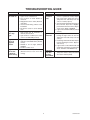
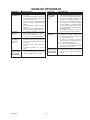
TROUBLESHOOTING GUIDE
SYMPTOM
POSSIBLE CAUSE
SYMPTOM
POSSIBLE CAUSE
Lights will
not come on.
1. Light switch is turned off.
2. Light is loose or burned out.
3. Fuse is blown or circuit breaker is
turned off.
4. Daylight turn-off is in effect (Recheck
after dark).
5. Incorrect circuit wiring, if this is a new
installation.
6. Re-aim the sensor to cover desired
area.
Lights stay
on continuously.
Lights come
on in daylight.
1. Light control may be installed in a
relatively dark location.
2. Light control is in TEST. (Set control
switch to an ON-TIME position).
1. A bulb is positioned too close to the
sensor or pointed at nearby objects
that cause heat to trigger the sensor.
(Reposition the bulb away from the
sensor or nearby objects).
2. Sensor is pointed toward a heat source
like an air vent, dryer vent, or brightlypainted heat-reflective surface. (Reposition sensor. Reduce RANGE).
3. Light control is in Manual Mode. (Switch
to Auto).
Lights flash
on and off.
Lights come
on for no
apparent
reason.
1. Light control may be sensing small
animals or automobile traffic. (Re-aim
sensor).
2. RANGE is set too high. (Reduce
RANGE).
3. DualBrite® Timer is on.
Lights turn
off too late
in Dusk-toDawn setting.
1. Sensor is in a relatively dark location.
(Relocate sensor, or use 3 hr or 6 hr
setting).
1. Heat or light from the bulbs may be
turning the light control on and off.
(Reposition the bulbs away from the
sensor).
2. Heat being reflected from other objects
may be affecting the sensor. (Reposition sensor).
3. Light control is in the TEST mode and
warming up. (Flashing is normal under
these conditions. Turn BOOST off).
Lights flash
once, then
stay off in
Manual Mode.
1. Sensor is detecting its own lights.
(Reposition bulbs to keep area below
the sensor relatively dark).
598-1295-02