1
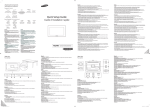
Connecting and Using a Source Device
Connexion et utilisation d’un peripherique source
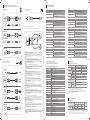
Connecting to a PC
Connexion à un PC
RGB IN
Troubleshooting Guide
Guide de depannage
Connecting the Antenna
Connexion de l’antenne
ANT IN
[English]
[Svenska]
Issues
Solutions
Problem
Lösningar
The screen keeps switching on and off.
Check the cable connection between the product and PC, and ensure the connection is secure.
Skärmen håller på att slås på och av.
Kontrollera kabelanslutningen mellan produkten och datorn och se till att anslutningen är säker.
“No Cable Connected” is displayed
on the screen.
Check that the product is connected correctly with a cable.
“Ingen kabel är ansluten” visas på
skärmen.
Kontrollera att produkten är korrekt ansluten med en kabel.
“Not Optimum Mode” is displayed.
Check that the device connected to the product is powered on.
This message is displayed when a signal from the graphics card exceeds the product’s
maximum resolution and frequency.
Refer to the Standard Signal Mode Table and set the maximum resolution and frequency
according to the product specifications.
Problèmes
Solutions
L’écran s’allume et s’éteint continuellement.
Vérifiez que le câble est connecté correctement entre l’appareil et l’ordinateur.
“Aucun câble connecté” s’affiche à
l’écran.
Vérifiez que l’appareil est connecté correctement à l’aide d’un câble.
“Mode non optimal” est affiché.
Connecting to a TV Viewing Card slot
Connexion à un emplacement pour carte d’affichage télé
HDMI IN (DVI)
Assurez-vous que le périphérique connecté à l’appareil est sous tension.
Ce message s’affiche lorsqu’un signal émis par la carte graphique est supérieur à la
fréquence et la résolution maximales de l’appareil.
Consultez le tableau des modes de signal standard et réglez la fréquence et la résolution
maximales conformément aux spécifications de l’appareil.
[Deutsch]
Megoldások
A képernyő felváltva be- és kikapcsol.
Ellenorizze a készülék és a számítógép közötti kábeles kapcsolatot, és gyozodjön meg
arról, hogy a csatlakoztatás stabil.
A képernyőn a „No Cable Connected”
üzenet látható
Gyozodjön meg arról, hogy a készülék megfeleloen van csatlakoztatva a kábellel.
Ellenorizze, hogy be van-e kapcsolva a kijelzohöz csatlakoztatott eszköz.
Ez az üzenet akkor jelenik meg, ha a videokártyától érkezo jel felbontása és frekvenciája
meghaladja a készülék maximális felbontását vagy frekvenciáját.
Megjelenik a „Nem optimális mód”
üzenet.
A Szabványos jelmód táblázat alapján állítsa be a készülék muszaki jellemzoinek
megfeleloen a maximális felbontást és frekvenciát.
Problem
Rozwiązanie
Der Bildschirm wird ständig ein- und
ausgeschaltet.
Überprüfen Sie die Kabelverbindung zwischen dem Gerät und dem PC.
Ekran naprzemiennie włącza się i wyłącza.
Sprawdz połaczenie miedzy urzadzeniem a komputerem i upewnij sie, ze zostało wykonane
poprawnie.
Überprüfen Sie, ob das Gerät korrekt über ein Kabel angeschlossen ist.
Na ekranie pojawia się komunikat
„Nie podłączono kabla”.
Überprüfen Sie, ob das angeschlossene Gerät eingeschaltet ist.
Diese Meldung wird angezeigt, wenn ein Signal von der Grafikkarte die
maximale Aulösung und Frequenz des Geräts überschreitet.
Schlagen Sie in der Tabelle der Standardsignalmodi nach und stellen Sie die maximale
Auflösung und Frequenz gemäß den technischen Daten des Geräts ein.
Upewnij sie, ze urzadzenie jest prawidłowo podłaczone kablem.
Sprawdz, czy urzadzenie podłaczone do monitora jest właczone.
Komunikat ten pojawia sie, gdy sygnał z karty graficznej przekroczy maksymalna
rozdzielczosc i czestotliwosc urzadzenia.
Wyświetlany jest komunikat
„Niewłasciwy tryb”.
Patrz Tabela trybu standardowego i ustaw maksymalna rozdzielczosc i czestotliwosc zgodnie
ze specyfikacja urzadzenia.
[Português]
Problemi
Soluzioni
Problemas
Soluções
Lo schermo si accende e si spegne.
Controllare la connessione del cavo tra il prodotto e il PC e verificare che il collegamento
sia sicuro.
O ecrã está continuamente a ligar e a
desligar.
Verifique a ligação do cabo entre o produto e o PC, e certifique-se de que a ligação está bem
efectuada.
Verificare che il prodotto sia collegato correttamente mediante cavo.
A mensagem “Nenhum Cabo Ligado” é
exibida no ecrã.
Verifique se o produto está ligado correctamente com um cabo.
Sullo schermo viene visualizzato “Nessun
cavo connesso”.
Viene visualizzato “Mod non ottimale” .
Verificare che il dispositivo collegato al prodotto sia acceso.
Questo messaggio viene visualizzato quando il segnale proveniente dalla scheda grafica
supera la risoluzione e la frequenza massima del prodotto.
Vedere la Tabella delle modalità standard del segnale e impostare la frequenza e la
risoluzione massima in base alle specifiche del prodotto.
[Español]
Turn the TV off to connect or disconnect a CI card.
If you don’t insert the “CI or CI+ CARD”, some channels will display the message “Scrambled Signal”.
The pairing information containing a telephone number, the “CI or CI+ CARD” ID the Host ID and other
information will be displayed in about 2~3 minutes. If an error message is displayed, please contact your
service provider.
When the configuration of channel information has finished, the message “Updating Completed” is displayed,
indicating the channel list is updated.
Problémák
[Polski]
[Italiano]
[English]
Se tabellen för standardsignalläge och ställ in maximal frekvens enligt
produktspecifikationerna.
Lösungen
„ungeeign. Modus“ wird angezeigt.
HDMI IN (DVI)
“Ej optimalt läge” visas.
Problem
„Keine Kabelverbindung“ wird auf dem
Bildschirm angezeigt.
RGB / DVI AUDIO IN
Meddelandet visas när en signal från grafikkortet överskrider produktens maximala
upplösning och frekvens.
[Magyar]
[Français]
RGB / DVI AUDIO IN
Kontrollera att enheten som är ansluten till produkten som är påslagen.
Verifique se o dispositivo ligado ao produto está ligado.
Esta mensagem é apresentada quando um sinal da placa gráfica ultrapassa a resolução e a
frequência máximas do produto.
A mensagem “Modo inadequado” é
exibida.
Consulte a Tabela do modo de sinal padrão e defina a resolução e a frequência máximas de
acordo com as especificações do produto.
[Türkçe]
Problemas
Soluciones
Sorunlar
Çözümler
La pantalla se enciende y se apaga
continuamente.
Compruebe la conexión del cable entre el producto y el PC, asegúrese de que la conexión
sea firme.
Ekran açılıp kapanmaya devam ediyor.
Ürün ve PC arasındaki kablo baglantısını kontrol edin ve baglantının saglam oldugundan
emin olun.
“Cable no conectado” se muestra en
la pantalla.
Compruebe que el producto esté conectado correctamente con un cable.
”Modo no óptimo” se muestra en la
pantalla.
Compruebe que el dispositivo conectado al producto esté encendido.
Este mensaje se muestra cuando una señal de la tarjeta gráfica supera la frecuencia y la
resolución máxima del producto.
Consulte la Tabla de los modos de señal estándar y configure la frecuencia y la resolución
máximas en función de las especificaciones del producto.
Ürünün bir kabloyla dogru sekilde baglandıgını kontrol edin.
Ekranda “Kablo Bağlı Değil”
görüntüleniyor.
Cihazın baglı oldugu ürünün açık oldugunu kontrol edin.
“Uygun Olmayan Mod” görüntüleniyor.
Bu mesaj, grafik kartından gelen bir sinyal ürünün maksimum çözünürlügünü ve frekansını
astıgında görüntülenir.
Standart Sinyal Modu Tablosu’na bakın ve ürünün teknik özelliklerine uygun olarak
maksimum çözünürlügü ve frekansı ayarlayın.
[Français]
Connecting to a Video Device
Connexion à un appareil vidéo
Mettez le téléviseur hors tension pour connecter ou déconnecter la carte CI.
Si vous ne l'insérez pas, certaines chaînes afficheront le message "Signal brouillé".
Les informations de pairage contenant un numéro de téléphone, l'ID de la carte d'interface commune (CI
ou CI+), l'ID de l'hôte et d'autres informations s'afficheront après 2 ou 3 minutes. Si un message d'erreur
s'affiche, contactez votre fournisseur d'accès.
Lorsque la configuration des informations sur les chaînes est terminée, le message "Mise à jour terminée"
s'affiche, indiquant que la liste des chaînes est mise à jour.
[Deutsch]
AV IN / VIDEO
AV IN / L-AUDIO-R
HDMI IN (DVI)
RGB / DVI AUDIO IN
Schalten Sie den Fernseher aus, bevor Sie eine CI-Karte einsetzen oder entnehmen.
Wenn Sie keine „CI“- oder „CI+“-Karte einsetzen, wird bei einigen Kanälen die Meldung „Gestörtes Signal“ angezeigt.
Die Verbindungsinformationen mit Telefonnummer, Kennung der „CI“- oder „CI+“-Karte, Hostkennung und anderen
Angaben wird nach ungefähr 2 bis 3 Minuten angezeigt. Wenn eine Fehlermeldung angezeigt wird, wenden Sie sich
bitte an Ihren Dienstanbieter.
Wenn das Konfigurieren der Kanalinformationen abgeschlossen ist, wird die Meldung „Updating Completed“
(Aktualisierung abgeschlossen) angezeigt. Dies bedeutet, dass die Kanalliste aktualisiert ist.
[Italiano]
Spegnere la TV per collegare o scollegare una scheda CI.
Se non si inserisce la "SCHEDA CI o CI+" alcuni canali visualizzeranno il messaggio "Segnale criptato".
Le informazioni di accoppiamento contenenti un numero telefonico, l'ID della "SCHEDA CI o CI+", l'ID dell'host
e altre informazioni verranno visualizzati in circa 2-3 minuti. Se viene visualizzato un messaggio di errore,
contattare il proprio fornitore di servizi.
Al termine della configurazione delle informazioni sui canali, viene visualizzato il messaggio "Aggiornamento
completato" a indicare che l'elenco dei canali è aggiornato.
[Español]
Country
Customer Care Centre
AUSTRIA
0800 - SAMSUNG (0800 - 7267864)
BELGIUM
02-201-24-18
BOSNIA
051 331 999
BULGARIA
800 111 31, Безплатна телефонна линия
40 CLASS (40.0 inches / 101 cm)
48 CLASS (47.6 inches / 120 cm)
Display area
886.168 mm (H) x 497.664 mm (V)
1053.186 mm (H) x 592.128 mm (V)
Without Stand
914.2 x 547.9 x 90.9 mm / 7.0 kg
1083.2 x 637.8 x 90.9 mm / 9.1 kg
With Stand
914.2 x 586.4 x 196.4 mm / 8.0 kg
1083.2 x 677.0 x 203.9 mm / 10.2 kg
Dimensions (W x H x D)
/ Weight
Synchronization
Horizontal Frequency
30 ~ 61 kHz
60 ~ 75 Hz
Optimum Resolution
1366 x 768 @ 60 Hz
Maximum Resolution
1366 x 768 @ 60 Hz
[Svenska]
800 - SAMSUNG (800-726786)
Resolution
Samsung Electronics Czech and Slovak, s.r.o. V Parku 2343/24, 148 00 - Praha 4
0818 717100
800-7267
FINLAND
030-6227 515
FRANCE
01 48 63 00 00
GERMANY
0180 6 SAMSUNG bzw.
0180 6 7267864*
(*0,20 €/Anruf aus dem dt. Festnetz, aus dem Mobilfunk max. 0,60 €/Anruf)
GREECE
80111-SAMSUNG (80111 726 7864) only from land line
(+30) 210 6897691 from mobile and land line
HUNGARY
0680SAMSUNG (0680-726-786)
0680PREMIUM (0680-773-648)
ITALIA
800-SAMSUNG (800.7267864)
LATVIA
8000-7267
[Polski]
LITHUANIA
8-800-77777
Podłączanie i odłączanie karty CI jest możliwe dopiero po wyłączeniu telewizora.
Jeśli karta CI lub CI+ nie zostanie włożona, dla niektórych kanałów będzie wyświetlany komunikat Scrambled Signal
(Sygnał zakodowany).
Informacje umożliwiające parowanie, w tym numer telefonu, identyfikator karty CI lub CI+, identyfikator hosta i inne
informacje, zostaną wyświetlone po około 2–3 minutach. Jeśli zostanie wyświetlony komunikat o błędzie, należy się
skontaktować z lokalnym usługodawcą.
Po zakończeniu konfiguracji parametrów kanałów wyświetlany jest komunikat Updating Completed (Aktualizacja
zakończona), informując o zaktualizowaniu listy kanałów.
LUXEMBURG
261 03 710
MONTENEGRO
020 405 888
NETHERLANDS
0900 - SAMSUNG (0900-7267864) (€ 0,10/Min)
NORWAY
815 56480
POLAND
0 801-172-678* lub +48 22 607-93-33 *
* (koszt połączenia według taryfy operatora)
PORTUGAL
808 20 7267
Bir CI kart takmak veya çıkarmak için TV'yi kapatın.
“CI veya CI+ KART” takmazsanız, bazı kanallarda "Bozuk Sinyal" mesajı görüntülenir.
2-3 dakika içinde, bir telefon numarası, “CI veya CI+ KART” numarası ile ana sistem numarası ve diğer bilgileri
içeren eşleme bilgisi görüntülenir. Bir hata mesajı görüntülenirse lütfen hizmet sağlayıcınızla iletişime geçin.
Kanal bilgisi yapılandırması tamamlanınca, kanal listesinin güncellendiğini belirten "Güncelleme Tamamlandı"
mesajı görüntülenir.
Size
072 726 786
ESTONIA
Desligue o televisor para ligar ou desligar um cartão CI.
Se não inserir o cartão “CI ou CI+”, alguns canais exibem a mensagem “Scrambled Signal” (sinal codificado).
As informações do emparelhamento, as quais incluem um número de telefone, a ID do cartão “CI ou CI+” e a ID
do anfitrião, entre outras, são exibidas cerca de 2 a 3 minutos depois. Se surgir uma mensagem de erro, contacte
o seu fornecedor de serviços.
Quando a configuração das informações do canal estiver concluída, surge a mensagem "Updating Completed"
(atualização concluída), a qual indica que a lista de canais foi atualizada.
Panel
8009 4000 only from landline, toll free
EIRE
Kapcsolja ki a TV-készüléket a CI kártya csatlakoztatásához vagy eltávolításához.
Ha nem helyezi be a “CI vagy CI+ kártyát", egyes csatornák a "Zavaros jel" üzenetet jelenítik meg.
Az összepárosító információ, amely egy telefonszámot, a “CI vagy CI+ kártya” azonosítót és a Gazdagép
azonosítót, valamint további információkat tartalmaz, 2~3 percen belül jelenik meg. Ha hibaüzenet jelenik
meg, forduljon szakszervizhez.
Amikor a csatorna információ konfigurálása befejeződött, a "Frissítés befejezve" üzenet jelenik meg, jelezve
hogy a csatorna lista frissítésre került.
EB48D
CYPRUS
70 70 19 70
[Magyar]
EB40D
Model Name
CROATIA
DENMARK
Stäng av TV:n när du ska ansluta eller ta bort ett CI-kort.
Om du inte sätter in CI- eller CI+-kortet, visar vissa kanaler meddelandet ”Scrambled Signal”.
Sammankopplingsinformationen som innehåller ett telefonnummer, CI- eller CI+-kortets ID, värd-ID och
annan information visas om ca 2-3 minuter. Om ett felmeddelande visas kontaktar du tjänsteleverantören.
När konfigurationen av kanalinformation har slutförts visas meddelandet ”Updating Completed” som visar att
kanallistan har uppdaterats.
Specifications
Caractéristiques techniques
Vertical Frequency
CZECH
[Türkçe]
[EBD-EURO-QSG]BN68-06718C-02.indd 2
- Download the user manual from the website for further details.
- Téléchargez le manuel utilisateur du site Web pour obtenir plus de détails.
Apague el televisor antes de conectar o desconectar una tarjeta CI.
Si no inserta la “TARJETA CI o CI+”, algunos canales mostrarán el mensaje “Señal codificada”.
En unos 2 o 3 minutos se mostrará la información de vinculación, que incluye un número de teléfono, el ID de la
“TARJETA CI o CI+”, el ID del host y otra información. Si se muestra un mensaje de error, póngase en contacto
con su proveedor de servicio técnico.
Cuando se complete la configuración de la información de canales, se mostrará el mensaje “Actualización
completada”, que indica que la lista de canales se ha actualizado.
[Português]
HDMI IN (DVI)
[Contact SAMSUNG WORLD WIDE]
[Comment contacter Samsung dans le monde]
Web site: http:// www.samsung.com/displaysolutions
ROMANIA
08008 726 78 64 (08008 SAMSUNG ) Apel GRATUIT
SERBIA
011 321 6899
SLOVAKIA
0800 - SAMSUNG(0800-726 786)
SLOVENIA
080 697 267, 090 726 786
SPAIN
0034902172678
SWEDEN
0771 726 7864 (SAMSUNG)
SWITZERLAND
0800 726 78 64 (0800-SAMSUNG)
TURKEY
444 77 11
UK
0330 SAMSUNG (7267864)
AC 100 to 240 VAC (+/- 10%), 60 / 50Hz ± 3Hz
Refer to the label at the back of the product as the standard voltage can vary
in different countries.
Power Supply
Environmental
considerations
Operating
Temperature : 0°C ~ 40°C (32°F ~ 104°F)
Humidity : 10 % – 80 %, non-condensing
Storage
Temperature : -20°C ~ 45°C (-4°F ~ 113°F)
Humidity : 5 % – 95 %, non-condensing
- Plug-and-Play
This monitor can be installed and used with any Plug-and-Play compatible systems.
Two-way data exchange between the monitor and PC system optimizes the monitor settings.
Monitor installation takes place automatically. However, you can customize the installation settings if desired.
- Due to the nature of the manufacturing of this product, approximately 1 pixel per million (1ppm) may appear brighter or
darker on the panel. This does not affect product performance.
- This device is a Class A digital apparatus.
Power Consumption
Consommation
Normal Operation
PowerSaver
Power Consumption
Power off
Rating
Typical
Max
EB40D
70 W
47.2 W
77 W
EB48D
84 W
56.3 W
93 W
0.5 W
- The displayed power consumption level can vary in different operating conditions or when settings are changed.
- SOG (Sync On Green) is not supported.
- To reduce the power consumption to 0, turn off the switch at the back or disconnect the power cord.
Disconnect the power cable if you will not be using the product for an extended period of time (during vacation, etc.).
2014-09-23
1:57:00