1
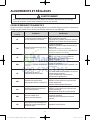
ALIGNMENT AND ADJUSTMENTS WARNING To avoid risk of electrical shock, personal injury or death, disconnect power to dryer before servicing, unless testing requires power. Data Display Mode Definition of Temperature Display Mode: - Display Mode 0 : Temperature data (Celsius) - Display Mode 1 : Average Touch Sensor data for 1 minute - Display Mode 2 : Average Temperature (Celsius) data for 1 minute How to Enter: - With Power On, press AdjustUp Key + AdjsutDown Key for 7 seconds until the dryer beeps. - If no keys are pressed for 5 minutes, Data Display Mode will terminate. - Press the AdjustUp Key to increase the Display Mode ID. - Press the AdjustDown Key to decrease the Display Mode ID. • Converting °C °F Celsius(°C) -30 -10 10 30 50 70 Fahrenheit(°F) -22 14 50 86 122 158 F =9/5C + 32 System Check Mode Definition of System Check Mode: - - “ 02 ” will display. System Check Mode (02 mode) Progress Function Performed Start/Pause Motor (CW) Relay On Heater Relay On Heater Relay Off, Motor (CW) Relay Off How to Enter: - While in Power Off, press the Dry Level + Power keys simultaneously to put the dryer into the System Check mode. 4 DV9000HA DRY_TECH MANUAL_DC68-03171F_EN.indd 4 2014-1-17 14:00:26