1
Step 3: Connecting the Solar Panel to the Light
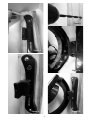
1) Connect the 20’ cord to the panel and tighten the connection.
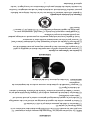
2) Plug the other end of the cord into the socket of the EZ Light (Figure 12).
NOTE: The end of the cord and socket are keyed so that the plug only fits one way.
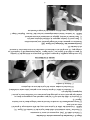
3) Hand-tighten the fitting by rotating the collar in a clockwise direction (Figure 13).
4) Secure the cord so that it is not hanging or resting in an area that could harm an
individual or interfere with pool/outdoor equipment.
A. Zip-tie the cord to the stake or post
B. Wrap the cord around the stake or post
C. Bury the cord.
Figure 12
Figure 13
OPERATION
On a full charge, the EZ Solar Panel will run the EZ Light for a total of 4 hours or 2 light
cycles. Operation of the EZ Light does not change, please see below or view
instructions in the EZ Light manual.
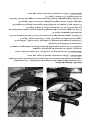
Light Function (Figure 14)
Allow the panel to charge for a full day.
1) To turn the light ON, press and release the switch once.
2) To turn the light OFF, press and hold the switch.
NOTE: The light will automatically shut off after 2 hours. Repeat step 1 in this section
if more time is required.
Figure 14
6