1
22
en | Connections
EXTEGRA IP 9000 FX
6
Connections
6.1
Power Cable Requirements
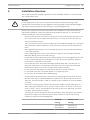
Warning!
!
Before proceeding, disconnect the power from the power supply cable. Ensure that the
voltage of the unit matches the voltage and type of the power supply being used.
Connect power from a 24 VAC class 2 power supply. Use AWG 16 to 22 stranded wire or AWG
16 to 26 solid wire; cut back 5 mm (0.2 in.) of insulation.
Cable size
Stranded wire: AWG 16 to 22
Solid wire: AWG 16 to 26
Cable shape
Round
Conductors
2-conductor version
Environmental
Outdoor rated
Warning!
!
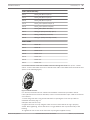
Bosch’s version of High PoE:
If supplying power to the camera by HPoE or a midspan device, you must install additional
surge protection.
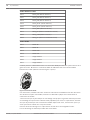
The table below identifies the power devices that can be connected simultaneously to the
camera.
If power is supplied from:
Camera can receive power simultaneously from:
60 W midspan (NPD-6001A)
24 VAC PSU
95 W midspan (NPD-9501A)
(VG4-A-PSU1, VG4-A-PSU2)
VIDEOJET connect (VJC-7000-90)
6.1.1
Wire Distance Guide
This table lists the maximum wire distances for 16 and 18 AWG wires for 24 VAC power.
6.2
16 AWG
18 AWG
(1.5 mm)
(1.0 mm)
With OFC Kit
40 m (131 ft)
25 m (83 ft)
Without OFC Kit
42 m (136 ft)
26 m (86 ft)
Ethernet Cable Requirements
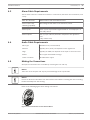
Cable Type
Cat5e/Cat6e Ethernet (directly to the camera, or to a network switch
between the camera and the network)
Maximum Distance 100 m (330 ft)
Terminal
RJ45, Male
Connector
2016.02 | 1.2 | F.01U.319.357
Installation Manual / Guide d'installation
Bosch Security Systems