1
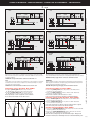
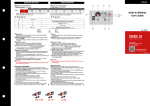
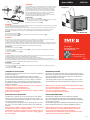
SCHEMI D’INSERZIONE • WIRING DIAGRAMS • SCHEMAS DE RACCORDEMENT • ANSCHLUßBILD
S 1000/433
1N1E
S 1000/434
3-1E
CURRENT
2 5 8 11 1 3 4 6 7 9
TI T2
3
4
5
2 5 8 11 1 3
20 21
b
A
B
Y
W
Rx / Tx GND
TI T2
7 9
4 6
a
b
a
b
S 1000/435
3N1E
RS 485
INPUT
CURRENT
2 5 8 11 1 3
4 6
Rx / Tx GND
7 9
+
3
TI T2
–
4
A
B
A
B
Y
W
X
5
INPUT
2 5 8 11 1 3
F
A
Y
W
L1
L3
S 1000/437
3-3E
CURRENT
2 5 8 11 1 3
TI T2
7 9
4 6
3
4
5
a
b
A
B
A
B
20 21
F
Y
W
Y
X
W
LOAD
X
INPUT
RS 485
CURRENT
VOLTAGE
2 5 8 11 1 3
20 21
Rx / Tx GND
7 9
4 6
TI T2
+
3
–
4
5
AUX.
SUPPLY
+ –
20 21
2 5 8 11
8
B
b
RS 485
AUX.
Rx / Tx GND SUPPLY
+ –
+ –
INPUT
A
5
AUX.
SUPPLY
+ –
S 1000/438
3N3E
VOLTAGE
B
–
4
L3
X X X
A
a
L2
LOAD
X
b
TI T2
7 9
4 6
+
3
8
X
X
N
Rx / Tx GND
L1
X
L2
5
2
RS 485
CURRENT
VOLTAGE
20 21
a
a
LOAD
X
X
AUX.
SUPPLY
+ –
2 5 8 11
b
20 21
S 1000/436
3-2E
VOLTAGE
a
5
AUX.
SUPPLY
+ –
F
L3
5
–
4
8
L2
2
+
3
L1
LOAD
X
N
5
2
F
L
CURRENT
VOLTAGE
11
2
a
RS 485
INPUT
RS 485
AUX.
Rx / Tx GND SUPPLY
+ –
+ –
INPUT
VOLTAGE
: 1A gG
F
W
Y
W
L1
Y
L2
F
a
A
Y
L1
Y
X
W
W
L3
W
X
L2
LOAD
X
Y
X
L3
N
X
Y
W
X
LOAD
X X X
NOTA
Negli schemi sono sempre indicate le configurazioni con uscita impulsi e comunicazione RS485.
Nelle versioni che non prevedono uscita impulsi o comunicazione RS485 non si deve tenere conto
dei relativi collegamenti.
ATTENZIONE! collegare alimentazione ausiliaria ai terminali 20 e 21
NOTE
The wiring diagrams, show the device complete with pulse output and RS485 interface.
In case of version without of these features, the corresponding terminals must not be considered.
WARNING! auxiliary supply must be connected to terminals 20 and 21
NOTE
Sur les schèmas sont toujours indiquèes les configurations avoc sortie à impulsions et communication RS485. Pour les versions sans sortie à impulsions ou communication RS485, on ne doit pas
tenir compte des connexions relatives.
ATTENTION! raccorder l’alimentation auxiliaire sur le bornes 20 et 21
ANMERKUNG
Auf den Schaltbilder sind immer die Konfigurationen mit Impulsausgang und Kommunikation
RS485 angegeben. Für die Modelle ohne Impulsausgang und Kommunikation RS485, muß man
nicht die dazugehörige Verbindungen aufzeichnen.
ACHTUNG! hilfsspannung (aux.supply) anscließen klemmen 20und 21
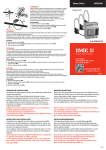
Collegamento sensore Rogowski - Nemo 96HDLe
Connection Rogowski coil - Nemo 96HDLe
1 Collegare il puntale giallo Y (cavo bianco) ai terminali
1 - 4 - 7 del Nemo (in funzione dello schema di inserzione)
2 Collegare il puntale bianco W (cavo nero) ai terminali
3 - 6 - 9 del Nemo (in funzione dello schema di inserzione)
Evitare di prolungare i cavi di collegamento sensore-strumento.
In caso di necessità contattare il nostro ufficio tecnico.
1 Connect the yellow prod Y (white cable) to Nemo’s 1 - 4 - 7 terminals
(according to the wiring diagram)
2 Connect the white prod W (black cable) to Nemo’s 3 - 6 - 9 terminals
(according to the wiring diagram)
Please avoid to extend the connection cables coil – meter.
In case of need, do not hesitate in contacting our technical department.
Connexion capteur à bobine Rogowski - Nemo 96HDLe
Terminali - Terminals - Bornes - Klemmen - Nemo
1
3
4
6
7
9
Y
W
Y
W
Y
W
La I.M.E. S.p.A. si riserva in qualsiasi momento, di modificare le caratteristiche tecniche senza darne preavviso. / I.M.E. S.p.A. reserves the right, to modify the technical characteristics without notice.
F
1 Brancher l’embout jaune Y (câble blanc) aux bornes 1 - 4 - 7 du Nemo
(selon le schéma de raccordement)
2 Brancher l’embout blanc W (câble noir) aux bornes 3 - 6 - 9 du Nemo
(selon le schéma de raccordement)
Prions éviter de prolonger les câbles des connexion capteur à bobine – appareil.
En cas de necessité prions contacter notre bureau technique.
Anschluss zur Rogowskispule - Nemo 96HDLe
1 Schliessen die gelbe Metallspitze Y (weißes Kabel) mit den Klemmen 1 – 4 – 7
des Nemo (gemäß des Anschlussplanes) an.
2 Schliessen die weiße Metallspitze W (schwarzes Kabel) mit den Klemmen
3 – 6 - 9 des Nemo (gemäß des Anschlussplanes) an.
Bitte vermeiden, Verlängerungen für die Anschlusskabel Spule – Messgerät zu
verwenden. Notfalls, bitte in Verbindung mit unserer technischen Abteilung setzen.
10785100