1
GARLAND HALF SIZE ELECTRIC CONVECTION OVEN MODEL:MCOE5
INSTALLATION/OPERATION MANUAL
OPERATING INSTRUCTIONS
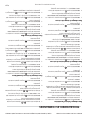
To turn oven ON
The Main Power Switch – Controls power to the oven
and must be turned ON to start operation. The controller
display will be active and default to product “BISCUITS”
(Product Key 1).
“beep” sounds. Another “beep” sounds when the timer is
cancelled. The CANCEL button works in the order of the
last product entered, i.e. Biscuits are timing and bagels
are started accidentally. Bagels will be cancelled first, then
biscuits.
Preheat
Once a timer has completed counting down, the display
will default back to the menu item programmed in
PRODUCT KEY 1 (Most often Biscuits).
The oven will preheat to the set temperature of Product
Key 1 (Note: Factory default for Product Key 1 is BISCUITS Oven set temperature 375°F).
Profile Baking
During this preheat mode, the controller will display “TOO
COOL”. “TOO COOL” will appear in the display while the
temperature is greater than 25°F below set temperature
AND for 10 minutes upon reaching set temperature from
initial power up. “TOO HOT” will be displayed when the
control is 250 F above the set temperature.
To Select a menu item
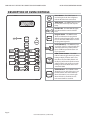
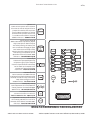
To select a menu item, simply press the desired menu item
number button.
To begin a cook cycle or start a bake cycle
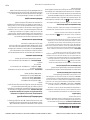
To start a bake for a selected menu item, press the
Profile Baking is only available in software & flash
numbers 240-91018-05-XX. With profile baking,
menu items can be programmed with up to 4 stages of
functional changes. The following menu item functions
are available with up to 4 stages:
• FAN CYCLE
• COOK TEMP
• COOK TIME
• FAN SPEED
• FLEX TIME
FAN CYCLE – The Fan Cycle function has 2 options:
FULL - The convection fan is constant on
HEAT – The convection fan is only on during the heat
cycle.
button. The product name and the remove time
programmed will be displayed. The countdown of the
programmed time for that product will start and a number
“1” will be displayed in the lower right hand corner of the
screen to indicate that there 1 product baking at that time.
The number will update as subsequent cook cycles are
started.
Hold Timer
Flex Time – Included in this oven is a feature called “FLEX
TIME”. Flex time is a feature which when a product bake
timer is counting down, the operator may notice the time
either slowing down or speeding up. The “flex time” is
based on the temperature drop in the oven over a period
of time. Larger bake sizes (i.e. full tray of Muffins) will have
a slower time where as smaller bake sizes will have a faster
time.
Recovery Timer
During baking, press the
button to display the product
name and the time remaining before removal.
NOTE: The oven is designed to bake batches of different
sizes using the same time settings.
To cancel a cook cycle or cancel a bake
The hold timer is a separate timer that counts down within
the control and is HIDDEN from the display. The hold timer
alerts the operator when product is available to be served
after cooling down. This timer is most often used for
cooling pies.
Built into this control is a recovery timer. This timer is a
stored value from when the oven last rise in temperature
from 150°F to 250°F. The value of this number should
generally be “1:00” to “1:30” indicating that it took
between 1 minute and 1 minute and 30 seconds to rise
in temperature between 150°F to 250°F. A value outside
this parameter may indicate a potential or future heating
problem.
Fast Cool
The fast cool feature when activated cools the oven down
in a rapid manner while the door is open. Press the VIEW/
UTILITY button and then press the START button.
To cancel a bake, the user presses and holds the
button. Immediately upon pressing the button, an audible
Page 7
Part # 4516833 Rev C (19 Mar 2014)