1
English
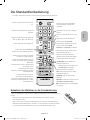
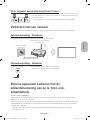
The Standard Remote Control
-- The button names above may be differ from the actual names.
Turns the TV on/off.
Displays and selects available video
sources.
Returns to the previous channel.
Gives direct access to channels.
Turns the sound on/off.
Alternately selects Teletext ON, Double,
Mix or OFF.
Changes the current channel.
Launches Smart Hub applications. Refer
to the e-Manual chapter, Smart Features
> Smart Hub.
Adjusts the volume.
Launches the Channel List.
Displays the Electronic Programme Guide
(EPG).
Displays the menu on the screen.
Displays information about the current
programme or content.
Quickly selects frequently used functions.
Moves the focus, and changes the values
seen on the TV's menu.
E (Enter): Selects or runs a focused
item.
Returns to the previous menu or channel.
-- Press and hold to display the Guide.
Use these buttons according to the
directions on the TV screen.
Exits the menu.
REC: Records whatever you are currently
watching.
Use these buttons with specific features.
Use these buttons according to the
directions on the TV screen.
E-MANUAL: Opens the e-Manual.
AD/SUBT.: Displays the Accessibility
Shortcuts.
': Stops playing content.
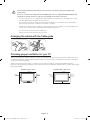
Installing batteries into the remote control
Match the polarity of the batteries to the symbols on the battery compartment.
-- Use the remote control within 7m the TV.
-- Bright light may affect the performance of the remote control. Avoid using near bright
fluorescent lights or neon signs.
-- The colour and shape of the remote may vary depending on the model.
English - 5
[JU6500-XN-ZF]BN68-07200C-00L04.indb 5
2015-03-11 오후 1:18:03