1
AIP v 1.0 - Manuel Installation (v1.6).doc
11)
12)
13)
14)
Annuaire Interne
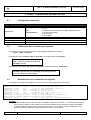
Lancez la commande make depend
Lancez la commande make
Lancez la commande make install
Supprimer le répertoire /opt/oldap_install et tout ce qu’il contient
Vérification file system :
La distribution Open LDAP doit être présente sous ${LDAP_HOME} (qui vaut /opt/openldap)
4.7.2.
Paramétrage technique
On rappelle que l’on créé plus haut un compte et un groupe local sont créés pour le service ldap :
# root
# useradd –u 502 –d /opt/openldap openldap
# chown –R openldap:openldap /opt/openldap-2.0.27
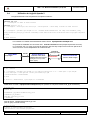
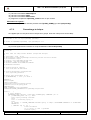
On procède également à la création du script d’initialisation /etc/init.d/openldap
#!/bin/sh
#
# Init file for ldap server deamon (slapd and slurpd).
#
# chkconfig: 2345 93 93
# description: LDAP Lightweight Directory Access Protocol Server.
# processname: slapd
# config: /etc/openldap/slapd.conf
# pidfile: /var/run/slapd.pid
# Laurent CHELET CG33/DGAF/DSI/BASIR
# Modified 20090603
# Source function library.
. /etc/rc.d/init.d/functions
# Source networking configuration.
. /etc/sysconfig/network
# Check that networking is up.
[ ${NETWORKING} = "no" ] && exit 0
RETVAL=0
prog="slapd"
owner="openldap"
lockfile="/var/lock/subsys/$prog"
pidfile="/var/run/$prog.pid"
THEPORT=0000
HOME_OPENLDAP="/opt/openldap"
CONFFILE="$HOME_OPENLDAP/etc/openldap/slapd.conf"
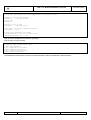
start()
{
# Start daemons.
SHUTDOWN_PORT=`netstat -vatn|grep LISTEN|grep $THEPORT |wc -l`
if [ $SHUTDOWN_PORT -ne 0 ]; then
echo "$prog already started"
else
echo -n "Starting $prog :"
echo
su $owner -c "$HOME_OPENLDAP/libexec/$prog -h ldap://$HOSTNAME:$THEPORT -f $CONFFILE"
RETVAL=$?
[ $RETVAL -eq 0 ] && {
touch $lockfile
ps -C $prog -o pid= > $pidfile
success $prog
Référence :
AIP v 1.0 - Manuel Installation (v1.6).doc
Page
14/32