1
OPERATION - RDV CD
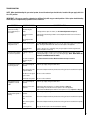
Child Safety Lock-Out
Transmission
Low Battery Alarm
Temperature Indicator Display
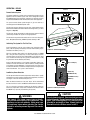
With the system in the “OFF” position, press the Thermostat Key and
the Mode Key at the same time (see Figure 22). Look at the LCD screen
on the Remote to verify that a C or F is visible to the right of the Room
Temperature display (see Figure 23).
Turn On The Appliance
Press the ON/OFF Key on the Remote. The Remote display will show all
active Icons on the screen (see Figure 23) and the appliance main burner
will turn on. A single “beep” from the Receiver will confirm reception
of the command.
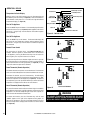
Thermostat
Off/On/Smart
Room Temperature
OFF
ON
SMART
Set Point
Temp./Level/State
Blower Control
Flame On
MAX
MAX
Maximum Level Indicators
Figure 23 - Indicator Icons
Turn Off The Appliance
Press the ON/OFF Key on the Remote. The Remote LCD display will
only show the room temperature and Icon and the appliance burner
will turn off. A single “beep” from the Receiver confirms reception of
the command.
Remote Flame Control
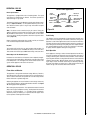
The system has six (6) flame levels. See Figures 24 and 25 for an
example. With the system on, and the flame level at the maximum
in the appliance, pressing the Down Arrow Key once will reduce the
flame height by one step until the flame is turned off.
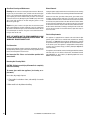
The Up Arrow Key will increase the flame height each time it is pressed.
If the Up Arrow Key is pressed while the system is on but the flame is
off, the flame will come on in the high position (see Figure 25). A single
“beep” will confirm reception of the command.
Figure 24
Flame Level 5
Room Thermostat (Remote Operation)
The Remote Control can operate as a room thermostat. The thermostat
can be set to a desired temperature to control the comfort level in a room.
To activate this function, press the Thermostat Key. The LCD display
on the Remote will change to show that the room temperature is “ON”
and the set temperature is now displayed (see Figure 23). To adjust the
set temperature, press the Up or Down Arrow Keys until the desired set
temperature is displayed on the LCD screen of the Remote.
Smart Thermostat (Remote Operation)
The smart Thermostat function adjusts the flame height in accordance
to the difference between the set point temperature and the actual room
temperatures. As the room temperature gets closer to the set point, the
Smart Function will modulate the flame down.
To activate this function, press the Thermostat Key until the word
“SMART” appears to the right of the temperature bulb graphic. To
adjust the set temperature, press the Up or Down Arrow Keys until the
desired set temperature is displayed on the LCD screen of the Remote
(see Figure 23).
22
Figure 25
Flame Level Maximum
WARNING
THE REMOTE (TRANSMITTER) AND RECEIVER ARE RADIO
FREQUENCY DEVICES. PLACING THE RECEIVER IN OR NEAR
METAL MAY SEVERELY REDUCE THE SIGNAL RANGE.
NOTE: DIAGRAMS & ILLUSTRATIONS ARE NOT TO SCALE.