1
TO MEMORIZE CHANNELS
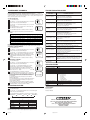
TROUBLESHOOTING GUIDE
This TV is equipped with a channel memory feature which allows channels to skip up or down
to the next channel set into memory, skipping over unwanted channels.
Before selecting channels, they must be programmed into the TV's memory. In addition to
normal VHF and UHF channels, this TV can receive up to 113 Cable TV channels. To use this
TV with an antenna, set the TV/CATV menu option to the TV setting. When shipped from the
factory, this menu option is in the CATV setting.
Before requesting service, please refer to the following chart for the symptom and possible solution.
SYMPTOMS
TV does not operate.
• Make sure the power cord is plugged in.
• Try another AC outlet.
• Power is off, check fuse or circuit breaker.
• Unplug unit for an hour, then plug it back in.
Poor sound or No sound.
• Station or CATV experiencing problems, tune to another station.
• Check sound adjustments (VOLUME and MUTE).
• Check for sources of possible interference.
Poor picture or No picture.
• Station or CATV experiencing problems, tune to another station.
• Make sure channels are set into memory.
• Check antenna or CATV connections, adjust antenna.
• Check for sources of possible interference.
• Check picture control adjustments.
Poor reception on some
channels.
• Station or CATV experiencing problems, tune to another station.
• Make sure channels are set into memory.
• Station is weak, adjust antenna to receive desired station.
• Check for sources of possible interference.
Poor colour or no colour.
• Station or CATV experiencing problems, tune to another station.
• Make sure channels are set into memory.
• Check picture control adjustments.
• Check antenna or CATV connections, reorient antenna.
• Check for sources of possible interference.
Picture wobbles or drifts.
• Station or CATV experiencing problems, tune to another station.
• Make sure channels are set into memory.
• CATV company is scrambling signal.
• Adjust antenna.
No CATV reception.
• Check all CATV connections.
• Set TV/CATV menu option to the CATV mode.
• Station or CATV system problems, try another station.
Horizontal or diagonal
bars on screen.
• Check antenna connections, adjust or re-direct antenna.
• Check for sources of possible interference.
No reception above
channel 13.
• Make sure TV/CATV menu option is in the appropriate mode.
• If using antenna, check UHF antenna connections.
No Remote operation.
• Batteries are weak, dead or inserted incorrectly.
• Remote is out of range, move closer to TV (within 15 feet).
• Make sure Remote is aimed at sensor.
• Confirm there are no obstructions between the Remote and the TV.
• Make sure the power cord is plugged in.
TV shuts off.
• No broadcast on station tuned.
• Sleep Timer is set.
• Power interrupted.
Closed Caption is not
activated.
• TV station experiencing problems or program tuned is not closed
captioned. Try another channel.
• Check CATV connection or VHF/UHF antenna, reposition or rotate
antenna.
• Press TV/CAP/TEXT button to turn on the closed caption decoder.
TV/CATV SELECTION
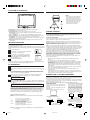
1
Press the MENU button.
2
Press the SET + or – button until the indicator next to "CH SETUP"
begins to flash, then press the ENTER button.
á
3
Press the SET + or – button until the indicator next to "TV/CATV"
begins to flash.
4
Press the ENTER button to select the TV or CATV mode. The
arrow indicates the selected mode.
5
ñ
TV
CATV
AUTO CH MEMORY
ADD / DELETE
〈 + / – / ENTER / MENU 〉
Press the MENU button twice to return to normal TV viewing.
The chart below is typical of many cable system channel allocations.
CATV CHART
Number on this TV
Corresponding CATV channel
23
24
25
26
27
28
29
J
K
L
M
N
O
P
41
42
43
44
45
46
47
EE FF GG HH
II
JJ
KK
59
60
61
62
63
64
65
WW AAA BBB CCC DDD EEE FFF
77
78
79
80
81
82
83
RRR SSS TTT UUU VVV WWW XXX
95
96
97
98
99 100 101
A-5 A-4 A-3 A-2 A-1 100 101
113 114 115 116 117 118 119
113 114 115 116 117 118 119
30
Q
48
LL
66
GGG
84
YYY
102
102
120
120
31
R
49
MM
67
HHH
85
ZZZ
103
103
121
121
14
A
32
S
50
NN
68
III
86
86
104
104
122
122
15
16
17
18
19
B
C
D
E
F
33
34
35
36
37
T
U
V
W
AA
51
52
53
54
55
OO PP QQ RR SS
69
70
71
72 73
JJJ KKK LLL MMM NNN
87
88
89
90
91
87
88
89
90
91
105 106 107 108 109
105 106 107 108 109
123 124 125 01
123 124 125 5A
20
G
38
BB
56
TT
74
OOO
92
92
110
110
21
H
39
CC
57
UU
75
PPP
93
93
111
111
22
I
40
DD
58
VV
76
QQQ
94
94
112
112
NOTE:
Contact your cable company to determine the type of cable system used in your area.
AUTOMATIC CHANNEL MEMORY
1
Press the MENU button.
2
Press the SET + or – button until the indicator next to "CH SETUP"
begins to flash, then press the ENTER button.
3
Press the SET + or – button until the indicator next to "AUTO CH
MEMORY" begins to flash, then press the ENTER button. The
TV will begin memorizing all the channels available in your area.
Channel numbers will remain red until auto memorizing is
complete.
á
4
ñ
TV
CATV
AUTO CH MEMORY
ADD / DELETE
〈 + / – / ENTER / MENU 〉
Press the MENU button twice to return to normal TV viewing.
TO ADD/DELETE CHANNELS
Press the MENU button.
3
Press the SET + or – button until the indicator next to "ADD/
DELETE" begins to flash, then press the ENTER button.
Press the SET + or – button until the indicator next to "CH SETUP"
begins to flash, then press the ENTER button.
á
4
5
6
Select the desired channels to be added or deleted using the
Direct Channel Selection buttons (10 keys. 0-9), the CH
or
button or the SET + or – button.
Press the ENTER button to select ADD or DELETE.
If an unmemorized channel was selected (step 4), the channel
indication will be red. Press the ENTER button if you wish to ADD
the unmemorized channel. The channel indicator will change
from red to green when a channel is added and the channel will
be memorized.
If a memorized channel was selected (step 4), the channel
indication will be green.
Press the ENTER button if you wish to DELETE the channel from
memory. The channel indicator will change from green to red
when a channel is deleted.
Repeat steps 4 and 5 for each channel to be added or deleted.
ñ
TV
ADD / DELETE
〈 + / – / ENTER / MENU 〉
á
AC Power Input:
AC Power Consumption:
Picture Tube:
Audio Power Output Rating:
Speaker:
Tuner Type:
Remote Control:
Receiving Channels:
Antenna Input Impedance:
Input:
Dimensions:
Weight:
You can adjust the settings for colour, sharpness, contrast, brightness and tint.
1
Press the MENU button.
2
Press the SET + or – button until the indicator next to "PICTURE" begins
to flash, then press the ENTER button.
3
Press the ENTER button repeatedly to select the item you want to adjust.
4
COLOR
TINT
• Select proper language in the menu options.
SPECIFICATIONS
ñ
ADJUSTING PICTURE
CONTRAST
CATV
AUTO CH MEMORY
Press the MENU button three times after adding or deleting all of
the desired channels, to return to normal TV viewing.
BRIGHTNESS
Display is not shown in
your language.
1
2
POSSIBLE SOLUTIONS
120V, 60Hz
73 Watts
19" (measured diagonally)
1.5 Watts
75 mm (3") Full Range, 8 ohm
181 Channel, Quartz PLL Frequency Synthesized
Infrared, Direct Access, 2 x AAA batteries (not supplied)
VHF 2-13
UHF 14-69
CATV 01-97 (5A)-(A-3)
98-99 (A-2)-(A-1)
14-22 (A)-(I)
23-36 (J)-(W)
37-65 (AA)-(FFF)
66-125 (GGG)-(125)
75 Ohm (VHF/UHF/CATV) Coaxial Input
Video: 1.0 Vp-p 75 ohm
Audio: 300 mV, 47k ohm
488 mm (19-3/16") (W) x 465 mm (18-5/16") (D) x 416 mm
(16-3/8") (H)
17.5 kg (38.6 Ibs)
ACCESSORIES
Remote Control
Instruction Manual
SHARPNESS
Press the SET + or – button to adjust the setting.
+
–
BRIGHTNESS
increase brightness
decrease brightness
CONTRAST
increase contrast
decrease contrast
COLOUR
enhances colour definition decreases colour definition
TINT
add greenish tint
makes picture
clearer
SHARPNESS
add reddish tint
THE TOLL FREE CITIZEN HELPLINE IS 1-800-663-5954
CALL US IF YOU HAVE ANY PROBLEMS OR QUESTIONS
WITH YOUR NEW CITIZEN PRODUCT
9 am - 5 pm (TORONTO TIME) MONDAY TO FRIDAY
CITIZEN ELECTRONICS
TORONTO, CANADA
makes picture softer
TO RETURN TO INITIAL SETTING
Press the RESET button while the picture adjusting mode appears on-screen.
3Q11101A E
5
2/20/04, 6:49 PM



![3T30631A [COVER]](http://vs1.manualzilla.com/store/data/006334567_1-569f92049c2ac3665fee2b2debb524ca-150x150.png)
![3T11131A [COVER]](http://vs1.manualzilla.com/store/data/006164578_1-b091c799fbe2f54ad080b700a0e61ea1-150x150.png)