1
SOUNDBASE
EN
1.
2.
3.
4.
5.
6.
7.
8. 9.
10.
11.
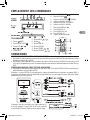
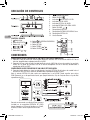
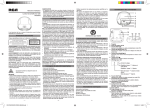
Standby/ON button
button
SOURCE
/ LEVEL indicator
BLUETOOTH
LINE IN / LEVEL indicator
AUX IN / LEVEL indicator
OPTICAL IN / LEVEL indicator
/ VOLUME button
AUX IN R / L jack
LINE IN 3.5mm jack
OPTICAL IN jack
Remote Sensor
Accessories
Please locate the included accessories. To order replacement units, visit http://www.RCAav.com
Remote control (with battery)...................x 1
Audio Cable...............................................x 1
ConnectionS
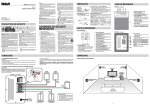
Connect audio through aN ANALOG AUDIO CABLE
1. Connect an Audio Cable (not included) from the AUX IN jacks to the AUDIO OUT jacks of your TV, Set-Top
Box or Blu-ray/DVD Player.
2. Connect a 3.5mm Audio Cable (included) from the LINE IN jack to the AUDIO OUT jacks or from the AUX IN
jacks to the Headphone Out jack of your TV, Set-Top Box or Blu-ray/DVD Player.
Connect audio through a digital optical cable
3. Connect an Optical Cable (not included) from the OPTICAL IN jack to the OPTICAL OUT jack of your TV, SetTop Box or Blu-ray/DVD Player.
Note: OPTICAL IN only supports PCM signal. You may need to activate PCM (Downmix) on your source device,
e.g. TV, Set-Top Box or Blu-ray/DVD Player.
Plug one end of a 3.5mm Audio Cable (not included)
into the LINE IN jack and other end into your iPad®,
iPhone®, iPod® or other audio devices.
4
RTS796B 3L IB.indd 4
2/18/2014 10:07:37