1
Service Manual
Dell Mobile Computing Station
Dock Partition Replacement
CRU
CUSTOM SOLUTION FOR DELL BY ERGOTRON
NOTICE: Customer Replacement Unit
A Certified Technician is not needed to undertake this replacement procedure.
K000959 Kit Contents:
• 1 Left Partition
• 3 Center Partitions
• 1 Right Partition
• 5 M3 Screws
Required Tools
• Small Flashlight
• Phillips Screwdriver
Please perform the preremoval steps
listed below before attempting to
install or remove ANY hardware from
your Dell Mobile Computing Station
(MCS).
Preremoval Steps
1
2
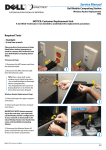
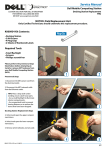
1. Disconnect the MCS power cord from
the electrical outlet.
2. Disconnect the MCS network cable
from the RJ45 outlet.
TIPS: Place a drop cloth under
working area to catch loose parts.
• Use a small flashlight to illuminate
interior compartments.
• Use magnetized tools to prevent
loosing fasteners or to retrieve fasteners that have been dropped.
3
Dock Partition Replacement Steps
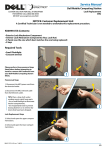
3. Unlock and open the upper compartment doors.
4. Remove all 24 netbooks and set aside.
5. Mark the faulty Partition with a piece
of tape.
4
888-97-079-W-01 rev. B • 08/09
1/4
Service Manual
NOTE: Each docking station has
3 different Partition types. There
are three center Partitions, one
right and one left. If replacing
a left partition, you will need to
pull the docking station forward
a few inches in order to access
the screw located on the left edge
of the dock. Follow appropriate
instructions based on Partition
type.
Dell Mobile Computing Station
Left Partition
Center Partitions
Right Partition
RIGHT / CENTER PARTITION
REPLACEMENT STEPS
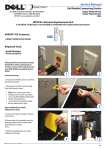
6. Use a Phillips head screw driver to
remove the single screw attaching the
faulty Right or Center Partition to the
back wall of the docking station.
7. Slide the faulty Partition out of the
dock and slide the new Partition in its
place. Secure the new Partition using
provided screw and Phillips head screwdriver.
8. Place netbooks in docking stations.
9. Close and lock upper compartment
doors.
RIGHT / CENTER PARTITION
REPLACEMENT IS NOW COMPLETE
6
7
LEFT PARTITION
REPLACEMENT STEPS
6. Use a Phillips screwdriver to remove
the 2 screws anchoring the dock containing the faulty partition.
7. Gently pull the docking station
forward an inch or two - until the Left
Partition screw can be reached with a
Phillips screwdriver. Remove the screw
and slide the partition off the docking
station. Slide the new Left Partition on to
Dock and secure with provided screw.
8. Push docking station back into place;
secure with two screws previously
removed.
CUSTOM SOLUTION FOR DELL BY ERGOTRON
FOR SERVICE CALL (800) 888-8458
OR VISIT www.ergotron.com/Dell
9. Place netbooks in docking stations.
10. Close and lock upper compartment
doors.
LEFT PARTITION
REPLACEMENT IS NOW COMPLETE
888-97-079-W-01 rev. B • 08/09
2/4
Service
Manuel
deManual
service
Dell
Mobile
Station
Station
deComputing
travail mobile
Dell
Remplacement d’une partition
d’accueil
SOLUTION PERSONNALISÉE POUR DELL PAR
ERGOTRON
AVERTISSEMENT : Unité remplaçable par le client
Un technicien certifié n’est pas requis pour effectuer cette procédure de remplacement.
Contenu de la trousse K000959 :
• 1 Partition gauche
• 3 Partitions centrales
• 1 Partition droite
• 5 vis M3
Outils requis
• Une petite lampe de poche
• Tournevis cruciforme
Prière d’exécuter les étapes préalables énumérées ici-bas avant
d’essayer d’installer ou d’enlever
TOUT matériel de votre station de travail mobile Dell (MCS).
Étapes préalables
1
2
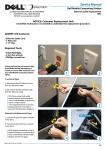
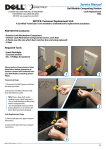
1. Débranchez le cordon d’alimentation
du MCS de la sortie d’alimentation.
2. Débranchez le câble réseau du MCS
de la sortie RJ45.
CONSEILS : Placez une toile de
protection sous votre zone de
travail pour récupérer les pièces
détachées.
• Utilisez une petite lampe de poche
pour éclairer les compartiments
intérieurs.
• Utilisez des outils magnétisés pour
éviter de perdre des attaches ou
pour récupérer des attaches qui
sont tombées.
3
Étapes pour le remplacement d’une
partition d’accueil
3. Déverrouillez et ouvrez les portes du
compartiment supérieur.
4. Enlevez et mettez de côté les 24
netbooks.
5. Marquez la partition défectueuse avec
un morceau de ruban.
4
888-97-079-W-01 rev. B • 08/09
3/4
Service
Manuel
deManual
service
NOTE : Chaque station d’accueil
possède trois différents types de
partitions. Il y a trois partitions
centrales, une droite et une gauche.
Si vous remplacez une partition de
gauche, vous devrez tirez la station
d’accueil vers l’avant de quelques
pouces pour avoir accès à la vis située sur l’arête gauche de la station
d’accueil. Suivez les instructions appropriées selon le type de partition.
Dell
Mobile
Station
Station
deComputing
travail mobile
Dell
Partition de gauche
Partitions centrales
Partition de droite
PARTITION DE DROITE/CENTRALE
ÉTAPES DE REMPLACEMENT
6. Utilisez un tournevis cruciforme pour
enlever l’unique vis qui retient la partition
droite ou centrale défectueuse à la paroi
arrière de la station d’accueil.
7. Glissez la partition défectueuse hors de
la station d’accueil et glissez la nouvelle
partition à sa place. Fixez la nouvelle
partition en utilisant la vis fournie et un
tournevis cruciforme.
8. Mettez les netbooks dans leurs stations
d’accueil.
9. Fermez et verrouillez les portes du compartiment supérieur.
6
7
LE REMPLACEMENT D’UNE PARTITION
DE DROITE/CENTRALE
EST MAINTENANT TERMINÉ.
PARTITION DE GAUCHE
ÉTAPES DE REMPLACEMENT
6. Utilisez un tournevis cruciforme pour enlever les deux vis qui retiennent la station d’accueil avec
une partition défectueuse.
7. Tirez doucement la station d’accueil
vers l’avant d’un pouce ou deux - jusqu’à ce que la vis de la partition de gauche soit accessible avec
un tournevis cruciforme. Enlevez la vis et faites glisser la partition hors de la station d’accueil. Faites
glisser la nouvelle partition de gauche
dans la station d’accueil et fixez-la avec la
SOLUTION PERSONNALISÉE POUR DELL PAR ERGOTRON
vis fournie.
8. Poussez la station d’accueil à sa place;
fixez-la avec les deux vis antérieurement
enlevées.
POUR TOUT SERVICE APRÈS-VENTE APPELER AU (800) 888-8458
OU CONSULTER www.ergotron.com/Dell
9. Mettez les netbooks dans leurs stations
d’accueil.
10. Fermez et verrouillez les portes du
compartiment supérieur.
LE REMPLACEMENT D’UNE PARTITION
DE GAUCHE
EST MAINTENANT TERMINÉ.
888-97-079-W-01 rev. B • 08/09
4/4