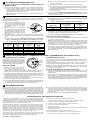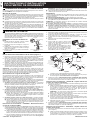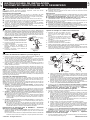
1
3
B. Plug the 4-pin Inductive Pick-Up connector into the 4-pin connector #1
on back of tachometer.
TACHOMETER CONNECTIONS (Cont)
Connection Instructions for OPTION #3 - Inductive Pick-Up
on Spark Plug Wire
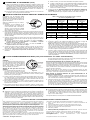
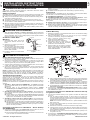
1. Connect the Inductive Pick-Up to a spark plug wire as follows (see Figure 3):
A. Use an existing firewall grommet, or drill a 3/8-inch (9,5 mm) hole
through firewall. Install a grommet in hole and route the Inductive PickUp 4-pin female connector from the engine compartment side through
grommet and to the tachometer gauge.
NOTE: The Inductive Pick-Up lead wire is a special shielded wire. DO
NOT cut the wire.
4
C. Remove the screw and nut from the Inductive Pick-Up Clamp.
D. Find a spark plug wire, and clamp the Inductive Pick-Up around the
wire. Make sure that the arrow stamped on the Inductive Pick-Up clamp
points toward the spark plug.
E. Re-install the screw and nut to secure the inductive pick up clamp on to
the spark plug wire.
2. Proceed to the "CYLINDER SETTING INSTRUCTIONS" section to adjust
the tachometer to the proper Cylinder/RPM setting for the "Inductive Pick- Up
on Spark Plug Wire” option.
CYLINDER SETTING INSTRUCTIONS
The tachometer's CYL setting must be adjusted to match the tachometer's
internal settings to the RPM signal received from the vehicle's ignition system.
Adjust the settings as follows:
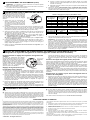
1. Make sure the tachometer power and
ground wires are connected to the vehicle, and the 3-pin connector is plugged
into the #2 connector on back of the
CYL
tachometer.
BUTTON
2. Remove power from the tachometer
(turn ignition switch off). Press and hold
the CYL button (small RED button on
rear of tachometer, see Figure 4), then
Figure 4
apply power to the tachometer (turn ignition switch on).
3. Press and release the CYL button as many times as required until the
tachometer's needle points to the correct RPM for the signal hookup option
used.
■ Use the settings in Table 1 if "OPTION #1- Direct Hook Up with GREEN
Wire" or "OPTION #2 -Inductive Pick-Up on Coil Wire” is being used.
Table 1. Tachometer Cylinder Setting Table (OPTION #1 and #2)
Set tachometer
needle to read
(RPM)
No. of Cylinders
on vehicle
Set tachometer
needle to read
(RPM)
1
500
6
3000
2
1000
8
4000
3
1500
10
5000
4
2000
12
6000
5
2500
Coil on Plug
500
No. of Cylinders
on vehicle
■
Use the settings in Table 2 if "OPTION #3 - Inductive Pickup on Spark
Plug Wire" is being used.
Table 2. Tachometer Cylinder Setting Table (OPTION #3)
Ignition Type
No. of Cylinders
on vehicle
Set tachometer
needle to read
(RPM)
Conventional
All
500
DIS
All
1000
4. When the correct cylinder setting is obtained, turn the ignition off. The cylinder setting is now saved in the tachometer's memory, and will remain until
changed. To change the setting, repeat steps A through D.
5. Proceed to "Tachometer Operational Checkout" to finish installation.
Tachometer Operational Checkout
1. Turn on ignition. DO NOT START ENGINE. Tachometer pointer should rotate
to "0" when ignition is turned on.
NOTE: This tachometer utilizes an "Air Core Movement". With this type of
movement, the needle will remain (point) at whatever position it was in (not
necessarily zero) at the time the power to the tachometer was removed.
This behavior is normal for this type of needle movement. The needle
should return to zero when power is reapplied to the tachometer.
2. Start and run engine. Rev engine several times and verify tachometer indication changes as RPM increases and decreases. If tachometer fails to operate, or operates erratically, consult the Troubleshooting section for troubleshooting details.
5 SHIFT LIGHT/RPM RECALL OPERATION (For Shift Light/RPM Recall Tachometers Only)
Shift Light Operation and Setting
The shift light can be used to provide a visual indication of engine "Red Line" (maximum
safe engine speed) or optimum gear shifting
engine speed (to improve vehicle performance when shifting gears). See Figure 5.
Setting Shift RPM
Peak RPM Recall Function
Shift Light
Set Button
Shift Light
RPM Recall
Button
1. With the ignition key in the "ON" position and the engine "OFF" (not runFigure 5
ning), press and hold down the shift
light set button. After about 4~5 seconds, the needle will start moving up the
display. Continue holding the shift button down and proceed to step 2.
2. When the tachometer’s needle indicates the desired "shift RPM speed" on
the display, release the shift light set button. The "shift RPM " is now set in
the tachometer's memory, and the shift light will illuminate every time the
needle reaches or exceeds the set "shift RPM ".
3. After the "shift RPM " is set, press and release the shift light set button to
return to the normal tachometer operating mode.
This function saves the highest (peak) RPM that was achieved during a trip in
the tachometer's memory and gives the operator the ability to recall this information at any time.
To view the peak RPM value stored in recall memory, press and release the
RPM recall button. Press and release again to return to normal operation.
NOTE: The Peak (highest) RPM achieved during a trip will remain in the
tachometer’s memory until overwritten by a higher RPM valu, or until the memory is cleared by the operator.
Clearing Peak RPM from Tachometer's Memory
1. Press and release the RPM recall button to place the tachometer in RPM
recall mode. The needle should rise and remain at whatever value is in
Recall Memory.
2. While tachometer is in RPM Recall mode, press and hold the RPM Recall
button. Within 3 ~ 4 seconds, the tachometer’s needle will begin to move
down. Wait until the needle reaches zero, then release the RPM Recall button. The RPM Recall memory is now cleared, and the tachometer will begin
saving the highest (peak) RPM reached during the next trip.
4. To check the shift light RPM setting, press and release the shift light set button. Press and release again to return to normal tachometer operation. If
the "shift RPM setting" needs to be changed, repeat steps 1~3.
6 TROUBLESHOOTING
If the tachometer does not function, or functions erratically, perform the following:
■
Ensure that the ignition system is in good working order in accordance with
the vehicle manufacturer’s specifications. If the ignition system is in good
working order but you still experience erratic readings, the tachometer may
be picking up Electromagnetic Interference (EMI). Try re-routing the Inductive
Pick-Up lead wire or the GREEN tachometer signal wire (whichever is applicable) away from all other spark plug wires, ignition coils and the alternator.
■
If the Inductive Pick-Up option is being used, reverse the direction of the
Inductive Pick-Up clamp on the spark plug wire so the arrow points away
from the spark plug. If this is unsuccessful, try moving the Inductive PickUp clamp to a different location on the spark plug wire, or to a different
spark plug wire.
For further assistance, contact the Technical Service Center.
LIMITED WARRANTY AND SERVICE PROCEDURES
The Manufacturer warrants to the original purchaser that this unit is free of defects
in materials and workmanship for a period of one (1) year from the date of original
purchase. If the unit fails within the one (1) year period, it will be repaired or replaced,
at the Manufacturer's option, at no charge, when returned prepaid to the Technical
Service Center with Proof of Purchase. The sales receipt may be used for this purpose. Installation labor is not covered under this warranty.
All replacement parts, whether new or re-manufactured, assume as their warranty
period for only the remaining time of this warranty. This warranty does not apply to
damage caused by improper use, accident, abuse, or if the product was altered or
repaired by anyone other than the Manufacturer's Technical Service Center.
Consequential and incidental damages are not recoverable under this warranty.
Some states do not allow the exclusion or limitation of incidental or consequential
damages, so the above limitation or exclusion may not apply to you.
This warranty gives you specific legal rights, and you may also have other rights,
which vary from state to state. No portion of this warranty may be copied or duplicated without the expressed written permission from the Manufacturer.
© 2004 IEC - All Rights Reserved
Technical Assistance and Warranty Service:
Products requiring service should be returned as follows:
1. Call the Technical Service Center to obtain a Return Reference Number:
2. Package the product carefully to prevent shipping damage
3. Include your name, return address, and a day contact phone
4. Enclose a copy of the dated sales receipt
5. Describe the problem
6. Ship prepaid to: Technical Service Center, 17291 Mt. Herrmann Street, Fountain
Valley, CA 92708 U.S.A.
For Technical Assistance/Warranty Service, contact us at:
Phone: USA & Canada 1-800-544-4124, Others 714-241-6805; Fax:
714-432-7910; Web: www.iEquus.com; Email: [email protected]