1
V 3.02
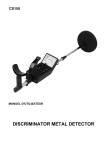
Metal
Detector
User Manual
Please read and understand all instructions before use. Retain this manual for future reference.
8476749
V 3.02
Metal
Detector
8476749
SPECIFICATIONS
Head Phone Jack
14 in. (3.5mm)
(Head phone not included)
Batteries (2)
Current
9V DC (not included)
Type
Alkaline
Voltage Range
6~11.5 V
Audio Frequency
400 Hz ± 60 Hz, 700 Hz ±105 Hz, 1,500 Hz ± 225 Hz
Detection Range
Depth: 55 in. (140 cm)
Frequency
15 kHz ± 2 kHz
INTRODUCTION
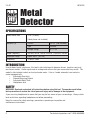
Used to detect metal substances, this tool is able to distinguish between ferrous (contains iron) and
non-ferrous metals. Audio signals and an analog meter ensure that you are aware of any results. This
model is able to detect metals on land and under water. It has a 4 mode automatic tuner and also
comes equipped with:
• Adjustable Sensitivity
• Ground Balancing Control
• Adjustable Metal Shaft
• Headphone Jack.
SAFETY
WARNING! Read and understand all instructions before using this tool. The operator must follow
basic precautions to reduce the risk of personal injury and/or damage to the equipment.
If you are using headphones be aware that you may be less aware of your surroundings. Always check
local restrictions regarding headphone use before proceeding.
Keep this manual for safety warnings, precautions, operating or inspection and
maintenance instructions.
2
For technical questions call: 1-800-665-8685
8476749
Metal Detector
V 3.02
HAZARD DEFINITIONS
Please familiarize yourself with the hazard notices found in this manual. A notice is an alert that there is
a possibility of property damage, injury or death if certain instructions are not followed.
DANGER! This notice indicates an immediate and specific hazard that will result in severe personal
injury or death if the proper precautions are not taken.
WARNING! This notice indicates a specific hazard or unsafe practice that could result in severe
personal injury or death if the proper precautions are not taken.
NOTICE! This notice indicates that a specific hazard or unsafe practice will result in equipment or
property damage, but not personal injury.
WORK AREA
PERSONAL PROTECTIVE EQUIPMENT
Non-skid footwear is recommended to maintain footing and balance in the work environment.
PERSONAL PRECAUTIONS
Control the tool, personal movement and the work environment to avoid personal injury or damage
to tool.
1.
2.
Do not operate any tool when tired or under the influence of drugs, alcohol or medications.
Do not overreach when operating a tool. Proper footing and balance enables better control
in unexpected situations.
SPECIFIC SAFETY PRECAUTIONS
TRAFFIC SAFETY
DANGER! Stay alert and be aware of your surroundings. Do not walk near vehicular traffic while
using the detector. There is a real possibility of becoming distracted and missing traffic cues
resulting in personal injury. Even though some headphones let you hear some outside sounds, they
still present a traffic hazard due to possible distractions.
Visit www.princessauto.com for more information
3
V 3.02
Metal Detector
8476749
HEADPHONE SAFETY
WARNING! To protect your hearing, follow these guidelines when you use headphones:
1.
2.
3.
4.
Set the volume to the lowest setting before you begin listening.
After you begin listening, adjust the volume to a comfortable level.
Do not listen at extremely high volume levels. Extended high-volume listening can lead to
permanent hearing loss.
Once you set the volume, do not increase it. Over time, your ears adapt to the volume,
(volume levels that are not uncomfortable, may still damage your hearing.)
PARTS IDENTIFICATION
WARNING! Do not operate the tool if any part is missing. Replace the missing part before
operating. Failure to do so could result in a malfunction and personal injury.
Remove the parts and accessories from the packaging and inspect for damage. Make sure that all items
in the parts list are included.
Contents:
• Analog Meter
• Arm Support
• Waterproof Search Coil
• Adjustable Stem
• Headphone Jack
• Search Coil Adjusting Knobs
• Lock Nut
• Control Housing
ASSEMBLY OF THE DETECTOR
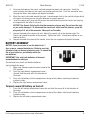
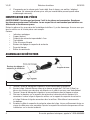
Fig.1
1.
2.
3.
4
Turn the stem’s lock nut clockwise until it has loosened.
Adjust the stem. It should be level with and about 0.5 in. (1.3 to 5cm) above the ground with
your arm relaxed at your side when you stand upright.
Turn the stem’s lock nut counter-clockwise to lock it in place.
For technical questions call: 1-800-665-8685
8476749
4.
5.
6.
Metal Detector
V 3.02
Unscrew the knobs on the search coil and remove the knobs and connector. Insert the
stem and align the holes on the search coil bracket and the stem. Push the connector stem
through the holes, then replace and tighten the knobs.
Wind the search coil cable around the stem. Leave enough slack in the cable to let you adjust
the search coil when you are using the detector on uneven ground.
Insert the search coil’s plug into the jack on the control housing so that the pins on the plug
are aligned with the holes in the jack.
NOTICE! The Search Coil plug fits into the connector only one way. Do not force the plug
or you could damage it. To disconnect the search coil cable from the detector, grasp the
plug and pull it out of the connector. Never pull on the cable.
7.
8.
Loosen the knob at the search coil end. Adjust the search coil to the desired angle. The
Search coil should be parallel to the ground. Tighten the knob. (Do not over tighten or use
tools to do this).
Loosen the knob at the base of the handle, insert the arm support and tighten the knob.
BATTERY ASSEMBLY
NOTICE! If you do not plan to use the detector for 7
days or more, remove the batteries. Batteries can leak
chemicals that can destroy electronic parts. To extend the
life of your batteries, periodically switch the
two batteries.
IMPORTANT! Use only fresh batteries of the exact
recommended size and type.
This detector uses two 9 volt alkaline batteries
(not included) for power.
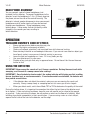
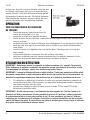
Fig.2
1. Make sure detector mode has been turned to the
OFF position.
2. Press the right battery compartment cover
tab and slide the cover off in the direction of
the arrow.
3. Place a 9-volt battery into the compartment on top of the ribbon, matching the polarity
symbols inside.
4. Replace the right battery compartment cover.
To insert second 9V battery on the Left
1.
2.
3.
Press the left battery compartment cover tab and slide the cover off in the direction of
the arrow.
Place a 9-volt battery into the compartment on top of the ribbon, matching the polarity
symbols inside.
Replace the left battery compartment cover.
Visit www.princessauto.com for more information
5
V 3.02
Metal Detector
8476749
HEAD PHONE ASSEMBLY
You can connect a pair of stereo headphones (not
included) to this detector. To connect headphones to the
detector, insert the headphone’s 1.5 in. (3.5mm) plug into
the phone jack on the side of the control housing. The
detector’s internal speaker disconnects when you connect
headphones and all audio signals will now be received
through your headphones. Using headphones saves
battery power. It also makes it easier to identify subtle
changes in the sounds you hear, resulting in
better detection.
OPERATION
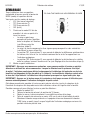
Fig.3
TREASURE HUNTER’S CODE OF ETHICS
•
•
•
•
•
•
•
Always get permission before searching any site.
Respect the rights and property of others.
Observe all national, provincial, and municipal laws while treasure hunting.
Never destroy historical or archaeological treasures. If you are not sure about an object you
have found, contact a museum or historical society in your area.
Leave the land and vegetation as it was. Fill in any holes you dig.
Use your detector only in safe areas.
Dispose of any junk you find, only in approved areas. Do not leave it for the next treasure
hunter to find.
USING THE DETECTOR
IMPORTANT! Never sweep the search coil as if it were a pendulum. Raising the search coil while
sweeping, or at the end of a sweep causes false readings.
IMPORTANT! Once the detector locates metal, the analog indicator will display your find as either
ferrous (contains iron) or non-ferrous metals. If non-ferrous metals are detected, the detector will
also provide an audio tone.
•
•
If the detector does not detect the material; make sure you are moving the search coil
correctly. Always sweep slowly as sweeping too fast can cause you to miss targets.
When you detect metal, switch from Mode TR1 to TR2 to determine the quality of the metal.
During the testing phase, it is important to remember that either the test item or the detector must
be in motion. If you are testing it outdoors, keep the sear coil parallel and as close to the ground
as practical. If you are testing it indoors, do not perform a search on the floor of a building. Most
buildings have metal components in their construction. If you are using a coin as a test subject,
expose the flat side of the coin to the detector, not the edge.
6
For technical questions call: 1-800-665-8685
8476749
Metal Detector
V 3.02
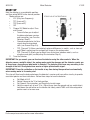
START UP
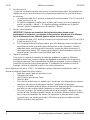
Hold the detector in a comfortable position,
and then rotate MODE to the desired position.
Mode settings are:
• VLF (Very Low Frequency)
• TR1 (transmit 1),
• TR2 (transmit 2)
• OFF
1.
2.
Choose VLF Mode to adjust Tune
and Ground
• Tune will allow you to adjust
the balance between receiver
and transmitter (see Tune the
Detector, Step 2).
• Ground compensates for false
Fig.4
signals due to mineralized
soils (see Ground Step 3 b).
• TR1 (Transmit 1) Allows you to detect extreme differences in metals, such as iron and
gold. Metals containing iron and gold will show on the analog meter.
• TR2 (Transmit 2)-Allows you to detect finer distinctions between metals, such as
aluminum and gold (see Adjusting Discrimination Step 4).
Tune the Detector
IMPORTANT! As you search, you can fine-tune the detector using the other controls. When the
detector senses a metallic object, the analog meter reads the changes and the detector sounds one
of three tones, depending on what metal is detected. The detector pitch tones vary according to the
strength of the find. Strong detections receive a higher pitched audio signal.
IMPORTANT! Press the red button on the handle at any time during the operation to automatically
return analog meter to its center point.
This step will fine-tune the balance between the detector’s receiver and transmitter circuitry to provide
consistent pointer and tone indications. Follow these steps to tune the detector:
a. Set Mode to VLF.
b. Rotate Volume to the 10 o’clock position
c. Set Ground, Discrimination, and Sensitivity to mid-range.
d. Hold the search coil at least 10 in. (25cm) away from the ground and any metal object,
hold down the red button on the handle and slowly rotate TUNE until the analog meter
pointer resets at or near zero.
Visit www.princessauto.com for more information
7
V 3.02
3.
4.
Metal Detector
8476749
Adjust Ground
This is a critical step for accurate operations. Adjusting the ground settings will allow
separation from false signals given off in highly mineralized soil conditions.
• With Mode set to VLF, lower the search coil to 0.5 inch to 0.6 inch (1.3 to 1.5 cm) above
the ground.
• If the analog needle swings to the right (Non-Ferrous), adjust Ground setting to Normal.
If the analog needle swings to the left (Ferrous), adjust Ground setting to Basalt.
Adjust Discrimination
IMPORTANT! Re-adjust discrimination settings for each new search location. Discrimination
settings determine whether the detector will distinguish between different types of ferrous and nonferrous metals.
a.
5.
8
With Mode set to VLF, lower the search coil to 0.5 to 0.6 in. (1.3 to 1.5 cm) above
the ground.
b. The higher you set the discrimination, the more sensitive your detector becomes to
the differences between large aluminum and gold pieces. However, it also becomes
less sensitive to small finds, like coins. If you set your Mode to TR2, begin with
discrimination set to midrange and adjust to the best position for the site.
Adjust Sensitivity
To adjust the search coil’s ability to detect objects at different depths in the soil, rotate
sensitivity between Minimum and Maximum. For maximum detection depth, leave sensitivity
setting as high as possible. If the detector makes a chattering noise, reduce sensitivity until
chatter stops.
No detector is 100 % accurate. Various conditions influence metal detection. The detector’s
reaction depends on a number of factors:
• The angle at which the object rests in the ground
• The depth of the object
• The amount of iron in the object
• The size of the object.
• If buried trash is so heavy in an area, you get false signals, slow your sweep speed and
use shorter sweeps.
• Recently buried coins might not respond the same as coins buried for long periods of
time due to oxidation.
• Nails, nuts, bolts and other iron objects tend to oxidize and create a halo effect. This
effect is where, due to natural elements of the soil and oxidation of metals, target
signals might not be in a specific position. This makes these objects very hard to
locate accurately.
For technical questions call: 1-800-665-8685
8476749
Metal Detector
V 3.02
MAINTENANCE
WARNING! Only qualified service personnel should repair the tool. An improperly repaired tool may
present a hazard to the user and/or others.
NOTICE! Keep the metal detector dry. The search coil supplied is waterproof and can be submerged
in either fresh or salt water. However, please note that the control housing is not waterproof. Do not
let control housing get wet.
•
•
•
•
After searching in salt water, rinse with fresh water to prevent corrosion of metal parts.
Use and store this metal detector @ room temperature
Handle carefully and prevent against being dropped.
Keep away from dust and dirt, and wipe with a damp cloth occasionally.
1.
Maintain the tool with care. A tool in good condition is efficient, easier to control and will
have fewer problems.
2. Inspect the tool components periodically. Repair or replace damaged or worn components.
3. Have damaged or worn components repaired or replaced by an authorized technician.
4. When servicing, use only identical replacement parts. Only use accessories intended for use
with this tool. Replace damaged parts immediately.
STORAGE
•
•
Remove both batteries, if not in use for over seven days.
Store at room temperature, in a dry environment, away from children.
DISPOSAL
•
•
Recycle a tool damaged beyond repair at the appropriate facility.
Contact your local municipality for a list of disposal facilities or by-laws for electronic
devices, batteries, oil or other toxic liquids.
Visit www.princessauto.com for more information
9
V 3.02
Metal Detector
8476749
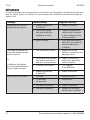
TROUBLESHOOTING
Contact Princess Auto Ltd. for a solution if the tool does not function properly or parts are missing. If
unable to do so, have a qualified technician service the tool.
Problem(s)
Possible Cause(s)
Suggested Solution(s)
Detector displays or sounds
false signals
1. Sensitivity set too high.
1. Adjust sensitivity.
2. Sweeping area too fast or
incorrect body position.
2. Sweep the search coil
slower and hold the
detector correctly.
3. Heavily oxidized metal.
3. Too much iron in any
given substance will
prevent detection.
1. More than one piece
of metal.
1. Scan smaller area, using
short overlapping sweeps.
2. Target may be a type of
metal that the detector
doesn’t recognize.
2. Adjust sensitivity,
ground and
discrimination settings.
3. Target is heavily rusted.
3. This is not a malfunction.
4. Sensitivity set too high.
4. Adjust sensitivity setting.
1. Low Battery.
1. Replace battery.
2. Connection is loose.
2. Re-connect.
3. Not sensitive enough.
3. Adjust sensitivity settings.
4. Improper search.
4. Review techniques
provided in this manual.
Display does not show the
correct metal type when it
locates a target.
Or
Detector sounds more than
one type of tone when it finds
a target
No Metals detected
10
For technical questions call: 1-800-665-8685
V 3,02
Détecteur
de métaux
8476749
Manuel d'utilisateur
Vous devez lire et comprendre toutes les instructions avant d'utiliser l'appareil. Conservez ce manuel
afin de pouvoir le consulter plus tard.
V 3,02
Détecteur
de métaux
8476749
SPÉCIFICATIONS
Prise de casque d’écoute
3,5 mm (14 po)
(casque d’écoute non compris)
Piles (2)
Courant
9 V c.c. (non comprises)
Type
Alcaline
Plage de tension
6 à 11,5 V
Fréquence audio
400 Hz ± 60 Hz, 700 Hz ± 105 Hz, 1 500 Hz ± 225 Hz
Plage de détection
Profondeur : 140 cm (55 po)
Fréquence
15 kHz ± 2 kHz
INTRODUCTION
Utilisé pour détecter des substances métalliques, cet outil permet de faire la distinction entre les
métaux ferreux (qui renferment du fer) et les métaux non-ferreux. Des signaux sonores et un indicateur
analogique vous assurent qu’aucun résultat ne vous échappera. Ce modèle permet de détecter les
métaux sur la terre et sous l’eau. Il présente un syntoniseur automatique à 4 modes en plus d’être muni
des éléments suivants :
• Sensibilité réglable
• Commande d’équilibrage de masse
• Manche réglable en métal
• Prise de casque d’écoute
SÉCURITÉ
AVERTISSEMENT ! Veuillez lire et comprendre toutes les instructions avant d'utiliser cet outil.
L'utilisateur doit respecter les précautions de base lorsqu'il utilise cet outil afin de réduire le risque
de blessure ou de dommage à l'équipement.
Si vous utilisez un casque d'écoute, sachez que peu importe le volume, il se peut que vous soyez moins
conscient de vos alentours. Consultez toujours les restrictions locales en ce qui concerne le port de
casque d'écoute avant de débuter.
Conservez ce manuel qui contient les avertissements de sécurité, les précautions, les instructions de
fonctionnement ou d'inspection et d'entretien.
2
En cas de questions techniques, appelez le 1-800-665-8685
8476749
Détecteur de métaux
V 3,02
DÉFINITIONS DE DANGER
Veuillez-vous familiariser avec les avis de danger qui sont présentés dans ce manuel. Un avis est une
alerte indiquant qu'il existe un risque de dommage à la propriété, de blessure ou de décès si on ne
respecte pas certaines instructions.
DANGER ! Cet avis indique un risque immédiat et particulier qui entraînera des blessures
corporelles graves ou même la mort si on omet de prendre les précautions nécessaires.
AVERTISSEMENT ! Cet avis indique un risque particulier ou une pratique non sécuritaire qui
pourrait entraîner des blessures corporelles graves ou même la mort si on omet de prendre les
précautions nécessaires.
AVIS ! Cet avis indique un risque particulier ou une pratique non sécuritaire qui entraînera des
dommages au niveau de l'équipement ou des biens, mais non des blessures corporelles.
AIRE DE TRAVAIL
ÉQUIPEMENT DE PROTECTION PERSONNELLE
Les chaussures antidérapantes sont recommandées pour maintenir la stabilité et l'équilibre au sein de
l'environnement de travail.
PRÉCAUTIONS PERSONNELLES
Gardez le contrôle de l'outil, de vos mouvements et de l'environnement de travail pour éviter les
blessures ou le bris de l'outil.
1. N'utilisez pas l'outil si vous êtes fatigué ou sous l'effet de drogues, d'alcool ou
de médicaments.
2. N'utilisez pas l'outil si vous devez étirer les bras pour vous en servir. Une stabilité et un
équilibre appropriés sont nécessaires afin d'avoir un meilleur contrôle en cas de
situations inattendues.
CONSIGNES DE SÉCURITÉ SPÉCIFIQUES
SÉCURITÉ DE LA CIRCULATION
DANGER ! Restez alerte et portez attention aux alentours. Ne marchez pas près d’une voie où
les véhicules circulent lorsque vous utilisez le détecteur. Il est vraiment possible que vous soyez
distrait et que certains signaux de la circulation vous échappent, entraînant ainsi des blessures
corporelles. Même si certains casques d’écoute vous permettent d’entendre certains sons de
l’extérieur, ils présentent quand même un risque de distraction possible.
SÉCURITÉ DU CASQUE D’ÉCOUTE
AVERTISSEMENT ! Pour protéger votre ouïe, observez ces directives lorsque vous utilisez le
casque d’écoute :
1,
2.
3.
Réglez le volume au plus bas avant de commencer à écouter.
Après avoir commencé à écouter, ajustez le volume à un niveau confortable.
N’écoutez pas à des volumes extrêmement élevés. Une écoute prolongée à un volume élevé
peut entraîner une perte permanente de l’ouïe.
Visitez www.princessauto.com pour plus d'informations
3
V 3,02
4.
Détecteur de métaux
8476749
N’augmentez pas le volume après l’avoir réglé. Avec le temps, vos oreilles s’adaptent
au volume (les niveaux de volume qui ne sont pas inconfortables peuvent quand même
endommager votre ouïe).
IDENTIFICATION DES PIÈCES
AVERTISSEMENT ! Ne faites pas fonctionner l'outil si des pièces sont manquantes. Remplacez
les pièces manquantes avant l'utilisation. Le non-respect de cet avertissement peut entraîner une
défectuosité et des blessures graves.
Retirez les pièces et les accessoires de l'emballage et vérifiez s'il y a des dommages. Assurez-vous que
tous les articles sur la liste de pièces sont compris.
Contenu :
• Indicateur analogique
• Support de bras
• Serpentin de recherche imperméable à l’eau
• Tige réglable
• Prise de casque d’écoute
• Boutons de réglage du serpentin de recherche
• Écrou de blocage
• Boîtier de commande
ASSEMBLAGE DU DÉTECTEUR
Fig.1
1.
2.
3.
4.
5.
4
Tournez l’écrou de blocage de la tige dans le sens horaire pour le desserrer.
Ajustez la tige. Il devrait être au niveau et se trouver environ de 1,3 à 5 cm (0,5 po) audessus du sol alors que votre bras est détendu sur le côté et que vous vous tenez debout.
Tournez l’écrou de blocage de la tige dans le sens antihoraire pour le bloquer en place.
Dévissez les boutons sur le serpentin de recherche et retirez ensuite les boutons et le
connecteur. Insérez la tige et alignez les orifices sur le support du serpentin de recherche
et la tige. Enfoncez la tige du connecteur dans les orifices. Réinstallez et serrez ensuite
les boutons.
Enroulez le câble du serpentin de recherche autour de la tige. Laissez suffisamment de jeu au
niveau du câble pour vous permettre d’ajuster le serpentin de recherche lorsque vous utilisez
le détecteur sur un terrain accidenté.
En cas de questions techniques, appelez le 1-800-665-8685
8476749
6.
Détecteur de métaux
V 3,02
Insérez la fiche du serpentin de recherche dans la prise sur le boîtier de commande de façon
à ce que les broches de la fiche soient alignées avec les orifices de la prise.
AVIS ! Le bouchon du serpentin de recherche s’insère seulement dans un sens à
l’intérieur du connecteur. Ne forcez pas la fiche, parce que vous pourriez l’endommager.
Pour débrancher le câble de serpentin de recherche du détecteur, saisissez la fiche et
sortez-la du connecteur. Ne tirez jamais sur le câble.
7.
8.
Desserrez le bouton de réglage à l’extrémité du serpentin de recherche. Ajustez le serpentin
de recherche dans l’angle désiré. Le serpentin de recherche devrait être parallèle au sol.
Serrez le bouton. (Évitez de trop serrer ou utilisez les outils pour cette opération.)
Desserrez le bouton à la base de la poignée. Insérez le support de bras et serrez le bouton.
ASSEMBLAGE DE LA PILE
AVIS ! Si vous ne prévoyez pas utiliser le détecteur pendant 7 jours ou plus, retirez les piles. Les
piles peuvent présenter des fuites de produits chimiques capables de détruire les composants
électroniques. Pour prolonger la durée de vie de vos piles, effectuez régulièrement la permutation
des 2 piles.
IMPORTANT ! Utilisez uniquement des piles récentes qui présentent le format et le
type recommandés.
Ce détecteur est alimenté par 2 piles alcalines de 9 V
(non comprise).
1. Assurez-vous que le mode du détecteur a été
placé à la position OFF (arrêt).
2. Appuyez sur la languette du couvercle du
compartiment de la pile de droite et retirez le
couvercle en le glissant dans le sens de la flèche.
3. Placez une pile de 9 V dans le compartiment sur
le dessus du ruban en respectant les symboles de
polarité apparaissant à l’intérieur.
4. Remettez en place le couvercle du compartiment
de la pile de droite.
Fig.2
Pour insérer la deuxième pile de 9 V sur la
gauche :
1.
2.
3.
Appuyez sur la languette du couvercle du compartiment de la pile de gauche et retirez le
couvercle en le glissant dans le sens de la flèche.
Placez une pile de 9 V dans le compartiment sur le dessus du ruban en respectant les
symboles de polarité apparaissant à l’intérieur.
Remettez en place le couvercle du compartiment de la pile de gauche.
ASSEMBLAGE DE CASQUE D’ÉCOUTE
Vous pouvez brancher un casque d’écoute stéréo (non compris) à ce détecteur. Pour brancher un
casque d’écoute au détecteur, insérez la fiche de 3,5 mm (1,5 po) du casque d’écoute à la prise
téléphonique sur le côté du boîtier de commande. Le haut-parleur interne du détecteur se débranche
Visitez www.princessauto.com pour plus d'informations
5
V 3,02
Détecteur de métaux
8476749
lorsque vous branchez le casque d’écoute, alors que tous
les signaux audio seront alors reçus au niveau de votre
casque d’écoute. L’utilisation de casque d’écoute permet
d’économiser le courant des piles. Elle facilite également
l’identification des variations sonores subtiles que vous
écoutez, permettant ainsi une détection améliorée.
OPERATION
CODE DE DÉONTOLOGIE DU CHASSEUR
DE TRÉSORS
•
•
•
•
•
•
•
Demandez toujours la permission avant de
mener des recherches sur un site.
Fig.3
Respectez les droits et la propriété des gens.
Observez toutes les lois nationales, provinciales et municipales lorsque vous procédez à des
chasses au trésor.
Ne détruisez jamais les trésors historiques ou archéologiques. En cas de doute au sujet d’un
objet que vous avez trouvé, communiquez avec un musée ou une société historique dans
votre région.
Laissez le terrain et la végétation dans son état de départ. Remblayez tous les trous que
vous creusez.
Utilisez votre détecteur uniquement dans des endroits sécuritaires.
Jetez tous les déchets que vous trouvez uniquement dans les endroits approuvés. Ne les
laissez pas en place afin que le prochain chasseur de trésors les trouve.
UTILISATION DU DÉTECTEUR
IMPORTANT ! Ne balancez jamais le serpentin de recherche comme s’il s’agissait d’un pendule.
Évitez également de soulever le serpentin de recherche lorsque vous balayez le terrain ou à la fin
d’un mouvement de balayage, puisqu’il en résultera une fausse lecture.
IMPORTANT ! Lorsque le détecteur détecte un objet de métal, l’indicateur analogique affiche votre
découverte comme étant un objet fabriqué de métal ferreux (qui contient du fer) ou non ferreux. Le
détecteur fera également entendre un timbre sonore lors de la détection de métaux non ferreux.
•
•
Si le détecteur ne détecte pas le matériau, assurez-vous que vous déplacez le serpentin de
recherche correctement. Utilisez toujours un mouvement de balayage, puisqu’un balayage
trop rapide vous fera rater des cibles.
Lorsque vous détectez un objet de métal, passez du mode TR1 au mode TR2 afin de
déterminer la qualité du métal.
IMPORTANT ! Au cours de cet essai, il est important de vous rappeler que l'article d'essai ou le
détecteur doit être en mouvement. Si vous procédez à cet essai à l'extérieur, gardez le serpentin
de recherche parallèle et le plus près possible du sol. Si vous procédez à cet essai à l'intérieur,
n'effectuez pas la recherche sur le plancher d'un édifice. La plupart des édifices ont été construits
à partir d'éléments de métal. Si vous utilisez une pièce de monnaie pour l'essai, placez le côté plat
de la pièce contre le détecteur et non son rebord.
6
En cas de questions techniques, appelez le 1-800-665-8685
8476749
Détecteur de métaux
V 3,02
DÉMARRAGE
Tenez le détecteur dans une position
confortable et tournez ensuite le bouton de
MODE (mode) à la position désirée.
Voici quels sont les modes de réglage :
• VLF (très basse fréquence)
• TR1 (transmission 1),
• TR2 (transmission 2)
• OFF (arrêt)
1.
2.
Choisissez le mode VLF afin de
procéder à la mise au point et la
mise à la masse.
• La mise au point vous
permettra d’ajuster l’équilibre
entre le récepteur et l’émetteur
Fig.4
(voir Mise au point du
détecteur, étape 2).
• La mise à la masse compense les faux signaux que provoquent les sols minéralisés
(voir Mise à la masse, étape 3b).
• La position TR1 (transmission 1) vous permet de détecter les différences extrêmes dans
les métaux, tels le fer et l’or. Les métaux contenant du fer et de l’or apparaîtront sur
l’indicateur analogique.
• La position TR2 (transmission 2) vous permet de détecter les distinctions plus subtiles
entre les métaux, comme l’aluminium et l’or (voir Réglage de la discrimination, étape 4).
Mettez au point le détecteur.
IMPORTANT ! Alors que vous menez vos recherches, vous pouvez procéder à la mise au point du
détecteur en utilisant les autres commandes. Lorsque le détecteur sent la présence d’un objet
de métal, l’indicateur analogique affiche le changement et le détecteur fait entendre une de trois
tonalités, tout dépendant du type de métal qu’il a détecté. Les tonalités du détecteur varient selon
la force de l’objet détecté. Les détections très présentent provoquent un signal audio plus aigu.
IMPORTANT ! Appuyez sur le bouton rouge de la poignée en tout temps en cours d’utilisation pour
ramener automatiquement l’indicateur analogique au point central.
Cette étape permettra de procéder à la mise au point précise entre les circuits du récepteur et de
l’émetteur du récepteur afin de produire ainsi des indications claires de l’aiguille et de la tonalité.
Procédez comme suit pour effectuer la mise au point du détecteur :
a. Réglez le mode à VLF.
b. Tournez le bouton de volume à la position de 10 heures.
c. Réglez la masse, la discrimination et la sensibilité au milieu de la plage.
d. Tenez le serpentin de recherche au moins à 25 cm du sol et de tout objet de métal.
Maintenez le bouton rouge enfoncé sur la poignée et tournez doucement le bouton
TUNE (mise au point) jusqu’à ce que l’aiguille de l’indicateur analogique revienne à la
position initiale ou près de zéro.
Visitez www.princessauto.com pour plus d'informations
7
V 3,02
3.
4.
Détecteur de métaux
8476749
Ajustez la masse.
Il s’agit là d’une étape essentielle pour assurer un fonctionnement précis. En procédant aux
réglages de masse, vous éliminerez les faux signaux que produisent les sols à forte teneur
en minéraux.
• Le mode étant réglé à VLF, abaissez le serpentin de recherche entre 1,3 et 1,5 cm (0,5 et
0,6 po) au-dessus du sol.
• Si l’aiguille analogique se déplace vers la droite (non ferreux), ajustez le réglage de
masse à la position « Normal ». Si l’aiguille analogique se déplace vers la gauche
(ferreux), ajustez le réglage de masse à la position « Basalt ».
Ajustez la discrimination.
IMPORTANT ! Rajustez les paramètres de discrimination dans chaque nouvel
emplacement de recherche. Les réglages de discrimination déterminent si le détecteur
fera la différence entre les différents types de métaux ferreux et non ferreux.
a.
5.
Le mode étant réglé à VLF, abaissez le serpentin de recherche entre 1,3 et 1,5 cm (0,5 et
0,6 po) au-dessus du sol.
b. Plus le réglage de discrimination est élevé, plus votre détecteur devient sensible face
aux différences entre les grandes pièces d’aluminium et d’or. Cependant, il devient
également moins sensible aux petites trouvailles, comme les pièces de monnaie. Si
vous réglez votre mode à TR2, commencez en réglant la discrimination en milieu de
plage et ajustez-la ensuite à la position idéale pour le site.
Réglez la sensibilité.
Pour ajuster la capacité du serpentin de recherche de détecter les objets à différentes
profondeurs dans le sol, tournez le bouton de réglage de la sensibilité entre les positions
minimale et maximale. Pour une profondeur de détection maximale, laissez le réglage de
sensibilité à la position la plus élevée possible. Si le détecteur fait entendre un bruit de
broutage, réduisez la sensibilité jusqu’à ce que ce bruit disparaisse.
Aucun détecteur n’est précis à 100 %. Les conditions variées influencent la détection du métal. La
réaction du détecteur dépend de divers facteurs :
• Angle dans lequel l’objet est placé dans le sol
• Profondeur de l’objet
• Quantité de fer que contient l’objet
• Taille de l’objet
• Si les déchets enfouis dans un endroit sont si lourds que vous obtenez de faux signaux,
ralentissez votre vitesse de balayage et réduisez l’ampleur de vos balayages.
• Les pièces de monnaie enfouies depuis récemment ne réagissent pas de la même façon
que celles qui sont enfouies depuis longtemps en raison de l’oxydation.
• Les clous, les écrous, les boulons et autres objets de fer tendent à s’oxyder et à créer
un effet de halo. Cet effet est produit lorsque, en raison des éléments naturels contenus
dans le sol et de l’oxydation des métaux, les signaux de la cible pourraient ne pas
se trouver dans une position particulière. Cela fait en sorte que ces objets sont très
difficiles à localiser avec précision.
8
En cas de questions techniques, appelez le 1-800-665-8685
8476749
Détecteur de métaux
V 3,02
ENTRETIEN
AVERTISSEMENT ! Seul un personnel d'entretien qualifié doit effectuer la réparation de l'outil/
l'appareil. Un outil/appareil mal réparé peut présenter un risque pour l'utilisateur et/ou pour
les autres.
AVIS ! Assurez-vous que le détecteur de métal demeure sec. Le serpentin de recherche fourni est
étanche et il est possible de le plonger dans l’eau douce ou salée. Sachez cependant que le boîtier
de commande n’est pas étanche à l’eau. Ne laissez pas le boîtier de commande devenir humide.
•
•
•
•
1.
2.
3.
4.
Après une recherche dans l'eau salée, rincez le serpentin de recherche à l'eau fraîche pour
empêcher la corrosion des pièces de métal.
Utilisez et rangez ce détecteur de métal à la température ambiante.
Manipulez l'appareil avec soin et évitez de l'échapper.
Tenez-le à l'abri de la poussière et de la saleté et essuyez-le à l'occasion au moyen d'un
chiffon humide.
Entretenez l'outil avec soin. Un outil en bon état sera efficace, plus facile à contrôler et
préviendra les problèmes de fonctionnement.
Inspectez les composants de l'outil régulièrement. Réparez ou remplacez les composants
endommagés ou usés.
Inspectez les fixations de l'appareil, l'alignement, les tuyaux et le cordon d'alimentation
périodiquement. Demandez à un technicien autorisé de réparer ou de remplacer les
composants endommagés ou usés.
Pour réparer un outil, il faut utiliser uniquement des pièces de rechange identiques. Employez
seulement des pièce autorisées. Suivez les conseils donnés dans la section sur l'entretien
que vous trouverez dans ce manuel.
ENTREPOSAGE
•
•
Retirez les 2 piles si vous prévoyez ne pas utiliser l'appareil pendant plus de 7 jours.
Remisez-le à la température ambiante, dans un environnement sec et hors de la portée
des enfants.
MISE AU REBUT
•
•
Recyclez votre outil endommagé dans une installation prévue à cet effet s'il est impossible de
le réparer.
Communiquez avec votre municipalité locale afin de connaître les instructions et les
emplacements de mise au rebut.
Visitez www.princessauto.com pour plus d'informations
9
V 3,02
Détecteur de métaux
8476749
DÉPANNAGE
Si l'outil ne fonctionne pas correctement ou si des pièces sont manquantes, veuillez contacter Princess
Auto Ltd. afin de trouver une solution. Si ce n'est pas possible, demandez à un technicien qualifié de
réparer l'outil.
Problem(s)
Possible Cause(s)
Suggested Solution(s)
Le détecteur affiche ou fait
entendre de faux signaux.
1. Réglage trop élevé de
la sensibilité
1. Réglez la sensibilité.
2. Surface de balayage
trop vaste ou position
inadéquate du corps
2. Déplacez le serpentin de
recherche plus lentement
et tenez le détecteur dans
la bonne position.
3. Métal très oxydé
3. Une trop grande quantité
de fer dans une substance
donnée empêchera de
la détecter.
1. Plus d’une pièce de métal
1. Balayez une surface
réduite en chevauchant vos
balayages courts.
2. La cible peut être fabriquée
d’un type de métal que le
détecteur ne reconnaît pas.
2. Réglez la sensibilité, la
masse et les paramètres
de discrimination.
3. La cible est très rouillée.
3. Il ne s’agit pas
d’une défaillance.
4. Réglage trop élevé de
la sensibilité
4. Réglez la sensibilité.
1. Pile faible
1. Remplacez la pile.
2. La connexion
est desserrée.
2. Reconnectez.
3. Sensibilité insuffisante
3. Réglez la sensibilité.
4. Recherche inadéquate
4. Revoyez les techniques
décrites dans ce manuel.
L’affichage ne présente pas
le bon type de métal lorsqu’il
localise une cible.
Ou
Le détecteur fait entendre
plus d’une tonalité différente
lorsqu’il repère une cible.
Aucun métal n’a été trouvé
10
En cas de questions techniques, appelez le 1-800-665-8685