1
ENGLISH
OPERATION MANUAL
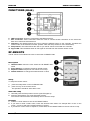
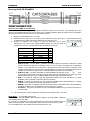
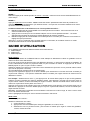
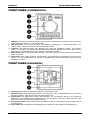
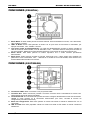
FUNCTIONS (REAR)
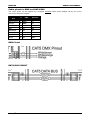
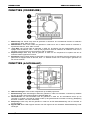
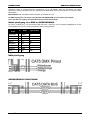
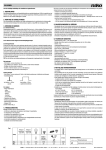
6. DMX connection: should be connected to the DMX projectors.
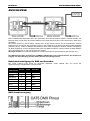
7. Bus connection: those connections allow the user to connect several controllers on the same bus.
Each unit controls the same dmx line.
8. Dipswitch: The dipswitch allows the user to setup the different zones on the controller. It enables the
master mode on the selected controller. (Please check the setup section for more information)
9. Setup button: This button allows the user to sync the RF remote control with the controller.
10. Signal LED: This led flashes when an RF signal is received from the wireless remote control.
RF-REMOTE
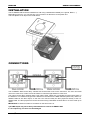
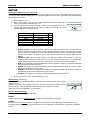
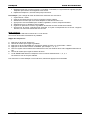
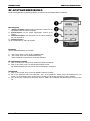
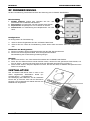
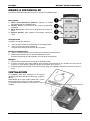
The RF remote control allows the user to control the LD-SMART DIM.
Description
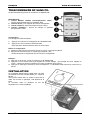
1. ON/OFF button: allow the user switch the LD-SMART DIM
on/off
2. Scene buttons: to recall the previously stored scenes
3. Sequence button: Sequence of 6 scenes runs in loop
4. Dimmer buttons: to change the master dimmer 0-100%
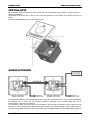
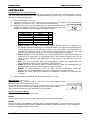
Setup
To setup the remote control:
1.
2.
press the setup button on the LD-SMART DIM
press one key on the remote control.
This operation should be done within 5 sec.
Clear the setup
1. Hold and press the Setup button until the signal LED lights up
2. press the Setup button, the signal LED blinks 3 times.
The remote control has been successfully remove from the setup.
Example:
1. Press the “on/off” button to turn the LD-SMART DIM on
2. If you want to recall a static scene, Press the desired scene button: for example SC1 to turn on the
scene 1. Press up and down to adjust dimmer of scene 1.
3. If you want to run the scene in sequence, Press SEQ: the LD-SMART DIM runs the six scenes in loop.
BRITEQ®
3/44
LD-SMART DIM