1
Set-Up & First Brew
IMPORTANT: You cannot use your Keurig
brewer until it has been primed for its first use
as set forth below.
continuing. Please note, a K-Cup should not
be used for the Priming Sequence.
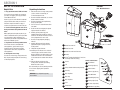
Ready to Brew your First Cup
®
K-Cup
portion pack
NOTE: If Brewer has been exposed to temperatures below freezing, allow Brewer at least two
hours to reach room temperature before priming. A frozen or extremely cold brewer will not
prime properly and can cause damage.
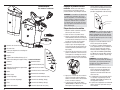
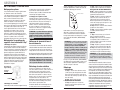
Handle
K-Cup
Chamber
Priming your Brewer
1. Unwrap cord and plug the brewer into a
grounded outlet.
2. Place a cup or mug on the Drip Tray Plate.
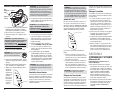
3. Remove the Water Reservoir from Brewer by
first removing Lid from Reservoir, then lifting
Reservoir straight up and away from Brewer
(may be tight). Rinse with fresh water.
4. Fill Water Reservoir with fresh water so
that the water level reaches the line just
below the top edge of the clear viewing
area. (Be careful not to over fill.)
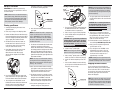
5. Place Water Reservoir base into the left
side of the Brewer and be sure the
Water Reservoir Lock Tabs engage
with the Brewer. Replace Lid on Water
Reservoir.
8. Press the Brew Button below the flashing
green light.
NOTE: If the Water Reservoir is empty or not
in place on the Brewer, then the blue light
next to 'ADD WATER' on the LED Control
Center will be illuminated. The Brew Button
will not be activated until water is added to
the Water Reservoir.
9. The Brewer will automatically fill with water
(priming it) and then the water will be
heated. This will take about 3 minutes. During
the heating period the red light next to 'HEATING' on the LED Control Center will become
illuminated. Once the water is heated, the red
light will turn off and the green light above the
Brew Button will flash.
NOTE: You may see small amounts of water
coming from the Vent and dripping into the
Water Reservoir during this and subsequent
heating – this is normal.
10.Press the Brew Button below the flashing
green light to start a cleansing brew, during
which hot water will flow into your cup or
mug. Pour the hot water into the sink.
6. Press Power Button found on upper right
panel of the Brewer. The green light next to
the Power Button will become illuminated.
7. The red light next to 'DE-SCALE' on the
LED Control Center will flash to indicate the
Brewer needs to be primed. Make sure
the handle is all the way down before
6
11.The Brewer may take 15 seconds to reheat
water between brews during which time the
red light next to 'HEATING' on the LED
Control Center may be illuminated. When the
water has heated, the red light will turn off.
12. The one-time priming process is now
complete and you are ready to brew!
1. The green light next to the Power Button on
the LED Control Center will be illuminated
to indicate the Brewer is powered on.
2. Place a cup or mug on the Drip Tray Plate.
3. Lift the Handle and the K-Cup Holder will
open toward you.
CAUTION: There are two sharp needles that
puncture the K-Cup® portion pack, one above
the K-Cup Holder and the other in the bottom
of the K-Cup Holder. To avoid risk of injury,
do not put your fingers in the K-Cup Chamber.
4. Select a K-Cup® portion pack.
NOTE: Do not remove the foil lid or
puncture the K-Cup® portion pack.
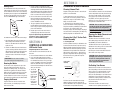
5. Place a K-Cup® portion pack in the K-Cup
Holder (as shown in exhibit at top of page).
6. Lower the Handle completely to close the
Lid.
7. Press the Brew Button below the flashing
green light on the LED Control Center. This
will yield a 7.25 oz serving.
NOTE: If you do not push the Brew Button in
60 seconds, the Brew Button will be disabled
to prevent accidental activation. Re-activate
the Brew Button by raising and lowering the
Handle completely.
8. The green light above the Brew Button on
the LED Control Center will remain lit while
brewing.
CAUTION: There is extremely hot water in
the K-Cup Holder during the brew process.
To avoid risk of injury, do not lift the
Handle or open the K-Cup Chamber
during the brew process.
9. There may be a short pause before the
brewing process begins. The process lasts
for approximately 40 seconds and ends
with a burst of air to remove all liquid
coffee or tea from the K-Cup.
10. Lift the Handle to remove and dispose of
the used K-Cup. CAUTION: K-Cup will be hot.
11. Enjoy your first cup of Keurig Brewed®
gourmet coffee or tea!
12. The red light next to 'HEATING' on the
LED Control Center may be lit as the
water is heated for the next brew cycle.
The Brewer will be ready for use in
approximately 15 seconds.
NOTE: Following the brew, your Brewer will
fill in preparation for the next brew. The pump
will make a vibrating sound. This is normal.
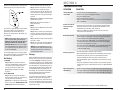
Stopping the Brew Process
If you need to stop the brewing after the
process has started, press the Power Button
to turn the Brewer ‘OFF’. The flow of coffee
or tea will stop, the heating element will shut
off and the green light next to the Power
Button will disappear.
NOTE: You may get less coffee or tea in your
cup during your next brew. We recommend
that you perform a cleansing brew with water
only after a terminated brew. Then your NEXT
brew will be the proper volume.
7