1
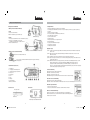
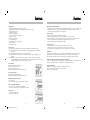
2. Mounting without adjustable arm
Step 5:
(
Remove this adjustable clip
Plug the sunvisor clip into the main unit clip bracket
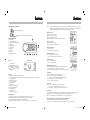
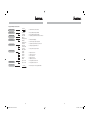
Key function (front side)
1. LCD display
2. 1.Pairing/2.Disconnect
3. 1.Call transfer./2.Voice dialing.
4. Speaker
5. Charging Indicator.
6. Volume Down
7. Volume Up
8. Hang up
9. Answer call
10. Swivel Microphone
Once you have entered the pass code, your phone is the standard device for this car kit. This car kit’s
LCD display shows “PAIRED”. Then, LCD shows Hans-free Profile or Headset profile. Also, LCD display
shows the name of the paired phone. Pairing has been completed successfully.
How to disconnect
Method 1 : Press L button once.
Method 2 : Switch off this car kit
Method 3 : Switch off your phone
Method 4 : Move the phone 10 meters away from this car kit
How to re-connect
Method 1 : Press L button once.
Method 2 : From phone’s Bluetooth menu.
Answer incoming calls
• Press ( button.
• Press phone Answer call button.
(
Reject and hang up a call
• Press
button to reject or hang up.
• Or Press phone hang up button to end the call.
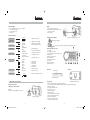
Back side view
Power On/Off
9 10
Charging socket
Sunvisor Clip Bracket
Features
• Display caller’s telephone number (12 digits)
• Voice output of caller’s telephone number in 5 languages (Germany-French-Spanish-Italy-English)
• 5 languages display
• Mute microphone on/off
• Support voice dialing
• 20 calls memory
• Call transfer
• Battery low an full indication
• Battery charging indicator
• Pairable for 4 users
• Talk time : 10 hours
• Standby time : 500 hours.
Pairing procedure
Step 1: Please refer to phone user manual to activate phone bluetooth connection.
Step 2: SEARCH for a Bluetooth device according to the phone’s user manual.
Step 3 : Once SEARCH is finished, select “CAR 08” from the list.
Step 4: Enter generic pass code”1234” to associate (Pair”) and connect the car kit with phone.
6
00016327bda.indd Abs1:7-Abs1:8
Volume up and down
• Press + to increase volume
• Press - to decrease volume
Mute Mic during conversation
• Press L to mute the mic. The display show “Mute On”. The mic is off.
• Press L again, the mic is on, display shows “Mute off”.
The mic is automatically switched on once call has been completed.
L
Call waiting
In conversation with 1st call, a new 2nd calls come in.
• Press (to activate 2nd call, keep 1st call waiting
• Press (again to re-activate 1st call and hold 2nd call waiting
• Press
hang up 1st call and reactivate 2nd call
• Press
again to hang up 2nd call.
( (
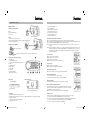
Top view
Call transfer
• Press C once to transfer the calls from car kit to phone.
• Press C once more to transfer calls from phone to car kit.
• For Nokia phones, press L to transfer calls from phone to car kit.
Voice dialing
Press and hold C 2 seconds until you hear a tone that indicates it is ready for speech recognition. Say the
desired name. The phone replays the desired name and dials the related phone number.
Note : This voice dialing function is available for phones supporting voice dialing.
CC
Making a call from 10-Received calls memory OR from 10 last Missed calls
• Press and hold ( 2 seconds, display shows “ Call Rec. Received “
• Press + or – to select the telephone number you dial. Press ( to make an outgoing call.
7
30.08.2006 10:59:59 Uhr