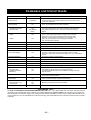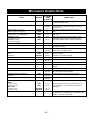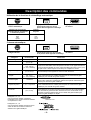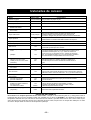
1
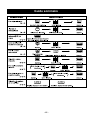
Controls and Operating Procedures
Before using your oven choose Metric or Imperial
This oven can be set to operate with either Metric or Imperial weights. We strongly recommend that you choose the Metric, as all
purchased items such as meat, poultry, fish, frozen, canned and prepared foods are labelled with Metric weights but not all include
Imperial weights. You need only enter the number on the package.
To Set the Metric or Imperial System:
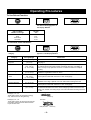
To Choose Metric:
Oven will accept Metric weights in
grams for Popcorn, Frozen Vegetables
and Fried Chicken.
1. Plug in oven.
2. Press Start Pad once,
"g" shows in display.
To Choose Imperial:
Oven will accept Imperial weights in
ounces, pounds and tenths of a pound
for Popcorn, Frozen Vegetables and
Fried Chicken.
1. Plug in oven.
2. Press Start Pad twice,
"oz" shows in display.
• To change from one system to another unplug oven and reprogram.
To Set Clock:
1. Press Timer/Clock Set Pad twice.
2. Enter time of day by pressing
Number Pads.
e.g. 11:25 AM or PM
3. Press Timer/Clock Set Pad.
Time selected will show in the
display.
• To change time or reset clock, repeat steps 1 to 3 above.
• When power is interrupted and has resumed, a colon will show in the display.
• Clock does not need to be set for oven to operate.
To Cook / Defrost by Power and Time:
1. Press Power Pad until
desired cooking power shows
in display. (see page 11)
2. Set required cooking time by
pressing Number Pads.
e.g. 5:00 minutes
3. Press Start Pad.
• When selecting HIGH Power as the first stage, you can start from step 2.
• To set 2 or 3 programs in a row.
e.g. MEDIUM ➞ 10.00 min. ➞ DEFROST ➞ 3.00 min. ➞ HIGH ➞ 7.00 min. ➞ START
Stage 1
Stage 2
Stage 3
• To defrost use DEFROST.
• When setting cooking stage, HIGH power cannot be set for 2 consecutive stages.
-6-