1
5.
OPERATION
a.
STAND ALONE OPERATION : Sound activation and AUTO
This mode allows a single device to react to the sound of music.
1.
Place the device in a suitable and stable position.
2.
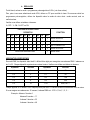
Set the dipswitch to select AUTO or Sound active mode.
3.
Turn on the unit. The unit resets then it begins to work.
4.
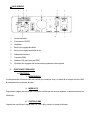
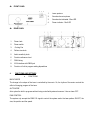
The unit will react to low frequencies through the internal microphone. Adjust the sound sensitivity with
the appropriate knob located at the rear of the unit. The LED indicates whether the music mode is activated.
b.
MASTER / SLAVE MODE
This mode allows you to connect up to many together without controller.
1.
Install the unit in a suitable and stable position.
2.
Choose a unit to function as master mode, set dipswitch to select AUTO or Sound active mode. The
others must be set in slave mode. Set the DIP switch to slave mode.
3.
Use an XLR cable to connect devices together. Taken at the rear of the unit.
4.
Turn on all units. The devices reset and then begin to work. The slave units will react the same as the
master unit.
5.
The units respond to low frequencies through the internal microphone. Adjust the sound sensitivity with
the appropriate knob located at the rear of the unit. The LED indicates whether the music mode is activated.