1
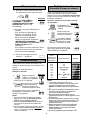
Setting the Clock
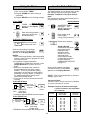
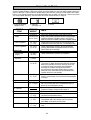
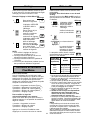
Popcorn Pad
For use with prepackaged Popcorn bags.
This feature allows you to display the time of day.
The oven will operate without setting the clock.
Example: To pop 3.5 oz package of microwave
popcorn.
Press Popcorn pad until package weight appears
in the Display Window. See Chart below.
Display Window
Example: To set 12:34 AM or PM.
Display Window
1.
Colon appears
and flashes.
Press.
2.
1.
“POPCORN (weight)
PRESS START”
scrolls across Display
Press once. Window.
“SET TIME” scrolls
across Display
Window.
Verify packaged weight
on Display Window.
Enter time of day
using number pads.
2.
Colon continues
flashing.
“PRESS CLOCK”
scrolls across Display
Window.
Press once.
3.
3.
Cooking begins.
Press.
Press Clock again
to set time of day.
Colon stops flashing.
At the end of cooking, five beeps
sound and “ENJOY YOUR MEAL”
appears on the Display Window.
NOTES:
1. To reset the clock, repeat step 1 through 3.
2. The Clock will retain the time of day as long
as electricity is supplied.
3. Clock is a 12 hour display.
4. Oven will not operate while colon is flashing.
Press
Popcorn pad
once
twice
three times
four times
five times
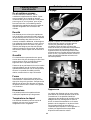
To Use More/Less Pad
For Popcorn:
When using Popcorn pad, the weight may not
be the same as the options offered. By using
the More/Less pad, the programs can be
adjusted to cook food for a longer or shorter
time or a heavier or lighter weight.
1
2
3
4
5
Time counts down
and power level
arrow scrolls.
Popcorn
package
3.5 oz (99 g)
3.0 oz (85 g)
2.85 oz (80 g)
2.65 oz (75 g)
1.75 oz (50 g)
Time
will vary
depending
on size and
wattage of
oven
NOTES:
1. Popcorn packages should be at room
temperature.
2. Place bag in oven according to manufacturer’s
directions.
3. Pop one bag at a time.
4. After popping, allow bag to cool. Carefully
open bag away from face and body, since
popcorn and steam are extremely hot.
5. Do not reheat unpopped kernels or reuse bag.
6. NEVER leave the oven unattended when
popping popcorn. Stop the oven when
popping slows to 2 to 3 seconds between
pops. Overcooking may cause scorching.
7. With the many varieties of microwave popcorn
available in the market place, it may be
necessary for you to move the popcorn
container to the outer edge of the Glass Tray
to obtain the best cooking results.
tap = More+ Cooking
taps = More++ Cooking
taps = Less- Cooking
taps = Less-- Cooking
taps = original setting
For Sensor Reheat/Cook:
Preferences for food doneness vary with each
individual. After having used the Sensor Cook
feature a few times, you may decide you would
prefer your food cooked to a different
doneness.
1 tap = More+ Cooking
2 taps = Less- Cooking
3 taps = original setting
REMARKS: When popping multiple bags one
right after the other, the cooking times may vary
slightly. This does not affect the popping results.
To maintain the cooking quality for many brands
of microwave popcorn available in the market,
some preset weights have the same cooking
time.
Press More/Less pad before pressing Start.
11