1
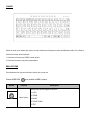
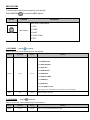
5. TEXT MODE
(button
on remote)
When in Text mode, use the following keys.
Select Pg Up or Pg Dn to get the wished page.
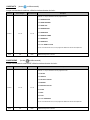
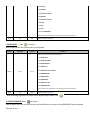
Fuction
Original Key
New Key
Description
Flow
F1
Sets the text flow. Press again to restart
Draw
F3
Selects the drawing fuctionality
Zoom
F4
Selects the zoom in, zoom out, and zoom in/out functionality
X Move
F5
Text moves right or left. (2 modes)
Y Move
F6
Text moves uo or down. (2 modes)
Y Roll
F7
Text curves around the y-axis (2 modes)
X Roll
F8
Text curves around the x-axis (2 modes)
Z Roll
F9
Text spins around the z-axis (2 modes)
Wave
F10
Text projected with a wave effect (4 modes)
Text Qty
F11
Displays characters in quantities of 4,6,7,10,12
Play Time
F12
Set the display time for each page from 0.0 to 99.9S
Use the up and down arrows to set the functions speed, Text Qty and Play Time functions
Mirror
Tab
Mirror the display in 4 directions
Delete
Clears the cache
BACKSPACE
Deletes a character to the left
Home
Moves the cursor to the beginning of the text
End
Moves the cursor to the end of the text
Arrow Keys
Set up the speed of functions
Text scrolling (for >12 letters )
Ctrl+Alt+Del
Deletes the entire text
Save+No.
Ctrl+No.
Saves the text ang pattern
Play+No.
Alt+No.
Plays back the saveed taxt and pattern
Page Up
Chooses the last edited text (max 10 pages 0 to 9)
Page Down
Chooses the next edited text (max 10 pages 0 to 9)
Pause
Pauses the program
Esc
Esc
Come back to the default text