1
English
Package contents
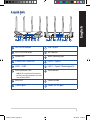
RT-AC87U Wireless Router
AC adapter
Network cable (RJ-45)
Quick Start Guide
Support CD (User Manual)
NOTE:If any of the items is damaged or missing, contact your retailer.
NOTES:
• USB External HDD/Flash disk:
• The wireless router works with most USB HDDs/Flash disks up to
2TB and supports read-write access for FAT16, FAT32, EXT2, EXT3,
and NTFS.
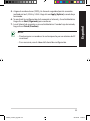
• To safely remove the USB disk, launch the web GUI
(http://192.168.1.1), then in the Network Map page's upper right
corner, click the USB icon and click Eject USB 3.0 / USB 2.0.
• Incorrect removal of the USB disk may cause data corruption.
• For the list of file system and hard disk partitions that the wireless
router supports, visit
http://event.asus.com/networks/disksupport
• F or the list of printers that the wireless router supports, visit
http://event.asus.com/networks/printersupport
4
na8972_rt-ac87u_qsg.indb 4
2014/6/10 13:56:16