1
• Owner’s Use and Care Guide
• Guide d’utilisation et d'entretien
PORTABLE AIR CONDITIONER
CLIMATISEUR PORTATIF
Model • Modèle • Modelo
DPA80C1WA
Danby Products Limited, Ontario, Canada N1H 6Z9
Danby Products Inc., Findlay, Ohio, USA 45840
v1 11.11
Welcome
Thank you for choosing a Arcticaire appliance to provide you and your family with all of the “Home Comfort” requirements
of your home, cottage, or office. This Owner’s Use and Care Guide will provide you with valuable information necessary
for the proper care and maintenance of your new appliance. If properly maintained, your Arcticaire appliance will give you
many years of trouble free operation. Please take a few moments to read the instructions thoroughly and familiarize
yourself with all of the operational aspects of this appliance.
Your Arcticaire Portable Air-Conditioner is a multi-functional room air-exchanging, air-processing appliance, designed to
offer you the functions of; Air Conditioning, Dehumidifying, and Independent Fan. Each individual mode is featured with
“oscillating” air swing capabilities. This unit can be conveniently moved from room to room within your home and set up
in just minutes. Imagine the convenience of 4 Season Home Comfort at your fingertips, anywhere, anytime.
For easy reference, may we suggest you attach a copy of your sales slip/receipt to this page, along with the following
information, located on the manufacturers nameplate on the rear panel of the unit.
Model Number:
Serial Number:
Date of Purchase:
This information will be necessary if your unit requires servicing and/or for general inquiries. To contact a Customer
Service Representative, call Danby TOLL FREE: 1-800-263-2629
2
Important Safety Information
READ AND FOLLOW ALL SAFETY INSTRUCTIONS
FOR YOUR SAFETY: Read these instructions carefully before operating and keep them for consultation.
ENERGY SAVING TIPS
Your Arcticaire appliance is designed to be highly efficient in energy
savings. Follow these recommendations for greater efficiency.
1) Select a thermostat setting that suits your comfort needs and leave at
that chosen setting.
2) The air filter is very efficient in removing airborne particles. Keep the air
filter clean at all times.
3) Use drapes, curtains or shades to keep direct sunlight from penetrating
and heating the room, but do not allow drapes or curtains to obstruct
the air flow around the unit.
4) Start your air conditioner before the outdoor air becomes hot and
uncomfortable, to avoid an initial period of discomfort while the unit is
cooling off the room. Use of the automatic start/stop programmable
TIMER feature can be a major asset in this regard if utilized to the
fullest extent.
5) When outdoor temperatures are cool enough, turn the air conditioner off
and use the FAN MODE. This circulates indoor air, providing some
cooling comfort while utilizing less electricity.
SUMMARY
A Mobile Air Conditioner is a type of small multifunctional and movable air
conditioner that contains functions of COOLING and DRYING the air and it
can be moved freely to different locations. It is suitable for office and houses especially those with many rooms. This product also contains the
advantages of compact configuration, excellent process, elegant appearance, convenient moving, low cost and low noise.
Note: Please read this instruction manual carefully before operating the
unit. This manual is only for reference the specification parameters are
subject to change without notice.
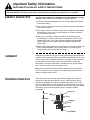
WORKING PRINCIPLE
Under the function of fan motor, indoor airflow changes into cooled air
through the evaporator then blows the air out, while the indoor airflow
changes into heated air through the condenser then blows it out. There
are 2 flues designed on the unit: heated air is discharged from the rear air
outlet vent while cool air is discharged from the front air outlet vent. Gentle
and steady cool air flows through the louver to reach the needed
temperature.
Evaporator
evaporato
Cool
airai
cool
Flue
1
fluel
Fanfan
motor
moto
Capillary
capillary
Hot
air
heat
air
Flue
2
flue2
Condenser
condense
4
Important Safety Information
READ AND FOLLOW ALL SAFETY INSTRUCTIONS
FOR YOUR SAFETY: Read these instructions carefully before operating and keep them for consultation.
WORKING PRINCIPLE
(cont)
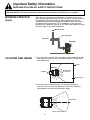
When the unit is operating as a dehumidifier, remember to take off the
heat discharge pipe and reinstall it on the unit when it is being used as an
air conditioner. Since partial indoor air will be heated and will be discharged outside by the discharge pipe the outdoor air will enter to maintain balance of the air pressure. The air conditioner will only lower the
temperature of a particular region of air in a indoor room instead of turning
the entire indoor air to a lower temperature.
Window
or wall
windoworwall
Discharge
pipe
dischar
gepipe
Heated
airai
Heated
Cooled
cooled
aair
i
LOCATION AND USAGE
1. If the room area is smaller than 15m and the walls or building has good
heat insulation, place the unit in the following location (see below) for
best cooling effect.
Room
Room
Mobile
AC
Mobile
AC
Heat
Air
Heat
ai
Flow direction
Flowdirection
of cooled air
ofcooled
air
Coolingregio
region
Cooling
2. If the room area is larger than 20m , for example workshops or
factories, the unit can only cool partial area (as shown in following
figure) people in this area can enjoy better cooling.
60 ~70
1.52 meters
1.5~2m
Sector
coolingarea)
area
(Sector
cooling
5
Important Safety Information
READ AND FOLLOW ALL SAFETY INSTRUCTIONS
FOR YOUR SAFETY: Read these instructions carefully before operating and keep them for consultation.
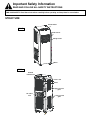
STRUCTURE
Control
Panel
Control
panel
FRONT
Guide
GuideLouver
louver
Swing Louver
Swinglouve
Wheel
Wheel
REAR
Rear
Remote
controler box
Power cord
Filters
Upper air inlet
grille
Air outlet
vent
Lower air inlet
grille
6
Operating Instructions
OPERATING METHODS
Applying the range for COOLING and DRYING.
The temperature range for this unit is from 16°C - 35°C (60.8°F - 95°F) for
cooling and ranges from 16°C - 35°C (60.8°F - 95°F) for dehumidifying.
Location
Place the unit on a horizontal floor when using, and maintain a distance of
50cm from the walls, surfaces, flammable objects or other obstructions.
Power (Check before connecting the power)
The normal running fluctuation range of voltage for this unit is ±10 value
listed on the nameplate. Too high or too low of voltage will influence the
unit. It is better to adopt a power lead and pickup current above 10A to
prevent sudden drop of voltage when the unit is running. It is necessary to
exchange a broken power cord for a special quality power cord.
When it is time to change the power cord or repaire it, please
contact the seller and have them repair it by a professional personnel.
Grounding must be conducted and the unit should be connected to special
grounding equipment in the building to ensure it’s well grounded.
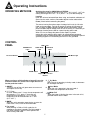
CONTROL
PANEL
LED screen
WATER FULL
Light
COOL Mode
Light
DRY Mode
Light
Receiver Window
FAN Mode Light
ON/OFF Button
MODE Button
Temperature Selection
Buttons
When pressing a valid key/button a beep will sound to
indicate a button was pressed and a light will turn on
for that particular button.
1. ON/OFF
Turn on or turn off the unit (press once to turn on unit
and repress to turn off).
2. "+","-" key
In COOL mode, press "-" once, the set temperature will
decrease by 1 (1°C), press "+" once, the set
temperature will incresae by 1 (1°C). The set
temperature can be selected from 16°C -30°C
(61°F -86°F ).
3. MODE
While the unit is operating, press the key to enter the
mode menu. FAN, COOL or DEHUME mode.
4. Fan speed
When working in FAN or COOL mode, the air
conditioner can select 3 speeds. The initial speed is
high when running in DRY the initial speed is low
when running FAN mode.
7
5.
Dry Mode
When the unit is operating in the dry mode, it decreases
the humidityof the room.
6.
Cool Mode
When the unit is operating in the cool mode, it
decreases the temperature of the room.
7.
Water Full
When the button is blinking the water in the tank is full,
proceed to drain out the water.
Operating Instructions
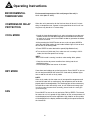
ENVIRONMENTAL
TEMPERATURE
Environmental temperature of this unit (range of the unit) is
16°C - 35°C (60.8°F - 95°F).
COMPRESSOR DELAY
PROTECTION
When the unit is powered on for the first time there will be a 2-5 minute
delay in compressor start. If power is interrupted while the unit is still running there may also be a 2-5 minute delay.
COOL MODE
1. Install the heat discharge pipe firmly, select a location near a door and
window, connect the heat discharge pipe to the outside and remember
to leave an air return vent in the window or door to guarantee the indoor
air returns to normal.
2. After pressing the ON/OFF button to turn on the unit press MODE to
select the cool option mode, the cool mode indicater light will turn on and
the unit will run in cooling mode.
3. Press SPEED to select desired fan speed (High/Medium/Low).
4. Turn on the unit (initial start) first, make sure unit is running in COOL
mode, the initial fan speed is set to high.
NOTE:
While COOL mode is running, in order to raise cooling effect, please:
• Close the curtains to prevent sunshine from shining into the air
conditioning room:
• Prevent setting other heat source in the room.
DRY MODE
Close doors and windows to get the best results. Press ON/OFF to turn on
the unit and press MODE then select DRY. Cool and dry indicater lights
turn on and the unit will run in dry mode.
NOTE:
When in dry mode, the fan motor runs in low speed the compressor and
external fan motor will run continuously. Set temperature will not be displayed and will not beadjustable. The Discharge pipe will be unnecessary
to install.When under dehumidify mode, do not install the discharge pipe.
In order to make the water drain smoothly, please install the water pipe
(to the drainage).
FAN
Press ON/OFF to turn on the unit and select FAN by SPEED. The internal
fan motor can run in 3 speeds of High, Medium or low, set temperature will
not be displayed and will not be adjustable. High, Medium or low symbols
will be displayed in the display window according to the speed selected of
the internal fan.
8
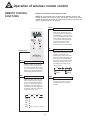
Operation of wireless remote control
REMOTE CONTROL
FUNCTIONS
Names and functions on the remote control.
NOTE: Be sure that there are no obstructions between receiver and
remote controller; Don't drop or throw the remote control, Don't get the
remote control wet, do not put the remote control directly under the sunlight or any place where it is very hot.
SLEEP
SLEEP Button
•
Press this button, Sleep On and
Sleep Off can be selected. Once
the unit is powered on, Sleep Off is
the default setting . Wehn the unit is
turned off, the Sleep function is canceled. After the Sleep function set
up, the symbol of Sleep will display.
In this mode the timer can be
adjusted. Under Fan and Auto
modes this function is not available.
•
By pressing this key, you may
select AUTO, FAN 1, FAN 2, FAN 3
or FAN 4 and may also cycle
between them. FAN 4 is only available in cool mode. After being energized AUTO is the default setting.
Only the LOW fan can be set under
DRY mode, pressing this key can
not adjust the fan speed but can
send the signal.
FAN
Remote Control
ON/OFF
•
MODE
ON/OFF Button
Press this button, the unit will be
turned on, press it once more, the
unit will be turned off. When turning
on or turning off the unit, the Timer
Sleep function will be canceled, but
the presetting time will still remain.
AUTO
MODE Button
•
FAN Button
SWING
Press this button, Auto, Cool, Dry,
Fan and Heat mode can be selected. Auto mode is default while the
power is on. Under Auto mode,the
temperature will not be displayed;
Under Heat mode, the initial value is
28°C (82°F) under other modes, the
initial value is 25°C (77°F).
COOL
AUTO
HEAT
FAN
AUTO
COOL
DRY
FAN
HEAT
Only on some units. (optional)
9
Fan 2
Fan 4
SWING Button
•
DRY
Fan 1
Fan 3
Press this key to activate or deactivate the swing. Moving of the louvers allow cooled air to change
direction.
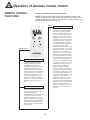
Operation of wireless remote control
REMOTE CONTROL
FUNCTIONS
Names and functions on the remote control.
NOTE: Be sure that there are no obstructions between receiver and
remote controller; Don't drop or throw the remote control, Don't get the
remote control wet, do not put the remote control directly under the sunlight or any place where it is very hot.
TIMER
TIMER Button
•
Remote Control
+
+ Button
•
-
Press for temperature increase.
Pressing this button can set the
temperature when unit is on.
Continuously pressing this button or
holding this button for more than 2
seconds will change the settings
rapidly. Once the button is released
and not pressed the °C (°F) will be
displayed. Once the unit is in auto
mode the temperature can not be
altered or set. The celsius setting
range from 16°C-30°C . The fahrenheit scale setting range from 61°F 86°F.
- Button
•
By pressing this button the temperature can be decreased. Pressing
this button allows the user to set
the desired temperature.
Continuously pressing this button or
holding the button for 2 seconds,
settings can quickly change. Once
button is released the °C (°F) signal
will be displayed. The temperqature
adjustment is unavailable under the
auto mode, but can be set by pressing this button.
10
By pressing this button while the
unit is off you can set the time for
auto switch on (when unit should
turn on). The range of setting is 0.524 hours. Letters “T-ON” and “H”
will flash for 5 seconds. Within 5
seconds you may press this key to
complete the set up. If the setting is
valid the set time will be displayed
for 2 seconds before the temperature display message. During flashing you may press “+” key to
increase the value and press “-” key
to decrease the value. The time will
increase or decrease by 0.5 hours
with each press of these keys. If
pressing “+” or “-” key continuously
the time value will change rapidly.
The remote controller can increase
the set time by 0.5 hours every 0.25
seconds. After being energized the
default is no timer setting and there
is no display of “T-ON” or “H”. Press
ON/OFF key to switch the unit on
and cancel the auto switch-on.
When the temperature display
becomes constant, you may press
this key again to display the remaining set time.The time value, "T-ON"
and "H" will display constantly for 2
seconds. After 2 seconds the preset
temperature will be displayed.
Within these 2 seconds, you may
press this key again to cancel the
auto switch-on. By pressing this key
under the switch-on state, you may
set the time for auto switch-off.
(when the unit should turn off). This
procedure is the same as for auto
switch-on.
Operation of wireless remote control
GENERAL OPERATION
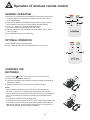
1. After the unit is powered on (press ON/OFF button) the unit will start to
run.(Note: When it is powered off, the guide louver of main unit will
close automatically.)
2. Press MODE button, select desired running mode, or press COOL or
HEAT mode to enter into their corresponding operation directly.
3. Press + or - buttons, to set the desired temperature.
(It is unnecessary to set the temp. at AUTO mode.)
4. Pressing FAN button, set fan speed, can select AUTO, FAN 1, FAN 2,
FAN 3 or FAN 4.
5. Press SWING button to select the swing.
OPTIONAL OPERATION
1. Press SLEEP button to set sleep timer.
2. Press TIMER button to set the scheduled timer on or timer off.
CHANGING THE
BATTERIES
1. Press slightly
to take off the back cover of the remote control.
2. Take out the old batteries as shown.
3. Insert two new AAA1.5V dry batteries, and pay attention to the polarity.
(As shown in figure)
4. Attach the back cover of remote control. (As show in figure)
NOTE:
• When changing the batteries do not use old or different batteries,
otherwise, it can cause a malfunction to the wireless remote control.
• If the wireless remote control will not be used for a long time, please take
them out, and don't let the leaking liquid damage the wireless remote
control.
• The operation should be in its receiving range.
• It should be placed 1m away from the TV set or stereo sound system sets.
• If the wireless remote control can not operate normally, please take the
batteries out and wait 30 seconds then reinsert them. If the remote still
cant function properly please change the batteries.
e
11
Installation Instructions
DRAINAGE METHOD
When the unit is running in cool or dry mode the condenstaion will drain to
the water tank. When the water tank is full a beeper will sound 8 times for
warning. When the water tank is full a green indicator light will flash on
the panel displaying “H8” in the display window and the unit will stop running. Plug in the drainage hose and take off the hose from the fixing
clamp, then drain out the water in the tank. After that plug in the plug pipe
onto the pipe to prevent leakage of condensed content and fix the
drainage pipe fixing clamp as shown in the following figure. The unit will
resume running once the tank is empty and the compressor stops for 3
minutes.
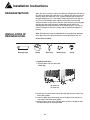
INSTALLATION OF
DRAINAGE HOSE
Note: Drainage hose must be installed before using otherwise blockage
of the drain may occur that will effect the normal operation of the unit.
Accessories Included:
Drainage Pipe
Clamp
Pipe hoop
Rubber plug
Screw
• Installing Drain Hose:
1. Remove drain cap from drain port.
Drain Cap
C. Drain port
D. Drain cap
2. Attach one end of the drain hose to the drain port with the clamp. See
Drain Hose graphic.
3. Insert the drain plug into the other end of the drain hose and secure
with clamp. See Drain Hose graphic.
4. Attach the drain hose clip to the back panel of the air conditioner near
the drain port with the screw provided.
12
Installation Instructions
INSTALLATION OF
DRAINAGE HOSE
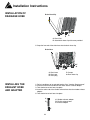
Drain Hose Clip
-
C
D
C. Drain Port
D. Attach drain hose clip with screw provided.
5. Snap the free end of the drain hose into the drain hose clip.
Drain Hose
F
G
C
C. Drain hose
D. Drain port
E. Drain plug
INSTALLING THE
EXHAUST HOSE
AND ADAPTER
D E
F. Clamps
G. Drain hose clip
1. Roll air conditioner to its selected location. See “Location Requirements.”
2. Insert one end of the flexible exhaust hose into the exhaust adapter.
3. Twist clockwise to lock hose into place.
4. Insert the other end of the flexible exhaust hose into the window exhaust
adapter.
5. Twist clockwise to lock hose into place.
C
C. Window exhaust adapter
D. Flexible exhaust hose
E. Exhaust adapter
D
E
13
Installation Instructions
INSTALLATION OF
HEAT EXHAUST HOSE
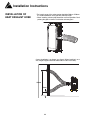
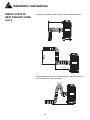
• The length range of the exhaust pipe should be 500mm-1500mm.
It is recommended to use a pipe with shortest length.
• When installing, exhaust pipe should be as flat as possible. Don't
prolong the pipe or connect it with other exhaust pipes.
Correct installation is as shown (see figure) (When installing it on a
wall, height of pipes should be about 40cm-130cm from floor).
130cm
40cm
14
Installation Instructions
INSTALLATION OF
HEAT EXHAUST HOSE
(con’t)
If the pipe is to be bent, please install it by following these dimension.
55cm
55cm
Wrong installation is shown in the following figure (If the pipe is bent too
much, it would easily cause malfunction.)
15
Care and Maintenance
MOVING THE UNIT
There are wheels at bottom of the unit that enable the unit to be moved
among rooms conveniently according to need. Unplug the power cord
from the socket to disable the power of the unit before any maintenance is
done to the unit.
CLEANING THE AIR
FILTER
If too much duct deposit is on the filter, performance of air conditioner will
reduce, thus it is better to clean the filter at least once every 2 weeks.
(more often if you have pets due to pet hair)
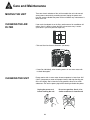
• Take out filter from these 2 directions. (see below)
2
1
• Clean filter individually, when cleaning wash it in luke warm water with
no harsh detergents.
CLEANING THE UNIT
Please soak a cloth in warm water whose temperature is lower than 40°C
(104°F) (soap water or water with proper cleaner) and wipe the dirty part
of the unit slightly. Don't clean the unit by gasoline, diesel oil or similar
substances. Pull out the power plug before cleaning to disable the power.
Unplug the power cord
before cleaning the unit
Do not use gasoline, diesel, oil or
similar sustances to clean the unit
Gas
16
Troubleshooting
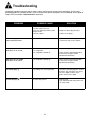
Occasionally a problem may arise that is minor in nature, and a service call may not be neccessary. Use this troubleshooting guide for a possible solution. If the unit continues to operate improperly, call an authorized service depot or
Danby’s Toll Free Number 1-800-263-2629 for assistance.
PROBLEM
POSSIBLE CAUSE
SOLUTION
• The power supply is incorrect.
• The power plug is incorrect.
• There is a malfunction with the power
plug or socket.
• The fuse is blown.
• Insert the power plug tightly.
The LCD displays the number of
time, but it doesn't work.
• Is the TIMER ON in operation?
• Cancel the "SET TIMER" operation
or wait for the unit to run in “AUTO”.
Although it was set to COOL
mode, there is no cool air.
• The room temperature is lower than the
set temperature.
• The evaporator is frosted up.
• This is the normal phenomenon.
Although it was set to DRY
mode, there is no cool air.
• The evaporator is frosted up.
• Unit is running in defrosting operation,
it will resume running in normal
operation after defrosting.
The LCD displays
• Low voltage over current protection.
• Turn off the unit and unplug the unit from
the power, after 10 minutes turn on the
unit. If the display is still the same
please call the service depot.
The LCD displays
The water tank gets full.
• Drain the tank.
• If the malfunction still exists, please call
the service dept.
The air conditioner doesn't start.
17
• Replace the power plug or socket.
• Call the service depot.
• Unit is running in defrosting operation,
it will resume running in normal
operation after defrosting.
Safety Notes
LOCATION
• Don't place the unit where there is direct sunlight
• The unit should be at least 50cm away anything flammable.
Don't place the unit or operate it in a place where it will get wet to
prevent electrical malfunctions.
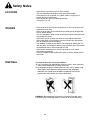
• Don't operate the unit in the following locations:
*Gas place *Fire *Oil
OTHERS
• Don't climb on the unit or place something on it, unit may fall down and
malfunctions may occur.
• Don't let the air from the unit blow directly towards you for long periods
of time (health hazard).
• The unit should be at least lm from a television to prevent disturbance of
electromagnetic waves.
• Don't block air inlet or outlet vent because it will lead to malfunction.
• Don't insert finger or stick anything into the air outlet vent; take special
care of children to prevent accidents.
• It is forbidden to slope or turn down the air conditioner. Unplug the unit
from the power immediately if abnormal circumstances occur and contact
the authorized seller to check and repair the unit.
• Don't sprinkle and shower the unit by insecticide for it will lead to
deformation or breakage.
• If your air conditioner has problems on quality or others, please contact
local seller.
DISPOSAL
For disposal there are several possibilities:
a) The municipality has established a collection system, where electronic
waste can be disposed at no charge to the user.
b) As old products contain valuable resources, they can be sold to scrap
metal dealers. Wild disposal of waste in forests and landscapes
endangers your health when hazardous substances leak into the
ground-water and find their way into the food chain.
DISPOSAL: Do not dispose this product as unsorted municipal waste.
Collection of such waste separately is necessary for special treatment.
18
LIMITED IN-HOME APPLIANCE WARRANTY
This quality product is warranted to be free from manufacturer’s defects in material and workmanship, provided that the unit is used under the normal operating
conditions intended by the manufacturer.
This warranty is available only to the person to whom the unit was originally sold by Danby Products Limited (Canada) or Danby Products Inc. (U.S.A.) (hereafter
“Danby”) or by an authorized distributor of Danby, and is non-transferable.
TERMS OF WARRANTY
Plastic parts, are warranted for thirty (30) days only from purchase date, with no extensions provided.
First Year
During the first 2 years (24) months, any functional parts of this product found to be defective, will be repaired or replaced, at warrantor’s
option, at no charge to the ORIGINAL purchaser.
To obtain
Service
Danby reserves the right to limit the boundaries of “In Home Service” to the proximity of an Authorized Service Depot. Any appliance
requiring service outside the limited boundaries of “In Home Service” ,it will be the consumer’s responsibility to transport the appliance (at
their own expense) to the original retailer (point of purchase) or a service depot for repair. See “Boundaries of In Home Service” below.
Contact your dealer from whom your unit was purchased, or contact your nearest authorized Danby service depot, where service
must be performed by a qualified service technician.
If service is performed on the units by anyone other than an authorized service depot, or the unit is used for commercial application, all
obligations of Danby under this warranty shall be void.
Boundaries of
In Home Service
If the appliance is installed in a location that is 100 kilometers (62 miles) or more from the nearest service center your unit must be
delivered to the nearest authorized Danby Service Depot, as service must only be performed by a technician qualified and certified for
warranty service by Danby. Transportation charges to and from the service location are not protected by this warranty and are the
responsibility of the purchaser.
Nothing within this warranty shall imply that Danby will be responsible or liable for any spoilage or damage to food or other contents of this appliance, whether due
to any defect of the appliance, or its use, whether proper or improper.
EXCLUSIONS
Save as herein provided, Danby, there are no other warranties, conditions, representations or guarantees, express or implied, made or intended by Danby or its
authorized distributors and all other warranties, conditions, representations or guarantees, including any warranties, conditions, representations or guarantees
under any Sale of Goods Act or like legislation or statue is hereby expressly excluded. Save as herein provided, Danby shall not be responsible for any damages
to persons or property, including the unit itself, howsoever caused or any consequential damages arising from the malfunction of the unit and by the purchase of
the unit, the purchaser does hereby agree to indemnify and hold harmless Danby from any claim for damages to persons or property caused by the unit.
GENERAL PROVISIONS
No warranty or insurance herein contained or set out shall apply when damage or repair is caused by any of the following:
1) Power failure.
2) Damage in transit or when moving the appliance.
3) Improper power supply such as low voltage, defective house wiring or inadequate fuses.
4) Accident, alteration, abuse or misuse of the appliance such as inadequate air circulation in the room or abnormal operating conditions
(extremely high or low room temperature).
5) Use for commercial or industrial purposes (ie. If the appliance is not installed in a domestic residence).
6) Fire, water damage, theft, war, riot, hostility, acts of God such as hurricanes, floods etc.
7) Service calls resulting in customer education.
8) Improper Installation (ie. Building-in of a free standing appliance or using an appliance outdoors that is not approved for outdoor application).
Proof of purchase date will be required for warranty claims; so, please retain bills of sale. In the event warranty service is required, present this document to our
AUTHORIZED SERVICE DEPOT.
Warranty Service
In-home
Danby Products Limited
PO Box 1778, Guelph, Ontario, Canada N1H 6Z9
Telephone: (519) 837-0920 FAX: (519) 837-0449
1-800-263-2629
04/09
Danby Products Inc.
PO Box 669, Findlay, Ohio, U.S.A. 45840
Telephone: (419) 425-8627 FAX: (419) 425-8629
Bienvenue
Merci d’avoir choisi un appareil Arcticaire qui vous fournira ainsi qu’à votre famille, le confort au foyer, à la maison, au
chalet ou au bureau. Ce manuel d’utilisation vous offre des renseignements pratiques pour le soin et l’entretien de votre
nouvel appareil. Un appareil Arcticaire bien entretenu vous fournira plusieurs années de service sans ennui.
Veuillez prendre quelques moments pour lire attentivement toutes les directives pour vous renseigner et vous
familiariser avec tous les aspects du fonctionnement de votre appareil.
Votre climatiseur portable Arcticaire est un appareil d’échange et de traitement de l’air à fonctions multiples. Sa conception
vous offre les fonctions suivantes: la climatisation, la déshumidification et la ventilation indépendante. Chacun des
modes est équipé d’une capacité de balayage de l’air par oscillation. Cet appareil peut être aisément déplacé d’une
pièce à l’autre de la maison et il est installé en quelques minutes seulement. Imaginez la commodité du confort au foyer
3 saisons à portée de la main, en tout temps, en tout lieu.
Pour la référence aisée, nous vous suggérons de joindre une copie de votre reçu de caisse et/ou facture d’achat à cette
page, et d’inscrire les renseignements suivants qui sont trouvés sur la plaque d’identification du fabricant. Celle-ci est
située sur le panneau arrière de l’appareil.
Numéro de modèle:
Numéro de série:
Date d’achat :
Ces renseignements seront requis si le service est demandé et/ou si vous désirez obtenir des renseignements
supplémentaires. Pour consulter un Représentant du service à la clientèle, composez le NUMÉRO D’APPEL SANS
FRAIS suivant: 1-800-263-2629
20
Consignes de sécurité important
LISEZ TOUTE L'INFORMATION DE SÉCURITÉ AVANT UTILISATION
POUR VOTRE SÉCURITÉ : Lisez ces instructions attentivement avant d’utiliser l’appareil et conservez-les afin
de pouvoir vous y référer ultérieurement.
SPÉCIFICATIONS
ÉLECTRIQUES
• Vérifiez l’alimentation disponible et réglez tout problème relatif au
câblage AVANT d’installer et d’utiliser cet appareil. La totalité du câblage
doit respecter les codes de l’électricité locaux et nationaux et être
installée par un électricien qualifié. Si vous avez des questions
concernant les instructions suivantes, communiquez avec un électricien
qualifié.
• Pour assurer votre sécurité et votre protection, cet appareil est mis à la
terre par l’entremise du cordon d’alimentation lorsqu’il est branché dans
une prise murale correspondante. Si vous n’êtes pas certain que les
prises murales de votre maison sont correctement mises à la terre,
veuillez consulter un électricien qualifié.
AVERTISSEMENT
Une fiche de mise à la terre mal branchée peut entraîner un risque
d’incendie, de choc électrique ou de blessures aux personnes qui utilisent
l’appareil. Si vous n’êtes pas certain que l’appareil est correctement mis à
la terre, consultez un préposé du service qualifié.
• N’UTILISEZ PAS D’ADAPTATEURS DE FICHE OU DE RALLONGES
AVEC CET APPAREIL. S’il est nécessaire d’utiliser une rallonge avec
cet appareil, n’utilisez qu’une rallonge approuvée pour « climatiseurs »
(disponible dans la plupart des quincailleries).
• Pour éviter les blessures, débranchez toujours l’appareil avant de
l’installer ou de procéder à son entretien ou à sa réparation.
MISE EN GARDE
Ne laissez pas cet appareil sans surveillance à un endroit où des individus
ou des animaux ne peuvent pas réagir en cas de défaillance. Une
défaillance de l’appareil dans un endroit clos sans surveillance peut causer
une surchauffe extrême ou même la mort.
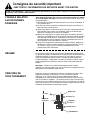
CORDON
D’ALIMENTATION
Le cordon d’alimentation fourni avec ce climatiseur contient un dispositif
qui détecte les dommages au cordon. Pour vérifier si votre cordon
d’alimentation fonctionne correctement, voici la marche à suivre :
1) Branchez le cordon
d’alimentation sur une prise
électrique.
2) Vous trouverez deux boutons sur
la fiche du cordon d’alimentation.
Un bouton est marqué « TEST »
et l’autre « RESET ». Appuyez
sur le bouton « TEST »; vous
entendrez un déclic et le bouton
« RESET » ressortira.
3) Appuyez sur le bouton « RESET
»; vous entendrez un déclic
lorsque le bouton s’engagera.
4) Le cordon d’alimentation est
maintenant sous tension et
alimente le climatiseur (sur
certains produits, cela est
également indiqué par un témoin
lumineux sur la fiche).
21
REMARQUE : Le cordon
d’alimentation fourni avec ce
climatiseur contient un dispositif de
détection des fuites de courant,
conçu pour réduire les risques
d’incendie. Si un cordon
d’alimentation est endommagé, il
ne peut pas être réparé et doit être
remplacé par un nouveau cordon
fourni par le fabricant du produit.
• Ce dispositif ne doit jamais être
utilisé pour allumer ou éteindre
l’appareil.
• Pour assurer le bon
fonctionnement, le bouton «
RESET » doit toujours être
enfoncé.
• Le cordon d’alimentation doit être
remplacé s’il ne se réinitialise pas
lorsque l’on appuie sur le bouton
« TEST ».
Consignes de sécurité important
LISEZ TOUTE L'INFORMATION DE SÉCURITÉ AVANT UTILISATION
POUR VOTRE SÉCURITÉ : Lisez ces instructions attentivement avant d’utiliser l’appareil et conservez-les afin
de pouvoir vous y référer ultérieurement.
CONSEILS RELATIFS
AUX ÉCONOMIES
D’ÉNERGIE
Votre appareil Arcticaire est conçu pour être très économe en matière
de consommation d’énergie. Pour une plus grande efficacité, suivez ces
recommandations.
1) Sélectionnez un réglage du thermostat que vous trouvez confortable, et
ne le modifiez plus.
2) Le filtre à air enlève les particules aériennes de façon très efficace. Le
filtre doit toujours rester propre.
3) Utilisez des rideaux ou des stores pour éviter que la lumière directe du
soleil pénètre dans la pièce et la réchauffe, mais ne les laissez pas
bloquer la circulation de l’air autour de l’appareil.
4) Mettez votre climatiseur en marche avant que l’air extérieur devienne
chaud et inconfortable pour éviter la période d’inconfort initiale, pendant
que l’appareil refroidit la pièce. L’utilisation de la fonction de minuterie
programmable de mise en marche et d’arrêt automatique peut être un
atout important si elle est utilisée au maximum.
5) Lorsque les températures extérieures sont assez fraîches, éteignez le
climatiseur et utilisez le mode ventilation. Cela permet de faire circuler
l’air intérieur, ce qui procure un certain rafraîchissement tout en
consommant moins d’électricité.
RÉSUMÉ
Un climatiseur mobile est un petit climatiseur déplaçable et multifonction,
qui permet de refroidir et d’assécher l’air et qui peut être déplacé librement
à différents endroits. Il convient aux bureaux et aux maisons, surtout à
celles qui possèdent plusieurs pièces. Ce produit possède également
d’autres avantages : configuration compacte, excellent processus, aspect
élégant, déplacement commode, coût peu élevé et fonctionnement peu
bruyant.
Remarque : Veuillez lire ce manuel attentivement avant d’utiliser
l’appareil. Ce manuel ne doit servir que de référence; les paramètres de la
spécification sont modifiables sans préavis.
PRINCIPES DE
FONCTIONNEMENT
Lorsque le moteur du ventilateur fonctionne, l’air intérieur qui entre dans
l’appareil passe dans l’évaporateur où il est refroidi puis soufflé à
l’extérieur; et l’air intérieur qui entre dans l’appareil passe dans le
condensateur où il est réchauffé puis soufflé à l’extérieur. Deux conduits
d’air se trouvent sur l’appareil : l’air chaud est évacué par l’évent de sortie
situé à l’arrière de l’appareil, tandis que l’air froid est évacué par l’évent de
sortie situé à l’avant. Un courant d’air frais doux et régulier sort par la grille
d’aération afin d’atteindre la température requise.
Évaporateur
evaporato
Aircool
fraisai
Conduit
fluel d’air 1
Moteur
du
fanmoto
ventilateur
Capillaire
capillary
Air
chaud
heat
air
Conduit
flue2 d’air 2
Condensateur
condense
22
Consignes de sécurité important
LISEZ TOUTE L'INFORMATION DE SÉCURITÉ AVANT UTILISATION
POUR VOTRE SÉCURITÉ : Lisez ces instructions attentivement avant d’utiliser l’appareil et conservez-les afin
de pouvoir vous y référer ultérieurement.
PRINCIPES DE
FONCTIONNEMENT
(suite)
Lorsque l’appareil fonctionne comme déshumidificateur, n’oubliez pas de
retirer le tuyau de sortie de l’air chaud et de le réinstaller sur l’appareil
lorsque celui-ci est utilisé comme climatiseur. Puisqu’une partie de l’air
intérieur chauffé sera rejeté à l’extérieur par le conduit de sortie, de l’air
extérieur entrera pour assurer une pression d’air équilibrée. Le climatiseur
baisse uniquement la température d’une région particulière d’une pièce
intérieure au lieu de baisser la température de tout l’air dans la pièce.
Fenêtre
ou mur
windoworwall
Conduit
de sortie
dischar
gepipe
Air chauffé
Heatedai
Air
refroidi
cooled
ai
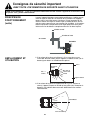
EMPLACEMENT ET
UTILISATION
1. Si la surface de la pièce est inférieure à 15 m et que les murs ou
l’immeuble sont bien isolés, placez l’appareil à l’endroit suivant (voir cidessous) pour obtenir un refroidissement optimal.
Pièce
Room
Climatiseur
mobile
MobileAC
AirHeatai
chauffé
Direction du
Flowdirection
courant d’air
ofcooled
refroidi air
Région regio
refroidie
Cooling
2. Si la surface de la pièce est supérieure à 20 m (p. ex., ateliers ou
usines), l’appareil ne peut en refroidir qu’une partie (voir l’illustration cidessous). Les individus dans cette zone bénéficieront d’un meilleur
refroidissement.
60 ~70
1,5
à 2 mètres
1.5~2m
Zone
refroidie
(Sector
cooling
area)
23
Consignes de sécurité important
LISEZ TOUTE L'INFORMATION DE SÉCURITÉ AVANT UTILISATION
POUR VOTRE SÉCURITÉ : Lisez ces instructions attentivement avant d’utiliser l’appareil et conservez-les afin
de pouvoir vous y référer ultérieurement.
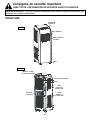
STRUCTURE
Panneau de
commande
Control
panel
AVANT
Grille
d’aération
Guide
louver
Grille d’aération
Swinglouve
pivotante
Roue
Wheel
ARRIÈRE
Rear
Boîte de contrôle
de la télécommande
Cordon d’alimentation
Filtres
Grille
supérieure
d’entrée d’air
Évent de
sortie d’air
Grille
inférieure
d’entrée d’air
24
Consignes d’utilisation
MÉTHODES DE
FONCTIONNEMENT
PANNEAU DE
COMMANDE
Application des gammes de température pour le REFROIDISSEMENT
et la DÉSHUMIDIFICATION.
La gamme de température de cet appareil va de 16 °C à 35 °C (60,8 °F à
95 °F) pour le refroidissement et de 16 °C à 35 °C (60,8 °F à 95 °F) pour
la déshumidification.
Emplacement
Posez l’appareil sur un sol horizontal lors de l’utilisation, et maintenez une
distance de 50 cm entre l’appareil et les murs, les surfaces, les objets
inflammables et les autres obstructions.
Alimentation (Vérifiez avant de brancher l’alimentation)
La fluctuation normale de tension de cet appareil en marche est de ±10
par rapport à la valeur indiquée sur la plaque signalétique. Une tension
trop élevée ou trop basse causera des dommages à l’appareil. Il est
préférable d’adopter un câble et une intensité minimale supérieure à 10
ampères pour éviter une chute de tension soudaine lorsque l’appareil
fonctionne. Il est nécessaire d’échanger un cordon d’alimentation brisé
contre un cordon d’alimentation de qualité particulière.
Lorsqu’il faut remplacer le cordon d’alimentation ou le réparer, veuillez
communiquer avec le vendeur et lui demander de le faire réparer par un
professionnel. La mise à la terre doit être effectuée et l’appareil doit être
branché à un équipement de mise à la terre spécial dans l’immeuble afin
de s’assurer qu’il est mis à la terre correctement.
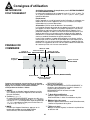
Afficheur à DEL
Témoin de mode
Témoin de
RÉSERVOIR PLEIN REFROIDISSEMENT
Témoin de mode
DÉSHUMIDIFICATION
Fenêtre de
réception
Témoin de mode
VENTILATEUR
Bouton ON/OFF (MARCHE/ARRÊT)
Bouton MODE
Boutons de sélection
de la température
Lorsque vous appuyez sur une touche ou un bouton
valide, un bip sonore est émis pour indiquer que l’on a
appuyé sur un bouton, et un témoin lumineux
correspondant au bouton s’allume.
1. ON/OFF
Pour allumer ou éteindre l’appareil (appuyez une fois
sur le bouton pour allumer l’appareil et une deuxième
fois pour l’éteindre).
DÉSHUMIDIFICATION.
4. Vitesse du ventilateur
En mode VENTILATEUR ou REFROIDISSEMENT, le
climatiseur peut sélectionner l’une de 3 vitesses. La
vitesse initiale est Élevée en mode
DÉSHUMIDIFICATION et Basse en mode
VENTILATEUR.
5.
Mode Déshumidification
Lorsque l’appareil fonctionne en mode
Déshumidification, il réduit l’humidité dans la pièce.
6.
Mode Refroidissement
Lorsque l’appareil fonctionne en mode Refroidissement,
il baisse la température de la pièce.
7.
Réservoir plein
Lorsque ce bouton clignote, le réservoir est plein d’eau
et doit être vidé.
2. Touches « + », « - »
En mode REFROIDISSEMENT, appuyez une fois sur « » et la température réglée diminue de 1 (1 °C); appuyez
une fois sur « + » et la température réglée augmente de
1 (1 °C). La température réglée peut se situer entre 16
°C et 30 °C (61 °F à 86 °F).
3. MODE
Pendant que l’appareil fonctionne, appuyez sur la
touche pour accéder au menu Mode. Modes
VENTILATEUR, REFROIDISSEMENT ou
25
Consignes d’utilisation
TEMPÉRATURE DE
L’ENVIRONNEMENT
La température de l’environnement de cet appareil (plage de
l’appareil) se situe entre 16 °C et 35 °C (60,8 °F à 95 °F).
DÉLAI DE PROTECTION
DU COMPRESSEUR
Lorsque l’appareil est allumé pour la première fois, il faut attendre 2 à 5
minutes pour que le compresseur se mette en marche. En cas
d’interruption de l’alimentation pendant que l’appareil fonctionne, un délai
de 2 à 5 minutes est également possible.
MODE
REFROIDISSEMENT
1. Installez solidement le conduit de sortie de la chaleur; choisissez un
emplacement proche d’une porte ou d’une fenêtre, raccordez le conduit
de sortie de la chaleur à l’extérieur et n’oubliez pas de laisser un évent
de retour d’air dans la fenêtre ou la porte pour s’assurer que l’air
intérieur revient à la normale.
2. Après avoir appuyé sur le bouton ON/OFF pour allumer l’appareil,
appuyez sur MODE pour sélectionner le mode Refroidissement; le
témoin indicateur du mode Refroidissement s’allume et l’appareil
fonctionne en mode Refroidissement.
3. Appuyez sur SPEED pour sélectionner la vitesse du ventilateur (élevée,
moyenne ou basse).
4. Allumez l’appareil d’abord (pour la première fois). Assurez-vous que
l’appareil fonctionne en mode Refroidissement; le ventilateur fonctionne
initialement à vitesse élevée.
REMARQUE :
En mode Refroidissement, pour augmenter l’effet de refroidissement,
veuillez suivre les conseils suivants :
• Tirez les rideaux pour que la lumière du soleil ne pénètre pas dans la
pièce à refroidir.
• Ne mettez pas en marche d’autres sources de chaleur dans la pièce.
MODE
DÉSHUMIDIFICATION
VENTILATEUR
Pour obtenir des résultats optimaux, fermez les portes et les fenêtres.
Appuyez sur ON/OFF pour allumer l’appareil, puis sur MODE, puis
sélectionnez DÉSHUMIDIFICATION. Les témoins de refroidissement et de
déshumidification d’allume, et l’appareil fonctionne en mode
Déshumidification.
REMARQUE :
En mode Déshumidification, le moteur du ventilateur fonctionne à basse
vitesse et le compresseur et le moteur du ventilateur externe fonctionnent
sans arrêt. La température réglée ne sera ni affichée, ni réglable. Il n’est
pas nécessaire d’installer le conduit de sortie.
Quand le climatiseur est en train de d é shumidifier, ne pas
installez la pipe d’évacuation d’air. Afin de faire l’eau
drainer doucement, installez la pipe d’eau.
Appuyez sur ON/OFF pour allumer l’appareil et sélectionnez la vitesse du
ventilateur. Le moteur du ventilateur interne peut fonctionner à 3 vitesses
(élevée, moyenne ou basse); la température réglée ne sera ni affichée, ni
réglable. Le symbole Élevé, Moyen ou Bas s’affiche dans l’afficheur, selon
la vitesse sélectionnée pour le ventilateur interne.
26
Fonctionnement de la télécommande sans fil
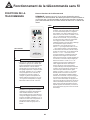
FONCTIONS DE LA
TÉLÉCOMMANDE
Noms et fonctions de la télécommande
REMARQUE : Assurez-vous qu’il n’y a aucune obstruction entre le
récepteur et la télécommande. Ne laissez pas tomber la télécommande et
ne la lancez pas. La télécommande ne doit pas être mouillée. Ne laissez
pas la télécommande sous la lumière directe du soleil ou à un endroit très
chaud.
SLEEP
Bouton SLEEP (VEILLE)
•
Appuyez sur ce bouton pour activer ou désactiver la
fonction Veille. Lorsque l’appareil est allumé, la
fonction Veille désactivée est le réglage par défaut.
Lorsque l’appareil est éteint, la fonction Veille est
annulée. Lorsque la fonction Veille est activée, le
symbole de Veille s’affiche. Dans ce mode, la
minuterie peut être réglée. Cette fonction n’est pas
disponible en mode Ventilateur ou Auto.
•
En appuyant sur ce bouton, vous pouvez sélectionner
AUTO, FAN 1, FAN 2, FAN 3 ou FAN 4 ou passer de
l’un à l’autre en séquence. FAN 4 n’est disponible
qu’en mode Refroidissement. Lorsque l’appareil est
sous tension, AUTO est le réglage par défaut. Seule
la basse vitesse peut être sélectionnée en mode
DÉSHUMIDIFICATION; une pression sur cette touche
ne fait que transmettre le signal, elle ne change pas
la vitesse du ventilateur.
FAN
Télécommande
ON/OFF
•
MODE
Bouton ON/OFF (MARCHE/ARRÊT)
Appuyez une fois sur ce bouton pour allumer
l’appareil et appuyez dessus à nouveau pour
l’éteindre. Lorsque vous allumez ou éteignez
l’appareil, la fonction de Veille est annulée, mais
l’heure préréglée reste.
AUTO
Bouton MODE
•
Bouton FAN (VENTILATEUR)
SWING
Appuyez sur ce bouton pour sélectionner le
mode Auto, Refroidissement, Déshumidification
et Chauffage. Le mode Auto est le mode par
défaut lorsque l’appareil est allumé. En mode
Auto, la température ne s’affiche pas. En mode
Chauffage, la valeur initiale est 28 °C (82 °F) et
dans les autres modes, la valeur initiale est 25
°C (77 °F).
COOL
AUTO
HEAT
FAN
AUTO
COOL
DRY
FAN
HEAT
Sur certains modèles seulement (facultatif)
27
Fan 2
Fan 4
Bouton SWING (ROTATION)
•
DRY
Fan 1
Fan 3
Appuyez sur cette touche pour activer ou désactiver
la rotation. Le déplacement des grilles d’aération
change la direction du courant d’air refroidi.
Fonctionnement de la télécommande sans fil
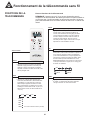
FONCTIONS DE LA
TÉLÉCOMMANDE
Noms et fonctions de la télécommande
REMARQUE : Assurez-vous qu’il n’y a aucune obstruction entre le
récepteur et la télécommande. Ne laissez pas tomber la télécommande et
ne la lancez pas. La télécommande ne doit pas être mouillée. Ne laissez
pas la télécommande sous la lumière directe du soleil ou à un endroit très
chaud.
TIMER
Bouton TIMER (MINUTEUR)
•
Télécommande
+
Bouton +
•
-
Appuyez sur ce bouton pour augmenter la
température. Appuyez sur ce bouton pour
régler la température lorsque l’appareil est
allumé. Maintenez ce bouton enfoncé
pendant plus de 2 secondes pour changer
les réglages rapidement. Lorsque le bouton
est relâché, l’indicateur °C ou °F s’affiche.
Lorsque l’appareil est en mode Auto, la
température ne peut être ni réglée, ni
changée. La gamme de température en
degrés Celsius se situe entre 16 °C et 30
°C. La gamme de température en degrés
Fahrenheit se situe entre 61 °F et 85 °F.
Bouton -
•
Appuyez sur ce bouton pour baisser la
température. En appuyant sur ce bouton,
l’utilisateur peut régler la température à la
valeur désirée. Maintenez ce bouton
enfoncé pendant plus de 2 secondes pour
changer les réglages rapidement. Lorsque
le bouton est relâché, l’indicateur °C ou °F
s’affiche. En mode Auto, la température ne
peut pas être réglée; toutefois, il est
possible de le faire en appuyant sur ce
bouton.
28
En appuyant sur ce bouton lorsque l’appareil
est éteint, vous pouvez régler l’heure de la mise
en marche automatique (l’heure où l’appareil
doit s’allumer). Les valeurs réglées peuvent se
situer entre 0,5 et 24 heures. Les lettres « T-ON
» et « H » clignoteront pendant 5 secondes.
Pendant ces 5 secondes, vous pouvez appuyer
sur cette touche pour achever la configuration.
Si le réglage est valide, l’heure réglée
s’affichera pendant 2 secondes avant l’affichage
de la température réglée. Pendant le
clignotement, vous pouvez appuyer sur la
touche « + » pour augmenter la valeur ou sur «
- » pour réduire la valeur. L’heure augmentera
ou diminuera d’une demi-heure lors de chaque
pression de ces touches. Si vous maintenez les
touches « + » ou « - » enfoncées, l’heure
changera rapidement. La télécommande peut
augmenter l’heure réglée d’une demi-heure
toutes les 0,25 secondes. Lorsque l’appareil est
sous tension, la minuterie n’est pas réglée par
défaut et les valeurs « T-ON » et « H » ne
s’affichent pas. Appuyez sur ON/OFF pour
mettre l’appareil en marche et annuler la
fonction de mise en marche automatique.
Lorsque l’affichage de la température redevient
constant, vous pouvez appuyer à nouveau sur
cette touche pour afficher la durée réglée
restante. La durée, « T-ON » et « H » restent
affichés pendant 2 secondes. Au bout de 2
secondes, la température préréglée s’affiche.
Pendant ces 2 secondes, vous pouvez appuyer
à nouveau sur cette touche pour annuler la
mise en marche automatique. En appuyant sur
cette touche pendant que la fonction de mise en
marche automatique est activée, vous pouvez
régler l’heure de l’arrêt automatique (l’heure à
laquelle l’appareil doit s’éteindre). La marche à
suivre est la même que pour la mise en marche
automatique.
Fonctionnement de la télécommande sans fil
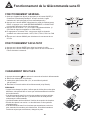
FONCTIONNEMENT GÉNÉRAL
1. Après que l’appareil est allumé (en appuyant sur le bouton ON/OFF), il
commence à fonctionner.(Remarque : lorsqu’il est éteint, la grille
d’aération de l’unité principale se ferme automatiquement.)
2. Appuyez sur le bouton MODE, sélectionnez le mode de fonctionnement
désiré, ou appuyez sur le mode REFROIDISSEMENT ou CHAUFFAGE
pour accéder directement à son fonctionnement.
3. Appuyez sur les boutons + ou - pour régler la température désirée. (Il
est inutile de régler la température en mode AUTO.)
4. En appuyant sur le bouton FAN, vous pouvez régler la vitesse du
ventilateur aux valeurs suivantes : AUTO, FAN 1, FAN 2, FAN 3 ou FAN
4.
5. Appuyez sur le bouton SWING pour sélectionner le mouvement de vaet-vient.
FONCTIONNEMENT FACULTATIF
1. Appuyez sur le bouton SLEEP pour régler la minuterie de veille.
2. Appuyez sur le bouton TIMER pour régler l’heure de mise en marche et
l’heure d’arrêt de la minuterie.
CHANGEMENT DES PILES
1. Appuyez doucement
pour enlever le couvercle arrière de la télécommande.
2. Retirez les vieilles piles, tel qu’illustré.
3. Insérez deux piles sèches AAA 1,5 V, en surveillant la polarité
(tel qu’illustré).
4. Remettez le couvercle arrière de la télécommande (tel qu’illustré).
REMARQUE :
• Lorsque vous changez les piles, n’utilisez pas de vieilles piles ou des piles
différentes; cela pourrait faire en sorte que la télécommande ait un défaut
de fonctionnement.
• Si la télécommande sans fil ne servira pas pendant une longue période,
veuillez retirer les piles afin qu’il n’y ait aucune fuite de fluide pouvant
endommager la télécommande.
• La télécommande doit être utilisée à l’intérieur de sa portée de réception.
• Elle doit être placée à au moins 1 m des téléviseurs ou des systèmes
stéréophoniques.
• Si la télécommande sans fil ne fonctionne pas normalement, retirez les
piles, attendez 30 secondes, puis réinsérez-les. Si la télécommande ne
fonctionne toujours pas correctement, changez les piles.
29
e
Installation
MÉTHODE DE DRAINAGE
Lorsque l’appareil fonctionne en mode REFROIDISSEMENT ou
DÉSHUMIDIFICATION, la condensation est drainée dans le réservoir
d’eau. Lorsque le réservoir d’eau est plein, un bip sonore est émis 8 fois
en guise d’avertissement. Lorsque le réservoir d’eau est plein, un témoin
lumineux vert clignote sur le panneau, « H8 » s’affiche sur l’afficheur et
l’appareil cesse de fonctionner. Raccordez le tuyau de drainage et retirezle de l’agrafe, puis videz l’eau du réservoir. Après cela, mettez le bouchon
de drainage sur le tuyau pour éviter toute fuite de la condensation, et
agrafez le tuyau de drainage sur l’agrafe, tel qu’illustré. L’appareil
recommence à fonctionner lorsque le réservoir est vide; le compresseur
s’arrête alors pendant 3 minutes.
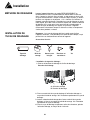
INSTALLATION DU
TUYAU DE DRAINAGE
Remarque : Le tuyau de drainage doit être installé avant d’utiliser
l’appareil; autrement, il est possible que le drain devienne bloqué, ce qui
pourrait nuire au fonctionnement normal de l’appareil.
Accessoires fournis :
Tuyau de
drainage
Bride de
serrage
Anneau pour
le tuyau
Bouchon en
caoutchouc
Vis
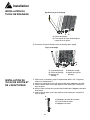
• Installation du tuyau de drainage :
1. Enlevez le bouchon de drainage de l’orifice de drainage.
Bouchon de drainage
C. Orifice de drainage
D. Bouchon de drainage
2. Fixez une extrémité du tuyau de drainage à l’orifice de drainage au
moyen de la bride de serrage. Voir l’illustration représentant le tuyau de
drainage.
3. Insérez le bouchon de drainage dans l’autre extrémité du tuyau de
drainage, et fixez-le au moyen de la bride de serrage. Voir l’illustration
représentant le tuyau de drainage.
4. Fixez le tuyau de drainage au panneau arrière du climatiseur, près de
l’orifice de drainage, au moyen de la vis fournie.
30
Installation
INSTALLATION DU
TUYAU DE DRAINAGE
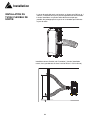
Agrafe du tuyau de drainage
-
C D
C. Orifice de drainage
D. Fixez l’agrafe du tuyau de drainage au
moyen de la vis fournie.
5. Enclenchez l’extrémité libre du tuyau de drainage dans l’agrafe.
Tuyau de drainage
F
G
C
D E
C. Tuyau de drainage
D. Orifice de drainage
E. Bouchon de
drainage
INSTALLATION DU
TUYAU DE SORTIE ET
DE L’ADAPTATEUR
F. Brides de serrage
G. Agrafe du tuyau de
drainage
1. Faites rouler le climatiseur jusqu’à l’emplacement désiré. Voir « Exigences
relatives à l’emplacement ».
2. Insérez une extrémité du tuyau de sortie flexible dans l’adaptateur de sortie.
3. Faites-la tourner dans le sens des aiguilles d’une montre pour verrouiller le
tuyau en place.
4. Insérez l’autre extrémité du tuyau de sortie flexible dans l’adaptateur de sortie
de la fenêtre.
5. Faites-la tourner dans le sens des aiguilles d’une montre pour verrouiller le
tuyau en place.
C
C. Adaptateur de sortie de la fenêtre
D. Tuyau flexible de sortie
E. Adaptateur de sortie
D
E
31
Installation
INSTALLATION DU
TUYAU FLEXIBLE DE
SORTIE
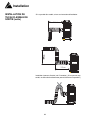
• Le tuyau de sortie doit avoir une longueur se situant entre 500 mm et 1
500 mm. L’utilisation du tuyau le plus court possible est recommandée.
• Lors de l’installation, le tuyau de sortie doit être aussi plat que
possible. Ne prolongez pas le tuyau et ne le raccordez pas à d’autres
tuyaux de sortie.
Installation correcte illustrée (voir l’illustration). (Lors de l’installation
murale, les tuyaux doivent se situer à environ 40 cm à 130 cm du sol.)
32
Installation
INSTALLATION DU
TUYAU FLEXIBLE DE
SORTIE (suite)
Si le tuyau doit être coudé, suivez ces instructions d’installation :
55cm
55cm
Installation incorrecte illustrée (voir l’illustration). (Si le tuyau est trop
coudé, un défaut de fonctionnement pourrait facilement se produire.)
33
Soins et entretien
DÉPLACEMENT DE
L’APPAREIL
L’appareil est équipé de roulettes afin qu’il puisse être déplacé d’une pièce
à l’autre commodément, selon les besoins. Débranchez l’appareil afin de
le mettre hors tension avant de procéder à l’entretien.
NETTOYAGE DU FILTRE
À AIR
Si la quantité de dépôts sur le filtre est excessive, la performance du
climatiseur sera réduite; il est donc préférable de nettoyer le filtre au
moins toutes les deux semaines (plus souvent si vous avez des animaux,
en raison des poils).
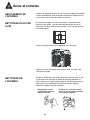
• Retirez le filtre par l’une de ces 2 directions (voir ci-dessous).
2
1
• Nettoyez les filtres individuellement; lavez-les dans l’eau tiède, sans
détergents puissants.
NETTOYAGE DE
L’APPAREIL
Trempez un chiffon dans l’eau tiède (température inférieure à 40 °C [104
°F]) savonneuse ou contenant un produit de nettoyage approprié, et
essuyez doucement la partie sale de l’appareil. N’utilisez pas d’essence,
d’huile diesel ou de substances similaires pour nettoyer l’appareil.
Débranchez l’appareil avant de le nettoyer.
Débranchez le cordon
d’alimentation avant de
nettoyer l’appareil
N’utilisez pas d’essence, d’huile
diesel ou de substances similaires
pour nettoyer l’appareil.
Gas
34
Dépannage
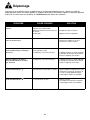
Il peut arriver qu’un problème mineur se produise qui ne nécessite pas d’appel de service. Consultez ce guide de
dépannage pour trouver une solution possible. Si l’appareil continue de mal fonctionner, appelez un atelier de réparation
autorisé ou le numéro sans frais de Danby, au 1-800-263-2629, pour obtenir de l’assistance.
PROBLÈME
CAUSE POSSIBLE
SOLUTION
• Mauvaise alimentation.
• Mauvaise fiche d’alimentation.
• Défaut de fonctionnement de la fiche ou
de la prise.
• Fusible grillé.
• Insérez bien la fiche dans la prise.
L’afficheur ACL affiche l’heure,
mais ne fonctionne pas.
• La fonction TIMER ON est-elle activée?
• Annulez la fonction « SET TIMER » ou
attendez que l’appareil se mette à
fonctionner en mode « AUTO ».
Bien que l’appareil soit réglé en
mode refroidissement, il n’émet pas
d’air froid.
• La température de la pièce est inférieure
à la température réglée.
• L’évaporateur est recouvert de givre.
• C’est un phénomène normal.
Bien que l’appareil soit réglé en
mode déshumidification, il n’émet
pas d’air froid.
• L’évaporateur est recouvert de givre.
• L’appareil fonctionne en mode dégivrage,
il reprendra son fonctionnement normal
lorsque le dégivrage sera terminé.
L’afficheur ACL affiche
• Protection pour tension faible et courant.
• Éteignez l’appareil et débranchez-le, puis
rebranchez-le au bout de 10 minutes. Si
ce même message apparaît toujours,
veuillez appeler l’atelier de réparation.
L’afficheur ACL affiche
Le réservoir d’eau est plein.
• Videz le réservoir.
• Si le défaut de fonctionnement persiste,
veuillez appeler l’atelier de réparation.
Le climatiseur ne se met pas en
marche.
35
• Remplacez la fiche ou la prise.
• Appelez l’atelier de réparations.
• L’appareil fonctionne en mode dégivrage,
il reprendra son fonctionnement normal
lorsque le dégivrage sera terminé.
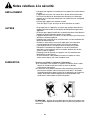
Notes relatives à la sécurité
EMPLACEMENT
• N’installez pas l’appareil à un endroit où il est exposé à la lumière directe
du soleil.
• L’appareil doit être situé à au moins 50 cm de tout article inflammable.
Pour éviter les défauts de fonctionnement électriques, n’installez pas
l’appareil et ne le faites pas fonctionner à un endroit où il est susceptible
d’être mouillé.
• N’utilisez pas l’appareil aux endroits suivants :
*Près d’un foyer au gaz, d’un foyer ou d’une fournaise au mazout
AUTRES
• Ne grimpez pas sur l’appareil et ne mettez pas quelque chose dessus :
l’appareil pourrait tomber ou des défauts de fonctionnement pourraient
apparaître.
• Ne laissez pas l’appareil souffler de l’air directement dans votre direction
pendant de longues périodes (danger pour la santé).
• L’appareil doit être situé à au moins 1 m des téléviseurs pour éviter toute
interférence électromagnétique.
• N’obstruez pas l’entrée d’air ou l’évent de sortie, car cela entraînera des
défauts de fonctionnement.
• N’insérez ni votre doigt ni aucun autre objet dans l’évent de sortie;
surveillez particulièrement les enfants pour éviter les accidents.
• Il est interdit d’incliner le climatiseur ou de le mettre face en bas.
Débranchez immédiatement l’appareil en cas de circonstances
anormales, et communiquez avec le revendeur autorisé afin de faire
vérifier et réparer l’appareil.
• N’aspergez pas d’insecticide sur l’appareil, car cela entraînera des
déformations ou des fissures.
• Si votre climatiseur a des problèmes relatifs à la qualité ou autres,
veuillez communiquer avec votre revendeur local.
ÉLIMINATION
Plusieurs possibilités s’appliquent à l’élimination :
a) La municipalité a mis en place un système de collecte, dans le cadre
duquel les utilisateurs peuvent mettre au rebut les déchets
électroniques gratuitement.
b) Comme les vieux produits contiennent des ressources précieuses, ils
peuvent être revendus à des commerçants en ferraille. L’élimination
incontrôlée de déchets dans les forêts et les paysages met la santé en
danger, lorsque des matières dangereuses s’écoulent dans l’eau
souterraine et entrent dans la chaîne alimentaire.
ÉLIMINATION : Ne jetez pas ce produit dans les déchets municipaux non
triés. La collecte séparée de tels déchets pour un traitement particulier est
nécessaire.
36
GARANTIE LIMITÉE SUR
APPAREIL ÉLECTROMÉNAGER À DOMICILE
Cet appareil de qualité est garantie exempt de tout vice de matière première et de fabrication, s’il est utilisé dans les conditions normales recommandées par
le fabricant.
Cette garantie n’est offerte qu’à l’acheteur initial de l’appareil vendu par Danby Products Limited (Canada) ou Danby Products Inc. (E.- U. d’A) (ci-après “Danby”)
ou par l’un des ses distributeurs agréés et elle ne peut être transférée.
CONDITIONS
Les pièces en plastique sont garanties pour trente (30) jours seulement à partir de la date de l’achat, sans aucune prolongation prévue.
Première 24 mois
Pendant les 24 mois, toutes pièces fonctionnelles de ce produit s’avèrent défectueuses, seront réparées ou remplacées, selon le choix
du garant, sans frais à l’acheteur INITIAL.
Pour bénéficier du
Service
Le client sera responsable pour le transport et tous les frais d’expédition de tout appareil exigeant le service au dépot de service
autorisé le plus proche. S’adresser au détaillant qui a vendu l’appareil, ou à la station technique agréée de service la plus proche, où les
réparations doivent être effectuées par un technicien qualifié. Si les réparations sont effectuées par quiconque autre que la station de
service agréée où à des fins commerciales, toutes les obligations de Danby en vertu de cette garantie seront annulées.
Limites de l’entretien
à domicile
Si l'appareil est installé à plus de 100 kilomètres (62 milles) du centre de service le plus proche, il doit être livré à l'atelier de
réparation autorisé par Danby le plus proche, car l'entretien doit uniquement être réalisé par un technicien qualifié et certifié pour
effectuer un entretien couvert par la garantie de Danby. Les frais de transport entre votre domicile et le lieu de l'entretien ne sont pas
couverts par la présente garantie et doivent être acquittés par l'acheteur.
Cette garantie indique en aucun temps la responsabilité de Danby de l’avarie ou dommage de la vin ou autre contenu, soit par les vices de l’appareil, ou soit
parl’utilisation convenable ou inexacte.
EXCLUSIONS
En vertu de la présente, il n’existe aucune autre garantie, condition ou représentation, qu’elle soit exprimée ou tacite, de façon manifeste ou intentionnelle, par
Danby ou ses distributeurs agréés. De même, sont exclues toutes les autres garanties, conditions ou représentations, y compris les garanties, conditions ou
représentations en vertu de toute loi régissant la vente de produits ou de toute autre législation ou règlement semblables.
En vertu de la présente, Danby ne peut être tenue responsable en cas de blessures corporelles ou des dégâts matériels, y compris à l’appareil, quelle qu’en soit
les causes. Danby ne peut pas être tenue responsable des dommages indirects dus au fonctionnement défectueux de l’appareil. En achetant l’appareil,
l’acheteur accepte de mettre à couvert et de dégager Danby de toute responsabilité en cas de réclamation pour toute blessure corporelle ou tout dégât matériel
causé par cet appareil.
CONDITIONS GÉNÉRALES
La garantie ou assurance ci-dessus ne s’applique pas si les dégâts ou réparations sont dus aux cas suivants:
1) Panne de courant.
2) Dommage subis pendant le transport ou le déplacement de l’appareil.
3) Alimentation électrique incorrecte (tension faible, câblage défectueux, fusibles incorrects).
4) Accident, modification, emploi abusif ou incorrect de l’appareil tel qu'une circulation d'air inadéquate dans la pièce ou des conditions de fonctionnement
anormales (température extrêmement élevée ou basse).
5) Utilisation dans un but commercial ou industriel (à savoir, si l'appareil n'est pas installé dans un domicile résidentiel).
6) Incendie, dommage causés par l’eau, vol, guerre, émeute, hostilités, cas de force majeure (ouragan, inondation, etc.).
7) Visites d’un technicien pour expliquer le fonctionnement de l’appareil au propriétaire.
8) Installation inappropriée (par exemple, encastrement d'un appareil autoportant, ou utilisation extérieure d'un appareil non conçu à cet effet).
Une preuve d’achat doit être présentée pour toute demande de réparation sous garantie. Prière de garder le reçu. Pour faire honorer la garantie, présenter ce
document à la station technique agréée ou s’adresser à:
Service sous-garantie
Service au domicile
Danby Products Limited
PO Box 1778,Guelph, Ontario, Canada N1H 6Z9
Telephone: (519) 837-0920 FAX: (519) 837-0449
1-800-263-2629
04/09
Danby Products Inc.
PO Box 669, Findlay, Ohio, U.S.A. 45840
Telephone: (419) 425-8627 FAX: (419) 425-8629
PORTABLE AIR CONDITIONER
The model number can be found on the serial plate located
on the back panel of the unit.
CLIMATISEUR PORTATIF
Le numéro de modèle se trouve sur la plaque d'information
sur le panneau arrière de l’appareil.
All repair parts are available for purchase or special order
when you visit your nearest service depot. To request
service and/or the location of the service depot nearest you,
call the TOLL FREE NUMBER.
Toutes les pièces de rechange ou commandes spéciales
sont disponibles à votre centre de service régional autorisé.
Pour obtenir le service et/ou la localité de votre centre de
service régional, signalez le NUMÉRO D’APPEL SANS
FRAIS.
When requesting service or ordering parts, always provide
the following information:
•
•
•
•
Product Type
Model Number
Part Number
Part Description
Ayez les renseignements suivants à la portée de la main lors
de la commande de pièce ou service:
•
•
•
•
Type de produit
Numéro de modèle
Numéro de pièce
Description de la pièce
Tel: 1-800-26(1-800-263-2629)
Model
• Modèle
Model
• Modèle
• Modelo
DPA80C1WA
Danby
Products
Limited,
Ontario,
Canada
N1HN1H
6Z96Z9
Danby
Products
Limited,
Guelph
Ontario
Canada
DanbyProducts
Products
Inc.,
Findlay,
Ohio,
45840
Danby
Inc.,
Findlay,
Ohio
USAUSA
45839-0669
66129907091