1
IT
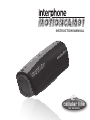
instruction manual
Before using this product, please read this manual carefully and keep it on hand for future reference.
SUMMARY
Preface............................................................................ 19
Product CERTIFICATIONS........................................... 19
Product Overview ..................................................... 19
Product features......................................................... 19
Product CONFIGURATION...........................................19
PACKAGE CONTENTS AND ACCESSORIES....................20
Contained in the package......................................... 20
Optional accessories...................................................20
DESCRIPTION OF FunctionS....................................... 20
1. Starting up............................................................. 20
2. Changing the operating mode . ........................ 20
3. Video Recording.....................................................21
4. Loop recording function...................................... 21
5. Taking Pictures.......................................................21
6. Recording audio.....................................................22
7. LED lights and laser light......................................22
8. Flashlight and laser pointer functions...............22
9. Shutoff and automatic shutoff function............23
10. Micro SD card error warning and
automatic shutoff function��������������������������������23
11. Low battery warning and automatic
shut down................................................................23
12. Downloading files - removable disk function....23
13. Charging..................................................................23
14. Shooting video while charging..........................23
15. Playing back files on a TV set..............................24
16. Taking pictures when the unit is connected
to a TV���������������������������������������������������������������������25
17. Setting the system parameters..........................25
18. Resetting the system............................................26
18
SPECIFICATIONS...............................................................27
Preface
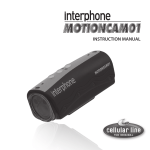
Thank you for purchasing our 1080P HD digital waterproof video camera model MOTIONCAM01. This product is compact, easy-to-handle and waterproof, and features a highly ergonomic design. With its multipurpose
cover, it can record video in all ambient conditions.
This manual contains important safety and operating
information.
Product CERTIFICATIONS
Certified by the FCC and CE authorities, this product
complies with all provisions of law.
Product Overview
The MOTIONCAM01 is ideal for shooting on motorcycles, in cars, outdoors, and when enjoying any kind of
sports activity.
With its multipurpose cover, it can record video and take
photos underwater down to a depth of 20 meters.
And with its HD lens and sensitivity at low light levels,
you can take beautiful underwater pictures.
Product features
- Waterproof down to 20 meters, so it’s ideal for outdoor
and underwater activities
- 1/2.5”, 5 MP CMOS sensor
- 120° wide-angle HD lens for total freedom to shoot
photos
- Advanced vibration advisory makes changing modes
easier and more convenient
- Optional video resolutions: A) 720p 60:1280x720p 60 fps H.264 AVI B) 720p 30:1280x720p 30 fps H.264 AVI C) FULL HD 30:1920x1080p 30 fps H.264 AVI D) 1080p 30: 1440x1080p 30 fps H.264 AVI
- 12 MP photo resolution, JPG format
- Audio-only recording feature
- Built-in high capacity Li battery provides up to 2.5
hours of video recording
- Support for HDMI and TV-OUT allows you to share videos easily
- Loop recording and audio recording functions
- Laser pointer for correct framing of subject
- 2 high-brightness LED lights for night recording
- Flashlight function with up to 10 hrs of operation
- High-brightness LEDs can flash to signal an emergency
- Supports Micro SD card with capacity of up to 32 GB
(class 4 is recommended)
- USB 2.0 UPnP. USB recharging.
Product CONFIGURATION
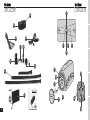
Components:
1. Power ON/mode change/arrow up key
2. LED light (yellow)
3. Record/playback key
4. LED ON/laser/arrow down key
5. LED indicator (red and blue)
6. USB/AV/recharge port
7. HDMI socket
8. TF card slot
9. Waterproof cover/ hook for carry cord (optional)
10. Microphone
11. Laser light
12. LED light
13. Camera lens
NOTES:
The MOTIONCAM01 can be hand-held or fastened to a
number of surfaces in different ways using the holders
supplied with the unit.
EN
FR
ES
DE