1
Monitor Setup
• “OFF” will change to “CUSTOM”, when any of the picture
mode (Brightness, Color, Tint, Contrast and Sharpness) has been
adjusted
Adjusting Picture
Visual EQ, Brightness, color, tint, contrast and sharpness are
adjustable.
• Each source is independently adjustable.
• Make adjustments within 6 seconds, otherwise the OSD (On Screen
Display) will turn off automatically.
• After adjusting, the “OFF” setting in Visual EQ changes to
“CUSTOM”. After resetting the unit, “CUSTOM” changes back to
“OFF”
1
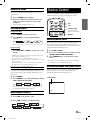
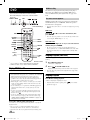
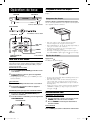
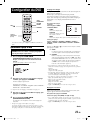
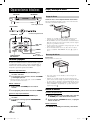
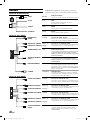
Press SETUP button on the remote control.
Or press and hold the SELECT button on the Front
Control Keys for at least 2 seconds to open SETUP
screen. The PICTURE setting menu is highlighted.
• NIGHT MOVIE, SOFT, SHARP and HIGH CONT. are fixed values.
They cannot be set manually. If the picture mode is changed, they
automatically change to CUSTOM mode.
• To return OFF mode, press RESET on the picture mode, or change
values of BRIGHT, COLOR, TINT, CONTRAST and SHARPNESS
to 0 manually.
3
Wait 6 seconds until OSD disappears; the
adjustment will be saved automatically.
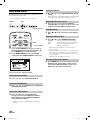
Adjusting the Brightness
2
3
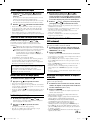
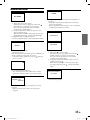
Press ▲ or ▼ and select BRIGHT.
Press or to adjust the brightness. Brightness
can be adjusted from –15 (MIN) to +15 (MAX).
SELECT
Front Control Keys
4
Wait 6 seconds until OSD disappears; the
adjustment will be saved automatically.
SETUP
Remote Control
VISUAL EQ Operation
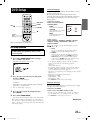
Adjusting the Color Density
2
3
Press ▲ or ▼ and select COLOR.
Press or to adjust the color density. Change
depth can be adjusted from –15 (MIN) to +15 (MAX).
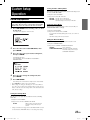
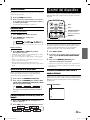
You can select a mode suitable for the subject image.
2
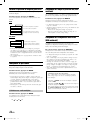
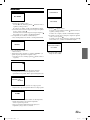
To change VISUAL EQ, press or to cycle
through the OSD as OFF, NIGHT MOVIE, SOFT,
SHARP and HIGH CONT. (Default: OFF)
4
Wait 6 seconds until OSD disappears; the
adjustment will be saved automatically.
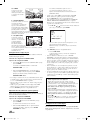
VISUAL EQ mode (manufacturer’s settings) selection
(VISUAL EQ MODE)
OFF:
Normal Setting (Visual EQ OFF)
NIGHT MOVIE: Suitable for movies in which dark
scenes frequently appear.
SOFT:
Suitable for CGs and animated
films.
SHARP:
Suitable for old movies where
images are not clearly shown.
HIGH CONT.: Suitable for recent movies.
17-EN
Book_PKG-RSE2.indb
17
4/8/06
2:17:24 AM