1
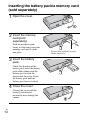
Inserting the battery pack/a memory card
(sold separately)
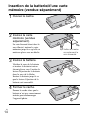
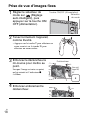
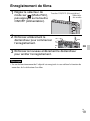
1 Open the cover.
the memory
2 Insert
card (sold
separately).
With the notched corner
facing as illustrated, insert the
memory card until it clicks
into place.
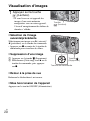
the battery
3 Insert
pack.
Check the direction of the
battery pack, insert the battery
pack while sliding back the
battery eject lever in the
direction of the arrow. Insert
the battery pack until the
battery eject lever is locked.
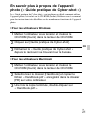
4 Close the cover.
Closing the cover with the
battery pack inserted
incorrectly may damage the
camera.
GB
14
Ensure the notched corner
faces correctly.