1
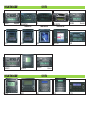
• Pressing the CD1-key on the car-radio, you will enter the Music-Playlist: the commands can now be effected both on the I-POD and the car-radio.
Operating on the I-POD, you will have all functions; operating on the car-radio, you will get ONLY the functions Forward/
Backward, one track after the other, by pressing the key
FF/REW.
• The Track-number appearing on the radio-display might not be correct.
Radio-keys CD2 - CD3 - CD4 - CD5 - CD6:
• Pressing the radio-keys CD2 - CD3 - CD4 - CD5 - CD6,
you will get the Playlist of the I-POD, from where you can
choose only the first 5 Tracks. The Track-Skipping can be effected only from the car-radio or the Steering-Wheel
comands, by using the keys FF/REW.
• If the Playlist contains more than 5 tracks, the exceeding
number of tracks will not be reproduced.
• If the Playlist contains less than 5 tracks, press the keys
corresponding to the missing tracks, so that the Unit will
place itself on the track CD1.
ATTENTION
• The I-PHONE could show the following indication:
The connected Accessory is not compatible with the I-PHONE.
Pass to Airplane-mode, to reduce interferences.
Press NO.
• It is not possible to use MP3-player and I-POD
contemporaneaously.
• Connect/deconnect I-POD or MP3-player while car-radio
is OFF.
• I-PHONE, I-TOUCH with a completely flat battery ,
will require a 5 minutes’ waiting-time to recharge battery. • Effect the comands slowly enough, to avoid that
the car-radio gets stuck.
To deblock the car-radio, press RESET.
Functions of MP3-Players or other appliances
All Functions can be effected on the Player itself.
RESET Switch car-radio OFF for 30 seconds.
Technical Features
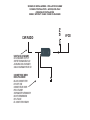
• Connect on CD-CHANGER-Input
• Direct connection with IPOD Nano and Classic, I-PHONE
and I-TOUCH
• Battery-charge-function only for I-POD and I-PHONE
• Functions can be controlled simultaneously by means of
car-radio.keys, Steeringwheel-comands and I-POD. • MP3-control by means of the Player itself. Connection
by means of connection-cable with 3.5mm-jack, to be plugged into
Headphone-exit.
FR
ATTENTION: I-PHONE 3GS / I-PHONE 4 PAS COMPATIBLE
Indications pour l’Installation
L’Interface peut être utilisé même sur les systèmes avec Echangeur-CD.
Les fonctions de l’Echangeur-CD restent unchangées.
Mode d’emploi
Si l’Echangeur-CD est présent, allumer l’appareil en appuyant
sur la touche RADIO, en suite sur la touche CD-CHANGER situées
sur l’autoradio.
Si l’Echangeur-CD n’est pas présent, allumer l’appareil en appuyant
sur la touche CD-CHANGER située sur l’autoradio.
Fonctions I-POD
Touche CD1 sur l’autoradio:
• En appuyant sur la touche CD1 de l’autoradio, on arrive à
la liste de morceaux “Playlist » : Il est possible d’effectuer les fonctions soit depuis l’I-POD soit sur l’autoradio.
Depuis l’I-POD, toutes les functions sont disponibles; depuis l’autoradio, on aura uniquement les fonctions Avant/Arrière, un Morceau par fois, en appuyant sur la touche FF/REW.
• Le numéro de Morceau visualisé sur le Display pourrait ne pas correspondre à la réalité.
Touches autoradio CD2 - CD3 - CD4 - CD5 - CD6 :
• En appuyant sur les touches autoradio CD2 - CD3 - CD4 - CD5 - CD6, on arrive au Playlist de l’ I-POD: de cette liste,
seuls les premiers 5 Morceaux sont sélectionnables.