1
POWERED BY
Note: The specific notation “VDC” might not be indicated, Instead the following international symbol shown
might be used 16
. In some cases you may determine the desired voltage is between whole numbers
such as 15.5VDC. In this case use the next higher voltage setting (16VDC).
Once you have determined the correct voltage, slide the switch
to either 16V / 19V. In some cases you may determine the desired
voltage is between whole numbers such as 18.5VDC. In this case
you would use the 19 V setting. In the case of 20VDC, also choose
the setting of 19VDC.
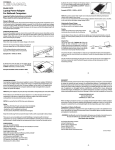
Model PPU916
Universal Laptop Power Pack
Important Safety Instructions are included.
Please read the entire manual before use.
Polarity
Look for this symbol in any of the three locations
mentioned above that looks like the following:
Owner’s Manual
Thank you for purchasing the PPU916 external battery pack for notebook and laptop computers. The
PPU916 provides a 16 & 19 VDC output that can provide up to 3 hours of additional runtime. Also included is
a USB output port for charging your cell phone, PDA, MP3 player or any other device that can be charged
from a standard USB port.
OPERATING INSTRUCTIONS
Before initial use you must charge the PPU916. Make sure you have selected the proper voltage setting,
verified polarity and have chosen the correct adapter tip before connecting to your laptop. Follow the steps
below.
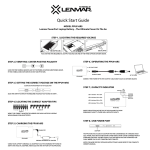
ADJUSTING THE CORRECT VOLTAGE
Follow these steps to adjust the voltage on the PPU916; you will need to determine the required voltage
needed by one of the following methods.
DC
1.) Review the power or ID plate on the laptops original AC /
DC power supply usually used to power the device. Look for
the word “DC RATING or OUTPUT” followed by a number
and VDC.
RAT
ING
:16V
SLIDING BUTTON BETWEEN 16V/19V SELECTION
CENTER POSITIVE
Use the diagram shown above to verify that your laptop uses “center positive” polarity as most all laptops use
“center positive” polarity. Do not use the PPU916 if your device shows “center negative” polarity.
Adapter Tips
The PPU916 comes with 8 power tips, and
7 charging tips and one 30” power cord.
POWER CORD
POWER TIP
CHARGING TIP
Determine the correct power tip and connect it to the included 30” power cord then plug it into your
laptop. The power tips consist of models L01D, L51D, L52D, L53D, L54D, L55D, L61D, and L62D. The
charging tips are made to connect to your existing AC adapter and then be plugged into the “IN” jack on
the PPU916. They are the right angle tips consisting of models: L01, L51, L53, L54, L55, L61 and L62. You
may also use your existing AC adapters tip if it fits.
Select the adapter tips that corresponds to your model by visiting www.lenmar.com/adaptertips Verify the
fit of the power tip by plugging it into the input jack on your laptop. It is important that the center contact
or pin be the correct size to insure proper electrical contact.
The tip should slide in as easily as your original did, do not force it. If it does not fit easily please verify you
have the correct tip listed in our reference.
Example: VIN: = 16VDC or 16V DC
AC ADAPTER LABEL
CHARGING THE PPU916
2.) Review the power ID plate on the bottom of the laptop
to be powered. Look for the word “DC RATING or INPUT”
followed by a number and VDC.
V
6
G:1
DC
DC
Please follow the steps below to charge your PPU916
1.) Determining the correct (Adapter Tip) charging
connector: By visiting www.lenmar.com/adaptortips you can
enter the model of your laptop and see the corresponding
charging and power tips. These tips will allow you to charge the
PPU916 and also power your laptop.
TIN
RA
Example: DC RATING: 16VDC or INPUT: 16VDC
RAT
ING
:16V
AC ADAPTER LABEL
BOTTOM OF LAPTOP
3.) Review the voltage indication marked next to the
input jack on the laptop device to be powered.
Example: VIN: = 16VDC or 16V DC
C
6VD
:=1
VIN
SIDE OF LAPTOP
2.) Charging
To charge the PPPU916 use your existing Ac adapter, attach the
correct charging tip to the end and plug into the “IN” port of
the PPU916. Approximate charge time is 5 hours. You will see
an indicator on the 5th LED light red while charging and turn
blue once the charge is finished.
1.
CHARGE TIP
PPU916
ORIGINAL NOTEBOOK AC ADAPTER
2.
OPERATING THE PPU916
Connecting the PPU916 to your laptop: Plug the supplied 30” power cable into the “OUT” port on the
PPU916. Attach the correct power tip to the other end of the cable and plug this into the “DC IN” port of
your laptop.
OUTPUT TIP
OUTPUT CABLE
PPU916
CAPACITY INDICATOR: Press the button on the top of the PPU916, there are 5 indicator lights that
LED
BUTTON 1 2 3 4 5
show remaining capacity.
LED 1 indicates 0% to 20%
CHARGING
INDICATOR
LED 2 indicates 20% to 40%
CAPACITY
INDICATOR
LED 3 indicates 40% to 60%
LED 4 indicates 60% to 80%
WARRANTY
This limited warranty starts from the date of original purchase and expires 1 year thereafter. If,
during this period, any part, because of manufacturing defects or workmanship fails to
function properly under normal use will be repaired at no charge for parts and labor or, at our
option, the product will be replaced. The following is excluded: damages from delay or loss of
use of equipment, or damaged batteries, malfunctions resulting from misuse, tampering,
unauthorized repairs, modifications, or accident. Package the unit and its accessories carefully
using ample padding material to prevent damage in transit and ship it prepaid and insured to:
LENMAR ENTERPRISES INC. USA
4035 VIA PESCADOR
CAMARILLO, CA 93012
When sending in product for service you must first get a Return Authorization by visiting
www.lenmar.com/warranty fill the out required form and our customer service reps will email
you instructions on returning the item to us and issue a RETURN AUTHORIZATION NUMBER
(RA) to be include on the box and any corresponding paper work. If you have any questions
please call customer service at (805) 384-9600.
LED 5 indicates 80% to 100%
All packages should include evidence of the date of purchase. Enclose $10.00 for shipping and
handling for addresses in the US and $15.00 for addresses in Canada. For outside the US and
Canada, freight will vary depending upon the ship to address.
PPU916
USB Power Port
The PPU916 has a built in USB port for the convenience of
charging your cell phone, PDA, MP3 player or any other
device that can be charged from a standard USB port.
USB PORT
NOTICE
- Keep the PPU916 dry, if it gets wet wipe it dry immediately.
- Use and store it in normal temperature environments.
- Handle the PPU916 carefully, do not drop it. Do not use the PPU916 if the cords become damaged.
- Keep the PPU916 away from dust and dirt; wipe it with a cloth occasionally to keep it clean.
- There are no user serviceable parts inside! Modifying or tampering with its internal components can cause a
malfunction and will invalidate its warranty. If your PPU916 is not performing as it should during the warranty
period, contact Lenmar for warranty service.
SPECIFICATIONS
Charge input: 15V ~ 23 V 2.5A~ 4A adapter input
Discharge output: 5.3 V, 16V, 19V
Charge time: Approx 3-4 hours.
Output WH: 61Wh / 5500mAh
3.
Proposition 65 Notice (California)
The following statement is required in the state of California pursuant to the settlement of an
action brought by the Mateel Environmental Justice Foundation against multiple electronics
and appliance manufacturers
• WARNING: Handling the cord on this product will expose you to lead, a chemical known to
the state of California to cause birth defects or other reproductive harm.
Wash hands after handling.
For further information contact
Lenmar Enterprises, Inc.
Product Service Department
Phone: (800) 424-2703
E-mail: [email protected]
Visit Our Web Site at: www.lenmar.com
310-091-33-0326 r1
4.
POWERED BY
Remarque : la notation « VDC » peut ne pas être indiquée. Le symbole international suivant pourrait être
utilisé :16
. Dans certains cas, la tension désirée ne correspond pas à un entier, comme 15,5 V CC. Utilisez
alors le réglage de tension plus élevé (16 V CC).
Lorsque vous aurez déterminé la tension désirée, placez le
commutateur à 16 ou 19 V CC. Dans certains cas, la tension
désirée ne correspond pas à un entier, comme 18,5 V CC. Utilisez
alors le réglage de tension de 19 V CC. Si la tension désirée est de
20 V CC, utilisez aussi le réglage de tension de 19 V CC.
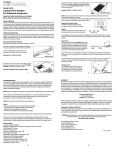
Modèle PPU916
Bloc d'alimentation universel pour ordinateur portable
Consignes importantes de sécurité incluses.
Veuillez lire le mode d'emploi en entier avant l'utilisation.
Mode d'emploi
Merci d'avoir acheté le bloc d'alimentation externe PPU916 pour ordinateurs portables et bloc-notes
électroniques. Le bloc d'alimentation externe PPU916 offre des sorties de 16 et 19 V CC qui peuvent donner
jusqu'à trois heures supplémentaires d'autonomie. Il est aussi doté d'une sortie USB pour charger les
téléphones cellulaires, ANP, lecteurs MP3 et tout autre dispositif qui peut être chargé par un port USB.
UTILISATION
Vous devez charger le bloc d'alimentation PPU916 avant de l'utiliser. Assurez-vous de choisir le bon réglage
de la tension, vérifiez la polarité et sélectionnez la fiche appropriée avant de brancher l'ordinateur. Suivez les
étapes suivantes.
RÉGLAGE DE LA TENSION APPROPRIÉE
Suivez les étapes suivantes pour régler la tension de sortie du bloc d'alimentation PPU196; vous devez
déterminer la tension requise en suivant l'une des méthodes suivantes.
1.) Examinez la plaque signalétique ou les indications sur le
bloc d'alimentation CA/CC d'origine servant à alimenter
l'appareil. Recherchez l'expression « DC RATING » (tension
nominale) ou « OUTPUT » (tension de sortie) suivie d'un
nombre et de VDC (V CC).
DC
RAT
ING
CENTRE POSITIF
Utilisez l'illustration ci-dessus pour vérifier si l'ordinateur utilise une polarité centrale positive; la plupart des
ordinateurs portables utilisent une polarité centrale positive. N'utilisez pas le bloc d'alimentation PPU916 si
l'ordinateur utilise une polarité centrale négative.
Fiches
Le bloc d'alimentation PPU916 est livré avec
8 fiches d'alimentation, 7 fiches de charge et
un cordon d'alimentation de 76 cm (30 po).
CORDON D'ALIMENTATION
FICHE D'ALIMENTATION
FICHE DE CHARGE
Déterminez la fiche d'alimentation appropriée, branchez-la au cordon d'alimentation de 76 cm (30 po) et
ensuite, à l'ordinateur. Les fiches d'alimentation correspondent aux modèles L01D, L51D, L52D, L53D,
L54D, L55D, L61D et L62D. Les fiches de charge sont utilisées pour être branchées à l'adaptateur CA
actuel et ensuite, dans la prise « IN » (entrée) du bloc d'alimentation PPU916. Ces fiches à angle droit
correspondent aux modèles L01, L51, L53, L54, L55, L61 et L62. Vous pouvez aussi utiliser la fiche de
l'adaptateur CA si elle est compatible.
Choisissez les fiches compatibles avec l'ordinateur sur le site www.lenmar.com/adaptertips. Vérifiez la
compatibilité de la fiche d'alimentation en l'insérant dans la prise d'alimentation de l'ordinateur. Il est
important que la borne ou broche centrale ait la bonne dimension pour garantir un contact électrique fiable.
ÉTIQUETTE DE
L'ADAPTATEUR CA
Exemple : VIN (tension d'entrée) : = 16VDC ou 16V DC (16 V CC)
2.) Examinez la plaque signalétique sous l'ordinateur qui
sera alimenté. Recherchez l'expression « DC RATING »
(tension nominale) ou « INPUT » (tension d'entrée) suivie
d'un nombre et de VDC (V CC).
:16V
Polarité
Recherchez dans l'un des trois endroits
mentionnés plus haut un symbole qui
ressemble à celui-ci :
COMMUTATEUR DE RÉGLAGE DE LA TENSION À 16 OU 19 V
La fiche doit s'insérer aussi facilement que la fiche d'origine; ne forcez pas l'insertion. Si elle ne s'insère pas
facilement, vérifiez s'il s'agit de la même fiche que celle qui est suggérée.
CHARGE DU BLOC D'ALIMENTATION PPU916
6V
G:1
DC
Exemple : DC RATING (tension nominale) : 16VDC
(16 V CC) ou INPUT (tension d'entrée) : 16VDC (16 V CC)
TIN
RA
DESSOUS DE L'ORDINATEUR
3.) Examinez les indications concernant la tension
près de la prise d'alimentation de l'ordinateur qui sera
alimenté.
Exemple : VIN (tension d'entrée) : = 16VDC ou
16V DC (16 V CC)
C
6VD
:=1
VIN
CÔTÉ DE L'ORDINATEUR
1.
DC
Veuillez suivre les étapes suivantes pour charger le bloc
d'alimentation PPU916.
1.) Détermination du connecteur de charge (fiche) approprié :
vous pouvez, sur le sitewww.lenmar.com/adaptortips, saisir le
modèle de l'ordinateur pour visualiser la fiche de charge et la
fiche d'alimentation appropriées. Ces fiches vous permettront de
charger le bloc d'alimentation PPU916 et d'alimenter l'ordinateur.
2.) Charge
Pour charger le bloc d'alimentation PPPU916, utilisez
l'adaptateur CA actuel; branchez la fiche de charge
appropriée à l'extrémité et ensuite, dans la prise « IN » (entrée)
du bloc d'alimentation PPU916. La charge prend environ 5
heures. Le 5e témoin DEL sera rouge pendant la charge et
passera au bleu lorsque la charge sera complète.
2.
RAT
ING
:16V
ÉTIQUETTE DE
L'ADAPTATEUR CA
FICHE DE CHARGE
PPU916
ADAPATATEUR CA
D'ORIGINE DE L'ORDINATEUR
FONCTIONNEMENT DU BLOC D'ALIMENTATION PPU916
Connexion du PPU916 à l'ordinateur : branchez le cordon d'alimentation de 76 cm (30 po) fourni dans la
prise « OUT » (sortie) du bloc d'alimentation PPU916. Branchez la fiche d'alimentation appropriée à
l'autre extrémité du cordon et ensuite, dans la prise « DC IN » (entrée CC) de l'ordinateur.
CORDON D'ALIMENTATION
FICHE D'ALIMENTATION
PPU916
TÉMOINS DE PUISSANCE : appuyez sur le bouton situé sur le bloc d'alimentation PPU916 pour
LED
activer les 5 témoins lumineux qui indiquent la puissance restante.
BOUTON 1 2 3 4 5
TÉMOINS DEL
DE CHARGE
La DEL 1 indique entre 0 et 20 %
La DEL 2 indique entre 20 et 40 %
TÉMOINS DE
PUISSANCE
La DEL 3 indique entre 40 et 60 %
GARANTIE
La présente garantie limitée commence à la date du premier achat et se termine une année plus tard. Si,
durant cette période, une pièce ne fonctionne pas correctement en usage normal en raison d'un défaut de
fabrication ou de main-d'oeuvre, elle sera réparée sans frais pour la pièce ou la main-d'oeuvre ou le produit
sera remplacé, à notre discrétion. Sont exclus les dommages dus à un délai ou à la perte d'usage de l'appareil
ou de piles endommagées, à un mauvais fonctionnement découlant d'une utilisation incorrecte, d'altération,
de réparation non autorisée, de modification ou d'accident. Emballez soigneusement l'appareil et ses
accessoires en utilisant suffisamment de matelassures pour éviter les dommages pendant le transport et
faites-le parvenir, frais de port et assurance payés, à :
LENMAR ENTERPRISES, INC.
4035 VIA PESCADOR
CAMARILLO, CA 93012 USA
Avant de retourner un produit pour une réparation sous garantie, vous devez obtenir une autorisation de
retour d'article en allant sur le site www.lenmar.com/warranty; remplissez le formulaire requis et le service à
la clientèle vous enverra un courriel contenant des instructions pour le retour du produit et un NUMÉRO
D'AUTORISATION DE RETOUR qui doit être inscrit sur le colis et rappelé dans toute correspondance. Si vous
avez des questions, appelez le service à la clientèle au 805-384-9600.
Tous les colis doivent inclure une preuve d'achat datée. Joignez 10 $ pour les frais de retour à une adresse
située aux États-Unis et 15 $ pour une adresse située au Canada. Les frais de retour varieront pour les
adresses hors des États-Unis et du Canada.
La DEL 4 indique entre 60 et 80 %
La DEL 5 indique entre 80 et 100 %
PPU916
Port USB d'alimentation
Le bloc d'alimentation PPU916 est doté d'une sortie USB
pour charger les téléphones cellulaires, ANP, lecteurs MP3 et
tout autre dispositif qui peut être chargé par un port USB.
PORT USB
AVIS
- Conservez le PPU916 au sec; s'il est humide, essuyez-le immédiatement.
- Utilisez-le et rangez-le à des températures normales.
- Manipulez le PPU916 avec soin; ne pas le laisser tomber. N'utilisez pas le PPU916 si les cordons sont endommagés.
- Conservez le PPU916 à l'abri de la poussière et de la saleté; essuyez-le périodiquement avec un chiffon.
- Aucune pièce à l'intérieur du produit ne peut être réparée par l'utilisateur! La modification ou l'altération des
pièces à l'intérieur peut entraîner un mauvais fonctionnement et annule la garantie. Si le bloc d'alimentation
PPU916 ne fonctionne pas correctement pendant la durée de garantie, communiquez avec Lenmar pour le faire
réparer sous garantie.
Avis relatif à la Proposition 65 (de la Californie)
La déclaration suivante est requise dans l'État de la Californie en vertu du règlement d'une poursuite
intentée par la Mateel Environmental Justice Foundation contre plusieurs fabricants d'appareils
électroniques et d'appareils ménagers
• AVERTISSEMENT : tenir le cordon de ce produit vous expose à du plomb, un produit chimique que l'État de
la Californie considère comme une cause d'anomalies congénitales et d'autres problèmes de reproduction.
Laver les mains à fond après manipulation.
Pour plus de renseignements, communiquez avec
Lenmar Enterprises, Inc.
Service à la clientèle
Téléphone : 800-424-2703
Courriel : [email protected]
Visitez notre site Web : www.lenmar.com
SPÉCIFICATIONS
Entrée de charge : entrée d'adaptateur 15 V ~ 23 V 2,5 A ~ 4 A
Tensions de sortie : 5,3 V, 16 V, 19 V
Durée de charge : de 3 à 4 heures.
Puissance Wh : 61 Wh/5 500 mAh
3.
310-091-33-0326 r1
4.
POWERED BY
Nota: Puede que no aparezca la inscripción "VDC" (VCC), en su lugar puede que aparezca el siguiente
símbolo internacional: 16
. En algunos casos, quizá determine que el voltaje necesario se encuentra entre
números enteros, tal como “15.5VDC”. En este caso, utilice el voltaje superior más cercano (16V CC).
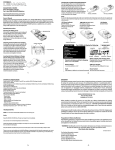
Modelo PPU916
Batería universal para computadoras portátiles
Contiene importantes instrucciones de seguridad.
Lea atentamente el manual completo antes de usar el equipo.
Una vez que haya determinado el voltaje correcto, deslice el
selector a la posición 16V ó 19V. En algunos casos, quizá
determine que el voltaje necesario se encuentra entre números
enteros, tal como “18.5VDC”. En este caso, deberá utilizar la
posición 19 V. En el caso de 20VCC, también seleccione 19VDC.
Polaridad
Busque este símbolo en cualquiera de los tres
lugares indicados anteriormente:
Manual del propietario
Gracias por comprar la batería externa PPU916 para computadoras portátiles. La PPU916 brinda una salida
de 16 y 19 VCC que puede ofrecer hasta 3 horas adicionales de funcionamiento. También incluye una salida
USB para cargar teléfonos celulares, PDAs, reproductores de MP3 o cualquier otro aparato que pueda
recargarse por medio de un puerto USB estándar.
INSTRUCCIONES DE USO
Antes de utilizar por primera vez la PPU916, deberá cargarla. Controle la correcta selección del voltaje,
polaridad y adaptador antes de conectarla a su computadora portátil. Siga los pasos que se detallan a
continuación.
AJUSTE DEL VOLTAJE CORRECTO
Siga estos pasos para seleccionar el voltaje correcto en la PPU916; se puede determinar el voltaje necesario
utilizando uno de los siguientes métodos.
1.) Observe la etiqueta de datos eléctricos o de identificación
que aparece en la fuente de alimentación eléctrica original de
la computadora portátil. Busque las palabras "DC RATING” o
“OUTPUT" que aparecen seguidas por un número y VCC.
DC
Por ejemplo: VIN: = 16VDC ó 16V DC
RAT
CAMBIO DEL SELECTOR ENTRE 16V/19V
CENTRO POSITIVO
Utilice el diagrama que aparece arriba para controlar que su computadora portátil utilice una polaridad de
“centro positivo”, ya que la mayoría de las computadoras portátiles utilizan centro positivo. No utilice la
PPU916 si su dispositivo muestra una polaridad con "centro negativo".
Adaptadores
La PPU916 incluye 8 adaptadores de
alimentación, y 7 adaptadores de carga y
un cable de alimentacion de 30"/76 cm.
CABLE DE ALIMENTACIÓN
ADAPTADOR DE ALIMENTACIÓN
ADAPTADOR DE CARGA
Determine el adaptador de alimentación correcto y conéctelo al cable de alimentación de 30”/76 cm,
luego conéctelo a su computadora portátil. Los adaptadores de alimentación son los modelos L01D,
L51D, L52D, L53D, L54D, L55D, L61D y L62D. Los adaptadores de carga están hechos para conectarse a su
adaptador de CA existente y luego en el zócalo "IN" de la PPU916. Los modelos de ángulo recto son: L01,
L51, L53, L54, L55, L61 y L62. También podrá utilizar su propio adaptador de CA si es el adecuado.
Seleccione el adaptador que corresponde a su modelo en www.lenmar.com/adaptertips. Controle el
ajuste del adaptador de alimentación al enchufarlo en el zócalo de entrada de su computadora portátil. Es
importante determinar que el contacto o espiga central sea de la medida correcta para garantizar un
buen contacto eléctrico.
ING
:16V
ETIQUETA DEL
ADAPTADOR DE CA
El adaptador deberá deslizarse tan fácilmente como su adaptador original, no lo fuerce. En caso de no
encajar correctamente, controle que haya seleccionado el adaptador adecuado en nuestra referencia.
CARGA DE LA PPU916
2.) Observe la placa de identificación en la parte inferior de
la computadora portátil que se desea alimentar. Busque las
palabras "DC RATING” o “INPUT" que aparecen seguida por
un número y VDC.
V
6
G:1
DC
Por ejemplo: ALIMENTACIÓN CON CC (DC RATING):
16VDC ó INPUT: 16VDC
TIN
RA
PARTE INFERIOR DE
LA COMPUTADORA PORTÁTIL
3.) Observe la indicación de voltaje que aparece al
lado del zócalo de entrada en la computadora portátil
que se desea alimentar.
Por ejemplo: VIN: = 16VDC ó 16V DC
C
6VD
:=1
VIN
COSTADO DE LA
COMPUTADORA PORTÁTIL
DC
Siga los pasos que aparecen a continuación para cargar su PPU916
1.) Determine el conector de carga (adaptador): visite
www.lenmar.com/adaptortips. Puede ingresar el modelo de su
computadora portátil y ver los adaptadores de carga y
alimentación correspondientes. Estos adaptadores le permitirán
cargar la PPU916 y también alimentar su computadora portátil.
2.) Carga
Para cargar la PPPU916 utilizando su adaptador de CA
existente, conecte el adaptador de carga existente y
enchúfelo en el zócalo "IN" de la PPU916. El tiempo
aproximado de carga es de 5 horas. Verá que el quinto
indicador LED se encenderá de color rojo mientras esté
cargando, y pasará a color azul cuando finalice.
1.
RAT
ING
:16V
ETIQUETA DEL
ADAPTADOR DE CA
ADAPTADOR DE CARGA
PPU916
ADAPTADOR ORIGINAL DE CA PARA
COMPUTADORA PORTÁTIL
2.
USO DE LA PPU916
Conexión de la PPU916 a su computadora portátil: Enchufe el cable provisto de 30"/76 cm en el zócalo
"OUT" de la PPU916. Conecte el adaptador correcto de alimentación en el otro extremo de carga en el
zócalo “DC IN” de su computadora portátil.
CABLE DE SALIDA
ADAPTADOR DE SALIDA
PPU916
INDICADOR DE CAPACIDAD: Oprima el botón en la parte superior de
INDICADOR
DE CARGA
El LED 1 indica 0% a 20%
INDICADOR
DE CAPACIDAD
El LED 2 indica 20% a 40%
Esta garantía limitada tiene validez a partir de la fecha original de compra y finaliza 1 año después de dicha
fecha. Si durante ese período cualquier parte, debido a defectos en la fabricación o en la mano de obra, deja
de funcionar correctamente durante el uso normal, será reparada sin costo por repuestos ni mano de obra o,
a nuestra opción, el producto también puede ser reemplazado. Se excluye lo siguiente: daños sufridos por
demoras o impedimento de uso del equipo o baterías dañadas; fallas ocasionadas por mal uso,
manipulación, reparaciones no autorizadas, modificaciones o accidentes. Embale cuidadosamente la unidad
y sus accesorios utilizando abundante material de relleno para evitar daños en tránsito y envíela con flete y
seguro prepago a:
LENMAR ENTERPRISES, INC. USA
4035 VIA PESCADOR
CAMARILLO, CA 93012
LED
BOTÓN 1 2 3 4 5
la PPU916, hay 5 indicadores luminosos que
muestran la carga remanente.
GARANTÍA
El LED 3 indica 40% a 60%
Para enviar un producto a servicio, primero deberá obtener una Autorización para devolución en
www.lenmar.com/warranty. Complete el formulario y nuestros empleados de servicio al cliente le enviarán
por correo electrónico las instrucciones para devolver el equipo y emitirán un NÚMERO DE AUTORIZACIÓN
PARA DEVOLUCIÓN (RA) que deberá ser incluido en la caja y en la documentación del trámite correspondiente. Si tiene preguntas, contáctese con el servicio al cliente al (805) 384-9600.
Todos los paquetes deberán incluir prueba de la fecha de compra. Incluya $10,00 para abonar el envío y la
entrega en direcciones de los EE.UU. y $15,00 para direcciones en Canadá. Para envíos fuera de los EE.UU. y
Canadá, el envío dependerá de la dirección del destinatario.
El LED 4 indica 60% a 80%
El LED 5 indica 80% a 100%
PPU916
Puerto USB de alimentación
La PPU916 tiene integrado un puerto USB para cargar con
comodidad su teléfono celular, PDA, reproductor de MP3 o
cualquier otro aparato que pueda ser recargado por medio
de un puerto USB estándar.
PUERTO USB
AVISO
- Mantenga la PPU916 seca; si se moja, séquela inmediatamente con un paño.
- Utilizar y guardar en ambientes con temperatura normal.
- Manipular cuidadosamente la PPU916 , no dejarla caer. No utilizar la PPU916 si los cables están dañados.
- Mantener la PPU916 libre de polvo y suciedad; limpiarla ocasionalmente con un paño para mantenerla limpia.
- ¡No contiene piezas que el usuario pueda reparar! La modificación o manipulación de sus componentes
internos puede generar fallas y anular la garantía. En caso de que su PPU916 no funcione correctamente
durante el período de garantía, comuníquese con Lenmar para recibir servicio de garantía.
Aviso sobre la Propuesta 65 (California)
La siguiente declaración es obligatoria en el estado de California para cumplir con el acuerdo de una
demanda impuesta por Mateel Environmental Justice Foundation contra múltiples fabricantes de productos
y aparatos electrónicos
• ADVERTENCIA: La manipulación del cable de este producto lo expondrá al plomo, un producto químico
que el estado de California reconoce como causante de defectos congénitos y otros peligros para la
reproducción.
Lávese las manos luego de manipularlo.
Para obtener más información, comuníquese con:
Lenmar Enterprises, Inc.
Product Service Department
Tel: (800) 424-2703
Correo electrónico: [email protected]
Visite nuestro sitio web: www.lenmar.com
ESPECIFICACIONES
Entrada de carga: Entrada por adaptador de 15V ~ 23 V 2,5A~ 4A
Salida de alimentación: 5,3 V; 16V; 19V
Tiempo de carga: Aproximadamente 3 a 4 horas.
WH de salida: 61Wh / 5500mAh
3.
310-091-33-0326 r1
4.