1
1/10 Racing ESC (ORI65101-65102)
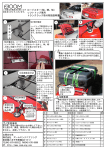
The ESC is connected to the box by using a special adapter.
Connect the adapter to the sensor port of the ESC
Connect the adapter to the box
Connect the ESC to a compatible battery
Switch ON the ESC
Note: the ORI65106 ESC is not compatible with the program box.
USING THE PROGRAM BOX
Switch on the ESC.
The program box will display a message indicating the program box
software version.
Press any button on the box.
The box connects to the ESC internal memory.
The actual ESC software version is displayed on the screen.
4
www.teamorion.com
If the “connecting ESC” message does not disappear, please check
the ESC and connections.
If the “Please update software” message appears you need to update
the ESC’s firmware by connecting the program box to your computer
and using the specialized software.
MODIFYING THE ESC PARAMETERS
Using the four keys located on the program box you can select and adjust all the available parameters within the ESC software. Furthermore,
the three different sets of settings can be memorized for the same ESC;
this allows you to easily modify the ESC setup without having to modify
all the settings each time.
The display shows the actual settings profile selected (mode 0, 1
or 2)*.
Then the program box automatically displays the first parameter.
By pressing the “ITEM” key you will navigate through the various
available parameters**.
Vortex DSB-R
5