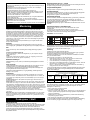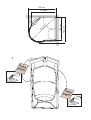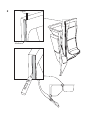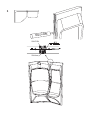
1
Lighting
Plumbing.
The lighting switches on and off automatically together with the steam generator, or can be
controlled manually by pressing the LIGHT button.
Plumbing work must be carried out by a qualified plumber.
Main switch
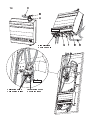
Figure 14
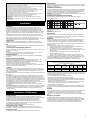
There is a main switch on the underside of the steam generator (F, fig.14) which should only
be used if the equipment is to be switched off for a lengthy period of time.
The CC panel’s memory function ceases to work if the power supply to the unit is interrupted.
Tylette steam generator
A = tee connector
B = capping nut
C = steam outlet
D = drainage connection
E = water connection with built-in filter
Settings.
Connecting the water: Connect the hot and cold water supply to the Tylette connection
hoses.
IMPORTANT! The pipes must be flushed clean before connecting the incoming water supply
to the Tylette.
This prevents swarf and other impurities from the pipes from entering the generator.
1
G
A B C D
1 = 2/4 Tylette
200–240 V~
Type Centre (4.5 kW)
200 – 208 – 230 – 240 V~
200–208 V~
230–240 V~
Amp mm² Amp mm² Awg
6
4
12
23
20
.
Manual on/off
Setting automatic start time (pre-set)
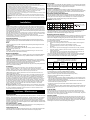
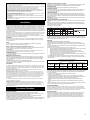
Electrical work is to be carried out only by a qualified electrician using the built-in relay box
(see wiring diagram). The internal connections between the relay box, steam generator and
solenoid valves are fitted prior to delivery. Connect the lighting to the terminal box located on
the roof dome, using the cable connected to the isolating transformer.
The Tylette is powered via a cable direct from the distribution box. Do not fit a switch or
contactor along this cable. (Please refer to the section ‘Automatic Emptying’.)
UK: Do not forget to earth the equipment.
200–208 V~
230–240 V~
Amp mm² Amp mm² Awg
11
2.5 10
1.5 14
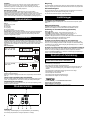
Press TEMP – the previous bathing temperature is displayed. If you wish to change the
temperature, use the arrow keys
Press ON to switch on (the diode lights up). Press OFF to switch off (the diode is no longer
lit). If you forget to switch off manually, the unit switches off automatically after 3 hours.
Electrical installation
Type Centre (2.2 kW)
200 – 208 – 230 – 240 V~
Setting the bathing temperature
1
G
A B C D
1 = 2/4 Tylette
(Do this when the unit is in the OFF mode)
Press TIME (the hour figures flash) – set the number of hours to the pre-set switch-on time
with the arrow keys.
Press TIME (the minute figures flash) – set the number of minutes pre-set with the arrow
keys.
(Important. The hour or minute figures must flash before you press ON.)
Press ON – the switch-on time is set. A red light diode flashes until the bathing cycle starts at
the pre-set time. The unit switches off automatically after 3 hours. You can also switch off the
unit at any time simply by pressing the OFF key.
Code lock to prevent settings from being changed.
First program as above, then wait at least 20 seconds. Press on the down arrow (Ø), hold it
down and press TEMP and TIME at the same time. The code lock, which prevents all
changing of settings, is now activated. To return to unlocked mode, press the down arrow (Ø),
hold it down and press OFF at the same time.
Code lock that only prevents changing of the temperature setting.
First program the temperature as above, then wait at least 20 seconds. Press TIME, hold it
down and press TEMP and LIGHT at the same time. The code lock, which prevents
changing of the temperature settings, is now activated. To return to unlocked mode, press
the down arrow (Ø), hold it down and press OFF at the same time.
200–240 V~
Type Centre (4.5 kW)
400 – 415 V 2N~
Amp mm² Awg
1.5 14
10
G
1
Checklist for faults.
A B C D
1 = 2/4 Tylette
L1 L2
N
400–415 V 2N~
WARNING. BEFORE DOING ANY WORK ON THE UNIT MAKE
SURE THAT THERE IS NO CURRENT IN THE EQUIPMENT.
Initial checks
Lighting
Lighting is controlled via the control panel.
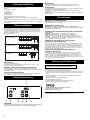
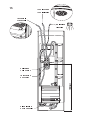
Connect to the terminal box marked max. 12V that is located in the service module (fig. 15).
Optional external ON/OFF switch (quick-break microswitch)
To be placed at any distance from the steam bath. Connect using a low-current cable to CC
Tylette – please refer to wiring diagram. If more than one external switch is used these are to
be connected in parallel.
Connection to a central computer
The unit can also be connected to a central controlling computer which sends a short impulse
between terminals 19 and 20 on the CC-Tylette.
Operating Instructions.
In the event of any malfunction, check:
• that the Tylette cabinet has been correctly wired in accordance with the wiring diagram.
• that the water filter is clean. (The filter is fitted to the connection for incoming water. To clean
the filter, disconnect the pipe joint, remove the filter and free it from any limescale and other
particles that have accumulated.)
• that the tap (if fitted) on the water pipe to the steam generator is not closed.
• that all the fuses in the fuse box are intact (or, if you have circuit breakers, that none has
been triggered).
• that the control panel setting is correct.
• that the inbuilt temperature limit control has not been activated.
• that the ventilation complies with our recommendations.
TYLÖ AB, Svarvaregatan 6, S-30250 Halmstad, Sweden.
Phone +46 35 100080, Fax +46 35 102580.
E-mail: [email protected], www.tylo.se
© This publication many not be reproduced, in part or in whole, without the written permission of Tylö. Tylö
reserves the right to make changes in materials, construction and design.
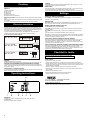
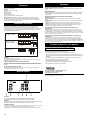
Functions
1 = lighting. 2 = on/off. 3 = temperature setting. 4 = time setting. 5 = reduce
temperature/time.
6 = increase temperature/time. 7 = display.
6