1
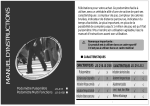
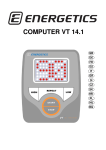
The display and it’s symbols
TIME / Time (min; sec)
CAL / Calories burned
SCAN
SP / Speed (km/h)
ODO / Odometer
accumulates total
distance (km).
DIST / Distance (km)
MODE – scans through
display functions
PULSE / Pulse
(beats per minute)
Button Functions
MODE
1. Press the button to select TIME, DISTANCE and CAL to preset.
2. Press the button to scan trough the values in the display (Time – Calories – Odometer – Pulse – Speed – Distance).
3. Press the button and hold for 2 seconds to reset all values to zero (except odometer).
Functions & Operations
Batteries Installation
Insert 2 pieces of AA 1.5 V batteries in the battery case on the back of monitor.
Whenever batteries are removed or replaced, all values will be reset to zero except for the odometer.
Auto On / Off
While the user starts to do exercise, the display will show the workout value automatically. If the computer does not
receive a signal for more than 4 minutes the display will turn off automatically. All values are reset to zero except for
the odometer which will accumulate the total distance continuously.
SCAN / Auto Scan
After the monitor is switched on, the LCD will display all values such as Time – Calories – Odometer – Pulse – Speed –
Distance alternating every 6 seconds.
SP / Speed
Read out of the current speed in kilometres per hour, range from 0.0 – 999.9.
4
www.energetics.eu