1
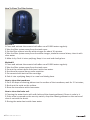
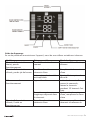
Trouble Shooting Guide
Any trouble found in normal operation, please kindly refer to the following points:
Trouble
Power lamp off, does
not work
Power lamp on, no
mist outlet with wind
Possible reasons
No power supply
No water in water tank
Abnormal smell mist
Security switch is too slight
New unit
Power lamp on, unit
doesn’t work
Dirty water or long time
staying water
Too much water in the
water basin
Mist fog is too small
Abnormal noise
Mist fog coming out
from around nozzle
Too much scale in the water
basin
Water is too dirty or water
kept too long in the tank
Resonant in water tank
when water is too less
Unit is on a unstable surface
There are gaps between the
nozzle and water tank
Shooting Way
Connect power supply,
switch on
Fill water into water tank
Make the switch tight
Take out water tank,
open cover, let it stay 12
hours in cool position
Cleaning water tank, fill
in clear water
Pull out same water from
the water basin, closed
the cover of water tank
tightly
Clean transducer
Clean water tank, change
to fresh clear water
Fill water into water tank
Move the unit to a stable
flat surface
Dip the nozzle in water
for a while and then fix
it to the socket on water
tank
Maintenance:
In case when the water is hard which means water contains too much calcium and
magnesium, they can cause “white powder” problem and give limes on the surface of water
basin, transducer and inner surface of the water tank. Limes on the surface of transducer
will unable the unit work properly.
We recommend:
1.Use cold boiled water or distilled water.
2.Clean the transducer, water tank and basin unit every week.
3.Change the water in water tank more often to keep it fresh.
4.Make sure to pull out the water from the water tank and dry the water basin before you
store the unit unused for a long period of time.
5.Clean the whole unit, and make sure that all parts of the unit are dried completely before
unused for a long period of time.
WHC750 User Manual I 9