1
Quick start instructions for connecting Peltor WS ProTac
headset with a mobile telephone
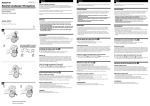
Synchronising (pairing) the Bluetooth units
1. All functions OFF at the WS ProTac headset. (If necessary remove and reinstall batteries.)
2. Press 8 seconds on the Bluetooth button on the left cup.
3. Search for new Bluetooth unit ”Peltor WS3” according to the
directions for use of your telephone.
4. End pairing by pressing the Bluetooth button until the LED indicator gives red light and an audio signal with 4 descending
tones is heard in the headset.
Activation
5. Activate the headset by pressing the Bluetooth button on the
left cup again for two seconds. If wanted, activate also the surround sound function on the right cup.
Turning off
6. If activated, shut off the surround sound function on the right
cup. Turn off the headset by pressing the Bluetooth button until
an audio signal with 4 descending tones is heard in the headset. (The LED indicator will also turn red when the deactivation
signal is heard.)
(C)
Usage times, WS ProTac headset
operating
Current
time
consumption
hours
mA
Mode
(average)
(average)
All functions turned off
–
0
Bluetooth only, standby
417
6
Bluetooth only, active
63
40
Surround+Bluetooth, standby
312
8
Surround+Bluetooth, active
59
42
All calculations are based on a
2500 mAH battery