1
Features
1.
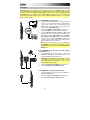
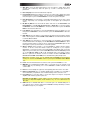
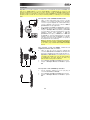
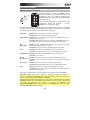
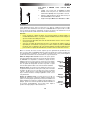
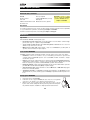
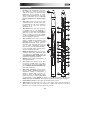
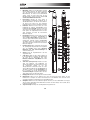
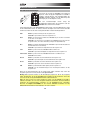
Mouthpiece: Hold the mouthpiece gently
in between your lips with your teeth and
exhale into it (like a traditional wind
instrument). You can produce a vibrato
effect by gently biting the mouthpiece
while blowing into it, but do not bite too
hard.
2.
Note Keys: Press these keys in different
combinations while blowing into the
mouthpiece to determine the note. You
can adjust the position of the three lowest
note keys by loosening their screws.
3.
4.
5.
6.
7.
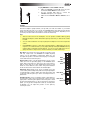
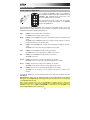
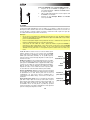
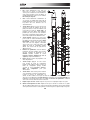
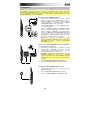
Hold Button: Press this button to enter
Hold Mode. By default, Hold Mode is set
to Legato (LE); the first note of a phrase
will sustain while you play subsequent
notes. While in Setup Mode, use this
button to navigate the different menus.
Interval Button: Press this button to enter
Interval Mode. By default, this is set to
Fixed Interval (Fd); when you play a note,
that note and the note at the assigned
interval will sound (an octave below, by
default). While in Setup Mode, use this
button to navigate the different menus.
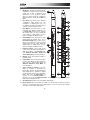
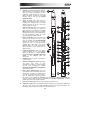
Parameter Knobs: These eight knobs
control some of the basic characteristics of
either the Program or the EWI5000 itself.
(See Advanced Functions: Sound and
Sensor Adjustment for more information.)
1
FILTER
7
BREATH
BITE
SEMI
FINE
REVERB
CHORUS
LFO
SETUP
TRANS.
5
6
8
9
10
2
11
12
3
13
9
4
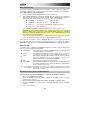
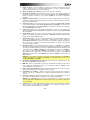
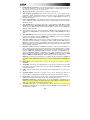
Display: Shows the Program number or
the setting value.
Setup Button: Press and hold this button
to enter Setup Mode. Its LED will light up
when you are in Setup Mode. Please see
Advanced Functions: Setup Mode for
more information.
15
17
14
FX
BANK
LEVEL
PRESET
SAVE
USER
WIRELESS
POWER
16
18
ON
19
OFF
MIDI OUT
20
PHONES
21
22
23
8.
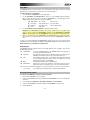
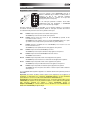
Trans (Transpose) Button: Press this
button to activate or deactivate the
transposition function. Its LED will light up
when transposition is activated. To adjust
the transposition value, press and hold this
25
24
button and press the Hold Button to
increase it or the Interval Button to
decrease it. To access the Parameter Knobs' secondary functions, press and hold this
button before turning the knobs.
9.
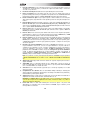
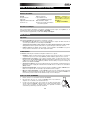
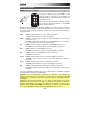
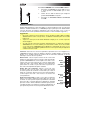
Grounding Plate: Always touch these plates while playing.
10. Octave Rollers: Move your thumb up or down over these rollers to shift the note keys'
range. You can shift them up to four octaves higher or up to two octaves lower. Always
touch these octave rollers while playing.
6