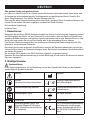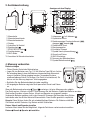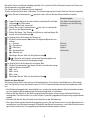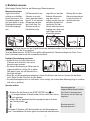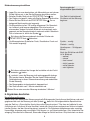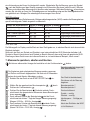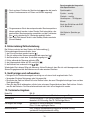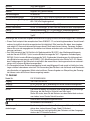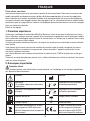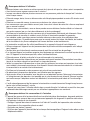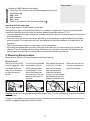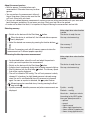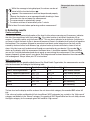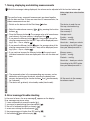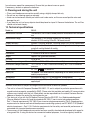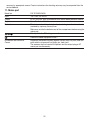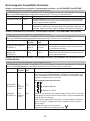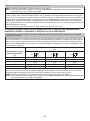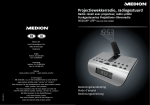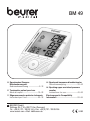
1
BM 49 D Sprechendes Oberarm- Blutdruckmessgerät Gebrauchsanweisung ......................2 – 12 O Sprekende bovenarm-bloeddrukmeter Gebruiksaanwijzing....................... 33 – 42 F Tensiomètre parlant pour bras Mode d’emploi............................... 13 – 22 G Speaking upper arm blood pressure monitor Instructions for use ....................... 43 – 52 I Sfigmomanometro parlante da braccio Instruzioni per l’uso....................... 23 – 32 Electromagnetic Compatibility Information .......................................... 53 – 54 BEURER GmbH Söflinger Str. 218 • 89077 Ulm (Germany) Tel.: +49 (0) 731 / 39 89-144 • Fax: +49 (0) 731 / 39 89-255 www.beurer.com • Mail: [email protected] 0483 DEUTSCH Sehr geehrte Kundin, sehr geehrter Kunde, wir freuen uns, dass Sie sich für ein Produkt unseres Sortimentes entschieden haben. Unser Name steht für hochwertige und eingehend geprüfte Qualitätsprodukte aus den Bereichen Wärme, Gewicht, Blutdruck, Körpertemperatur, Puls, Sanfte Therapie, Massage und Luft. Bitte lesen Sie diese Gebrauchsanleitung aufmerksam durch, bewahren Sie sie für späteren Gebrauch auf, machen Sie sie anderen Benutzern zugänglich und beachten Sie die Hinweise. Mit freundlicher Empfehlung Ihr Beurer-Team 1. Kennenlernen Überprüfen Sie das Beurer BM 49 Blutdruckmessgerät auf äußere Unversehrtheit der Verpackung und auf die Vollständigkeit des Inhalts. Vor dem Gebrauch ist sicherzustellen, dass das Gerät und Zubehör keine sichtbaren Schäden aufweisen und jegliches Verpackungsmaterial entfernt wird. Benutzen Sie es im Zweifelsfall nicht und wenden Sie sich an Ihren Händler oder an die angegebene Service-Adresse. Das Oberarm-Blutdruckmessgerät dient zur nichtinvasiven Messung und Überwachung arterieller Blutdruckwerte von erwachsenen Menschen. Sie können damit schnell und einfach Ihren Blutdruck messen, die Messwerte abspeichern und sich den Verlauf und Durchschnitt der Messwerte anzeigen lassen. Bei eventuell vorhandenen Herzrhythmusstörungen werden Sie gewarnt. Die ermittelten Werte werden nach WHO-Richtlinien eingestuft und grafisch beurteilt. Bewahren Sie diese Gebrauchsanweisung für weitere Benutzung auf und machen Sie diese auch anderen Benutzern zugänglich. 2. Wichtige Hinweise Zeichenerklärung In der Gebrauchsanweisung, auf der Verpackung und auf dem Typschild des Geräts und des Zubehörs werden folgende Symbole verwendet: Vorsicht Hersteller Hinweis Hinweis auf wichtige Informationen Storage 50°C -20°C Gebrauchsanweisung beachten RH ≤85% Operating +40°C +10°C RH ≤85% Anwendungsteil Typ BF Zulässige Lagerungstemperatur und -luftfeuchtigkeit Zulässige Betriebstemperatur und -luftfeuchtigkeit Vor Nässe schützen Gleichstrom SN Entsorgung gemäß Elektro- und Elektronik-Altgeräte EG-Richtlinie WEEE (Waste Electrical and Electronic Equipment) Seriennummer Die CE-Kennzeichnung bescheinigt die Konformität mit den grundlegenden Anforderungen der Richtlinie 93/42/EWG für Medizinprodukte. 2 Hinweise zur Anwendung • Um eine Vergleichbarkeit der Werte zu gewährleisten, messen Sie Ihren Blutdruck immer zu gleichen Tageszeiten. • Ruhen Sie sich vor jeder Messung ca. 5 Minuten aus! • Wenn Sie mehrere Messungen an einer Person durchführen möchten, warten Sie zwischen den einzelnen Messungen jeweils 5 Minuten. • Mindestens 30 Minuten vor der Messung sollten Sie nicht essen, trinken, rauchen oder sich körperlich betätigen. • Wiederholen Sie die Messung im Falle zweifelhaft gemessener Werte. • Die von Ihnen selbst ermittelten Messwerte können nur zu Ihrer Information dienen – sie ersetzen keine ärztliche Untersuchung! Besprechen Sie Ihre Messwerte mit dem Arzt, begründen Sie daraus auf keinen Fall eigene medizinische Entscheidungen (z.B. Medikamente und deren Dosierungen)! • Verwenden Sie das Blutdruckmessgerät nicht bei Neugeborenen und Präeklampsie-Patientinnen. Vor Anwendung des Blutdruckmessgerätes in der Schwangerschaft empfehlen wir eine Abstimmung mit dem Arzt. • Erkrankungen des Herz-Kreislaufsystems können zu Fehlmessungen bzw. zu Beeinträchtigungen der Messgenauigkeit führen. Ebenso der Fall ist dies bei sehr niedrigem Blutdruck, Diabetes, Durchblutungs- und Rhythmusstörungen sowie bei Schüttelfrost oder Zittern. • Das Blutdruckmessgerät darf nicht im Zusammenhang mit einem Hochfrequenz-Chirurgiegerät verwendet werden. • Verwenden Sie das Gerät nur bei Personen mit dem für das Gerät angegebenen Umfangbereich des Oberarmes. • Beachten Sie, dass es während des Aufpumpens zu einer Funktionsbeeinträchtigung des betroffenen Gliedmaßes kommen kann. • Die Blutzirkulation darf durch die Blutdruckmessung nicht unnötig lange unterbunden werden. Bei einer Fehlfunktion des Gerätes nehmen Sie die Manschette vom Arm ab. • Vermeiden Sie das mechanische Einengen, Zusammendrücken oder Abknicken des Manschettenschlauches. • Verhindern Sie einen anhaltenden Druck in der Manschette sowie häufige Messungen. Eine dadurch resultierende Beeinträchtigung des Blutflusses kann zu Verletzungen führen. • Achten Sie darauf, dass die Manschette nicht an einem Arm angelegt wird, dessen Arterien oder Venen in medizinischer Behandlung sind, z.B. intravaskulärer Zugang bzw. eine intravaskuläre Therapie oder ein arteriovenöser (A-V-) Nebenschluss. • Legen Sie die Manschette nicht bei Personen an, die eine Brustamputation hatten. • Legen Sie die Manschette nicht über Wunden an, da dies zu weiteren Verletzungen führen kann. • Sie können das Blutdruckmessgerät mit Batterien oder mit einem Netzteil betreiben. Beachten Sie, dass eine Datenübertragung und Datenspeicherung nur möglich ist, wenn Ihr Blutdruckmessgerät Strom erhält. Sobald die Batterien verbraucht sind oder das Netzteil vom Stromnetz getrennt wird, verliert das Blutdruckmessgerät Datum und Uhrzeit. • Die Abschaltautomatik schaltet das Blutdruckmessgerät zur Schonung der Batterien aus, wenn innerhalb 1 Minute keine Taste betätigt wird. • Das Gerät ist nur für den in dieser Gebrauchsanweisung beschriebenen Zweck vorgesehen. Der Hersteller haftet nicht für Schäden, die durch unsachgemäßen oder falschen Gebrauch verursacht wurden. 3 Hinweise zur Aufbewahrung und Pflege • Das Blutdruckmessgerät besteht aus Präzisions- und Elektronik-Bauteilen. Die Genauigkeit der Messwerte und Lebensdauer des Gerätes hängt ab vom sorgfältigen Umgang: – Schützen Sie das Gerät vor Stößen, Feuchtigkeit, Schmutz, starken Temperaturschwankungen und direkter Sonneneinstrahlung. – Lassen Sie das Gerät nicht fallen. – Benutzen Sie das Gerät nicht in der Nähe von starken elektromagnetischen Feldern, halten Sie es fern von Funkanlagen oder Mobiltelefonen. – Verwenden Sie nur die mitgelieferte oder originale Ersatz-Manschetten. Ansonsten werden falsche Messwerte ermittelt. • Drücken Sie nicht auf Tasten, solange die Manschette nicht angelegt ist. • Falls das Gerät über einen längeren Zeitraum nicht benutzt wird, wird empfohlen, die Batterien zu entfernen. Hinweise zu Batterien • Batterien können bei Verschlucken lebensgefährlich sein. Bewahren Sie deshalb Batterien und Produkte für Kleinkinder unerreichbar auf. Wurde eine Batterie verschluckt, muss sofort medizinische Hilfe in Anspruch genommen werden. • Batterien dürfen nicht geladen oder mit anderen Mitteln reaktiviert, nicht auseinandergenommen, in Feuer geworfen oder kurzgeschlossen werden. • Nehmen Sie die Batterien aus dem Gerät heraus, wenn diese verbraucht sind oder Sie das Gerät länger nicht benutzen. So vermeiden Sie Schäden, die durch Auslaufen entstehen können. Ersetzen Sie immer alle Batterien gleichzeitig. • Benutzen Sie keine verschiedenen Batterie-Typen, Batterie-Marken oder Batterien mit unterschiedlicher Kapazität. Verwenden Sie vorzugsweise Alkaline-Batterien. Hinweise zu Reparatur und Entsorgung • Batterien gehören nicht in den Hausmüll. Bitte entsorgen Sie die verbrauchten Batterien an den dafür vorgesehenen Sammelstellen. • Öffnen Sie nicht das Gerät. Bei Nichtbeachten erlischt die Garantie. • Das Gerät darf nicht selbst repariert oder justiert werden. Eine einwandfreie Funktion ist in diesem Fall nicht mehr gewährleistet. • Reparaturen dürfen nur vom Kundenservice oder autorisierten Händlern durchgeführt werden. Prüfen Sie jedoch vor jeder Reklamation zuerst die Batterien und tauschen Sie diese gegebenenfalls aus. • Bitte entsorgen Sie das Gerät gemäß der Elektro- und Elektronik-Altgeräte-EG-Richtlinie WEEE (Waste Electrical and Electronic Equipment). Bei Rückfragen wenden Sie sich bitte an die für die Entsorgung zuständige kommunale Behörde. 4 3. Gerätebeschreibung 2 1 Anzeigen auf dem Display: 3 4 10 1 11 10 2 3 5 9 4 6 8 7 5 9 6 8 1. Manschette 2. Manschettenschlauch 3. Manschettenstecker 4. Display 5. Anschluss für Netzteil 6. Speichertaste 7. START/STOPP-Taste 8. Funktionstasten 9. WHO-Skala 10. Anschluss für Manschettenstecker 7 1. Aufpumpen , Luft ablassen 2. Systolischer Druck 3. Speicheranzeige: Durchschnittswert ( morgens ( ), abends ( ) 4. Diastolischer Druck 5. Benutzerspeicher 6. Ermittelter Pulswert 7. Symbol Herzrhythmusstörung 8. Uhrzeit und Datum 9. WHO-Einstufung 10. Nummer des Speicherplatzes 11. Symbol Batteriewechsel ), 4. Messung vorbereiten Batterie einlegen • Öffnen Sie den Deckel des Batteriefaches. • Legen Sie vier Batterien vom Typ 1,5 V AA (Alkaline Type LR6) ein. Achten Sie unbedingt darauf, dass die Batterien entsprechend der Kennzeichnung mit korrekter Polung eingelegt werden. Verwenden Sie keine wiederaufladbaren Akkus. Die Ansage „Das Gerät ist betriebsbereit, Sie können mit der Messung beginnen“ wird ausgegeben. • Schließen Sie den Batteriefachdeckel wieder sorgfältig. • Mit eingelegten Batterien zeigt das Gerät permanent Uhrzeit und Datum an. 4 x AA (LR6) 1,5 V und erscheinen, ist keine Messung mehr möglich. Wenn die Batteriewechselanzeige Das Gerät sagt an: „Batterie schwach.“ Bitte erneuern Sie alle Batterien. Sobald die Batterien aus dem Gerät entfernt werden, müssen Datum, Uhrzeit und Sprache neu eingestellt werden. Verbrauchte Batterien gehören nicht in den Hausmüll. Entsorgen Sie diese über Ihren Elektrofachhändler oder Ihre örtliche Wertstoff-Sammelstelle. Dazu sind Sie gesetzlich verpflichtet. Hinweis: Diese Zeichen finden Sie auf schadstoffhaltigen Batterien: Pb: Batterie enthält Blei, Cd: Batterie enthält Cadmium, Hg: Batterie enthält Quecksilber. Datum, Uhrzeit und Sprache einstellen In diesem Menü haben Sie die Möglichkeit, folgende Funktionen nacheinander einzustellen: Datum Uhrzeit Sprache Lautstärke 5 Sie sollten Datum und Uhrzeit unbedingt einstellen. Nur so können Sie Ihre Messwerte korrekt mit Datum und Uhrzeit speichern und später abrufen. Die Uhrzeit wird im 24-Stunden-Format dargestellt. Zudem verfügt das Gerät über 4 Sprachen. Im Auslieferungszustand ist das Gerät auf Deutsch eingestellt. Sprache Datum / Uhrzeit Wenn Sie die Funktionstasten gedrückt halten, können Sie die Werte schneller einstellen. • Legen Sie die Batterien ein oder drücken und halten Sie die Speichertaste für 5 Sekunden. Im Display blinkt die Jahreszahl. • Stellen Sie mit den Funktionstasten das Jahr ein und bestätigen Sie mit der Speichertaste . • Stellen Sie Monat, Tag, Stunde und Minute ein und bestätigen Sie jeweils mit der Speichertaste . Im Display blinkt die Anzeige der Sprache . • Mit den Funktionstasten können Sie folgende Sprachen auswählen: = Deutsch = Französisch = Italienisch = Niederländisch = Sprache aus Sprachausgabe Das Gerät ist betriebsbereit, Sie können mit der Messung beginnen. Deutsch Français Italiano Nederlands Lautstärke Bestätigen Sie Ihre Wahl mit der Speichertaste . = Sprache aus bedeutet, dass keine Sprachausgabe und damit keine akustische Wiedergabe erfolgt. Im Display blinkt die Anzeige der Lautstärke Vo1. • Mit den Funktionstasten können Sie die Lautstärke der ausgewählten Sprache einstellen: Vo3 = laut Vo2 = mittel Vo1 = leise Bestätigen Sie Ihre Wahl mit der Speichertaste . Betrieb mit dem Netzteil Sie können dieses Gerät auch mit einem Netzteil betreiben. Dazu dürfen keine Batterien im Batteriefach sein. Das Netzteil ist unter der Bestellnummer 071.60 im Fachhandel oder bei der Serviceadresse erhältlich. • Das Blutdruckmessgerät darf ausschließlich nur mit dem hier beschriebenen Netzteil betrieben werden, um eine mögliche Beschädigung des Blutdruckmessgerätes zu verhindern. • Stecken Sie das Netzteil in den dafür vorgesehenen Anschluss auf der rechten Seite des Blutdruckmessgerätes. Das Netzteil darf nur an die auf dem Typschild angegebene Netzspannung angeschlossen werden. • Schließen Sie danach den Netzstecker des Netzteils an die Steckdose an. • Nach dem Gebrauch des Blutdruckmessgerätes trennen Sie das Netzteil zuerst von der Steckdose und anschließend vom Blutdruckmessgerät. Sobald Sie das Netzteil ausstecken, verliert das Blutdruckmessgerät Datum und Uhrzeit. Die gespeicherten Messwerte bleiben jedoch erhalten. 6 5. Blutdruck messen Bitte bringen Sie das Gerät vor der Messung auf Raumtemperatur. Manschette anlegen Legen Sie die Manschette am entblößten linken Oberarm an. Die Durchblutung des Arms darf nicht durch zu enge Kleidungsstücke oder Ähnliches eingeengt sein. Die Manschette ist am Oberarm so zu platzieren, dass der untere Rand 2 – 3 cm über der Ellenbeuge und über der Arterie liegt. Der Schlauch weist zur Handflächenmitte. Legen Sie nun das freie Ende der Manschette eng, aber nicht zu stramm um den Arm und schließen Sie den Klettverschluss. Die Manschette sollte so stramm angelegt sein, dass noch zwei Finger unter die Manschette passen. Stecken Sie nun den Manschettenschlauch in den Anschluss für den Manschetten stecker. Achtung: Das Gerät darf nur mit der Original-Manschette betrieben werden. Die Manschette ist für einen Armumfang von 22 bis 36 cm geeignet. Unter der Bestellnummer 163.387 ist eine größere Manschette für Oberarmumfänge von 35 bis 44 cm beim Fachhandel oder bei der Serviceadresse erhältlich. Richtige Körperhaltung einnehmen • Ruhen Sie sich vor jeder Messung ca. 5 Minuten aus! Ansonsten kann es zu Abweichungen kommen. • Sie können die Messung im Sitzen oder im Liegen durchführen. Achten Sie in jedem Falle darauf, dass sich die Manschette in Herzhöhe befindet. • Sitzen Sie zur Blutdruckmessung bequem. Lehnen Sie Rücken und Arme an. Kreuzen Sie die Beine nicht. Stellen Sie die Füße flach auf den Boden. • Um das Messergebnis nicht zu verfälschen, ist es wichtig, sich während der Messung ruhig zu verhalten und nicht zu sprechen. Speicher wählen Sprachausgabe bei eingeschalteter Sprachfunktion Benutzerspeicher • Schalten Sie das Gerät mit der START/STOPP-Taste ein. Im ausgeschalteten Zustand werden Uhrzeit und Datum permanent angezeigt. • Wählen Sie den gewünschten Benutzerspeicher durch Drücken der Funktionstasten . Sie haben 2 Speicher á 60 Speicherplätze um die Messergebnisse von 2 verschiedenen Personen getrennt voneinander abzuspeichern. 7 Das Gerät ist betriebsbereit, Sie können mit der Messung beginnen. Benutzerspeicher 1 Benutzerspeicher 2 Blutdruckmessung durchführen Sprachausgabe bei eingeschalteter Sprachfunktion • Legen Sie, wie zuvor beschrieben, die Manschette an und nehmen Sie die Haltung ein, in der Sie die Messung durchführen wollen. • Schalten Sie das Gerät mit der START/STOPP-Taste ein. • Das Display wird geprüft, indem alle Display-Segmente aufleuchten. • Starten Sie das Gerät mit der START/STOPP-Taste . Der zu belegende Speicherplatz wird angezeigt. • Die Manschette wird auf 190 mmHg aufgepumpt. Der Manschetten-Luftdruck wird langsam abgelassen. Bei einer bereits zu erkennenden Tendenz zu hohem Blutdruck wird nochmals nachgepumpt und der Manschettendruck nochmals erhöht. Sobald ein Puls zu erkennen ist, blinkt das Symbol . Sie können die Messung jederzeit durch das Drücken der START/STOPP-Taste abbrechen. • Die Messergebnisse Systolischer Druck, Diastolischer Druck und Puls werden angezeigt. Das Gerät ist betriebsbereit, Sie können mit der Messung beginnen. Systole ... mmHg Diastole ... mmHg Messung Herzfrequenz ... Schläge pro Minute Nach den Richtlinien der WHO ist Ihr Blutdruck – optimal – normal – hoch normal – leicht hyperton – mittel hyperton – stark hyperton ie können während der Ansage die Lautstärke mit den FunktiS onstasten ändern. • erscheint, wenn die Messung nicht ordnungsgemäß durchgeführt werden konnte. Beachten Sie das Kapitel Fehlermeldung/ Fehlerbehebung in dieser Gebrauchsanweisung und wiederholen Sie die Messung. • Das Messergebnis wird automatisch abgespeichert. • Das Gerät schaltet nach 1 Minute automatisch ab. Warten Sie vor einer erneuten Messung mindestens 5 Minuten! 6. Ergebnisse beurteilen Herzrhythmusstörungen: Dieses Gerät kann während der Messung eventuelle Störungen des Herzrhythmus identifizieren und weist darauf hin. Bei eingeschalteter Sprachfunktion gegebenenfalls nach der Messung mit dem Symbol sagt das Gerät an: „Eine mögliche Herzrhythmusstörung wurde erkannt.“ Dies kann ein Indikator für eine Arrhythmie sein. Arrhythmie ist eine Krankheit, bei der der Herzrhythmus aufgrund von Fehlern im bioelektrischen System, das den Herzschlag steuert, anormal ist. Die Symptome (ausgelassene oder vorzeitige Herzschläge, langsamer oder zu schneller Puls) können u.a. von Herzerkrankungen, Alter, körperlicher Veranlagung, Genussmittel im Übermaß, Stress oder Mangel an Schlaf herrühren. Arrhythmie kann nur durch 8 eine Untersuchung bei Ihrem Arzt festgestellt werden. Wiederholen Sie die Messung, wenn das Symbol nach der Messung auf dem Display angezeigt wird. Bitte achten Sie darauf, dass Sie sich 5 Minuten ausruhen und während der Messung nicht sprechen oder bewegen. Sollte das Symbol oft erscheinen, wenden Sie sich bitte an Ihren Arzt. Selbstdiagnose und -behandlung aufgrund der Messergebnisse können gefährlich sein. Befolgen Sie unbedingt die Anweisungen Ihres Arztes. WHO-Einstufung: Gemäß den Richtlinien/Definitionen der Weltgesundheitsorganisation (WHO) werden die Messergebnisse gemäß nachfolgender Tabelle eingestuft und beurteilt: Bereich der Blutdruckwerte Stufe 3: starke Hypertonie Stufe 2: mittlere Hypertonie Stufe 1: leichte Hypertonie Hoch Normal Normal Optimal Systole (in mmHg) ≥ 180 160 – 179 140 – 159 130 – 139 120 – 129 < 120 Diastole (in mmHg) ≥ 110 100 – 109 90 – 99 85 – 89 80 – 84 < 80 Maßnahme einen Arzt aufsuchen einen Arzt aufsuchen regelmäßige K ontrolle beim Arzt regelmäßige K ontrolle beim Arzt Selbstkontrolle Selbstkontrolle Quelle: WHO, 1999 Die Balkengrafik im Display und die Skala auf dem Gerät geben an, in welchem Bereich sich der ermittelte Blutdruck befindet. Sollte sich der Wert von Systole und Diastole in zwei unterschiedlichen WHO-Bereichen befinden (z.B. Systole im Bereich Hoch normal und Diastole im Bereich Normal) dann zeigt Ihnen die graphische WHOEinteilung auf dem Gerät immer den höheren Bereich an, im beschriebenen Beispiel „Hoch normal“. 7. Messwerte speichern, abrufen und löschen Sie können während der Ansage die Lautstärke mit den Funktionstasten ändern. Durchschnittswerte Benutzerspeicher Sprachausgabe bei eingeschalteter Sprachfunktion Die Ergebnisse jeder erfolgreichen Messung werden zusammen mit Datum und Uhrzeit abgespeichert. Bei mehr als 60 Messdaten gehen die jeweils ältesten Messdaten verloren. • Schalten Sie das Gerät mit der START/STOPP-Taste ein. • Wählen Sie den gewünschten Benutzerspeicher ( … ) durch Drücken der Funktionstasten . • Drücken Sie die Speichertaste . Zunächst wird der Durchschnittswert aller gespeicherten Messwerte dieses Benutzerspeichers angezeigt . • Durch weiteres Drücken der Speichertaste wird der Durchschnittswert der letzten 7 Tage der Morgen-Messung angezeigt (Morgen: 5.00 Uhr – 9.00 Uhr, Anzeige ). • Durch weiteres Drücken der Speichertaste wird der Durchschnittswert der letzten 7 Tage der Abend-Messung angezeigt (Abend: 18.00 Uhr – 20.00 Uhr, Anzeige ). 9 Das Gerät ist betriebsbereit, Sie können mit der Messung beginnen. Benutzerspeicher 1 Benutzerspeicher 2 Durchschnittswert: Systole ... mmHg Diastole ... mmHg Herzfrequenz ... Schläge pro Minute Nach den Richtlinien der WHO ist Ihr Blutdruck ... Messwerte löschen Einzelmesswerte Sprachausgabe bei eingeschalteter Sprachfunktion • Durch weiteres Drücken der Speichertaste werden die jeweils letzten Einzelmesswerte mit Datum und Uhrzeit angezeigt. Speicherplatz ... Systole ... mmHg Diastole ... mmHg Herzfrequenz ... Schläge pro Minute Nach den Richtlinien der WHO ist Ihr Blutdruck ... • Die gemessenen Werte des entsprechenden Benutzerspeichers können gelöscht werden, indem Sie das Gerät einschalten, den gewünschten Benutzerspeicher auswählen und die Funktionstasten und gleichzeitig für 5 Sekunden gedrückt halten. • Das Gerät wird danach direkt in den Standby-Modus wechseln (Uhrzeit-Modus). Alle Werte im Speicher gelöscht! 8. Fehlermeldung/Fehlerbehebung Bei Fehlern erscheint auf dem Display die Fehlermeldung _. Fehlermeldungen können auftreten, wenn 1. der Puls nicht erfasst werden konnte ( ), 2. Sie sich während der Messung bewegen oder sprechen ( ), 3. die Manschette zu stark bzw. zu schwach angelegt ist ( ), 4. Fehler während der Messung auftreten ( ), 5. der Aufpumpdruck höher als 300 mmHg ist ( ), 6. die Batterien fast verbraucht sind ( ). Wiederholen Sie in diesen Fällen die Messung. Achten Sie darauf, dass Sie sich nicht bewegen oder reden. Setzen Sie gegebenenfalls die Batterien neu ein oder ersetzen Sie diese. 9. Gerät reinigen und aufbewahren • Reinigen Sie Ihr Blutdruckmessgerät vorsichtig nur mit einem leicht angefeuchteten Tuch. • Verwenden Sie keine Reinigungs- oder Lösungsmittel. • Sie dürfen das Gerät auf keinen Fall unter Wasser halten, da sonst Flüssigkeit eindringen kann und das Gerät beschädigt. • Wenn Sie das Gerät aufbewahren, dürfen keine schweren Gegenstände auf dem Gerät stehen. Entnehmen Sie die Batterien. Der Manschettenschlauch darf nicht scharf abgeknickt werden. 10. Technische Angaben Modell-Nr. Messmethode Messbereich Genauigkeit der Anzeige Messunsicherheit BM 49 Oszillometrisch, nicht invasive Blutdruckmessung am Oberarm Manschettendruck 0 – 300 mmHg, systolisch 50-250 mmHg, diastolisch 30-200 mmHg, Puls 30 –180 Schläge /Minute systolisch ± 3 mmHg, diastolisch ± 3 mmHg, Puls ± 5 % des angezeigten Wertes max. zulässige Standardabweichung gemäß klinischer Prüfung: systolisch 8 mmHg / diastolisch 8 mmHg 10 Speicher Abmessungen Gewicht Manschettengröße Zul. Betriebsbedingungen Zul. Aufbewahrungsbedingungen Stromversorgung Batterie-Lebensdauer Zubehör Klassifikation 2x60 Speicherplätze L 145 mm x B 96 mm x H 60 mm Ungefähr 264 g (ohne Batterien) 22 bis 36 cm +10 °C bis +40 °C, ≤ 85 % relative Luftfeuchte (nicht kondensierend) -20 °C bis +50 °C, ≤ 85 % relative Luftfeuchte, 800 –1050 hPa Umgebungsdruck 4 x 1,5 V Batterien AA (Alkaline Type LR6) Für ca. 250 Messungen, je nach Höhe des Blutdrucks bzw. Aufpumpdrucks Gebrauchsanweisung, 4 x 1,5 V AA Batterien, Aufbewahrungstasche Interne Versorgung, IPX0, kein AP oder APG, Dauerbetrieb, Anwendungsteil Typ BF Änderungen der technischen Angaben ohne Benachrichtigung sind aus Aktualisierungsgründen vorbehalten. • Dieses Gerät entspricht der europäischen Norm EN60601-1-2 und unterliegt besonderen Vorsichtsmaßnahmen hinsichtlich der elektromagnetischen Verträglichkeit. Bitte beachten Sie dabei, dass tragbare und mobile HF-Kommunikationseinrichtungen dieses Gerät beeinflussen können. Genauere Angaben können Sie unter der angegebenen Kundenservice-Adresse anfordern oder am Ende der Gebrauchsanweisung nachlesen. • Das Gerät entspricht der EU-Richtlinie für Medizinprodukte 93/42/EC, dem Medizinproduktegesetz und den Normen EN1060-1 (nicht invasive Blutdruckmessgeräte Teil 1: Allgemeine Anforderungen), EN1060-3 (nicht invasive Blutdruckmessgeräte Teil 3: Ergänzende Anforderungen für elektromechanische Blutdruckmesssysteme) und IEC80601-2-30 (Medizinische elektrische Geräte Teil 2 – 30: Besondere Festlegungen für die Sicherheit einschließlich der wesentlichen Leistungsmerkmale von automatisierten nicht invasiven Blutdruckmessgeräten). • Die Genauigkeit dieses Blutdruckmessgerätes wurde sorgfältig geprüft und wurde im Hinblick auf eine lange nutzbare Lebensdauer entwickelt. Bei Verwendung des Gerätes in der Heilkunde sind Messtechnische Kontrollen mit geeigneten Mitteln durchzuführen. Genaue Angaben zur Überprüfung der Genauigkeit können unter der Service-Adresse angefragt werden. 11. Netzteil Modell Nr. Eingang Ausgang Hersteller Schutz FW 7575M/EU/6/06 100 – 240 V, 50 – 60 Hz 6 V DC, 600 mA, nur in Verbindung mit Beurer Blutdruckmessgeräten Friwo Gerätebau GmbH Das Gerät ist doppelt schutzisoliert und verfügt über eine primärseitige Sicherung, die das Gerät im Fehlerfall vom Netz trennt. Stellen Sie sicher, dass Sie die Batterien aus dem Batteriefach entnommen haben, bevor Sie das Netzteil benutzen. Polarität des Gleichspannungsanschlusses Schutzisoliert / Schutzklasse 2 Gehäuse und Schutz abdeckungen Das Netzteilgehäuse schützt vor Berührung von Teilen, die unter Strom stehen bzw. stehen können (Finger, Nadel, Prüfhaken). Der Anwender darf nicht gleichzeitig den Patienten und den Ausgangsstecker des DC-Netzteils berühren. 11 12. Garantie / Service Wir leisten 3 Jahre Garantie für Material- und Fabrikationsfehler des Produktes. Die Garantie gilt nicht: • im Falle von Schäden, die auf unsachgemäßer Bedienung beruhen, • für Verschleißteile, • für Mängel, die dem Kunden bereits beim Kauf bekannt waren, • bei Eigenverschulden des Kunden. Die gesetzlichen Gewährleistungen des Kunden bleiben durch die Garantie unberührt. Für Geltend machung eines Garantiefalles innerhalb der Garantiezeit ist durch den Kunden der Nachweis des Kaufes zu führen. Die Garantie ist innerhalb eines Zeitraumes von 3 Jahren ab Kaufdatum gegenüber der Beurer GmbH, Söflinger Straße 218, 89077 Ulm, Germany geltend zu machen. Der Kunde hat im Garantiefall das Recht zur Reparatur der Ware bei unseren eigenen oder bei von uns autorisierten Werkstätten. Weitergehende Rechte werden dem Kunden (aufgrund der Garantie) nicht eingeräumt. 12 FRANÇAIS Chère cliente, cher client, nous sommes heureux que vous ayez choisi un produit de notre assortiment. Notre nom est synonyme de produits de qualité haut de gamme ayant subi des vérifications approfondies, ils trouvent leur application dans le domaine de la chaleur, du contrôle du poids, de la pression artérielle, de la mesure de température du corps et du pouls, des thérapies douces, des massages et de l’air. Lisez attentivement ce mode d’emploi, conservez-le pour un usage ultérieur, mettez-le à la disposition des autres utilisateurs et suivez les consignes. Avec nos sentiments dévoués Beurer et son équipe 1. Premières expériences Vérifiez que l‘emballage du tensiomètre BM 49 de Beurer est intact et que tous les éléments sont inclus. Avant l‘utilisation, assurez-vous que l‘appareil et les accessoires ne présentent aucun dommage visible et que la totalité de l‘emballage a bien été retirée. En cas de doute, ne l’utilisez pas et adressez-vous à votre revendeur ou au service client indiqué. Le lecteur de tension artérielle au bras sert à la mesure non invasive et au contrôle de la tension artérielle chez l’adulte. Vous pouvez ainsi mesurer votre tension artérielle de manière simple et rapide, enregistrer les valeurs mesurées et afficher la courbe et la moyenne des valeurs mesurées. L’appareil vous prévient en cas d’arythmie cardiaque éventuelle. Les valeurs obtenues sont classées conformément aux directives de l’OMS et évaluées sur le plan graphique. Conservez ce mode d’emploi pour pouvoir vous y référer ultérieurement et faites en sorte qu’il soit accessible aux autres utilisateurs. 2. Remarques importantes Symboles utilisés Les symboles suivants sont utilisés dans le mode d’emploi, sur l’emballage et sur la plaque signalétique de l’appareil et des accessoires : Attention Fabricant Remarque Ce symbole indique des informations importantes. Storage 50°C -20°C Respectez les consignes du mode d’emploi Température et taux d’humidité de stockage admissibles RH ≤85% Operating +40°C +10°C RH ≤85% Appareil de type BF Température et taux d’humidité d’utilisation admissibles Protéger contre l’humidité Courant continu SN Élimination conformément à la directive européenne DEEE relative aux déchets d’équipements électriques et électroniques Numéro de série Le sigle CE atteste de la conformité aux exigences fondamentales de la directive 93/42/CEE relative aux dispositifs médicaux. 13 Remarques relatives à l’utilisation • Mesurez toujours votre tension au même moment de la journée afin que les valeurs soient comparables. • Avant toute mesure, reposez-vous environ 5 minutes ! • Lorsque vous devez effectuer plusieurs mesures sur une personne, patientez à chaque fois 5 minutes entre chaque mesure. • Évitez de manger, boire, fumer ou d’exercer des activités physiques pendant au moins 30 minutes avant la mesure. • Effectuez une nouvelle mesure si vous avez un doute sur les valeurs mesurées. • Les mesures que vous avez établies servent juste à vous tenir informé de votre état- elles ne remplacent pas un examen médical ! Parlez-en avec votre médecin, vous ne devez prendre aucune décision d’ordre médical sur la base de ces seules mesures (par ex. choix de médicaments et de leurs dosages) ! • N’utilisez pas le tensiomètre sur des nouveaux-nés et les patientes atteintes de pré-éclampsie. Nous recommandons de consulter le médecin avant d’utiliser le tensiomètre pendant la grossesse. • Les maladies cardio-vasculaires peuvent entraîner des erreurs de mesure, plus précisément des mesures imprécises. Ce problème se pose aussi en cas de tension très basse, de diabète, de troubles de la circulation et du rythme cardiaque et de frissons de fièvre ou de tremblements. • Le tensiomètre ne doit pas être utilisé parallèlement à un appareil chirurgical haute fréquence. • Utilisez uniquement l’appareil sur des personnes dont le périmètre du bras correspond à celui indiqué pour l’appareil. • Veuillez noter que la fonction du membre concerné peut être entravée lors du gonflage. • Il ne faut pas bloquer la circulation sanguine plus longtemps que nécessaire au cours de la prise de tension. Si l’appareil ne fonctionne pas bien, retirez le brassard du bras. • Évitez de presser, d’aplatir ou de plier le tuyau du brassard en le manipulant. • Évitez des mesures trop fréquentes ou une pression continue du brassard. Elles entraînent une réduction de la circulation sanguine et constituent un risque de blessure. • Veillez à ne pas placer le brassard sur un bras, dont les artères ou les veines sont soumises à un traitement médical, par exemple en présence d’un dispositif d’accès intravasculaire destiné à un traitement intravasculaire ou en cas de shunt artérioveineux. • N’utilisez pas le brassard sur des personnes qui ont subi une mastectomie. • Ne placez pas le brassard sur des plaies, son utilisation peut les aggraver. • Vous pouvez utiliser le tensiomètre avec des piles ou un adaptateur secteur. Notez que la transmission et l’enregistrement des données n’est possible que si votre tensiomètre est alimenté. Dès que les piles sont usées ou que l’adaptateur secteur est débranché, le tensiomètre perd la date et l’heure configurées. • L’arrêt automatique permet de faire passer le tensiomètre en mode économie d’énergie lorsqu’aucune touche n’est utilisée pendant 1 minute. • L’appareil est conçu pour l’utilisation décrite dans ce mode d’emploi. Le fabricant ne peut être tenu pour responsable des dommages causés par une utilisation inappropriée ou non conforme. Remarques relatives à la conservation et à l’entretien • L’appareil de mesure de la tension artérielle est constitué de pièces électroniques, de grande précision. L’appareil doit être conservé dans un environnement approprié afin de garantir la précision des valeurs et d’optimiser la durée de vie du produit : – Protégez l’appareil des chocs et conservez-le à l’abri de l’humidité, de la poussière, des variations thermiques et d’une exposition directe au soleil. – Ne laissez pas tomber l’appareil. – N’utilisez pas l’appareil à proximité de forts champs électromagnétique. Eloignez-le des radios ou des téléphones mobiles. 14 – Utilisez uniquement les brassards de rechange fournis ou d’origine. Dans le cas contraire, vous obtiendrez des valeurs mesurées erronées. • N’appuyez pas sur les touches tant que vous n’avez pas mis le brassard. • Au cas où vous ne vous servez pas de l’appareil pendant une longue période, nous vous recommandons de retirer les piles. Remarques relatives aux piles • L’ingestion de piles peut se révéler mortelle. Laissez par conséquent les piles et les produits hors de portée des jeunes enfants. Au cas où une pile a été avalée, faites immédiatement appel à un médecin. • Les piles ne doivent être ni rechargées ni réactivées par d’autres méthodes ni démontées ni jetées dans le feu ni court-circuitées. • Lorsqu’elles sont usagées ou si l’appareil ne doit pas être utilisé avant longtemps, retirez les piles de l’appareil. Vous éviterez ainsi les dommages liés aux fuites. Remplacez toujours toutes les piles en même temps. • N’utilisez pas des types ou des marques de piles différents et n’utilisez pas des piles d’une capacité différente. Utilisez de préférence des piles alcalines. Remarques relatives à la réparation et à la mise au rebut • Les piles ne sont pas des ordures ménagères. Veuillez jeter les piles usagées dans les conteneurs prévus à cet effet. • N’ouvrez pas l’appareil. Le non-respect de cette consigne annulera la garantie. • Vous ne devez en aucun cas réparer ou ajuster l’appareil vous-même. Le cas contraire, aucun fonctionnement irréprochable n’est garanti. • Les réparations doivent être effectuées uniquement par le service après-vente ou des revendeurs agréés. Cependant avant de faire une réclamation, contrôlez d’abord les piles et changez-les, le cas échéant. • Pour éliminer l’appareil, conformez-vous à la directive sur les appareils électriques et électroniques WEEE (Waste Electrical and Electronic Equipment). Pour toute question, adressez-vous aux collectivités locales responsables de l’élimination de ces déchets. 15 3. Description de l’appareil 2 1 Données affichées à l’écran 3 4 10 1 11 10 2 3 5 9 4 6 8 7 5 9 6 8 1. Manchette 2. Tuyau de manchette 3. Connexion à la manchette 4. Écran 5. Prise pour l’adaptateur secteur 6. Touche mémoire 7. Touche MARCHE/ARRÊT 8. Touches de fonctions 9. Échelle de l’OMS 10. Prise pour la connexion à la manchette 7 1. Gonflage , Dégonflage 2. Pression systolique 3. Affichage de la mémoire : Valeur moyenne ( ), matin ( ), soir ( ) 4. Pression diastolique 5. Emplacement de mémoire 6. Valeur du pouls mesurée 7. Symbole trouble du rythme cardiaque 8. Heure et date 9. Classement OMS 10. Numéro de l’emplacement de sauvegarde 11. Symbole changement des piles 4. Préparation de la mesure Insérer la pile • Ouvrez le couvercle du compartiment à piles. • Insérez quatre piles de type 1,5 V AA (type alcaline LR6). Veillez impérativement à insérer les piles en respectant la polarité indiquée. N’utilisez pas d’accus rechargeables. Le message « L’appareil est prêt à fonctionner : prenez votre tension ! » est énoncé. • Refermez soigneusement le couvercle du compartiment à piles. • Une fois les piles insérées, l’appareil affiche en permanence l’heure et la date. et s’affichent, les mesures ne sont plus Si l’indicateur de changement des piles possibles. L’appareil dit : « Batterie faible ». Changez toutes les piles. Dès que les piles sont retirées de l’appareil, la date, l’heure et la langue doivent être de nouveau réglées. Les piles usées ne doivent pas être jetées avec les ordures ménagères. Éliminez-les par le biais de votre revendeur électronique ou de votre point de collecte de matières recyclables local. Vous y êtes légalement obligé(e). Remarque : ce pictogramme se trouve sur les piles à substances nocives : Pb : pile contenant du plomb, Cd : pile contenant du cadmium, Hg : pile contenant du mercure. Régler la date, l’heure et la langue Dans ce menu, vous avez la possibilité de régler successivement les fonctions suivantes : Date Heure Langue Volume 16 4 x AA (LR6) 1,5 V Vous devez impérativement régler la date et l’heure. Ce n’est qu’ainsi que vous pouvez correctement enregistrer et récupérer ultérieurement vos mesures avec la date et l’heure. L’heure est affichée au format 24 heures. L’appareil propose 4 langues. À la livraison, l’appareil est réglé sur l’allemand. Langue Date/Heure Vous pouvez régler plus rapidement les valeurs en maintenant les touches de fonction enfoncées. Message vocal enfoncée pen- L’appareil est prêt à fonctionner : prenez votre tension ! •Insérez les piles ou maintenez la touche mémoire dant 5 secondes. L’année clignote à l’écran. • Réglez l’année à l’aide de la touche de fonction et confirmez votre choix grâce à la touche mémoire . • Réglez le mois, le jour, l’heure et les minutes en confirmant à chaque fois avec la touche mémoire . L’affichage de la langue clignote à l’écran. • Avec les touches de fonction , vous pouvez choisir entre les langues suivantes : = allemand = français = italien = Néerlandais = voix désactivée Deutsch Français Italiano Nederlands Volume sonore Confirmez votre choix en appuyant sur la touche mémoire . = Voix désactivée signifie qu’aucune voix et donc aucune lecture acoustique n’est disponible. L’affichage du volume Vo1 clignote à l’écran. • Avec les touches de fonction , vous pouvez régler le volume de la langue sélectionnée : Vo3 = fort Vo2 = moyen Vo1 = faible Confirmez votre choix en appuyant sur la touche mémoire . Fonctionnement avec l’adaptateur secteur Vous pouvez aussi utiliser cet appareil en le branchant avec un adaptateur secteur. Pour cela, le compartiment à piles doit être vide. L’adaptateur secteur est disponible en boutique spécialisée ou auprès du service après vente sous la référence 071.60. • Pour éviter d’endommager le tensiomètre, ne l’utilisez qu’avec l’adaptateur secteur décrit ici. • Branchez l’adaptateur secteur à la prise prévue à cet effet sur le côté droit du tensiomètre. Ne raccordez pas l’adaptateur à une autre tension que celle indiquée sur la plaque signalétique. • Branchez ensuite la fiche de l’adaptateur secteur à la prise. • Après chaque utilisation du tensiomètre, débranchez d’abord l’adaptateur secteur de la prise, puis déconnectez-le du tensiomètre. Dès que vous débranchez l’adaptateur secteur, le tensiomètre perd la date et l’heure. Les valeurs mesurées enregistrées sont néanmoins conservées. 17 5. Mesurer la tension Avant la mesure, placez l’appareil à température ambiante. Positionner la manchette Placez la manchette sur Positionnez la manle bras gauche nu. La chette sur le bras de circulation du bras ne façon à ce que le bord doit pas être gênée par inférieur se trouve des vêtements serrés 2 – 3 cm au-dessus du ou autre. pli du coude et au-dessus de l’artère. Le tuyau est dirigé vers le milieu de la paume de la main. Refermez maintenant la partie libre de la manchette autour du bras, sans trop serrer, à l’aide de la fermeture à velcro. Le serrage de la manchette doit permettre de passer deux doigt au-dessous. Branchez maintenant le tuyau de la manchette dans la prise de connexion de la manchette. Attention : L’appareil ne doit être utilisé qu’avec la manchette d’origine. La manchette est prévue pour un tour de bras de 22 à 36 cm. Une plus grande manchette pour les bras de 35 à 44 cm est disponible sous la référence 163.387 dans les magasins spécialisés ou à l’adresse du SAV. Adopter une position adéquate • Avant chaque mesure, reposez-vous pendant env. 5 minutes! Cela peut sinon engendrer des écarts. • Vous pouvez effectuer la mesure en position assise ou couchée. Quelque soit la position, veillez à ce que le brassard se trouve à la hauteur du coeur. Pour ne pas fausser le résultat, il est important de rester tranquille durant la mesure et de ne pas parler. •Installez-vous confortablement avant de prendre votre tension. Faites en sorte que votre dos et vos bras soient bien appuyés sur le dossier et les accoudoirs. Ne croisez pas les jambes. Posez les pieds bien à plat sur le sol. • Pour ne pas fausser le résultat de la mesure, il est important de rester calme pendant la mesure et de ne pas parler. Mémoire utilisateur Sélectionner une mémoire Message vocal lorsque la fonction vocale est activée • Démarrez l’appareil en appuyant sur la touche START/STOP . Lorsqu’il est éteint, l’heure et la date s’affichent de façon permanente. • Sélectionnez l’utilisateur souhaité en appuyant sur les touches de fonction . Vous disposez de 2 mémoires à 60 emplacements, afin d’enregistrer séparément les résultats de 2 personnes. 18 L’appareil est prêt à fonctionner : prenez votre tension Emplacement de mémoire 1 Emplacement de mémoire 2 Mesurer la tension artérielle Message vocal lorsque la fonction vocale est activée Mesure • Positionnez la manchette tel que décrit plus haut et installez-vous dans la position de votre choix pour effectuer la mesure. • Démarrez l’appareil en appuyant sur la touche START/STOP . • Tous les segments s’allument pendant le contrôle de l’écran. • Démarrez l’appareil en appuyant sur la touche START/STOP . L’emplacement de sauvegarde à confirmer s’affiche. • Gonflez la manchette à 190 mmHg. Relâchez lentement la pression d’air contenu dans la manchette. En cas de tendance à l’hypertension connue, gonflez de nouveau la manchette pour augmenter la pression. Dès qu’un pouls est détecté, le symbole clignote. Vous pouvez interrompre la mesure à tout moment en appuyant sur la touche START/STOP . • Les résultats de mesure de la pression systolique, de la pression diastolique et du pouls sont affichés. L’appareil est prêt à fonctionner : prenez votre tension ! Systole ... mmHg Diastole ... mmHg Pouls ... pulsations par minute Selon l’OMS, votre tension est – optimale – normale – normale haute – légèrement élevée – moyennement élevée – fortement élevée ous pouvez modifier le volume pendant l’énonciation du mesV sage vocal en appuyant sur les touches de fonction . • s’affiche lorsque la mesure n’a pas pu être effectuée correctement. Lisez le chapitre Message d’erreur/Résolution des erreurs de ce mode d’emploi et recommencez la mesure. • Le résultat de la mesure est enregistré automatiquement. • L’appareil s’éteint automatiquement au bout d’une minute. Attendez au moins 5 minutes avant d’effectuer une nouvelle mesure ! 6. Évaluer les résultats Troubles du rythme cardiaque : Cet appareil est capable d’identifier d’éventuels troubles du rythme cardiaque au cours de la mesure et . Lorsque la fonction vocale est activée, le signale le cas échéant après la mesure, par le symbole l’appareil énonce le message suivant : « Une éventuelle arythmie a été détectée. » Cela peut indiquer une arythmie. L’arythmie est une maladie qui se caractérise par une anomalie du rythme cardiaque, en raison de perturbations du système bioélectrique. Les symptômes (battements cardiaques en retard ou en avance, pouls plus rapide ou plus lent) peuvent être induits notamment par une pathologie cardiaque, par l’âge, par des prédispositions naturelles, par une alimentation trop riche, par le stress ou encore par un manque de sommeil. Une arythmie ne peut être établie que par une consultation médicale. Si le symbole s’affiche après la mesure, recommencez-la. Veillez à vous reposer pendant 5 minutes et à ne pas 19 parler ni bouger pendant la mesure. Si le symbole apparaît souvent, veuillez consulter un médecin. Il peut être dangereux d’effectuer un autodiagnostic et une automédication sur la base des résultats de la mesure. Suivez impérativement les instructions de votre médecin. Classement OMS : Conformément aux directives/définitions de l’Organisation Mondiale de la Santé (OMS), les résultats de mesure sont classés et évalués selon le tableau suivant : Plage des valeurs de tension Niveau 3 : Forte hypertonie Niveau 2 : hypertonie moyenne Niveau 1 : légère hypertonie Normale haute Normale Optimale Systole (en mmHg) ≥ 180 160 – 179 140 – 159 130 – 139 120 – 129 < 120 Diastole (en mmHg) ≥ 110 100 – 109 90 – 99 85 – 89 80 – 84 < 80 Solution consulter un médecin consulter un médecin examen régulier par un médecin examen régulier par un médecin auto-contrôles auto-contrôles Source : OMS, 1999 Le graphique à barres qui s’affiche ainsi que l’échelle de l’appareil permettent d’établir la plage dans laquelle se trouve la tension mesurée. Si les valeurs de systole et de diastole se trouvent dans deux plages OMS différentes (par ex. systole en plage normale haute et diastole en plage normale), la graduation graphique de l’OMS indique toujours la plage la plus haute sur l’appareil, à savoir « normale haute » dans le présent exemple. 7. Enregistrer, récupérer et supprimer les valeurs de mesure ous pouvez modifier le volume pendant l’énonciation du message en appuyant sur les touches de V fonction . Valeurs moyennes Mémoire utilisateur Message vocal lorsque la fonction vocale est activée Le résultat de chaque mesure réussie est enregistré avec la date et l’heure. Au-delà de 60 valeurs enregistrées, les plus anciennes sont supprimées. • Démarrez l’appareil en appuyant sur la touche START/STOP . • Sélectionnez l’utilisateur souhaité ( … ) en appuyant sur les touches de fonction . • Appuyez sur la touche mémoire . La valeur moyenne de toutes les valeurs mesurées enregistrées pour cet utilisateur s’affiche . alors • En appuyant encore sur la touche mémoire , la valeur moyenne des mesures matinales des 7 derniers jours s’affiche (matin : 5 h à 9 h , affichage ). • En appuyant encore sur la touche mémoire , la valeur moyenne des mesures du soir des 7 derniers jours s’affiche (soir : 18 h à 20 h , affichage ). 20 L’appareil est prêt à fonctionner : prenez votre tension ! Emplacement de mémoire 1 Emplacement de mémoire 2 Moyennes : Systole ... mmHg Diastole ... mmHg Pouls ... pulsations par minute Selon l’OMS, votre tension est ... Effacer des valeurs mesurées Valeurs mesurées Message vocal lorsque la fonction vocale est activée • En appuyant encore une fois sur la touche mémoire , les dernières valeurs de mesure individuelles s’affichent avec la date et l’heure. Mémoire ... Systole ... mmHg Diastole ... mmHg Pouls ... pulsations par minute Selon l’OMS, votre tension est ... •Pour effacer tous les enregistrements d’une mémoire utilisateur donnée, allumez d’abord l’appareil. Sélectionnez la mémoire utilisateur de votre choix. Maintenez les touches de fonction et enfoncées en même temps pendant 5 secondes. •L’appareil passe ensuite directement en mode veille (mode heure). Toutes les données ont été effacées 8. Message d’erreur/Résolution des erreurs En cas d’erreur, un message d’erreur s’affiche à l’écran _. Des messages d’erreur peuvent s’afficher lorsque 1. le pouls n’a pas pu être pris ( ), 2. vous bougez ou parlez pendant la mesure ( ), 3. la manchette est trop ou pas assez serrée ( ), 4. des problèmes surviennent au moment de la mesure ( ), 5. la pression de gonflage est supérieure à 300 mmHg ( ), 6. les piles sont presque vides ( ). Dans ce cas, réitérez la mesure. Veillez à ne pas bouger ni parler. Le cas échéant, remettez les piles ou remplacez-les. 9. Nettoyage et conservation de l’appareil • Nettoyez soigneusement le tensiomètre, uniquement à l’aide d’un chiffon légèrement humide. • N’utilisez pas de détergent ni de solvant. • Ne passez jamais l’appareil sous l’eau, qui pourrait s’infiltrer à l’intérieur de l’appareil et l’endommager. • Ne posez pas d’objets lourds sur l’appareil lorsque vous le conservez. Retirez les piles. Ne pliez pas le tuyau de la manchette. 10. Fiche technique N° du modèle Mode de mesure Plage de mesure Précision de l’indicateur Incertitude de mesure BM 49 Mesure de la tension artérielle au bras, oscillométrique et non invasive Pression du brassard 0 – 300 mmHg, systolique 50-250 mmHg, diastolique 30-200 mmHg, Pouls 30 –180 battements/mn systolique ± 3 mmHg, diastolique ± 3 mmHg, Pouls ± 5 % de la valeur affichée écart type max. admissible selon des essais cliniques : systolique 8 mmHg / diastolique 8 mmHg 21 Mémoire Dimensions Poids Taille du brassard Conditions de fonctionnement admissibles Conditions de stockage admissibles Alimentation électrique Durée de vie des piles Accessoires Classement 2 x 60 emplacements d’enregistrement L 145 mm x l 96 mm x H 60 mm Environ 264 g (sans piles) de 22 à 36 mm de +10 °C à +40 °C, humidité relative de ≤ 85 % (sans condensation) de -20 °C à +50 °C, humidité relative de ≤ 85 % 800 –1050 hPa de pression ambiante 4 piles AA (type alcaline LR6) x 1,5 V Environ 250 mesures, selon le niveau de tension artérielle ainsi que la pression de gonflage Mode d’emploi, 4 x piles AA 1,5 V, pochette de rangement Alimentation interne, IPX0, pas d’AP ni d’APG, utilisation continue, appareil de type BF Des modifications pourront être apportées aux caractéristiques techniques sans avis préalable à des fins d’actualisation. • Cet appareil est conforme à la norme européenne EN60601-1-2 et répond aux exigences de sécurité spéciales relatives à la compatibilité électromagnétique. Veuillez noter que les dispositifs de communication HF portables et mobiles sont susceptibles d’influer sur cet appareil. Pour plus de détails, veuillez contacter le service après-vente à l’adresse mentionnée ou vous reporter à la fin du mode d’emploi. • Cet appareil est conforme à la directive européenne 93/42/EC sur les produits médicaux, à la loi sur les produits médicaux ainsi qu’aux normes européennes EN1060-1 (tensiomètres non invasifs, partie 1 : exigences générales), EN1060-3 (tensiomètres non invasifs, partie 3 : exigences complémentaires sur les tensiomètres électromécaniques) et EC80601-2-30 (appareils électromédicaux, partie 2 – 30 : exigences particulières pour la sécurité et les performances essentielles des tensiomètres non invasifs automatiques). • La précision de ce tensiomètre a été correctement testée et sa durabilité a été conçue en vue d’une utilisation à long terme. Dans le cadre d’une utilisation médicale de l’appareil, des contrôles techniques de mesure doivent être menés avec les moyens appropriés. Pour obtenir des données précises sur la vérification de la précision de l’appareil, vous pouvez faire une demande par courrier au service après-vente. 11. Adaptateur N° du modèle Entrée Sortie Fabricant Protection FW 7575M/EU/6/06 100 – 240 V, 50 – 60 Hz 6 V DC, 600 mA, uniquement en association avec les lecteurs de tension artérielle Beurer. Friwo Gerätebau GmbH L’appareil dispose d’une isolation double et d’un protecteur thermique primaire mettant l’appareil hors tension en cas de défaut. Assurez-vous que les piles ont bien été retirées du boîtier avant d’utiliser l’adaptateur. Polarité du connecteur CC Isolé / classe d’isolation 2 Boîtier et couvercles de protection Le boîtier de l’adaptateur permet d’évitertout contact des pièces qui sont ou peuvent être sous tension (doigt, aiguille, crochet d’essai).L’utilisateur ne doit pas toucher le patient en même temps que la fiche de sortie de l’adaptateur CA. 22 ITALIANO Gentile cliente, siamo lieti che abbia scelto un prodotto della nostra gamma. Il nostro nome è sinonimo di prodotti di alta qualità continuamente sottoposti a controlli nei settori del calore, del peso, della pressione sanguigna, della temperatura corporea, delle pulsazioni, della terapia dolce, del massaggio e dell’aria. La preghiamo di leggere attentamente le presenti istruzioni, di conservarle per un’eventuale consultazione successiva, di metterle a disposizione di altri utenti e di osservare le avvertenze ivi riportate. Cordiali saluti Il Suo team Beurer 1. Introduzione Controllare l‘integrità esterna della confezione e del contenuto del misuratore di pressione Beurer BM 49. Prima dell‘uso assicurarsi che l‘apparecchio e gli accessori non presentino nessun danno palese e che il materiale di imballaggio sia stato rimosso. Nel dubbio non utilizzare l‘apparecchio e consultare il proprio rivenditore o contattare il Servizio clienti indicato. Il misuratore di pressione da braccio consente la misurazione e il monitoraggio non invasivi dei valori di pressione arteriosa nelle persone adulte. Permette di misurare in modo rapido e semplice la propria pressione, memorizzare i valori misurati e visualizzare l’andamento e la media dei valori. Segnala inoltre eventuali disturbi del ritmo cardiaco. I valori misurati vengono classificati e interpretati graficamente secondo le linee guida dell’OMS. Conservare le presenti istruzioni per impiego futuro e renderle accessibili anche ad altri utenti. 2. Avvertenze importanti Spiegazione dei simboli I seguenti simboli sono utilizzati nelle istruzioni per l’uso, sull’imballo e sulla targhetta dell’apparecchio e degli accessori: Attenzione Avvertenza Indicazione di importanti informazioni Produttore Storage 50°C -20°C Seguire le istruzioni per l’uso Temperatura e umidità di stoccaggio consentite RH ≤85% Operating +40°C +10°C Temperatura e umidità di esercizio consentite RH ≤85% Parte applicativa tipo BF Proteggere dall’umidità SN Corrente continua Smaltimento secondo le norme previste dalla Direttiva CE sui rifiuti di apparecchiature elettriche ed elettroniche WEEE (Waste Electrical and Electronic Equipment). Numero di serie Il marchio CE certifica la conformità ai requisiti di base della direttiva 93/42/CEE sui dispositivi medici. 23 Indicazioni per l’uso • Misurare la pressione sempre allo stesso orario della giornata, affinché i valori siano confrontabili. • Prima di ogni misurazione rilassarsi per ca. 5 minuti. • Per effettuare più misurazioni su una stessa persona, attendere 5 minuti tra una misurazione e l’altra. • Evitare di mangiare, bere, fumare o praticare attività fisica almeno nei 30 minuti precedenti alla misurazione. • In caso di valori dubbi, ripetere la misurazione. • I valori misurati autonomamente hanno solo scopo informativo, non sostituiscono i controlli medici. Comunicare al medico i propri valori, non intraprendere in alcun caso terapie mediche definite autonomamente (ad es. impiego di farmaci e relativi dosaggi). •Non utilizzare il misuratore di pressione su neonati e pazienti con preeclampsia. Prima di utilizzare il misuratore di pressione in gravidanza, si consiglia di consultare il medico. • In caso di patologie del sistema cardiovascolare possono verificarsi errori di misurazione o una riduzione della precisione di misurazione. Gli stessi problemi si possono verificare in caso di pressione molto bassa, diabete, disturbi della circolazione e del ritmo cardiaco nonché in presenza di brividi di febbre o tremiti. • Non utilizzare il misuratore di pressione insieme ad altri apparecchi chirurgici ad alta frequenza. • Utilizzare il misuratore di pressione solo su un braccio con misura compresa nell’intervallo indicato. • Tenere conto che durante il pompaggio può verificarsi una riduzione delle funzioni dell’arto interessato. • La misurazione delle pressione non deve impedire la circolazione del sangue per un tempo inutilmente troppo lungo. In caso di malfunzionamento dell’apparecchio, rimuovere il manicotto dal braccio. • Evitare di schiacciare, comprimere o piegare meccanicamente il tubo del manicotto. • Evitare di mantenere una pressione costante nel manicotto e di effettuare misurazioni troppo frequenti che causerebbero una riduzione del flusso sanguigno con il conseguente rischio di lesioni. • Accertarsi che il manicotto non venga applicato su braccia con arterie o vene sottoposte a trattamenti medici, quali dispositivo di accesso o terapia intravascolare o shunt arterovenoso. • Non applicare il manicotto a persone che hanno subito una mastectomia (asportazione della mammella). • Non applicare il manicotto su ferite per evitare rischi di ulteriori lesioni. • Il misuratore di pressione può essere alimentato a batterie o con un alimentatore. È possibile trasmettere e memorizzare i dati solo se l’apparecchio è alimentato. Quando le batterie si esauriscono o l’alimentatore viene scollegato dalla rete elettrica, data e ora vengono perse. • Se per 1 minuto non vengono utilizzati pulsanti, il dispositivo di arresto automatico spegne l’apparecchio per preservare le batterie. • L’apparecchio è concepito solo per l’uso descritto nelle presenti istruzioni per l’uso. Il produttore non risponde di danni causati da un uso inappropriato o non conforme. Indicazioni per la conservazione e la cura • Il misuratore di pressione è composto da moduli elettronici di precisione. La precisione dei valori misurati e la durata dell’apparecchio dipendono da un utilizzo attento e scrupoloso: – Non esporre l’apparecchio a urti, umidità, sporcizia, forti sbalzi di temperatura e direttamente alla luce solare. – Non far cadere l’apparecchio. – Non utilizzare l’apparecchio in prossimità di forti campi elettromagnetici, tenerlo lontano da impianti radio o telefoni cellulari. – Utilizzare esclusivamente i manicotti forniti in dotazione o ricambi originali. In caso contrario le misurazioni potrebbero non essere corrette. • Non azionare alcun pulsante prima di aver indossato il manicotto. • In caso di non utilizzo dell’apparecchio per lunghi periodi, si raccomanda di rimuovere le batterie. 24 Indicazioni per le batterie • Se ingoiate, le batterie rappresentano un pericolo mortale. Tenere batterie e prodotti lontani dalla portata dei bambini. In caso di ingestione delle batterie, contattare immediatamente un medico. • Le batterie non devono essere ricaricate o riattivate con altri mezzi; inoltre non devono essere aperte, gettate nel fuoco o cortocircuitate. • Estrarre le batterie dall’apparecchio quando sono scariche o se l’apparecchio non viene utilizzato per un lungo periodo. In questo modo si prevengono possibili danni prodotti dalla fuoriuscita di liquido. Sostituire sempre tutte le batterie contemporaneamente. • Non utilizzare batterie di tipo, marca o capacità diversi. Utilizzare preferibilmente batterie alcaline. Indicazioni per la riparazione e lo smaltimento • Le batterie non sono rifiuti domestici. Smaltire le batterie esauste negli appositi punti di raccolta. • Non aprire l’apparecchio. In caso contrario, decade la garanzia. • L’apparecchio non deve essere riparato o tarato personalmente. In questo caso non è più garantito il funzionamento corretto. • Le riparazioni possono essere effettuate solo dal Servizio clienti o da rivenditori autorizzati. Prima di inoltrare eventuali reclami, testare le batterie e, se necessario, sostituirle. • Smaltire l’apparecchio rispettando la direttiva CE sui rifiuti di apparecchi elettrici ed elettronici WEEE (Waste Electrical and Electronic Equipment). In caso di dubbi, rivolgersi agli enti comunali responsabili in materia di smaltimento. 3. Descrizione dell’apparecchio 2 1 Indicatori sul display: 3 4 10 1 11 10 2 3 5 9 4 6 8 7 5 9 6 8 1. Manicotto 2. Tubo del manicotto 3. Attacco del manicotto 4. Display 5. Ingresso per l’alimentatore 6. P ulsante per la memorizzazione 7. Pulsante START/STOP 8. Pulsanti funzione 9. Scala OMS 10. Ingresso per la spina del manicotto 7 1. Pompaggio , scarico aria 2. Pressione sistolica 3. Indicazione memoria: valore medio ( mattina ( ), sera ( ) 4. Pressione diastolica 5. Memoria utente 6. Battito cardiaco rilevato 7. Icona disturbo del ritmo cardiaco 8. Ora e data 9. Classificazione OMS 10. Numero della posizione di memoria 11. Icona sostituzione delle batterie 25 ), 4. Preparazione della misurazione Inserimento delle batterie • Aprire il coperchio del vano batterie. • Inserire quattro batterie AA da 1,5 V (tipo alcalino LR6). Verificare che le batterie siano inserite correttamente, con i poli posizionati in base alle indicazioni. Non utilizzare batterie ricaricabili. Viene emesso il messaggio “L’apparecchio è pronto. Può iniziare la misurazione”. • Richiudere attentamente il coperchio del vano batterie. • Quando le batterie sono inserite, sull’apparecchio sono visualizzate la data e l’ora. 4 x AA (LR6) 1,5 V e , non è Quando vengono visualizzati l’indicazione di sostituzione della batteria possibile eseguire alcuna misurazione. L’apparecchio annuncia: “cambio batterie.” Cambiare tutte le batterie. Quando le batterie vengono rimosse dall’apparecchio, è necessario reimpostare la data, l’ora e la lingua. Le batterie esauste non sono rifiuti domestici. Smaltirle presso un rivenditore di materiali elettrici o nel punto di raccolta differenziata locale. Lo smaltimento è un obbligo di legge. Avvertenza: I simboli riportati di seguito indicano che le batterie contengono sostanze tossiche. Pb: batteria contenente piombo, Cd: batteria contenente cadmio, Hg: batteria contenente mercurio. Impostazione di data, ora e lingua In questo menu è possibile impostare in sequenza le seguenti funzioni: Data Ora Lingua Volume La data e l’ora devono essere impostate necessariamente. Solo in questo modo è possibile memorizzare correttamente le misurazioni con data e ora per poter essere richiamate in seguito. Il formato dell’ora è di 24 ore. L’apparecchio dispone di altre 4 lingue. Al momento della consegna esso è impostato sul tedesco. Lingua Data / Ora Tenendo premuti i pulsanti funzione , è possibile impostare i valori in modo più veloce. •Inserire le batterie o tenere premuto il pulsante per 5 secondi. Sul display lampeggia il numero dell'anno. • Impostare l'anno con i pulsanti funzione e confermare l'immissione con il pulsante per la memorizzazione . • Impostare mese / giorno / ora / minuti e confermare con il pulsante per la memorizzazione . Sul display lampeggia l'indicazione della lingua . • Con i pulsanti funzione è possibile selezionare le seguenti lingue: = tedesco = francese = italiano = olandese = lingua disattivata Confermare la selezione mediante il pulsante per la memorizzazione . = lingua disattivata significa che non viene emessa alcuna risposta vocale e quindi nessuna riproduzione sonora. 26 Annuncio vocale L’apparecchio è pronto. Può iniziare la misurazione. Deutsch Français Italiano Nederlands Volume Annuncio vocale Sul display lampeggia l'indicazione del volume Vo1. • Con i pulsanti funzione è possibile impostare il volume della lingua selezionata: Vo3 = alto Vo2 = medio Vo1 = basso Confermare la selezione mediante il pulsante per la memorizzazione . Funzionamento con l’alimentatore di rete L’apparecchio può essere utilizzato anche con un alimentatore di rete. A tale scopo il vano batterie non deve contenere batterie. L’alimentatore è disponibile con il codice 071.60 presso i rivenditori specializzati o il centro di assistenza. • Il misuratore di pressione può essere utilizzato esclusivamente con l’alimentatore di rete descritto nelle presenti istruzioni per l’uso per evitare possibili danni all’apparecchio. • Collegare l’alimentatore di rete all’apposito attacco sul lato destro del misuratore di pressione. Collegare l’alimentatore esclusivamente alla tensione di rete riportata sulla targhetta. • Collegare quindi la spina dell’alimentatore alla presa. • Dopo avere utilizzato il misuratore di pressione, staccare l’alimentatore di rete prima dalla presa e poi dal misuratore di pressione. Quando l’alimentatore di rete viene staccato, il misuratore di pressione perde data e ora. I valori misurati restano memorizzati. 5. Misurazione della pressione Prima della misurazione portare l’apparecchio a temperatura ambiente. Applicazione del manicotto Denudare il braccio siPosizionare il manicotto nistro e indossare il ma- in modo tale che il nicotto. Verificare che la bordo inferiore si trovi a circolazione del braccio 2 – 3 cm al di sopra del non sia costretta da gomito e dell’arteria. Il indumenti o simili. tubo deve essere orientato verso il centro del palmo della mano. Tirare il lembo libero del manicotto, stringerlo attorno al braccio senza eccedere, quindi chiudere la chiusura a strappo. Stringere il manicotto in modo tale che vi sia ancora spazio sufficiente per due dita. Inserire l’attacco del tubo del manicotto nel relativo ingresso sull’apparecchio. Attenzione: Utilizzare l’apparecchio esclusivamente con il manicotto originale. Il manicotto è adatto a una circonferenza braccio compresa tra 22 e 36 cm. Con il codice 163.387 è possibile ordinare presso i rivenditori specializzati o all’indirizzo del servizio di assistenza manicotti più grandi per circonferenze del braccio comprese fra 35 e 44 cm. 27 Postura corretta • Riposare per circa 5 minuti prima di ogni misurazione! In caso contrario l’apparecchio può fornire misure inesatte. • La misurazione può essere eseguita da seduti o sdraiati. Ad ogni modo controllare che il bracciale si trovi all’altezza del cuore. L’avambraccio va appoggiato in modo che il bracciale venga a trovarsi all’altezza del cuore. Durante la misurazione, per non influenzarne il risultato, è importante rimanere tranquilli e non parlare. • Sedersi in posizione comoda per la misurazione della pressione. Appoggiare la schiena e le braccia. Non incrociare le gambe. Appoggiare la pianta dei piedi al pavimento. • Per non falsare il risultato della misurazione, è importante mantenere un atteggiamento calmo e non parlare durante la misurazione. Selezione della memoria Risposta vocale con funzione vocale attiva Memoria utente • Accendere l'apparecchio con il pulsante START/STOP Esecuzione della misurazione della pressione Misurazione . uando l'apparecchio è spento, l'ora e la data sono sempre Q visualizzate. • Selezionare la memoria utente desiderata premendo i pulsanti funzione . Sono disponibili 2 memorie, ognuna da 60 posizioni, per poter memorizzare separatamente le misurazioni di 2 persone diverse. L’apparecchio è pronto. Può iniziare la misurazione. Memoria utente 1 Memoria utente 2 Risposta vocale con funzione vocale attiva • Applicare il manicotto e sistemarsi nella posizione in cui si desidera eseguire la misurazione. L’apparecchio è pronto. • Accendere l'apparecchio con il pulsante START/STOP . Può iniziare la misurazione. • Il corretto funzionamento del display viene verificato con l'accensione di tutti i segmenti. • Accendere l'apparecchio con il pulsante START/STOP . Viene visualizzata la posizione di memoria da occupare. • Il manicotto viene gonfiato fino a 190 mmHg, quindi la pressione viene rilasciata lentamente. In caso di tendenza all'ipertensione il manicotto viene gonfiato ulteriormente, aumentando la relativa pressione. Appena è rilevabile il battito cardiaco, viene visualizzato il simbolo . La misurazione può essere interrotta in qualsiasi momento premendo il pulsante "START/STOP" . 28 Risposta vocale con funzione vocale attiva • Vengono visualizzati i valori misurati per pressione sistolica e diastolica e battito cardiaco. Sistole ... mmHg Diastole ... mmHg Frequenza cardiaca ... battiti al minuto Misurazione La sua pressione sanguigna è in linea con le direttive dell‘OMS – ottimale – normale – normale-alta – ipertensione leggera – ipertensione media – forte ipertensione urante l'annuncio è possibile modificare il volume con i pulD santi funzione . • Se la misurazione non è stata effettuata correttamente, compare . Consultare il capitolo Messaggi di errore/Soluzioni delle presenti Istruzioni per l'uso e ripetere la misurazione. • La misurazione viene memorizzata automaticamente. • L'apparecchio si spegne automaticamente dopo 1 minuto. Attendere almeno 5 minuti prima di effettuare una nuova misurazione! 6. Interpretazione dell’esito Disturbi del ritmo cardiaco Questo apparecchio è in grado di individuare eventuali disturbi del ritmo cardiaco durante la misurazione . Se la funzione vocale è e in tal caso al termine della misurazione ne segnala la presenza con l’icona attiva, l’apparecchio annuncia: “È stato rilevata un’aritmia cardiaca.” Può essere un’avvisaglia di aritmia. L’aritmia è una patologia in cui il ritmo cardiaco è anormale a causa di errori nel sistema bioelettrico, che controlla il battito cardiaco. I sintomi (battiti cardiaci accelerati o anticipati, polso rallentato o troppo veloce) possono essere determinati tra l’altro da patologie cardiache, età, costituzione, sovralimentazione, stress o mancanza di riposo. Un’aritmia può essere diagnosticata solo dal medico. Ripetere la misurazione dopo una prima misurazione. Assicurarsi di aver osservato 5 minel caso compaia sul display l’icona nuti di riposo prima di effettuare l’esame e di non parlare né muoversi durante la misurazione. Rivolgersi al proprio medico nel caso l’icona compaia frequentemente. Diagnosi e terapie definite autonomamente in base agli esiti delle misurazioni possono rivelarsi pericolose. Attenersi sempre alle indicazioni del proprio medico. Classificazione OMS In conformità con le linee guida/definizioni dell’Organizzazione Mondiale della Sanità (OMS), i valori misurati vengono classificati e interpretati in base alla seguente tabella. Intervallo dei valori di pressione Sistole (in mmHg) Livello 3: forte ipertensione ≥180 Diastole (in mmHg) Misura da adottare ≥ 110 Rivolgersi a un medico Livello 2: moderata ipertensione Livello 1: leggera ipertensione Normale alto 100 – 109 90 – 99 85 – 89 160 – 179 140 – 159 130 – 139 29 Rivolgersi a un medico Controlli medici regolari Controlli medici regolari Intervallo dei valori di pressione Sistole (in mmHg) Normale 120 – 129 Ottimale < 120 Diastole (in mmHg) Misura da adottare 80 – 84 Autocontrollo < 80 Autocontrollo Fonte: OMS, 1999 Il grafico a barre sul display e la scala graduata sul misuratore di pressione indicano la classe nella quale rientra la pressione misurata. Nel caso in cui il valore sistolico e quello diastolico rientrino in due classi OMS diverse (ad es. sistole nella classe Normale alto e diastole nella classe Normale), la graduazione OMS grafica dell’apparecchio indica sempre la classe più alta, in questo caso “Normale alto”. 7. Memorizzazione, ricerca e cancellazione dei valori misurati Durante l’annuncio è possibile modificare il volume con i pulsanti funzione . Valori di misurazione singoli Valori medi Memoria utente Risposta vocale con funzione vocale attiva Gli esiti di ogni misurazione corretta vengono memorizzati con data e ora. Quando i dati misurati superano le 60 unità, vengono eliminati i dati più vecchi. • Accendere l'apparecchio con il pulsante START/STOP . • Selezionare la memoria utente desiderata ( … ) premendo i pulsanti funzione . • Premere il pulsante per la memorizzazione . Innanzitutto viene visualizzato il valore medio di tutti i valori misurati nella memoria utente . • Premendo nuovamente il pulsante per la memorizzazione , viene visualizzata la media delle ultime 7 misurazioni effettuate la mattina (mattina: 5.00 - 9.00, indicazione ). • Premendo nuovamente il pulsante per la memorizzazione , viene visualizzata la media delle ultime 7 misurazioni effettuate la sera (sera: 18.00 - 20.00, indicazione ). • Premendo nuovamente il pulsante per la memorizzazione il sistema visualizza gli ultimi esiti di misurazione con data e ora. L’apparecchio è pronto. Può iniziare la misurazione. Memoria utente 1 Memoria utente 2 Media: Sistole ... mmHg Diastole ... mmHg Frequenza cardiaca ... battiti al minuto La sua pressione sanguigna è in linea con le direttive dell‘OMS ... Risposta vocale con funzione vocale attiva Spazio memoria ... Sistole ... mmHg Diastole ... mmHg Frequenza cardiaca ... battiti al minuto La sua pressione sanguigna è in linea con le direttive dell‘OMS ... 30 Cancellare i valori di misurazione Risposta vocale con funzione vocale attiva •Per cancellare una posizione di memoria di una determinata memoria utente, accendere innanzitutto l’apparecchio. Selezionare la memoria utente desiderata. Tenere premuti contemporaneamente i Tutti i valori in memoria sono stati cancellati. pulsanti funzione e per 5 secondi. •L’apparecchio passa direttamente in standby (modalità ora). 8. Messaggi di errore/Soluzioni In caso di errore sul display compare il messaggio di errore _. I messaggi di errore possono verificarsi quando 1. non è possibile misurare il battito ( ), 2. durante la misurazione la persona si è mossa o ha parlato ( ), 3. il manicotto è troppo stretto o troppo allentato ( ), 4. si è verificato un errore durante la misurazione ( ), 5. la pressione di gonfiaggio è superiore a 300 mmHg ( ), 6. le batterie sono quasi esaurite ( ). In questi casi ripetere la misurazione. Non muoversi o parlare. Se necessario reinserire le batterie o sostituirle. 9. Pulizia e cura • Pulire con attenzione il misuratore della pressione utilizzando solo un panno leggermente inumidito. • Non utilizzare detergenti o solventi. • L’apparecchio non deve per nessun motivo essere immerso nell’acqua, in quanto potrebbe infiltrarsi dell’umidità e danneggiarlo. • Quando viene riposto, non posizionare oggetti pesanti sull’apparecchio. Rimuovere le batterie. Non piegare eccessivamente il tubo del manicotto. 10. Dati tecnici Codice Metodo di misurazione Range di misurazione Precisione dell’indicazione Tolleranza Memoria Ingombro Peso Dimensioni manicotto BM 49 Oscillometrico, misurazione non invasiva della pressione dal braccio Pressione del manicotto 0 – 300 mmHg, sistolica 50-250 mmHg, diastolica 30-200 mmHg, pulsazioni 30 –180 battiti/minuto Sistolica ± 3 mmHg, diastolica ± 3 mmHg, pulsazioni ± 5 % del valore indicato scostamento standard massimo ammesso rispetto a esame clinico: sistolica 8 mmHg / diastolica 8 mmHg 2 x 60 posizioni di memoria Lungh. 145 mm x Largh. 96 mm x Alt. 60 mm Circa 264 g (senza batterie) 22 –36 cm 31 Condizioni di funzionamento ammesse Condizioni di stoccaggio ammesse Alimentazione Durata delle batterie Accessori Classificazione +10 °C – +40 °C, ≤ 85 % di umidità relativa (senza condensa) -20 °C – +50 °C, ≤ 85 % di umidità relativa 800 –1050 hPa di pressione ambiente 4 batterie AA da 1,5 V (tipo alcalino LR6) Ca. 250 misurazioni, in base alla pressione sanguigna e di pompaggio Istruzioni per l’uso, 4 batterie AA da 1,5 V, custodia Alimentazione interna, IPX0, non fa parte della categoria AP/APG, funzionamento continuo, parte applicativa tipo BF Ai fini dell’aggiornamento i dati tecnici sono soggetti a modifiche senza preavviso. • L’apparecchio è conforme alla norma europea EN60601-1-2 e necessita di precauzioni d’impiego particolari per quanto riguarda la compatibilità elettromagnetica. Apparecchiature di comunicazione HF mobili e portatili possono influire sul funzionamento di questo apparecchio. Per informazioni più dettagliate, rivolgersi all’Assistenza clienti oppure consultare la parte finale delle istruzioni per l’uso. • L’apparecchio è conforme alla direttiva CE per i dispositivi medici 93/42/CEE, alla legge sui dispositivi medici e alle norme europee EM1060-1 (Sfigmomanometri non invasivi Parte 1: Requisiti generali), EN1060-3 (Sfigmomanometri non invasivi Parte 3: Requisiti integrativi per sistemi elettromeccanici per la misurazione della pressione arteriosa) e IEC80601-2-30 (Apparecchi elettromedicali Parte 2 – 30: Prescrizioni particolari relative alla sicurezza fondamentale e alle prestazioni essenziali di sfigmomanometri automatici non invasivi). • La precisione di questo misuratore di pressione è stata accuratamente testata ed è stata sviluppata per una lunga durata di vita utile. Se l’apparecchio viene utilizzato a scopo professionale, è necessario effettuare controlli tecnici con gli strumenti adeguati. Richiedere informazioni dettagliate sulla verifica della precisione all’indirizzo indicato del servizio assistenza. 11. Adattatore Codice Ingresso Uscita Produttore Protezione FW 7575M/EU/6/06 100 – 240 V, 50 – 60 Hz 6 V DC, 600 mA, solo in abbinamento con sfigmomanometri Beurer. Friwo Gerätebau GmbH L’apparecchio dispone di un doppio isolamento di protezione ed è equipaggiato di un fusibile termico sul lato primario che, in caso di guasto, separa l’apparecchio dalla rete. Prima di utilizzare l’adattatore, assicurarsi che le batterie siano state rimosse dal loro vano. Polarità del collegamento di tensione continua Isolamento di protezione / Classe di protezione 2 Involucro e coperture protettive L’involucro dell’adattatore protegge dal contatto con parti che potrebbero essere messe sotto tensione (dita, aghi, ganci di controllo). L’utente non deve toccare contemporaneamente il paziente e il connettore di uscita dell’adattatore AC. 32 NEDERLANDS Geachte klant, we zijn blij dat u hebt gekozen voor een product uit ons assortiment. Onze naam staat voor hoogwaardige en grondig gecontroleerde kwaliteitsproducten die te maken hebben met warmte, gewicht, bloeddruk, lichaams temperatuur, hartslag, zachte therapie, massage en lucht. Neem deze gebruikshandleiding aandachtig door, bewaar deze voor later gebruik, houd deze toegankelijk voor andere gebruikers en neem alle aanwijzingen in acht. Met vriendelijke groet, Uw Beurer-team 1. Kennismaking Controleer of de buitenkant van de verpakking van de Beurer BM 49 bloeddrukmeter intact is en of alle onderdelen aanwezig zijn. Alvorens het apparaat te gebruiken, moet worden gecontroleerd of het apparaat en de toebehoren zichtbaar beschadigd zijn en moet al het verpakkingsmateriaal worden verwijderd. Wij adviseren u om het apparaat bij twijfel niet te gebruiken en contact op te nemen met de verkoper of met de betreffende klantenservice. De bovenarmbloeddrukmeter dient voor het non-invasief meten en controleren van de arteriële bloeddrukwaarden van volwassenen. U kunt daardoor snel en eenvoudig uw bloeddruk meten, de meetwaarden opslaan en het verloop en het gemiddelde van de meetwaarde laten weergeven. Bij eventueel aanwezige hartritmestoornissen wordt u gewaarschuwd. De gemiddelde waarden worden conform WHO-richtlijnen geclassificeerd en grafisch beoordeeld. Berg deze gebruiksaanwijzing op voor later gebruik en zorg dat andere gebruikers deze handleiding ook kunnen lezen. 2. Belangrijke aanwijzingen Verklaring van symbolen In de gebruiksaanwijzing, op de verpakking en op het typeplaatje van het apparaat en de accessoires worden de volgende symbolen gebruikt: Voorzichtig Aanwijzing Verwijzing naar belangrijke informatie Fabrikant Storage 50°C -20°C Neem de gebruiksaanwijzing in acht Toegestane temperatuur en luchtvochtigheid bij opslag RH ≤85% Operating +40°C +10°C Toegestane temperatuur en luchtvochtigheid bij gebruik RH ≤85% Toepassingsdeel type BF Niet blootstellen aan vocht Gelijkstroom SN Verwijder het apparaat conform EUrichtlijn betreffende de verwijdering van elektrische en elektronische apparatuur WEEE (Waste Electrical and Electronic Equipment) Serienummer Met de CE-markering wordt aangetoond dat het apparaat voldoet aan de fundamentele eisen van de richtlijn 93/42/EEG voor medische hulpmiddelen. 33 Gebruiksaanwijzingen • Meet uw bloeddruk altijd op hetzelfde tijdstip, zodat de gemeten waarden vergelijkbaar zijn. • Rust voor iedere meting ongeveer 5 minuten uit! • Als u meerdere metingen bij dezelfde persoon wilt uitvoeren, moet tussen de afzonderlijke metingen telkens 5 minuten rust worden gehouden. • Ten minste 30 minuten voor de meting mag u niet eten, drinken of roken, en geen lichamelijke inspanningen verrichten. • Herhaal de meting wanneer u twijfelt over de gemeten waarden. • De waarden die u hebt gemeten, dienen slechts als indicatie – ze vormen geen vervanging van een medisch onderzoek! Bespreek uw meetwaarden met uw arts. Neem in geen geval op eigen grond medische beslissingen op basis van deze waarden (bijv. met betrekking tot medicijnen en hun doseringen)! •Gebruik de bloeddrukmeter niet bij baby’s en vrouwen met pre-eclampsie. Alvorens de bloeddrukmeter tijdens de zwangerschap te gebruiken, adviseren wij u uw arts te raadplegen. • Aandoeningen aan het hart en de bloedvaten kunnen leiden tot foutieve metingen of de meetnauwkeurigheid beïnvloeden. Dit is ook het geval bij een zeer lage bloeddruk, diabetes, doorbloedings- en hartritmestoornissen en bij koude rillingen of trillingen. • De bloeddrukmeter mag niet in combinatie met een een chirurgisch apparaat met hoge frequenties worden gebruikt. • Gebruik het toestel alleen bij personen met een bovenarmomvang die geschikt is voor het apparaat. • Let op dat de functie van het betreffende ledemaat tijdens het oppompen kan worden beïnvloed. • De bloedsomloop mag door de bloeddrukmeting niet onnodig lang worden afgebonden. Haal bij storingen van het apparaat de manchet van de arm. • Zorg ervoor dat de manchetslang niet wordt bekneld, samengedrukt of geknikt. • Voorkom een aanhoudende druk in de manchet en veelvuldige metingen. De belemmering van de bloeddoorstroming die daardoor ontstaat, kan leiden tot verwondingen. • Let op dat de manchet niet om een arm wordt geplaatst waarvan de slagaderen of aderen een medische behandeling ondergaan, zoals intravasculaire toegang, intravasculaire therapie of een arterioveneuze shunt. • Plaats de manchet niet bij personen die een borstamputatie hebben ondergaan. • Plaats de manchet niet over wonden, omdat dit kan leiden tot meer verwondingen. • U kunt de bloeddrukmeter gebruiken met batterijen of met een netadapter. Houd er rekening mee dat u alleen gegevens kunt overdragen en opslaan als uw bloeddrukmeter wordt voorzien van stroom. Zodra de batterijen leeg zijn of de netadapter wordt losgekoppeld van het elektriciteitsnet, verliest de bloeddrukmeter datum en tijd. • Om de batterijen te sparen wordt net bloeddrukmeter automatisch uitgeschakeld als er één minuut lang geen toets wordt ingedrukt. • Dit apparaat is alleen bedoeld voor het in deze gebruiksaanwijzing beschreven gebruik. De fabrikant is niet aansprakelijk voor schade die is veroorzaakt door onjuist of verkeerd gebruik. Aanwijzingen voor het opbergen en de verzorging • De bloeddrukmeter bestaat uit elektronische onderdelen en precisieonderdelen. De nauwkeurigheid van de meetwaarden en de levensduur van het apparaat zijn afhankelijk van de zorgvuldige omgang hiermee: – Bescherm het apparaat tegen schokken, vocht, vuil, sterke temperatuurschommelingen en direct zonlicht. – Laat het apparaat niet vallen. – Gebruik het apparaat niet in de buurt van sterke elektromagnetische velden en houd het uit de buurt van radiografische apparaten en mobiele telefoons. – Gebruik uitsluitend de meegeleverde of originele vervangende manchetten. Anders krijgt u foutieve meetwaarden. • Druk niet op de toetsen, zolang de manchet niet is aangebracht. • Indien het apparaat gedurende langere tijd niet wordt gebruikt, raden wij aan de batterijen te verwijderen. 34 Aanwijzingen m.b.t. batterijen • Batterijen levensgevaarlijk zijn als ze worden ingeslikt. Berg daarom batterijen en producten buiten het bereik van kleine kinderen op. Mocht een batterij zijn ingeslikt, moet u onmiddellijk medische hulp zoeken. • Batterijen mogen niet worden opgeladen of anderszins worden gereactiveerd, niet uit elkaar worden gehaald, in het vuur geworpen of worden kortgesloten. • Haal de batterijen uit het apparaat, wanneer deze leeg zijn of wanneer u het apparaat langere tijd niet zult gebruiken. Zo voorkomt u schade door lekkende batterijen. Vervang altijd alle batterijen tegelijk. • Gebruik niet verschillende soorten of merken of batterijen met verschillende capaciteit door elkaar. Gebruik uit voorzorg alkalinebatterijen. Aanwijzingen voor reparatie en afvalverwijdering • Batterijen horen niet thuis in het huisvuil. Deponeer de lege batterijen in daarvoor voorziene inzamelplaatsen. • Maak het apparaat niet open. Doet u dit toch, dan vervalt de garantie. • Het apparaat mag niet zelf worden gerepareerd of afgesteld. Een storingsvrije werking is in dat geval niet meer gewaarborgd. • Reparaties mogen alleen door de klantenservice of een geautoriseerd verkooppunt worden uitgevoerd. Controleer echter voordat u een klacht indient de batterijen en vervang deze zo nodig. • Verwijder het apparaat conform EU-Richtlijn betreffende afgedankte elektrische en elektronische apparatuur WEEE (Waste Electrical and Electronic Equipment). Als u vragen hebt, neemt u contact op met de verantwoordelijke voor afvalverwijdering in uw gemeente. 3. Apparaatbeschrijving 2 1 Weergaves op het display: 3 4 10 1 11 10 2 3 5 9 4 6 8 7 5 9 6 8 1. Manchet 2. Manchetslang 3. Manchetstekker 4. Display 5. Aansluiting voor de netvoeding 6. Geheugentoets 7. Toets START/STOP 8. Functietoetsen 9. WHO-schaalverdeling 10. Aansluiting voor stekker van manchet 7 1. Oppompen , lucht weg laten lopen 2. Systolische druk 3. Geheugenweergave: G emiddelde waarde ( ), ’s ochtends ( ), ’s avonds ( ) 4. Diastolische druk 5. Gebruikergeheugen 6. Gemeten pulswaarde 7. Symbool hartritmestoornis 8. Tijdstip en datum 9. WHO-niveau 10. Geheugenplaatsnummer 11. Symbool batterij vervangen 35 4. Meting voorbereiden Plaats de batterij • Open het deksel van het batterijvak. • Plaats vier batterijen van het type 1,5 V AA (Alkaline Type LR6). Let goed op dat de batterijen zoals aangeduid met correcte polariteit geplaatst worden. Gebruik geen oplaadbare batterijen. De melding “Het apparaat is klaar voor gebruik. U kunt de meting starten.” klinkt. • Sluit het deksel van het batterijvak weer zorgvuldig. • Voorzien van batterijen geeft het apparaat continu de tijd en datum weer. 4 x AA (LR6) 1,5 V en op het display verschijnen, is het niet meer Wanneer de batterijwisselweergave mogelijk een meting te starten. Het apparaat geeft de melding: “Batterij zwak”. Vervang alle batterijen. Wanneer de batterijen uit het apparaat worden verwijderd, moeten datum, tijd en taal opnieuw worden ingesteld. Lege batterijen horen niet thuis in het restafval. Deponeer ze bij uw elektrohandelaar of de milieudienst in uw woonplaats. U bent hiertoe wettelijk verplicht. Aanwijzing: Deze tekens kunt u aantreffen op batterijen met schadelijke stoffen: Pb: batterij bevat lood, Cd: batterij bevat cadmium, Hg: batterij bevat kwik. Datum, tijd en taal instellen In dit menu kunt u achtereenvolgens de volgende functies instellen: Datum tijd taal geluidsvolume De datum en de tijd moeten absoluut ingesteld worden. Alleen zo kunt u uw gemeten waarden correct met datum en tijdstip opslaan en later laden. De tijd wordt weergegeven in de 24-uurs-indeling. Bovendien beschikt het apparaat over 4 talen. Als u het apparaat geleverd krijgt, staat het ingesteld op Duits. Taal Datum/tijd Wanneer u de functietoetsen ingedrukt houdt, kunt u de waarden sneller instellen. •Plaats de batterijen in het apparaat of houd de geheugentoets 5 seconden ingedrukt. In het display knippert het jaartal. • Stel met de functietoetsen het jaar in en bevestig de invoer met de geheugentoets . • Stel maand, dag, uur en minuten in en bevestig iedere keer met de geheugentoets . Op het display knippert de weergave van de taal . • Met de functietoetsen kunt u de volgende talen selecteren: = Duits = Frans = Italiaans = Nederlands = Taal uit Bevestig uw keuze met de geheugentoets . = Taal uit betekent dat er geen taalversie is gekozen en dat daardoor de geluidsweergave is uitgeschakeld. 36 Gesproken uitvoer Het apparaat is klaar voor gebruik. U kunt de meting starten. Deutsch Français Italiano Nederlands Geluidsvolume Gesproken uitvoer Op het display knippert de weergave van het geluidsvolume Vo1. • Met de functietoetsen kunt u het geluidsvolume voor de geselecteerde taal instellen: Vo3 = hard Vo2 = gemiddeld Vo1 = zacht Bevestig uw keuze met de geheugentoets . Gebruik met netvoeding U kunt dit apparaat ook met netvoeding gebruiken. In dat geval mogen er geen batterijen in het batterijvakje zitten. De netvoeding is verkrijgbaar in de vakhandel of via het serviceadres en heeft bestelnummer 071.60. • De bloeddrukmeter mag alleen worden gebruikt met de hier beschreven netvoeding om mogelijke schade aan de bloeddrukmeter te voorkomen. • Plaats de aansluiting van de netadapter in de daarvoor bestemde stekkeringang aan de rechterkant van de bloeddrukmeter. De netadapter mag alleen op de netspanning worden aangesloten die op het typeplaatje is aangegeven. • Plaats vervolgens het stekkergedeelte van de netvoeding in het stopcontact. • Haal na gebruik van de bloeddrukmeter eerst de stekker uit het stopcontact en ontkoppel vervolgens de adapter van de bloeddrukmeter. Zodra u de netadapter uit de contactdoos trekt, verliest de bloeddrukmeter datum en tijd. De opgeslagen meetwaarden blijven echter bewaard. 5. Bloeddruk meten Laat het apparaat op kamertemperatuur komen voor u aan de meting begint. Manchet aanbrengen Breng de manchet op de ontblote linker bovenarm aan. De doorbloeding van de arm mag niet worden belemmerd, bijvoorbeeld door te nauwe kledingstukken. De manchet moet zo op de bovenarm worden geplaatst dat de onderste rand 2 – 3 cm boven de elleboog en boven de slagader ligt. De slang wijst naar het midden van de handpalm. Breng nu het vrije uiteinde van de manchet nauw, maar niet strak, om de arm aan en sluit deze met de klittenband. De manchet moet zo strak worden aangebracht dat nog twee vingers onder de manchet passen. Steek nu de manchetslang in de aansluiting voor de manchetstekker. Attentie: Het apparaat mag alleen met de originele manchet gebruikt worden. De manchet is geschikt voor een armomvang van 22 tot 36 cm. Een grotere manchet voor een armomvang van 35 tot 44 cm is verkrijgbaar in de vakhandel of via het serviceadres en heeft bestelnummer 163.387. 37 Neem de juiste lichaamshouding aan • Rust voor elke meting ongeveer 5 minuten uit! Anders kunnen onnauwkeurigheden ontstaan. • U kunt de meting zowel zittend als staand uitvoeren. Let er in elk geval op dat de manchet zich op harthoogte bevindt. • Zorg ervoor dat u tijdens de bloeddrukmeting comfortabel zit. Ondersteun uw rug en armen. Ga niet met gekruiste benen zitten. Plaats uw voeten plat op de vloer. • Om een foutieve meting te voorkomen, is het belangrijk dat u tijdens de meting rustig blijft en niet spreekt. Geheugen selecteren Taalversie bij ingeschakelde gesproken uitvoer Gebruikersgeheugens • Schakel het apparaat in met de toets START/STOP Uitvoeren van een bloeddrukmeting Meting . anneer het apparaat is uitgeschakeld, worden tijd en datum W continu weergegeven. • Selecteer het gewenste gebruikersgeheugen met behulp van de functietoetsen . Er zijn 2 geheugens met elk 60 geheugenplaatsen beschikbaar om de meetgegevens van 2 verschillende personen gescheiden van elkaar op te slaan. Het apparaat is klaar voor gebruik. U kunt de meting starten. Gebruikergeheugen 1 Gebruikergeheugen 2 Taalversie bij ingeschakelde gesproken uitvoer • Breng zoals eerder beschreven de manchet aan en neem de houding aan waarin u de meting wilt uitvoeren. Het apparaat is klaar voor ge• Schakel het apparaat in met de toets START/STOP . bruik. U kunt de meting starten. • Bij de controle van het display lichten alle displaysegmenten op. • Start het apparaat met de toets START/STOP . De te gebruiken geheugenplaats wordt weergegeven. • De manchet wordt tot 190 mmHg opgepompt. De luchtdruk in de manchet wordt langzaam verlaagd. Bij een al waargenomen tendens in de richting van een hoge bloeddruk wordt nog een keer bijgepompt om de manchetdruk te verhogen. Zodra er een polsslag herkend wordt, begint het symbool te knipperen. U kunt de meting te allen tijde door middel van de toets START/ STOP annuleren. 38 Taalversie bij ingeschakelde gesproken uitvoer • De meetresultaten systolische druk, diastolische druk en polsslag worden weergegeven. Bovendruk ... mmHg Onderdruk ... mmHg Hartfrequentie ... Slagen per minuut Meting Volgens de richtlijnen van de WHO is Uw bloeddruk – optimaal – normaal – hoog normaal – licht verhoogd – te hoog – veel te hoog ijdens de gesproken mededeling kunt u het geluidsvolume met T de functietoetsen aanpassen. • verschijnt wanneer de meting niet juist kon worden uitgevoerd. Lees het hoofdstuk “Foutmeldingen/storingen verhelpen” in deze gebruikshandleiding en herhaal de meting. • Het meetresultaat wordt automatisch opgeslagen. • Het apparaat schakelt zichzelf na 1 minuut automatisch uit. Wacht minstens 5 minuten voor een nieuwe meting! 6. Resultaten beoordelen Hartritmestoornissen: Dit apparaat kan tijdens het meten eventuele storingen van het hartritme identificeren. Indien dit voorkomt, weergegeven. Wanneer de gesproken uitvoer is ingeschawordt dit na de meting met het symbool keld, geeft het apparaat de melding: “Een mogelijke hartritmestoring werd herkend..” Dit kan een indicator voor een aritmie zijn. Aritmie is een aandoening waarbij het hartritme abnormaal is vanwege storingen in het bio-elektrische systeem dat de hartslag stuurt. De symptomen (overslaand hart of voortijdige hartslagen, langzame of te snelle hartslag) kunnen ondermeer het gevolg zijn van hartaandoeningen, ouderdom, lichamelijke aanleg, overmatig gebruik van genotmiddelen, stress of slaapgebrek. Aritmie kan uitsluitend worden vastgesteld via medisch onderzoek. Herhaal de meting, indien het symbool na de meting op de display wordt weergegeven. Let er op dat u 5 minuten rust moet nemen en dat u tijdens de meting niet praat of beweegt. Indien het symbool vaak wordt weergegeven, raadpleeg dan uw arts. Zelfdiagnose en behandeling op basis van de meetgegevens kan gevaarlijk zijn. Volg de aanwijzingen van uw arts op. WHO-classificatie: Aan de hand van richtlijnen/definities van de Wereldgezondheidsorganisatie (WHO) worden de meetresultaten geclassificeerd en beoordeeld volgens de volgende tabel: Bereik van de bloeddrukwaarden Niveau 3: zeer hoge bloeddruk Niveau 2: hoge bloeddruk Niveau 1: licht verhoogde bloeddruk Hoog-normaal Systolisch (in mmHg) ≥ 180 160 – 179 140 – 159 130 – 139 Diastolisch (in mmHg) ≥ 110 100 – 109 90 – 99 85 – 89 39 Maatregel raadpleeg een arts raadpleeg een arts regelmatige controle door een arts regelmatige controle door een arts Bereik van de bloeddrukwaarden Normaal Optimaal Systolisch (in mmHg) 120 – 129 < 120 Diastolisch (in mmHg) 80 – 84 < 80 Maatregel zelfcontrole zelfcontrole Bron: WHO, 1999 Het staafdiagram in het display en de schaalverdeling op het apparaat geven aan binnen welk bereik de vastgestelde bloeddruk zich bevindt. Als de systolische en diastolische waarde zich in twee verschillende WHO-gebieden bevinden (bijvoorbeeld systolisch in het gebied hoog-normaal en diastolisch in het gebied normaal), geeft de grafische WHO-indeling op het apparaat het hoogste gebied weer, in het voorbeeld is dat hoog-normaal. 7. Meetwaarden opslaan, oproepen en wissen U kunt tijdens de gesproken mededeling het geluidsvolume met de functietoetsen veranderen. Meetwaarden wissen Individuele meetwaarden Gemiddelde waarden Gebruikersgeheugens Taalversie bij ingeschakelde gesproken uitvoer De resultaten van iedere succesvolle meting worden samen met de datum en de tijd opgeslagen. Bij meer dan 60 meetgegevens gaan iedere keer de oudste meetgegevens verloren. • Schakel het apparaat in met de toets START/STOP . • Selecteer het gewenste gebruikersgeheugen ( … van de functietoetsen . ) met behulp • Druk op de geheugentoets . Eerst wordt de gemiddelde waarde van alle in dit gebruikersgeheugen opgeslagen meetwaarden weergegeven . • Druk nogmaals op de geheugentoets om de gemiddelde waarde van de laatste 7 dagen van de ochtendmeting weer te geven (ochtend: 5:00 uur – 9:00 uur, weergave ). • Druk nogmaals op de geheugentoets om de gemiddelde waarde van de laatste 7 dagen van de avondmeting weer te geven (avond: 18:00:00 – 20:00:00 uur, weergave ). • Druk nogmaals op de geheugentoets om de laatste individuele meetwaarden met datum en tijdstip weer te geven. Het apparaat is klaar voor gebruik. U kunt de meting starten. Gebruikergeheugen 1 Gebruikergeheugen 2 Gemiddelde waarde: Bovendruk ... mmHg Onderdruk ... mmHg Hartfrequentie ... slagen per minuut Volgens de richtlijnen van de WHO is Uw bloeddruk ... Geheugenplaats ... Bovendruk ... mmHg Onderdruk ... mmHg Hartfrequentie ... slagen per minuut Volgens de richtlijnen van de WHO is Uw bloeddruk ... •Om het betreffende gebruikersgeheugen te wissen, moet u het apparaat eerst inschakelen. Selecteer het gewenste gebruikersgeheugen. Houd de functietoetsen en gelijktijdig 5 seconden ingedrukt. •Het apparaat wordt daarna meteen in de stand-bymodus (tijdmodus) geschakeld. 40 Alle waarden in het geheugen gewist. 8. Foutmeldingen / Storingen verhelpen Bij storingen wordt op het display de foutmelding _ weergegeven. Foutmeldingen kunnen optreden indien 1. de polsslag niet geregistreerd kon worden ( ), 2. u tijdens de meting beweegt of spreekt ( ), 3. de manchet te strak c.q. te los is aangebracht ( ), 4. er storingen optreden tijdens de meting ( ), 5. de oppompdruk hoger dan 300 mmHg is ( ), 6. de batterijen bijna leeg zijn ( ). Herhaal in zulke gevallen de meting. Let erop dat u niet beweegt of praat. Plaats de batterijen opnieuw of vervang ze. 9. Apparaat reinigen en opbergen • Reinig uw bloeddrukmeter voorzichtig met alleen een licht bevochtigde doek. • Gebruik geen reinigings- of oplosmiddel. • Dompel het apparaat nooit onder in water omdat anders water kan binnendringen en het apparaat beschadigd raakt. • Indien u het apparaat opbergt, mogen er geen zware voorwerpen op het apparaat drukken. Verwijder de batterijen. De manchetslang mag niet worden geknikt. 10. Technische gegevens Modelnr. Meetmethode Meetbereik BM 49 Oscillometrische non-invasieve bloeddrukmeting op de bovenarm. Manchetdruk 0 – 300 mmHg, systolisch 50 – 250 mmHg, diastolisch 30 – 200 mmHg, hartslag 30 –180 slagen/minuut Nauwkeurigheid van de weersystolisch ± 3 mmHg, diastolisch ± 3 mmHg, gave hartslag ± 5 % van de weergegeven waarde Meetafwijking max. toelaatbare standaardafwijking conform klinische controle: systolisch 8 mmHg / diastolisch 8 mmHg Geheugen 2 x 60 geheugenplaatsen Afmetingen l 145 mm x b 96 mm x h 60 mm Gewicht Ongeveer 264 g (zonder batterijen) Manchetgrootte 22 tot 36 cm Toegelaten gebruiksvoorwaarden +10 °C tot +40 °C, ≤ 85 % relatieve luchtvochtigheid (niet condenserend) Toegelaten voorwaarden voor -20 °C tot +50 °C, ≤ 85 % relatieve luchtvochtigheid bewaring 800 –1050 hPa omgevingsdruk Voeding 4 x 1,5 V AA-batterijen (alkaline, type LR6) Levensduur batterij Voor ongeveer 250 metingen, afhankelijk van de hoogte van de bloeddruk c.q. de oppompdruk Accessoires Gebruiksaanwijzing, 4 x 1,5 V AA-batterijen, opbergtas Classificatie Interne voorziening, IPX0, geen AP of APG, ononderbroken werking, toepassingsdeel type BF Wijzigingen van de technische gegevens zonder kennisgeving zijn om actualiseringsredenen voorbehouden. • Dit apparaat voldoet aan de Europese norm EN60601-1-2 en is onderworpen aan bijzondere veiligheidsmaatregelen op het gebied van elektromagnetische verdraagzaamheid. Houd er rekening mee dat draagbare 41 en mobiele HF-communicatieapparatuur dit apparaat kan beïnvloeden. U kunt uitgebreide informatie aanvragen bij de klantenservice op het aangegeven adres of deze aan het eind van de gebruiksaanwijzing nalezen. • Het apparaat is in overeenstemming met de EU-richtlijn voor medische hulpmiddelen 93/42/EG, de Duitse wet inzake medische producten en de normen EN1060-1 (Non-invasieve bloeddrukmeters deel 1: Algemene eisen) en EN1060-3 (Non-invasieve bloeddrukmeters deel 3: Aanvullende eisen voor elektromechanische bloeddrukmeetsystemen) en IEC80601-2-30 (Medische elektrische toestellen deel 2 – 30: Bijzondere eisen voor de veiligheid, met inbegrip van essentiële gebruikseigenschappen, van automatische non-invasieve bloeddrukmeters). •De nauwkeurigheid van deze bloeddrukmeter is zorgvuldig gecontroleerd en het apparaat is ontwikkeld met het oog op een lange gebruiksduur. Wanneer het apparaat wordt gebruikt in de geneeskunde moeten meettechnische controles met daarvoor geschikte middelen worden uitgevoerd. Uitgebreide informatie voor het controleren van de nauwkeurigheid kan worden aangevraagd via het serviceadres. 11. Adapter Modelnr. Ingang Uitgang Fabrikant Beveiliging FW 7575M/EU/6/06 100–240 V, 50–60 Hz 6 V DC, 600 mA, uitsluitend in verbinding met Beurer bloeddrukmeetapparaten. Friwo Gerätebau GmbH Het apparaat is dubbel geïsoleerd en beschikt over een primaire zijdelingse temperatuurbe veiliging,die in geval van gebreken de verbinding tussen het apparaat en de stroom verbreekt. Verzeker u ervan, dat u de batterijen uit de batterijhouder hebt gehaald, voordat u de adapter gebruikt. Polariteit van de gelijkstroomaansluiting Geïsoleerd / Beschermingsklasse 2 Behuizing en afdekplaat De adapterbehuizing beschermt voor Beschermingshet aanraken van delen, die onder stroom staan resp. kunnen staan (vingers, naalden, testhaken). De Gebruiker mag niet gelijktijdig de patiënt en de uitgangsstekker van de adapter aanraken. 42 ENGLISH Dear Customer, thank you for choosing one of our products. Our name stands for high-quality, thoroughly tested products for the applications in the areas of heat, weight, blood pressure, body temperature, pulse, gentle therapy, massage and air. Please read these instructions for use carefully and keep them for later use, be sure to make them accessible to other users and observe the information they contain. Best regards, Your Beurer Team 1. Getting to know your instrument Check that the packaging of the Beurer BM 49 blood pressure monitor has not been tampered with and make sure that all the required contents are present. Before use, ensure that there is no visible damage to the device or accessories and that all packaging material has been removed. If you have any doubts, do not use the device and contact your retailer or the specified Customer Services address. The upper arm blood pressure monitor is used for non-invasive measurement and monitoring of adults’ arterial blood pressure. You can use it to measure your blood pressure quickly and easily, storing the results and displaying the progression of readings together with the average. A warning is issued for anyone suffering from cardiac arrhythmia. The values determined are classified and graphically evaluated according to WHO guidelines. Keep these instructions carefully for further use and also let other users have access to them. 2. Important information Signs and symbols The following symbols are used in these instructions for use, on the packaging and on the type plate for the device and accessories: Caution Manufacturer Note Note on important information Storage 50°C -20°C Follow instructions for use RH ≤85% Operating +40°C +10°C RH ≤85% Type BF applied part Permissible storage temperature and humidity Permissible operating temperature and humidity Keep dry Direct current SN Disposal in accordance with EC Directive WEEE (Waste Electrical and Electronic Equipment). Serial number The CE labelling certifies that the product complies with the essential requirements of Directive 93/42/EEC on medical products. 43 Advice on use • In order to ensure comparable values, always measure your blood pressure at the same time of day. • Before every measurement, relax for about five minutes. • If you want to perform several measurements on the same person, wait five minutes between each measurement. • Do not take a measurement within 30 minutes after eating, drinking, smoking or exercising. • Repeat the measurement if you are unsure of the measured value. • The measurements taken by you are for your information only – they are not a substitute for a medical examination! Discuss the measurements with your doctor, and never base any medical decisions on them (e.g. medicines and their administration)! • Do not use the blood pressure monitor on newborns, pregnant women or patients with preeclampsia. We recommend consulting a doctor before using the blood pressure monitor during pregnancy. • Cardiovascular diseases may lead to incorrect measurements or have a detrimental effect on measurement accuracy. The same also applies to very low blood pressure, diabetes, circulatory disorders and arrhythmias as well as chills or shaking. • The blood pressure monitor must not be used in connection with a high-frequency surgical unit. • Only use the device on people who have the specified upper arm measurement for the device. • Please note that when inflating, the functions of the limb in question may be impaired. • During the blood pressure measurement, blood circulation must not be stopped for an unnecessarily long time. If the device malfunctions, remove the cuff from the arm. • Avoid any mechanical restriction, compression or bending of the cuff line. • Do not allow sustained pressure in the cuff or frequent measurements. The resulting restriction of the blood flow may cause injury. • Ensure that the cuff is not placed on an arm in which the arteries or veins are undergoing medical treatment, e.g. intravascular access or therapy, or an arteriovenous (AV) shunt. • Do not use the cuff on people who have undergone a mastectomy. • Do not place the cuff over wounds as this may cause further injury. • You can either use the blood pressure monitor with batteries or with a mains part. Please note that data transfer and data storage is only possible when your blood pressure monitor is supplied with power. As soon as the batteries are empty or the mains part is disconnected from the power supply, the blood pressure monitor loses the date and time. • To conserve the batteries, the monitor switches off automatically if no buttons are pressed for one minute. • The device is only intended for the purpose described in these instructions for use. The manufacturer is not liable for damage resulting from improper or careless use. Storage and Care • The blood pressure monitor is made up of precision electronic components. Accuracy of readings and the instrument’s service life depend on careful handling. – You should protect the device from impact, moisture, dirt, major temperature fluctuations and direct exposure to the sun’s rays. – Never drop the device. – Do not use near strong electromagnetic fields, i.e. keep it away from any radio systems and mobile phones. – Only ever use the cuffs provided with the monitor or original replacement cuffs. Otherwise erroneous results will be recorded. • Do not press any buttons until the cuff is in position. • If the instrument is not used for any length of time, we recommend removing the batteries. 44 Advice on batteries • Batteries can be fatal if swallowed. You should therefore store the batteries and products where they are inaccessible to small children. If a battery has been swallowed, call a doctor immediately. • Batteries should not be charged or reactivated with any other means, nor should they be taken apart, thrown in the fire or short-circuited. • Remove the batteries from the instrument if they are worn out or if you are not going to use the instrument for any length of time. This prevents any damage as a result of leakage. Always replace all the batteries at the same time. • Never use different types of battery, battery brands or batteries with different capacities. You should preferably use alkaline batteries. Repair and disposal • Batteries do not belong in domestic refuse. Used batteries should be disposed of at the collection points provided. • Never open the instrument. If these instructions are not heeded, the warranty will be null and void. • Never attempt to repair the instrument or adjust it yourself. We can no longer guarantee perfect functioning if you do. • Repairs may only be performed by Customer Service or authorized dealers. However, always check the batteries and replace them if necessary prior to making any complaint. • The appliance should be disposed of according to Regulation WEEE (Waste Electrical and Electronic Equipment). In case of queries, please contact the municipal authorities responsible for waste disposal in your area. 3. Unit description 2 1 Information on the display: 3 4 10 1 11 10 2 3 5 9 4 6 8 7 5 9 6 8 1. Cuff 2. Cuff line 3. Cuff connector 4. Display 5. Connection for mains part 6. Memory button 7. START/STOP button 8. Function buttons 9. WHO scale 10. Connection for cuff connector 7 1. Inflate , release air 2. Systolic pressure 3. Memory display: average value ( morning ( ), evening ( ) 4. Diastolic pressure 5. User memory 6. Calculated pulse value 7. Cardiac arrhythmia symbol 8. Time and date 9. WHO classification 10. Memory space number 11. Battery replacement symbol 45 ), 4. Preparing the measurement Insert the batteries • Open the battery compartment lid. • Insert four 1.5 V AA (alkaline type LR6) batteries. Make sure that the batteries are inserted with the correct polarity, according to the label. Do not use rechargeable batteries. The message “The device is ready for use. You may start measuring.” is displayed. • Close the battery compartment lid again carefully. • With inserted batteries, the unit permanently displays the time and date. 4 x AA (LR6) 1,5 V and appear, no further measurements can be If the the low battery indicator performed. The device will announce: “Battery weak.” Please replace all batteries. Once the batteries have been removed from the unit, the date, time and language must be set again. Used batteries should not be disposed of in normal household waste. Dispose of them via your electronics retailer or your local recycling point. You are legally obligated to do so. Note: The codes below are printed on batteries containing harmful substances: Pb: battery contains lead, Cd: battery contains cadmium, Hg: battery contains mercury. Set date, time and language This menu allows you to set the following functions, one after another. Date Time Language Volume It is essential to set the date and time. Otherwise, you will not be able to save your measured values correctly with a date and time and access them again later. The time is displayed in 24-hour format. In addition, the device has 4 language settings. The device is set to German when supplied to the customer. Language Date/Time If you press and hold the function buttons , you can set the values more quickly. • Insert the batteries or press and hold the Memory button for 5 seconds. The year flashes on the display. • Set the year with the function buttons and confirm with the Memory button . • Set the month, day, hour and minutes and confirm each setting with the Memory button . The language will flash on the display . • You can select the following languages with the function buttons = German = French = Italian = Dutch = Language off Confirm your selection with the Memory button . = Language off means that there is no voice output and therefore no acoustic playback. 46 Voice output The device is ready for use. You may start measuring. : Deutsch Français Italiano Nederlands Volume Voice output Volume level Vo1 flashes on the display. • You can set the volume of the selected language using the function buttons : Vo3 = loud Vo2 = medium Vo1 = quiet Confirm your selection with the Memory button . Operation with the mains part You can also operate this device with a mains part. When doing so, there must not be any batteries in the battery compartment. The mains part can be obtained from specialist retailers or from the service address using order number 071.60. • To prevent possible damage to the device, the blood pressure monitor must only be used with the mains part described here. • Insert the mains part into the connection provided for this purpose on the right-hand side of the blood pressure monitor. The mains part must only be connected to the mains voltage that is specified on the type plate. • Then insert the mains plug of the mains part into the mains socket. • After using the blood pressure monitor, unplug the mains part from the mains socket first and then disconnect it from the blood pressure monitor. As soon as you unplug the mains part, the blood pressure monitor loses the date and time setting but the saved measurements are retained. 5. Measuring blood pressure Please ensure the unit is at room temperature before measuring. Attach the cuff Place the cuff on to the bare left upper arm. The circulation of the arm must not be hindered by tight clothing or similar. The cuff must be placed on the upper arm so that the bottom edge is positioned 2 – 3 cm above the elbow and over the artery. The line points to the centre of the palm. Now tighten the free end of the cuff, but make sure that it is not too tight around the arm and close the Velcro fastener. The cuff should be fastened so that two fingers fit under the cuff. Now insert the cuff line into the connection for the cuff connector. Caution: The unit may only be operated with the original cuff. The cuff is suitable for an arm circumference of 22 to 36 cm. A larger cuff for upper-arm circumferences of 35 to 44 cm can be obtained from specialist retailers or from the service address using order number 163.387. 47 Adopt the correct posture • Rest for approx. 5 minutes before each measurement. Otherwise there may be divergences. • You can perform the measurement either sitting or lying down. Always make sure that the cuff is on a level with your heart. •To carry out a blood pressure measurement, make sure you are sitting comfortably with your arms and back leaning on something. Do not cross your legs. Place your feet flat on the ground. • In order not to distort the result, it is important to keep still during the measurement and not talk. Selecting memory User memory • Switch on the device with the Start/stop Voice output when voice function is active button. hen the device is switched off, the time and date are permaW nently displayed. • Select the desired user memory by pressing the function buttons . You have 2 memories, each with 60 memory spaces to store the measurements of 2 different people separately. Measurement Performing the blood pressure measurement • As described before, attach the cuff and adopt the posture in which you want to perform the measurement. • Switch on the device with the Start/stop button. • A display check is performed, during which all display segments light up. • Start the device with the Start/stop button. The memory space that will be used is displayed. • The cuff is inflated to 190 mmHg. The cuff’s air pressure is slowly released. If a tendency for high blood pressure is already recognised, the cuff is reinflated and the cuff’s pressure is increased again. As soon as a pulse is detected, the symbol flashes. Measuring can be cancelled at any time by pressing the Start/ stop button . • Systolic pressure, diastolic pressure and pulse measurements are displayed. The device is ready for use. You may start measuring. User memory 1 User memory 2 Voice output when voice function is active The device is ready for use. You may start measuring. Systole ... mmHg Diastole ... mmHg Heart rate ... beats per minute According to the WHO guidelines your blood pressure is – optimal – normal – high to normal – shows slight hypertension – shows medium hypertension – shows strong hypertension 48 Measurement hilst the message is being displayed, the volume can be adW justed with the function buttons . Voice output when voice function is active • appears if the measurement could not be performed properly. Observe the chapter on error messages/trouble-shooting in these instructions for use and repeat the measurement. • The measurement is automatically stored. • The device switches off automatically after 1 minute. Wait at least 5 minutes before performing another measurement! 6. Evaluating results Cardiac arrhythmia: This unit can identify potential disruption of the heart rhythm when measuring and if necessary, indicates . If the voice function is activated, the device will anthis after the measurement with the symbol nounce: “A possible cardiac arrhythmia was found.” This can be an indicator for arrhythmia. Arrhythmia is an illness in which the heart rhythm is abnormal because of flaws in the bioelectrical system that regulates the heartbeat. The symptoms (skipped or premature heart beats, pulse being slow or too fast) can be caused by factors such as heart disease, age, physical make-up, excess stimulants, stress or lack of sleep. Arrhythmia can only be determined through an examination by your doctor. If the symbol is shown on the display after the measurement has been taken, it should be repeated. Please ensure that you rest for 5 minutes beforehand and do not speak or move during the measurement. If the symbol appears frequently, please consult your doctor. Self-diagnosis and treatment based on the measurements can be dangerous. Always follow your GP’s instructions. WHO classification: In accordance with the guidelines/definitions of the World Heath Organization, the measurements are classified and assessed according to the following table: Blood pressure value category Grade 3: severe hypertension Grade 2: moderate hypertension Grade 1: mild hypertension High normal Normal Optimal Systole (in mmHg) ≥ 180 160 – 179 140 – 159 130 – 139 120 – 129 < 120 Diastole (in mmHg) ≥ 110 100 – 109 90 – 99 85 – 89 80 – 84 < 80 Action seek medical attention seek medical attention regular monitoring by doctor regular monitoring by doctor self-monitoring self-monitoring Source: WHO, 1999 The bar chart on the display and the scale on the unit show which category the recorded BMI values fall into. If the values of systole and diastole fall into two different WHO categories (e.g. systole in the ‘High normal’ category and diastole in the ‘Normal’ category), the graphical WHO classification on the unit always shows the higher category; for the example given this would be ‘High normal’. 49 7. Saving, displaying and deleting measurements Whilst the message is being displayed, the volume can be adjusted with the function buttons . Delete measured values Individual measured values Average values User memory Voice output when voice function is active The results of every successful measurement are stored together with the date and time. If there are more than 60 measurements, the oldest measurements are lost. • Switch on the device with the Start/stop button. • Select the desired user memory ( or ) by pressing the function buttons . • Press the Memory button . The average value of all saved measured values in this user memory is displayed first . • If you press the Memory button again, the average value of the morning measurements for the last 7 days will be displayed (morning: 5 a.m. – 9 a.m., display ). • If you press the Memory button again, the average value of the evening measurements for the last 7 days will be displayed (evening: 6 p.m. – 8 p.m., display ). • If you continue to press the Memory button , the most recent individual measured values are displayed in turn with the date and time. The device is ready for use. You may start measuring. User memory 1 User memory 2 Average count: Systole ... mmHg Diastole ... mmHg Heart rate ... beats per minute According to the WHO guidelines your blood pressure is ... Memory space ... Systole ... mmHg Diastole ... mmHg Heart rate ... beats per minute According to the WHO guidelines your blood pressure is ... • The measured values in the corresponding user memory can be deleted by switching on the device, selecting the desired user memory and pressing the function buttons and simultaneously for 5 seconds . • The device will go directly into standby mode (clock mode). 8. Error message/trouble shooting In the event of errors, the error message _ appears on the display. Error messages can occur when 1. it was not possible to record the pulse ( ), 2. you move or speak during the measurement ( ), 3. the cuff is fastened too tightly or loosely ( ), 4. errors occur during the measurement ( ), 5. the pump pressure is higher than 300 mmHg ( ), 6. the batteries are almost empty ( ). 50 All the counts in the memory have been erased. In such cases, repeat the measurement. Ensure that you do not move or speak. If necessary, reinsert or replace the batteries. 9. Cleaning and storing the unit • Clean your blood pressure monitor carefully using a slightly damp cloth only. • Do not use any cleaning agents or solvents. • Under no circumstances should you hold the unit under water, as this can cause liquid to enter and damage the unit. • If you store the unit, no heavy objects should be placed on top of it. Remove the batteries. The cuff line should not be bent sharply. 10. Technical specifications Model no. Measurement method BM 49 Oscillometric, non-invasive blood pressure measurement on the upper arm Measurement range Cuff pressure 0 – 300 mmHg, systolic 50-250 mmHg, diastolic 30-200 mmHg, Pulse 30 –180 beats/minute Display accuracy Systolic ± 3 mmHg, diastolic ± 3 mmHg, pulse ± 5 % of the value shown Measurement inaccuracy Max. permissible standard deviation according to clinical testing: systolic 8 mmHg /diastolic 8 mmHg Memory 2 x 60 memory spaces Dimensions L 145 mm x W 96 mm x H 60 mm Weight Approx. 264 g (without batteries) Cuff size 22 to 36 cm Permissible operating conditions +10 °C to +40 °C, ≤ 85 % relative air humidity (non-condensing) Permissible s torage conditions -20 °C to +50 °C, ≤ 85 % relative air humidity, 800 –1050 hPa ambient pressure Power supply AA batteries 4 x 1,5 V Battery life For approx. 250 measurements, depending on the blood pressure level and/or pump pressure Accessories Instruction for use, 4 x 1.5 V AA batteries, storage pouch Classification Internal supply, IPX0, no AP or APG, continuous operation, type BF applied part Technical information is subject to change without notification to allow for updates. • This unit is in line with European Standard EN 60601-1-2 and is subject to particular precautions with regard to electromagnetic compatibility (EMC). Please note that portable and mobile HF communication systems may interfere with this unit. More details can be requested from the stated Customer Service address or found at the end of the instructions for use. • This device is in line with the EU Medical Devices Directive 93/42/EC, the „Medizinproduktegesetz“ (German Medical Devices Act) and the standards EN 1060-1 (non-invasive sphygmomanometers, Part 1: General requirements), EN 1060-3 (non-invasive sphygmomanometers, Part 3: Supplementary requirements for electro-mechanical blood pressure measuring systems) and IEC 80601-2-30 (Medical electrical equipment – Part 2 – 30: Particular requirements for the safety and essential performance of automated non-invasive blood pressure monitors). • The accuracy of this blood pressure monitor has been carefully checked and developed with regard to a long useful life. If using the device for commercial medical purposes, it must be regularly tested for 51 accuracy by appropriate means. Precise instructions for checking accuracy may be requested from the service address. 11. Mains part Model no. Input Output Supplier Protection FW 7575M/EU/6/06 100 – 240 V, 50 – 60 Hz 6 V DC, 600 mA, only in connection with beurer blood pressure monitor. Friwo Gerätebau GmbH This device is double insulated and protected against short circuit and overload by a primary thermal fuse. Make sure to take the batteries out of the compartment before using the mains part. Polarity of the the DC voltage connection Double insulated / equipment class 2 Enclosures and Protective Covers Equipment enclosed to protect against contact with live parts, and with parts which can become live (finger, pin, hook test). The operator shall not contact the patient and the output plug of AC mains part simultaneously. 52 Electromagnetic Compatibility Information Guidance and manufacture’s declaration – electromagnetic emissions – for all EQUIPMENT and SYSTEMS Guidance and manufacture’s declaration – electromagnetic emission The BM49 blood pressure monitor is intended for use in the electromagnetic environment specified below. The customer of the user of the BM49 blood pressure monitor should assure that it is used in such and environment. Compliance Electromagnetic environment – guidance Emission test RF emissions CISPR 11 Group 1 The BM49 blood pressure monitor uses RF energy only for its internal function. Therefore, its RF emissions are very low and are not likely to cause any interference in nearby electronic equipment. The BM49 blood pressure monitor is suitable for use in all establishments, incluRF emission CISPR 11 Class B ding domestic establishments and those directly connected to the public low-voltage power supply network that supplies buildings used for domestic purposes. Guidance and manufacture’s declaration – electromagnetic immunity – for all EQUIPMENT and SYSTEMS Guidance and manufacture’s declaration – electromagnetic immunity The BM49 blood pressure monitor is intended for use in the electromagnetic environment specified below. The customer or the user of the BM49 blood pressure monitor should assure that it is used in such an environment. Immunity test IEC 60601 Compliance Electromagnetic environment – guidance test level level Floors should be wood, concrete or ceramic tile. If floor Electrostatic discharge (ESD) ± 6 kV contact ± 6 kV contact are covered with synthetic material, the relative humiIEC 61000-4-2 ± 8 kV air ± 8 kV air dity should be at least 30%. Power frequency (50Hz) Power frequency magnetic fields should be at levels magnetic field 3 A/m 3 A/m characteristic of a typical location in a typical commercial or hospital environment. IEC 61000-4-8 Guidance and manufacture’s declaration – electromagnetic immunity – for EQUIPMENT and SYSTEMS that are not LIFE-SUPPORTING Guidance and manufacture’s declaration – electromagnetic immunity The BM49 blood pressure monitor is intended for use in the electromagnetic environment specified below. The customer or the user of the BM49 blood pressure monitor should assure that it is used in such an environment. Immunity test IEC 60601 Compliance Electromagnetic environment – guidance test level level Portable and mobile RF communications equipment should be used no closer to any part of the BM49 blood pressure monitor, including cables, than the recommended separation distance calculated from the equation applicable to the frequency of the transmitter. Recommended separation distance: Conducted RF 3 Vrms 3 Vrms IEC 61000-4-6 150 kHz to 80 MHz 3 V/m Radiated RF 3 V/m IEC 61000-4-3 80 MHz to 2.5 GHz d= d= 80 MHz to 800 MHz d= 800 MHz to 2.5 GHz Where P is the maximum output power rating of the transmitter in watts (W) according to the transmitter manufacturer and d is the recommended separation distance in metres (m). Field strengths from fixed RF transmitters, as determined by an electromagnetic site survey,a should be less than the compliance level in each frequency range.b Interference may occur in the vicinity of equipment marked with the following symbol: 53 Guidance and manufacture’s declaration – electromagnetic immunity NOTE 1 At 80 MHz and 800 MHz, the higher frequency range applies. NOTE 2 These guidelines may not apply in all situations. Electromagnetic propagation is affected by absorption and reflection from structures, objects and people. a Field strengths from fixed transmitters, such as base stations for radio (cellular/cordless) telephones and land mobile radios, amateur radio, AM and FM radio broadcast and TV broadcast cannot be predicted theoretically with accuracy. To assess the electromagnetic environment due to fixed RF transmitters, an electromagnetic site survey should be considered. If the measured field strength in the location in which the BM49 blood pressure monitor is used exceeds the applicable RF compliance level above, the BM49 blood pressure monitor should be observed to verify normal operation. If abnormal performance is observed, additional measures may be necessary, such as reorienting or relocating the BM49 blood pressure monitor. b Over the frequency range 150 kHz to 80 MHz, field strengths should be less than 3 V/m. Recommended separation distances between portable and mobile RF communications equipment and the EQUIPMENT or SYSTEM – for EQUIPMENT or SYSTEM that are not LIFE-SUPPORTING Recommended separation distances between portable and mobile RF communications equipment and the BM49 blood pressure monitor The BM49 blood pressure monitor is intended for use in an electromagnetic environment in which radiated RF disturbances are controlled. The customer or the user of the BM49 blood pressure monitor can help prevent electromagnetic interference by maintaining a minimum distance between portable and mobile RF communications equipment (transmitters) and the BM49 blood pressure monitor as recommended below, according to the maximum output power of the communications equipment. Separation distance according to frequency of transmitter (m) 80 MHz to 800 MHz 800 MHz to 2.5 GHz 150 kHz to 80 MHz Rated maximum output power of transmitter d= d= d= (W) 0.01 0.117 0.117 0.234 0.1 0.370 0.370 0.740 1 1.170 1.170 2.340 10 3.700 3.700 7.400 100 11.7 11.7 23.4 For transmitters rated at a maximum output power not listed above, the recommended separation distance d in metres (m) can be estimated using the equation applicable to the frequency of the transmitter, where P is the maximum output power rating of the transmitter in watts (W) according to the transmitter manufacturer. NOTE 1 At 80 MHz and 800 MHz, the separation distance for the higher frequency range applies. NOTE 2 These guidelines may not apply in all situations. Electromagnetic propagation is affected by absorption and reflection from structures, objects and people. 54 55 56 751.675 - 1214 Irrtum und Änderungen vorbehalten