1
QUICKSTART GUIDE
ENGLISH ( 2 – 4 )
MANUAL DE INICIO RÁPIDO
ESPAÑOL ( 5 – 7 )
GUIDE D’UTILISATION RAPIDE
FRANÇAIS ( 8 – 10 )
GUIDA RAPIDA
ITALIANO ( 11 – 13 )
SCHNELLSTART-ANLEITUNG
DEUTSCH ( 14 – 16 )
SNELSTARTGIDS
NEDERLANDS ( 17 – 19 )
BOX CONTENTS
y
y
y
y
ZEPHYR mixer
Power adapter
Quickstart Guide
Safety Instructions & Warranty Information booklet
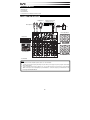
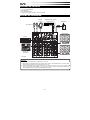
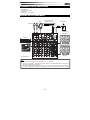
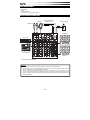
CONNECTION DIAGRAM
External effects rack,
compressor, etc.*
Headphones*
Microphones*
Power
House Speakers*
Keyboard*
og a m
r
s
se
tups
hy
at
tern
pr
octave
s
2 TK
-
m1
+
push
tap
m2
x
y
co
store
accomp
nf ig
z
r
latch
th m
a n a l o g
p
phrase
m o d e l i n g
s
pitch
volume
s y n t h
2 TK
Drum Machine*
2 TK
Monitors*
* not included
Notes:
y
y
Microphones, monitors, amplifier, speakers, cables, etc. are not included.
y
To use an external effects rack unit, compressor, etc., use a Y-cable (1/4" stereo to two 1/4" mono) to connect the AUX
SEND "2 FX" output to the left and right inputs your external device. Connect the outputs of your external device to the
left and right AUX RETURN INPUTS.
To reduce electrical hum at high gain settings, keep the mixer's power supply away from your guitar cable and the
mixer's channel inputs.
2
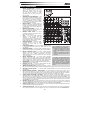
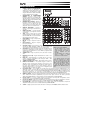
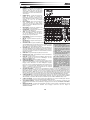
FEATURES
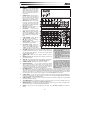
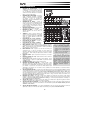
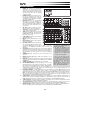
1.
2.
3.
POWER IN – Use the included power
adapter to connect the mixer to a power
outlet. While the power is switched off,
plug the power supply into the mixer
first, then plug the power supply into a
power outlet.
POWER SWITCH – Turns the mixer on
and off. Turn on the mixer after all
input devices have been connected and
before you turn on amplifiers. Turn off
amplifiers before you turn off the mixer.
FOOTSWITCH – When a latching-style
footswitch is connected to this jack with
a 1/4" TRS cable, it can be pressed to
allow all channels to bypass the mixer's
internal effects processor.
4.
MIC INPUT – Connect a microphone to
these inputs with an XLR cable.
5.
LINE INPUT * – Connect line-level
devices to these inputs with 1/4" cables.
6.
GAIN – Adjusts the channel audio level
(pre-fader and pre-EQ gain). Adjust
this so that the PEAK LED just barely
lights up during the loudest parts of the
song.
7.
8.
HI EQ (TREBLE) – Adjusts the high
(treble) frequencies of the channel.
MID EQ – Adjusts the mid-range
frequencies of the channel.
1
2
3
4
5
5
5
6
LOW EQ (BASS) – Adjusts the low
(bass) frequencies of the channel.
10.
AUX SEND 1 MON – Adjusts the
channel audio (pre-EQ) level that is
sent to the AUX SEND output labeled
"1 MON." You can use this to create a
custom monitor mix for yourself or your musicians.
16 17 18 19
1617 18 19
2020 21 21
2 TK
7
8
9
10
11
12
14
15
9.
22
23
26
24 27
14
25 28
29
13 13
30
2 TK
31
2 TK
35
34
33
32
* When using LINE INPUTS 5/6, 7/8,
and the AUX RETURNS:
• If only the left channel is used, the
signal will be heard in both left and
right channels and the balance will
not be adjustable.
• If only the right channel is used, the
signal will be heard in the right
channel only.
11.
AUX SEND 2 FX – Adjusts the channel audio (post-EQ) level that is sent
to the mixer's internal effects processor. Turn this up for the channels that
you want internal effects applied to. You can use this to apply external
effects to individual channels.
12.
CHANNEL PAN – Adjusts the (mono) channel's position in the stereo
field.
13.
BALANCE (CH 5/6 & 7/8) – Adjusts the balance between Channels 5 and
6 and Channels 7 and 8.
14.
PEAK LED – The LED will flash if the signal is clipping. If this happens,
decrease the setting of the GAIN knob or CHANNEL VOLUME knob.
15.
CHANNEL VOLUME – Adjusts the audio level on the channel.
16.
AUX RETURN INPUTS ** – You can connect the outputs of an external
device to these inputs with 1/4" mono cables. This is usually used for
outboard effects devices but can also be used like an extra input channel
for synthesizers, drum machines, etc. If your source is mono, plug it into
the left jack and it will be heard on both the left and right sides.
17.
AUX SEND OUTPUTS ** – You can use a 1/4" TRS cable to connect the
AUX 1 MON output to the input of an external amplifier or active monitor to create a custom monitor mix for onstage
musicians. You can adjust this level with the AUX RETURN LEVEL knob labeled "TO AUX 1 MON." To use an external
effects rack unit, compressor, etc. with the mixer, you can use a Y-cable to connect the AUX 2 FX output to the input of
your external device, then connect the outputs of the device to the AUX RETURN INPUTS of the mixer.
18.
2-TRACK INPUTS – You may connect these inputs to the outputs of an external sound source using a standard stereo
RCA cable (sold separately). You can send this channel to the monitor mix (using the MAIN/2-TRACK switch) and/or
the main mix (using the 2-TRACK TO MAIN switch).
19.
2-TRACK OUTPUTS – You may connect these outputs to the inputs of an external recording device using a standard
stereo RCA cable (sold separately).
20.
CTRL ROOM OUTPUTS – Use standard 1/4" cables to connect these outputs to your monitor or amplifier system. The
level of these outputs is controlled by the CTRL ROOM / PHONES knob.
21.
MAIN MIX OUTPUTS – Use standard 1/4" cables to connect these outputs to the house speaker or amplifier system.
The level of these outputs is controlled by the MAIN VOLUME knob.
22.
PHONES – Connect your 1/4" stereo headphones to this output. The CTRL ROOM / PHONES knob controls the
volume.
3
** To use an external effects rack unit,
compressor, etc., use a Y-cable (1/4"
stereo to two 1/4" mono) to connect the
AUX SEND "2 FX" output to the left and
right inputs your external device.
Connect the outputs of your external
device to the left and right AUX
RETURN INPUTS.
23.
EFFECTS SELECTOR – Selects the effect that the mixer's internal effects processor will apply to the various channels.
Each channel can send different levels of audio to the processor by adjusting their FX POST SEND knobs. See the
EFFECTS section for an explanation of the available effects.
24.
VARIATIONS SELECTOR – Selects the amount of the effect applied to the various channels.
25.
FX MUTE – Press this button to mute/unmute the effects.
26.
AUX RETURN TO MAIN MIX – Adjusts the volume of the signal being sent into the AUX RETURN INPUTS and routed
to the MAIN MIX OUTPUTS.
27.
AUX RETURN TO AUX 1 MON – Adjusts the volume of the signal being sent into the AUX RETURN INPUTS and
routed to the CTRL ROOM OUTPUTS.
28.
2-TRACK LEVEL – Adjusts the input signal level of the 2-TRACK INPUTS.
29.
CTRL ROOM / PHONES – Adjusts the volume of the CTRL ROOM OUTPUTS and your headphones.
30.
MAIN / 2-TRACK – Press this button to select which signal is routed to the CTRL ROOM OUTPUTS and your
headphones – the main mix or the signal from the 2-TRACK INPUTS.
31.
2-TRACK TO MAIN – Press this button to select which signal is routed to the MAIN MIX OUTPUTS – the main mix or
the signal from the 2-TRACK INPUTS.
32.
MAIN VOLUME – Adjusts the volume of the MAIN OUT.
33.
LED METERS – Shows the audio level of the main mix. Turn the volume down if the CLIP LED lights up excessively.
34.
PHANTOM POWER – This switch activates and deactivates phantom power. When activated, phantom power supplies
+48V to the XLR mic inputs and the LED above the switch will be lit. Please note that most dynamic microphones do not
require phantom power, while most condenser microphones do. Consult your microphone’s documentation to find out
whether it needs phantom power.
35.
POWER LED – Illuminates when the mixer is on.
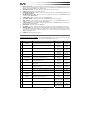
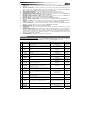
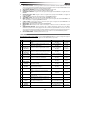
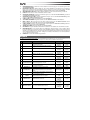
EFFECTS
TO HEAR THE EFFECTS ON A CHANNEL: Use the EFFECTS SELECTOR to choose one of the effects below, adjust the
parameter with the VARIATIONS SELECTOR, then turn up the FX POST SEND for that channel.
#
PRESET
DESCRIPTION
PARAMETER
RANGE
0.8~1.1s
0~79ms
1
VOCAL 1
Reverb, simulating a room with a small delay time.
Decay time
Pre-delay
2
VOCAL 2
Reverb, simulating a small space with a slight decay
time.
Decay time
Pre-delay
0.8~2.5s
0~79ms
3
LARGE HALL
Reverb, simulating a large acoustic space.
Decay time
Pre-delay
3.6~5.4s
23~55ms
4
SMALL HALL
Reverb, simulating the acoustics of a stage space.
Decay time
Pre-delay
1.0~2.9s
20~45ms
5
LARGE ROOM
Reverb, simulating a studio with many early reflections.
Decay time
Pre-delay
2.9~4.5s
23~55ms
6
SMALL ROOM
Reverb, simulating a bright studio room.
Decay time
Pre-delay
0.7~2.1s
20~45ms
7
PLATE
Simulates bright plate reverb.
Decay time
Pre-delay
0.6~6.1s
10ms
8
TAPE REVERB
Simulates classic tape delay created by multiple
playback heads.
Decay time
Pre-delay
1.3~5.4
0~84ms
9
SPRING REVERB
Simulates the lightly stretched sound of spring reverb
from analog transducers.
Decay time
Pre-delay
1.3~5.4s
0~84ms
10
MONO DELAY
Reproduces the signal after a small period of time.
Delay period
60~650ms
Reproduces the signal after a small period of time with a
slight difference between the two stereo channels.
Delay period
Feedback
210~400ms
37~73%
Rate
0.16~2.79Hz
11
STEREO DELAY
12
FLANGER
Classic stereo flanging effect, similar to a jet plane
taking off.
13
CHORUS
Simulates the full, complex, watery sound of several
instruments playing the same thing.
14
REVERB+DELAY
Delay effect with room reverb.
Rate
0.5~5Hz
Delay period
Reverse decay time
211~375ms
1.0~2.9s
15
REVERB+FLANGER Stereo flanger effect with room reverb.
Flanger rate
Reverse decay time
0.16~2.52Hz
16
REVERB+CHORUS
Chorus rate
Reverse decay time
0.5~4.74Hz
1.5~2.9s
Stereo chorus effect with room reverb.
4
CONTENIDO DE LA CAJA
y
y
y
y
Mezclador ZEPHYR
Adaptador de alimentación
Guía de inicio rápido
Folleto de instrucciones de seguridad e información sobre la garantía
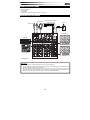
DIAGRAMA DE CONEXIÓN
Rack de efectos,
compresor, etc.
externo*
Auriculares*
Micrófonos*
Suministro
eléctrico
Altavoces del
auditorio*
Teclado*
s
2 TK
og a m
r
se
tups
hy
s
octave
at
tern
pr
-
m1
+
push
tap
m2
x
y
co
store
accomp
nf ig
z
r
latch
th m
a n a l o g
p
phrase
m o d e l i n g
s
pitch
volume
s y n t h
Caja de ritmos*
2 TK
2 TK
* no incluido
Monitores*
Notas:
y
y
No se incluyen micrófonos, amplificador, altavoces, cables, etc.
y
Para usar una unidad de rack de efectos, compresor, etc. externos, utilice un cable en “Y” (estéreo de 1/4"a dos mono
de 1/4") para conectar la salida de ENVÍO AUXILIAR "2 FX" a las entradas izquierda y derecha de su dispositivo
externo. Conecte las salidas de su dispositivo externo a las ENTRADAS DE RETORNO AUXILIAR izquierda y
derecha.
Para reducir el zumbido eléctrico cuando se usan ajustes altos de ganancia, mantenga la fuente de alimentación del
mezclador alejada del cable de su guitarra y de las entradas de los canales del equipo.
5
CARACTERÍSTICAS
1.
2.
3.
ENTRADA DE ALIMENTACIÓN - Use el
adaptador de alimentación incluido para conectar
el mezclador a un tomacorriente alimentado.
Con la alimentación eléctrica desconectada,
enchufe la fuente de alimentación al mezclador
1 2 3
primero, y luego al tomacorriente.
INTERRUPTOR DE ENCENDIDO – Enciende y
apaga el mezclador. Encienda el mezclador
después de desconectar todos los dispositivos
22
de entrada y antes de encender los
amplificadores. Apague los amplificadores antes
4
5
5
16
17 18 19
de apagar el mezclador.
INTERRUPTOR DE PEDAL – Cuando se
1617 18 19
5
conecta a este conector un interruptor de pedal
de tipo de enganche con un cable TRS de 1/4",
6
2020 21 21
se puede pulsar para permitir que todos los
canales puenteen el procesador de efectos
interno del mezclador.
ENTRADA DE MICRÓFONO – Conecte a estas
7
23
entradas un micrófono con un cable XLR.
35
26
ENTRADA DE LÍNEA * – Conecte a estas
8
entradas dispositivos de nivel de línea con
24 27
34
9
cables de 1/4”.
14
GANANCIA - Ajusta el nivel de ganancia de 10
28
25
audio del canal (preecualización y pre-fader).
Ajuste este control de modo que el LED PEAK 11
29
33
apenas se encienda durante las partes más
13
13
12
30
sonoras del tema.
ECUALIZACIÓN DE ALTOS (AGUDOS) –
14
Ajusta las altas frecuencias (agudos) del canal.
31 32
ECUALIZACIÓN DE MEDIOS – Ajusta las
15
frecuencias medias del canal.
ECUALIZACIÓN DE BAJOS (GRAVES) –
Ajusta las bajas frecuencias (graves) del canal.
ENVÍO AUXILIAR 1 MON – Ajusta el nivel de audio del canal (pre*Cuando use las ENTRADAS DE LÍNEA
ecualización) que se envía a la salida de ENVÍO AUXILIAR rotulada “1
5/6, 7/8 y los RETORNOS AUXILIARES:
MON”. Puede usarlo para crear una mezcla de monitor personalizada
• Si sólo se usa el canal izquierdo, la
para usted mismo o para sus músicos.
señal se oirá en los canales izquierdo
ENVÍO AUXILIAR 2 FX – Ajusta el nivel de audio del canal (posty derecho y no se puede ajustar el
ecualización) que se envía al procesador de efectos interno del
balance.
mezclador. Aumente el ajuste para los canales a los que desea aplicar
• Si sólo se usa el canal derecho, la
efectos internos. Puede usarlo para aplicar efectos externos a canales
señal se oirá sólo en ese canal.
individuales.
PANEO DE CANAL – Ajusta la posición del canal (mono) en el campo
** Para usar una unidad de rack de
estéreo.
efectos, compresor, etc. externos, utilice
BALANCE (CANALES 5/6 Y 7/8) – Ajusta el balance entre los canales 5
un cable en “Y” (estéreo de 1/4"a dos
y 6 y los canales 7 y 8.
mono de 1/4") para conectar la salida de
LED DE PICO – El LED destella si la señal se está recortando. Si esto
ENVÍO AUXILIAR "2 FX" a las entradas
sucede, disminuya el ajuste de la perilla GAIN o la perilla de volumen
izquierda y derecha de su dispositivo
CHANNEL (Canal) .
externo. Conecte las salidas de su
VOLUMEN DE CANAL – Ajusta el nivel de audio del canal.
dispositivo externo a las ENTRADAS DE
ENTRADAS DE RETORNO AUXILIAR ** – Puede conectar a estas
RETORNO AUXILIAR izquierda y
entradas las salidas de un dispositivo externo con cables mono de 1/4".
derecha.
Esta entrada se usa habitualmente para dispositivos de efectos externos
pero también se puede usar como canal de entrada adicional para
sintetizadores, cajas de ritmo, etc. Si su fuente es mono, enchúfela en el conector izquierdo y se escuchará en ambos
lados, izquierdo y derecho.
SALIDAS DE ENVÍO AUXILIAR ** – Puede usar un cable TRS de 1/4" para conectar la salida AUX 1 MON a la entrada
de un amplificador externo o monitor activo a fin de crear una mezcla de monitor personalizada para los músicos en el
escenario. Puede ajustar este nivel con la perilla de NIVEL DE RETORNO AUXILIAR rotulada "TO AUX 1 MON". Para
usar una unidad de rack de efectos, compresor, etc. externos con el mezclador, puede usar un cable en “Y” a fin de
conectar la salida AUX 2 FX a la entrada de su dispositivo externo y luego conectar las salidas de este último a las
ENTRADAS DE RETORNO AUXILIAR del mezclador.
ENTRADAS DE 2 PISTAS – Es posible conectar estas entradas a las salidas de una fuente de sonido externa
mediante un cable RCA estéreo estándar (se vende por separado). Puede enviar este canal a la mezcla de monitor
(mediante el interruptor MAIN/2-TRACK [PRINCIPAL/2 PISTAS]) y/o la mezcla principal (mediante el interruptor 2TRACK TO MAIN [2 PISTAS A PRINCIPAL]).
SALIDAS DE 2 PISTAS – Es posible conectar estas salidas a las entradas de un dispositivo de grabación externa
mediante un cable RCA estéreo estándar (se vende por separado).
SALIDAS PARA SALA DE CONTROL – Use cables estándar TRS de 1/4" para conectar estas salidas al sistema de
amplificador o monitores. El nivel de estas salidas se controla mediante la perilla CTRL ROOM / PHONES (SALA DE
CONTROL / AURICULARES).
SALIDAS DE MEZCLA PRINCIPAL – Use cables estándar TRS de 1/4" para conectar estas salidas al sistema de
amplificador o altavoces. El nivel de estas salidas está controlado por la perilla de VOLUMEN MAESTRO.
2 TK
4.
5.
6.
2 TK
7.
8.
9.
10.
11.
12.
13.
14.
15.
16.
17.
18.
19.
20.
21.
2 TK
6
22.
23.
24.
25.
26.
27.
28.
29.
30.
31.
32.
33.
34.
35.
AURICULARES – Conecte sus auriculares estéreo de ¼” a esta salida. La perilla CTRL ROOM / PHONES controla el
volumen.
SELECTOR DE EFECTOS – Selecciona el efecto que el procesador de efectos interno del mezclador aplica a los
diversos canales. Cada canal puede enviar al procesador niveles diferentes de audio ajustando sus perillas FX POST
SEND. Consulte en la sección EFECTOS una explicación de los efectos disponibles.
SELECTOR DE VARIACIONES – Selecciona la magnitud del efecto aplicado a los diversos canales.
SILENCIAMIENTO DE EFECTOS – Pulse este botón para silenciar/anular el silenciamiento de los efectos.
RETORNO AUXILIAR A MEZCLA PRINCIPAL – Ajusta el volumen de la señal que se envía a las ENTRADAS DE
RETORNO AUXILIAR y se aplica a las SALIDAS DE MEZCLA PRINCIPAL.
RETORNO AUXILIAR A AUXILIAR 1 MON – Ajusta el volumen de la señal que se envía a las ENTRADAS DE
RETORNO AUXILIAR y se aplica a las SALIDAS PARA SALA DE CONTROL.
NIVEL DE 2 PISTAS – Ajusta el nivel de señal de entrada de las ENTRADAS DE 2 PISTAS.
SALA DE CONTROL / AURICULARES – Ajusta el volumen de las SALIDAS PARA SALA DE CONTROL y sus
auriculares.
PRINCIPAL / 2 PISTAS – Pulse este botón para seleccionar la señal que se aplica a las SALIDAS PARA SALA DE
CONTROL y sus auriculares —la mezcla principal o la señal procedente de las ENTRADAS DE 2 PISTAS.
2 PISTAS A PRINCIPAL – Pulse este botón para seleccionar la señal que se aplica a las SALIDAS DE MEZCLA
PRINCIPAL —la mezcla principal o la señal procedente de las ENTRADAS DE 2 PISTAS.
VOLUMEN PRINCIPAL – Ajusta el volumen de la SALIDA PRINCIPAL.
MEDIDORES LED – Muestran el nivel de audio de la mezcla principal. Baje el volumen si el LED CLIP se enciende
excesivamente.
ALIMENTACIÓN FANTASMA – Este interruptor activa y desactiva la alimentación fantasma. Cuando está activada, la
alimentación fantasma suministra +48 V a las entradas de micrófono XLR y el LED que está arriba del interruptor se
enciende. Tenga en cuenta que la mayoría de los micrófonos dinámicos no requieren alimentación fantasma, mientras
que la mayoría de los micrófonos de condensador la requieren. Consulte la documentación de su micrófono para
averiguar si necesita alimentación fantasma.
LED DE ENCENDIDO - Se ilumina cuando el mezclador está encendido.
EFECTOS
PARA OÍR LOS EFECTOS EN UN CANAL: Use el SELECTOR DE EFECTOS para elegir uno de los efectos siguientes,
ajuste el parámetro con el SELECTOR DE VARIACIONES Y luego aumente el FX POST SEND de ese canal.
#
PRESET
PARÁMETRO
RANGO
1
VOCAL 1
Reverberación, que simula una sala con pequeño
tiempo de retardo
DESCRIPCIÓN
Tiempo de decaimiento
Pre-retraso
0.8~1.1 s
0~79 ms
2
VOCAL 2
Reverberación, que simula una espacio pequeño con
un ligero tiempo de decaimiento
Tiempo de decaimiento
Pre-retraso
0.8~2.5 s
0~79 ms
3
LARGE
HALL
Reverberación, que simula un espacio acústico
grande
Tiempo de decaimiento
Pre-retraso
3.6~5.4 s
23~55 ms
4
SMALL
HALL
Reverberación, que simula la acústica del espacio de
un escenario.
Tiempo de decaimiento
Pre-retraso
1.0~2.9 s
20~45 ms
5
LARGE
ROOM
Reverberación, que simula un estudio con muchas
reflexiones tempranas.
Tiempo de decaimiento
Pre-retraso
2.9~4.5 s
23~55 ms
6
SMALL
ROOM
Reverberación, que simula una sala de estudio
brillante.
Tiempo de decaimiento
Pre-retraso
0.7~2.1 s
20~45 ms
7
PLATE
Simula la reverberación de una placa brillante
Tiempo de decaimiento
Pre-retraso
0.6~6.1 s
10 ms
8
TAPE
REVERB
Simula el retardo de cinta clásico creado por múltiples
cabezales de reproducción.
Tiempo de decaimiento
Pre-retraso
1.3~5.4
0~84 ms
9
SPRING
REVERB
Simula el sonido ligeramente estirado de la
reverberación de resorte proveniente de los
transductores acústicos.
Tiempo de decaimiento
Pre-retraso
1.3~5.4 s
0~84 ms
10
MONO
DELAY
Reproduce la señal después de un breve período de
tiempo.
Período de retraso
60~650 ms
Período de retraso
Realimentación
210~400
ms
37~73%
11
STEREO
DELAY
Reproduce la señal después de un breve período de
tiempo con una ligera diferencia entre los dos canales
estéreo.
12
FLANGER
Efecto de flanger estéreo clásico, similar al despegue
de un avión a reacción.
Frecuencia
0.16~2.79
Hz
13
CHORUS
Simula el sonido pleno, complejo y acuoso de varios
instrumentos que tocan lo mismo.
Frecuencia
0.5~5 Hz
14
REVERB+
DELAY
Efecto de retardo con reverberación de sala.
Período de retraso
Tiempo de decaimiento inverso
211~375
ms
1.0~2.9 s
15
REVERB+
FLANGER
Efecto de flanger estéreo con reverberación de sala.
Frecuencia de flanger
Tiempo de decaimiento inverso
0.16~2.52
Hz
16
REVERB+
CHORUS
Efecto de coro estéreo con reverberación de sala.
Frecuencia de coro
Tiempo de decaimiento inverso
0.5~4.74 Hz
1.5~2.9 s
7
CONTENU DE LA BOÎTE
y
y
y
y
Console de mixage ZEPHYR
Bloc d’alimentation
Guide d’utilisation simplifié
Consignes de sécurité et informations concernant la garantie
SCHÉMA DE CONNEXION
Casque
d’écoute*
Appareils d’effet externes,
compresseur, etc.*
Alimentation
Microphones*
Haut-parleurs*
Clavier*
s
2 TK
og a m
r
se
tups
hy
s
octave
at
tern
pr
-
m1
+
push
tap
m2
x
y
co
store
accomp
nf ig
z
r
latch
th m
a n a l o g
p
phrase
m o d e l i n g
s
pitch
volume
s y n t h
Module de
percussion*
2 TK
2 TK
Moniteurs*
* non inclus
Remarques :
y
y
Microphones, haut-parleurs, câbles, amplificateur, etc. non inclus.
y
Pour utiliser un module d’effet externe, un compresseur, etc., branchez un câble en Y (1/4 po stéréo à deux ¼ po
mono) pour brancher la sortie AUX SEND « 2 FX » aux entrées gauche et droite de l’appareil externe. Branchez les
sorties de l’appareil externe aux entrées AUX RETURN gauche et droite.
Afin de réduire le ronflement électrique à des réglages élevés, gardez le câble d'alimentation de la console de mixage
éloigné du câble de la guitare et des canaux d’entrées de la console.
8
CARACTÉRISTIQUES
1.
2.
ENTRÉE D'ALIMENTATION – Branchez le
câble d’alimentation inclus pour brancher la
console
de
mixage
dans
une
prise
d’alimentation. Lorsque la console de mixage
est hors tension, branchez le câble
d'alimentation dans la console, puis dans la
1 2 3
prise de courant.
INTERRUPTEUR D'ALIMENTATION – Cette
touche permet de mettre l’appareil sous et hors
tension. Branchez la console de mixage après
22
avoir branché tous les appareils et avant de
4
5 5 16 17 18 19
mettre les amplificateurs sous tension. Mettez
les amplificateurs hors tension avant de mettre
1617 18 19
5
la console de mixage hors tension.
PÉDALE D’EFFET – Lorsqu'une pédale est
6
2020 21 21
branchée à cette entrée à l’aide d’un câble TRS
de 1/4 po, elle peut être utilisée pour contourner
les effets internes de la console de mixage pour
tous les canaux.
7
ENTRÉES MICROPHONES (1 à 4) – Ces
23
entrées permettent de brancher chacune un
35
26
8
microphone à l’aide d’un câble XLR.
24
ENTRÉES NIVEAU LIGNE* – Ces entrées
34
27
9
permettent de brancher des appareils à niveau
14
ligne à l’aide d’un câble ¼ po.
10
28
25
GAIN – Ces boutons rotatifs permettent
29
d'ajuster le niveau du signal audio pré- 11
33
atténuation et pré-égalisation du canal
13
13
12
30
correspondant. Ajustez ce réglage afin que le
témoin d'écrêtage s’allume à peine durant les
14
parties les plus fortes de la chanson.
31 32
15
ÉGALISEUR (AIGUËS) – Ces boutons rotatifs
permettent d'ajuster le niveau des hautes
fréquences du signal audio du canal
correspondant.
ÉGALISEUR (MOYENNES) – Ces boutons rotatifs permettent d'ajuster
Lors de l’utilisation des entrées à niveau
le niveau des fréquences moyennes du signal audio du canal
ligne 5/6 et 7/8 et des retours auxiliaires :
correspondant.
• Si seulement le canal gauche est utilisé,
ÉGALISEUR (GRAVES) – Ces boutons rotatifs permettent d'ajuster le
le signal sera entendu sur les canaux
niveau des basses fréquences du signal audio du canal correspondant.
gauche et droit et l’équilibre ne peut être
DÉPART AUXILIAIRE (1 MON) – Ces boutons rotatifs permettent
ajusté.
d'ajuster le niveau du signal audio du canal (avant atténuation)
• Si seulement le canal droit est utilisé, le
acheminé à la sortie « 1 MON » correspondante. Vous pouvez
signal sera entendu seulement sur le
également l’utiliser pour créer un mix de pré-écoute pour vous-même
canal droit.
ou pour les musiciens.
DÉPART AUXILIAIRE (2 FX) – Ces boutons rotatifs permettent
d'ajuster le niveau du signal audio du canal (après atténuation)
** Pour utiliser un module d’effet externe,
acheminé au processeur d’effet interne. Augmentez ce réglage pour les
un compresseur, etc., branchez un câble en
canaux auxquels vous désirez ajouter des effets. Vous pouvez
Y (1/4 po stéréo à deux ¼ po mono) pour
également l’utiliser pour ajouter des effets à des canaux individuels.
brancher la sortie AUX SEND « 2 FX » aux
PANORAMIQUE – Ces boutons rotatifs permettent d'ajuster la position
entrées gauche et droite de l’appareil
du canal (mono) dans le champ stéréo.
externe. Branchez les sorties de l’appareil
BALANCE (5/6 et 7/8) – Ces boutons rotatifs permettent de régler
externe aux entrées AUX RETURN gauche
l’équilibre entre les canaux 5 et 6 et les canaux 7 et 8.
et droite.
TÉMOIN D’ÉCRÊTAGE (PEAK) – En présence d'écrêtage, le témoin
DEL clignote. Pour remédier à l’écrêtage, diminuez le réglage du bouton du gain (GAIN) ou du niveau (LEVEL) du canal.
RÉGLAGE DU NIVEAU (LEVEL) – Ces boutons rotatifs permettent d'ajuster le niveau du signal audio du canal
correspondant.
ENTRÉES RETOUR AUXILIAIRE ** (AUX RETURN) – Un appareil externe peut être branché à chacune de ces
entrées à l’aide de câbles mono de 1/4 po. En général, ces entrées sont utilisées pour des appareils d’effet externes,
mais elles peuvent également être utilisées comme canaux supplémentaires pour synthétiseurs, batteries électroniques,
etc. Si votre source est mono, branchez-la dans l’entrée gauche afin qu’elle soit entendue des deux côtés.
SORTIES DÉPART AUXILIAIRE** (AUX SEND) – Vous pouvez brancher la sortie AUX 1 MON à l’entrée d’un
amplificateur externe ou un moniteur actif à l’aide de câbles mono de 1/4 po pour créer un mixe de pré-écoute pour les
musiciens sur scène. Le niveau du signal de ces sorties peut être ajusté avec le bouton rotatif « TO AUX 1 MON ». Pour
utiliser un module d’effet externe, compresseur, etc. avec la console de mixage, branchez un câble en Y à la sortie AUX
2 FX puis branchez-le à l’entrée de l’appareil externe. Branchez ensuite les sorties de l’appareil externe aux entrées
AUX RETURN de la console de mixage.
ENTRÉES 2-PISTES (2TK) – Vous pouvez brancher ces entrées aux sorties d’une source audio externe à l’aide d’un
câble RCA standard (vendu séparément). Vous pouvez envoyer le signal de ce canal au canal de pré-écoute (à l’aide du
commutateur MAIN/2-TRACK) et/ou le mix général (à l’aide du commutateur 2-TRACK TO MAIN).
SORTIES 2-PISTES (2TK) – Vous pouvez brancher ces sorties aux entrées d’un appareil d’enregistrement externe à
l’aide d’un câble RCA standard (vendu séparément).
SORTIES DE PRÉ-ÉCOUTE – Utilisez des câbles standards de 1/4 po afin de brancher cette sortie à un haut-parleur ou
à un système de sonorisation. Le niveau du signal de ces sorties est commandé par le bouton CTRL ROOM/PHONES.
2 TK
3.
4.
5.
6.
2 TK
7.
8.
9.
10.
11.
12.
13.
14.
15.
16.
17.
18.
19.
20.
2 TK
9
21.
22.
23.
24.
25.
26.
27.
28.
29.
30.
31.
32.
33.
34.
35.
SORTIES PRINCIPALES – Utilisez des câbles ¼ po standards afin de brancher ces sorties à un haut-parleur ou à un
système de sonorisation. Le niveau de ces sorties est commandé par le bouton MAIN VOLUME.
CASQUE D’ÉCOUTE – Cette sortie permet de brancher un casque d’écoute stéréo doté d’une fiche de ¼ po. Le niveau
de cette sortie est commandé par le bouton CTRL ROOM/PHONES.
SÉLECTEUR D’EFFET – Ce bouton permet de sélectionner l'effet que le processeur d’effet interne ajoutera aux
différents canaux. Chaque canal peut envoyer différents niveaux d’audio au processeur en ajustant leurs boutons FX
POST SEND. Veuillez consulter la section EFFETS pour une explication des différents effets disponibles.
VARIATEUR D’EFFET – Ce bouton permet de sélectionner la quantité d'effet que le processeur d’effet interne ajoutera
aux différents canaux.
SOURDINE D’EFFET – Cette touche permet de mettre en sourdine ou de réactiver les effets.
RETOUR AUXILIAIRE (TO MAIN MIX) – Ce bouton permet d'ajuster le niveau du signal envoyé aux entrées du retour
auxiliaire et acheminé aux sorties principales.
RETOUR AUXILIAIRE (TO AUX 1 MON) – Ce bouton permet d'ajuster le niveau du signal envoyé aux entrées du retour
auxiliaire et acheminé aux sorties cabine/casque.
NIVEAU 2-PISTES – Ce bouton rotatif permet d’ajuster le niveau du signal 2-piste entrant.
NIVEAU CABINE/CASQUE – Ce bouton rotatif permet d’ajuster le niveau du signal des sorties de pré-écoute et du
casque.
SÉLECTEUR D’AFFECTATION DU SIGNAL DE PRÉ-ÉCOUTE – Ce bouton permet de sélectionner le signal à
envoyer aux sorties de pré-écoute et casque – le mixe général ou le signal des entrées 2-pistes.
SÉLECTEUR D’AFFECTATION DU SIGNAL 2-PISTES – Ce bouton permet de sélectionner le signal à envoyer aux
sorties principales – le mixe général ou le signal des entrées 2-pistes.
VOLUME GÉNÉRAL – Ce bouton rotatif permet d'ajuster le niveau du volume de la sortie principale (MAIN OUT).
DEL – Ces DEL permettent de contrôler le niveau audio du mixe général. Baissez le volume si la DEL CLIP s’allume
excessivement.
ALIMENTATION FANTÔME – Cet interrupteur permet d’activer et de désactiver l’alimentation fantôme. Lorsqu'activée,
la DEL s’allume et l’alimentation fantôme fournit +48 V aux deux entrées micro XLR. Veuillez noter que la plupart des
microphones électrodynamiques ne nécessitent pas d’alimentation fantôme, alors que les microphones à condensateur
en ont besoin. Consultez la documentation fournie avec votre microphone pour savoir si vous devez utiliser
l’alimentation fantôme.
DEL D’ALIMENTATION – Cette DEL s’allume lorsque la console de mixage est sous tension.
EFFETS
POUR ENTENDRE LES EFFETS SUR UN CANAL : Utilisez le sélecteur d’effet afin de sélectionner un des effets ci-dessous, ajustez le
paramètre à l’aide du variateur d’effet, puis augmentez le réglage du bouton FX POST SEND du canal correspondant.
N˚ PRÉRÉGLAGE
DESCRIPTION
PARAMÈTRE
PLAGE
Durée
Retard initial
0,8 à 1,1 s
0 à 79 ms
1
VOCAL 1
Simulation d’une salle avec un temps de réverbération
court.
2
VOCAL 2
Simulation d’une petite salle avec un léger temps de
réverbération.
Durée de chute
Retard initial
0,8 à 2,5 s
0 à 79 ms
3
LARGE
HALL
Réverbération, simulation d’une grande salle de
concert.
Durée de chute
Retard initial
3,6 à 5,4 s
23 à 55 ms
4
SMALL
HALL
Réverbération, simulation d’un petit espace.
Durée de chute
Retard initial
1,0 à 2,9 s
20 à 45 ms
5
LARGE
ROOM
Simulation d’une salle de studio réverbérante.
Durée de chute
Retard initial
2,9 à 4,5 s
23 à 55 ms
6
SMALL
ROOM
Simulation d’une salle de studio « claire ».
Durée de chute
Retard initial
0,7 à 2,1 s
20 à 45 ms
7
PLATE
Simulation d’un son clair classique.
Durée de chute
Retard initial
0,6 à 6,1 s
10 ms
8
TAPE
REVERB
Simulation d’une chambre d’écho à bande.
Durée de chute
Retard initial
1,3 à 5,4
0 à 84 ms
9
SPRING
REVERB
Simulation d’une chambre d’écho à ressort de
transducteurs analogiques.
Durée de chute
Retard initial
1,3 à 5,4 s
0 à 84 ms
10
MONO
DELAY
Ré-injection du signal mono après un court délai.
Temps de retard
60 à 650 ms
11
STEREO
DELAY
Ré-injection du signal après un court délai avec un léger
décalage pour chaque canal.
Temps de retard
Effet de retour
210 à 400 ms
37 à 73 %
12
FLANGER
Effet Flanger classique, semblable au son produit par
un avion au décollage.
Fréquence
0,16 à 2,79 Hz
13
CHORUS
Simulation du son riche et dense donnant l’impression
d’entendre plusieurs instruments jouant simultanément
la même partie.
Fréquence
0,5 à 5 Hz
14
REVERB+
DELAY
Simulation d’un écho avec la réverbération d’une salle.
Temps de retard
Durée de chute inversée
211 à 375 ms
1,0 à 2,9 s
15
REVERB+
FLANGER
Simulation d’un avion au décollage avec la
réverbération d’une salle.
Fréquence Flanger
Durée de chute inversée
0,16 à 2,52 Hz
16
REVERB+
CHORUS
Simulation d’un effet de cœur stéréo avec la
réverbération d’une salle.
Fréquence Chorus
Durée de chute inversée
0,5 à 4,74 Hz
1,5 à 2,9 s
10
CONTENUTI DELLA CONFEZIONE
y
y
y
y
Mixer ZEPHYR
Adattatore di alimentazione
Guida rapida
Istruzioni di sicurezza e garanzia
SCHEMA DEI COLLEGAMENTI
Cuffie*
Rack effetti esterno,
compressore, ecc.*
Alimentazione
Microfoni*
Altoparlanti
domestici*
Tastiera*
s
2 TK
og a m
r
se
tups
hy
s
octave
at
tern
pr
-
m1
+
push
tap
m2
x
y
co
store
accomp
nf ig
z
r
latch
th m
a n a l o g
p
phrase
m o d e l i n g
s
pitch
volume
s y n t h
Drum Machine*
2 TK
2 TK
Monitor*
* non in dotazione
Note:
y
y
Microfoni, mixer, monitor, amplificatore, altoparlanti, cavi, ecc. non in dotazione.
y
Per utilizzare un'unità rack effetti esterna, un compressore, ecc., servirsi di un cavo a Y (da stereo da 1/4" a due mono
da 1/4") per collegare l'uscita AUX SEND "2 FX" agli ingressi sinistro e destro del dispositivo esterno. Collegare le
Per ridurre il ronzio elettrico con impostazioni elevate di guadagno, tenere l’alimentazione del mixer lontana dal cavo
della chitarra e dagli ingressi canale del mixer.
11
CARATTERISTICHE
1.
2.
3.
POWER IN (INGRESSO ALIMENTAZIONE)
– Servirsi del cavo di alimentazione in
dotazione per collegare il mixer ad una presa
di alimentazione. Ad alimentazione spenta,
collegare l’alimentazione elettrica innanzitutto
nel mixer, quindi ad una presa elettrica.
1 2 3
INTERRUTTORE
DI
ALIMENTAZIONE
(POWER) – Accende e spegne il mixer.
Accendere il mixer dopo aver collegato tutti i
dispositivi d’ingresso e prima di accendere gli
22
amplificatori. Spegnere gli amplificatori prima
4
5 5 16 17 18 19
di spegnere il mixer.
INTERRUTTORE A PEDALE – Quando un
1617 18 19
5
interruttore a pedale è collegato a questo jack
servendosi di un cavo TRS da 1/4", può
6
2020 21 21
essere premuto per consentire a tutti i canali
di bypassare il processore di effetti interno.
INGRESSO MICROFONO – Collegare un
microfono a questi ingressi servendosi di un
7
23
cavo XLR.
35
INGRESSI DI LINEA * – Collegare dispositivi
26
8
a livello di linea a questi ingressi servendosi
24
34
27
di cavi da 1/4”.
9
14
GAIN – Regola il livello audio del canale
10
28
(guadagno pre-fader e pre EQ). Regolarlo in
25
modo che PEAK LED si accenda unicamente
29
11
nelle parti più rumorose della canzone.
33
HI EQ (TREBLE) – Regola le frequenze alte
13
13
12
30
(treble) del canale.
MID EQ – Regola le frequenze medie del 14
31 32
canale.
15
LOW EQ (BASS) – Regola le frequenze
basse (bass) del canale.
AUX SEND 1 MON – Regola il livello del canale audio (pre-EQ) inviato
* Quando si utilizzano INGRESSI DI
all’uscita AUX SEND etichettata "1 MON". Può essere utilizzato pert
LINEA 5/6, 7/8, e AUX RETURNS:
creare un mix monitor personalizzato per sé o per i propri musicisti.
• Se viene utilizzato solo il canale
AUX SEND 2 FX – Regola il livello del canale audio (post-EQ) inviato al
sinistro, il canale si sente sia nel
processore di effetti interno del mixer. Alzarlo per i canali ai quali si
canale di sinistra che in quello di
desidera applicare effetti interni. Può essere utilizzato per applicare effetti
destra e l'equilibrio non sarà
esterni ai singoli canali.
regolabile.
CHANNEL PAN – Regola la posizione (mono) del canale nel campo
•
Se viene utilizzato solo il canale di
stereo.
destra, il segnale si sentirà
BALANCE (CH 5/6 & 7/8) – Regola il bilanciamento tra i canali 5 e 6 e i
unicamente nel canale di destra.
canali 7 e 8.
PEAK LED – Il LED lampeggia se il segnale salta. Se ciò dovesse
** Per utilizzare un'unità rack effetti
accadere, abbassare l’impostazione della manopola GAIN o della
esterna, un compressore, ecc., servirsi
manopola CHANNEL VOLUME.
di un cavo a Y (da stereo da 1/4" a due
CHANNEL VOLUME (volume canale) – Regola il livello audio sul canale.
mono da 1/4") per collegare l'uscita AUX
INGRESSI AUX RETURN ** – È possibile collegare le uscite di un
SEND "2 FX" agli ingressi sinistro e
dispositivo esterno a questi ingressi servendosi di cavi mono da 1/4".
destro del dispositivo esterno. Collegare
Solitamente questo viene utilizzato per dispositivi per effetti esterni, ma
le uscite del dispositivo esterno agli
può anche essere utilizzato come un canale d’ingresso extra per
INGRESSI AUX RETURN sinistro e
sintetizzatori, drum machine, ecc. Se la fonte è mono, collegarla al jack di
destro.
sinistra: verrà udita sia a sinistra che a destra.
USCITE AUX SEND ** – Si può utilizzare un cavo TRS da 1/4" per collegare l'uscita AUX 1 MON all'ingresso di un
amplificatore esterno o un monitor attivo per creare un mix personalizzato di monitoraggio per i musicisti sul palco. Si
può regolare questo livello con la manopola AUX RETURN LEVEL etichettata "TO AUX 1 MON". Per utilizzare un rack
effetti esterno, compressore, ecc. con il mixer, è possibile utilizzare un cavo a Y per collegare l'uscita AUX 2 FX
all'ingresso del dispositivo esterno, quindi collegare le uscite del dispositivo agli ingressi AUX RETURN del mixer.
INGRESSI 2-TRACK – Si possono collegare questi ingressi alle uscite di una fonte audio esterna servendosi di un cavo
stereo standard RCA (venduto separatamente). Si possono inviare questo canale al mix monitor (servendosi
dell'interruttore MAIN/2-TRACK) e/o il mix principale (servendosi dell'interruttore 2-TRACK TO MAIN).
USCITE 2-TRACK – Si possono collegare queste uscite agli ingressi di un dispositivo di registrazione esterno
servendosi di un cavo stereo standard RCA (venduto separatamente).
USCITE CTRL ROOM – Servirsi di cavi standard da 1/4" per collegare questa uscita ad un amplificatore a monitor o
impianto di altoparlanti. Il livello di queste uscite è controllato dalla manopola CTRL ROOM / PHONES.
USCITE MAIN MIX – Servirsi di cavi standard da 1/4" per collegare queste uscite ad un amplificatore o impianto di
altoparlanti. Il livello di queste uscite è controllato dalla manopola MAIN VOLUME.
CUFFIE – Collegate a questa uscita le vostre cuffie da 1/4”. La manopola CTRL ROOM / CUFFIE controlla il volume.
2 TK
4.
5.
6.
7.
8.
2 TK
2 TK
9.
10.
11.
12.
13.
14.
15.
16.
17.
18.
19.
20.
21.
22.
12
23.
24.
25.
26.
27.
28.
29.
30.
31.
32.
33.
34.
35.
SELETTORE DI EFFETTI – Seleziona gli effetti che il processore di effetti interno del mixer applicherà ai vari canali.
Ciascun canale può inviare diversi livelli di audio al processore regolando le relative monopole FX POST SEND. Si veda
la sezione EFFETTI per una spiegazione in merito agli effetti disponibili.
SELETTORE DI VARIAZIONI – Seleziona la quantità di effetti applicata ai vari canali.
FX MUTE – Premere questo tasto per silenziare / riattivare l'audio degli effetti.
AUX RETURN A MAIN MIX – Regola il volume del segnale inviato agli ingressi AUX RETURN e convogliato alle uscite
MAIN MIX.
AUX RETURN A AUX 1 MON – Regola il volume del segnale inviato agli ingressi AUX RETURN e convogliato alle
uscite CTRL ROOM.
2-TRACK LEVEL – Regola il livello del segnale di ingresso degli INGRESSI 2-TRACK.
CTRL ROOM / CUFFIE – Regola il volume delle USCITE CTRL ROOM e delle cuffie.
MAIN / 2-TRACK – Premere questo tasto per selezionare quale segnale convogliare alle USCITE CTRL ROOM e alle
cuffie: il mix principale o il segnale dagli INGRESSI 2-TRACK.
2-TRACK A MAIN – Premere questo tasto per selezionare quale segnale convogliare alle USCITE MAIN MIX: il mix
principale o il segnale dagli INGRESSI 2-TRACK.
MAIN VOLUME – Regola il livello del volume dell’USCITA PRINCIPALE.
MISURATORI A LED – Mostrano il livello audio del mix principale. Abbassare il volume se il LED CLIP si accende
troppo.
ALIMENTAZIONE PHANTOM – Questo interruttore attiva e disattiva l’alimentazione phantom. Una volta attivata,
l'alimentazione phantom fornisce +48V agli ingressi mic XLR e il LED al di sopra dell'interruttore sarà acceso. Va notato
che la maggior parte dei microfoni dinamici non richiede alimentazione phantom, mentre la maggior parte dei microfoni a
condensatore sì. Consultare la documentazione del microfono per scoprire se necessita di alimentazione phantom.
LED DI ALIMENTAZIONE – Si illumina quando il mixer è acceso..
EFFETTI
PER SENTIRE GLI EFFETTI SU UN CANALE: servirsi del SELETTORE DI EFFETTI per scegliere uno degli effetti, regolare il
parametro con il SELETTORE DI VARIAZIONI, quindi alzare il FX POST SEND per quel canale.
#
PRESET
DESCRIZIONE
PARAMETRO
GAMMA
1
VOCE 1
Riverbero, che simula una sala con un breve tempo
di delay.
Tempo di decadenza
Pre-delay
0,8~1,1 s
0~79 ms
2
VOCE 2
Riverbero, che simula un piccolo spazio, con un
leggero tempo di decadenza.
Tempo di decadenza
Pre-delay
0,8~2,5 s
0~79 ms
3
LARGE HALL
(GRANDE SALA Riverbero, che simula un grande spazio acustico.
CONCERTI)
Tempo di decadenza
Pre-delay
3,6~5,4 s
23~55 ms
4
SMALL HALL
(PICCOLA SALA Riverbero, che simula l'acustica di un palcoscenico.
CONCERTI)
Tempo di decadenza
Pre-delay
1,0~2,9 s
20~45 ms
5
LARGE ROOM Riverbero, che simula uno studio con numerosi
(SALA GRANDE) riflessi anticipati.
Tempo di decadenza
Pre-delay
2,9~4,5 s
23~55 ms
6
SMALL ROOM
Riverbero, che simula uno studio limpido.
(SALA PICCOLA)
Tempo di decadenza
Pre-delay
0,7~2,1s
20~45 ms
Simula il riverbero di un piatto limpido.
Tempo di decadenza
Pre-delay
0,6~6,1 s
10 ms
7
PIATTO
8
TAPE REVERB
(RIVERBERO
NASTRO)
Simula il delay classico del nastro creato da testine
di riproduzione multiple.
Tempo di decadenza
Pre-delay
1,3~5,4 s
0~84 ms
9
SPRING
REVERB
Simula il suono lievemente allungato del riverbero a
molla dai trasduttori analogici.
Tempo di decadenza
Pre-delay
1,3~5,4 s
0~84 ms
10
MONO DELAY
Riproduce il segnale dopo un breve periodo di
tempo.
Periodo di delay
60~650 ms
Riproduce il segnale dopo un breve periodo di
STEREO DELAY tempo con una lieve differenza tra i due canali
stereo.
Periodo di delay
Feedback
210~400 ms
37~73%
Frequenza
0,16~2,79 Hz
11
FLANGER
Classico effetto di flanging stereo, simile al suono di
un jet che decolla.
13
CHORUS
Simula il suono intero, complesso e acquoso di
numerosi strumenti che suonano la stessa cosa.
14
REVERB+
DELAY
15
REVERB+
FLANGER
16
REVERB+
CHORUS
12
Frequenza
0,5~5 Hz
Effetto delay con riverbero room
Periodo di delay
Tempo di decadimento inverso
211~375 ms
1,0~2,9 s
Effetto flanger stereo con riverbero room
Frequenza flanger
Tempo di decadimento inverso
0,16~2,52 Hz
Effetto chorus stereo con riverbero room
Frequenza chorus
Tempo di decadimento inverso
0,5~4,74 Hz
1,5~2,9 s
13
LIEFERUMFANG
y
y
y
y
ZEPHYR Mixer
Netzteil
Schnellstart-Anleitung
Sicherheitshinweise und Garantieinformationen
ANSCHLUSSÜBERSICHT
Kopfhörer*
Externes Effekt-Rack,
Kompressor etc.*
Stromversorgung
Mikrofone*
HiFi-Anlage*
Keyboard*
s
2 TK
og a m
r
se
tups
hy
s
octave
at
tern
pr
-
m1
+
push
tap
m2
x
y
co
store
accomp
nf ig
z
r
latch
th m
a n a l o g
p
phrase
m o d e l i n g
s
pitch
volume
s y n t h
Drum Machine*
2 TK
2 TK
Monitore*
* nicht im Liefterumfang enthalten
Hinweise:
y
y
Mikrofone, Monitore, Verstärker, Lautsprecher, Kabel, etc. sind nicht im Lieferumfang enthalten.
y
Um eine externe Effekt-Rack-Einheit oder einen Kompressor etc. zu verwenden, können Sie ein Y-Kabel (1/4"-Stereo
auf zwei 1/4"-Mono) nutzen, um den AUX SEND "2 FX"-Ausgang mit dem linken und rechten Eingang Ihres externen
Geräts zu verbinden. Verbinden Sie anschließend die Ausgänge des externen Gerätes mit den rechten und linken AUX
RETURN EINGÄNGEN.
Um Brummgeräusche bei hohen Gain-Einstellungen zu reduzieren, bewahren Sie das Netzteil des Mixers nicht in der
Nähe des Gitarrenkabels oder der Kanaleingänge des Mixers auf.
14
FUNKTIONEN
1.
2.
3.
4.
5.
6.
7.
8.
POWER IN – Verwenden Sie das mitgelieferte
Netzteil, um den Mixer mit einer Steckdose zu
verbinden. Stellen Sie sicher, dass das Gerät
ausgeschaltet ist. Verbinden Sie das Stromkabel
mit dem Mixer und stecken das Netzteil dann in
1 2 3
eine Steckdose.
POWER SWITCH – Schaltet das Gerät ein/aus.
Schalten Sie den Mixer ein, nachdem alle
Eingabegeräte angeschlossen wurden und bevor
22
Sie die Verstärker einschalten. Schalten Sie die
4
Verstärker aus, bevor Sie das Mischpult
5 5 16 17 18 19
ausschalten.
1617 18 19
5
FUSS-SCHALTER – Wenn ein Fuss-Schalter mit
einem 1/4"-Klinken-Kabel an diese Buchse
6
2020 21 21
angeschlossen ist, kann dieser Schalter betätigt
werden, um die internen Effektprozessoren aller
Kanäle zu umgehen.
MIC-EINGANG - Schließen Sie ein Mikrofon mit
7
23
einem XLR-Kabel an diese Eingänge an.
35
LINE-EINGANG* - Schließen Sie Line-Geräte mit
26
8
1/4"-Kabeln an diese Eingänge an.
24 27
34
9
GAIN – Regelt die Lautstärke des Kanals (Pre14
Fader und Pre-EQ-Gain). Stellen Sie diese so 10
25 28
ein, dass die PEAK LED bei den lautesten
Passagen des Songs kurz aufleuchtet.
29
11
33
HI EQ (HÖHEN) – Regelt die hohen Frequenzen
13 13
12
30
(Treble) des Kanals.
MID EQ – Regelt die mittleren Frequenzen des
14
Kanals.
31 32
LOW EQ (BASS) – Regelt die tiefen Frequenzen 15
(Bass) des Kanals.
AUX SEND 1 MON – Regelt die Lautstärke des Kanals (Pre-EQ), die an
* Wenn Sie LINE EINGÄNGE 5 /6, 7/ 8
den AUX SEND-Ausgang gesendet wird, welche als "1 MON" bezeichnet
und AUX RETURNS verwenden:
wird. Sie können diesen Regler verwenden, um einen individuellen
• Wenn nur der linke Kanal verwendet
Monitor-Mix für sich oder Ihre Musiker zu kreieren.
wird, wird das Signal sowohl am
AUX SEND 2 FX – Regelt die Lautstärke des Kanals (Post-EQ), die an
linken als auch am rechten Kanal zu
den internen Effektprozessor des Mischpults gesendet wird. Verwenden
hören sein. Die Balance kann nicht
Sie dies für jene Kanäle, die Sie mit internen Effekten versehen möchten.
justiert werden.
Sie können diese Funktion verwenden, um externen Effekte auf einzelnen
• Wenn nur der rechte Kanal
Kanälen zu verwenden.
verwendet wird, wird das Signal nur
KANAL-PAN – Regelt die Kanalposition (Mono) im Stereo-Feld.
am rechten Kanal zu hören sein.
BALANCE (CH 5/6 & 7/8) – Regelt die Balance zwischen den Kanälen 5
und 6 sowie zwischen 7 und 8.
** Um eine externe Effekt-Rack-Einheit
PEAK LED – Sobald das Signal übersteuert, blinkt die LED. Wenn dies
oder einen Kompressor etc. zu
geschieht, verringern Sie den Wert des GAIN-Reglers oder des
verwenden, können Sie ein Y-Kabel
KANALLAUTSTÄRKE-Reglers.
(1/4"-Stereo auf zwei 1/4"-Mono) nutzen,
KANALLAUTSTÄRKE– Regelt die Lautstärke des Kanals.
um den AUX SEND "2 FX"-Ausgang mit
AUX RETURN EINGÄNGE ** – Sie können die Ausgänge eines externen
dem linken und rechten Eingang Ihres
Gerätes mit 1/4"-Mono-Kabeln mit diesen Eingängen verbinden. Diese
externen
Geräts
zu
verbinden.
Eingänge werden üblicherweise für externe Effektgeräte eingesetzt,
Verbinden
Sie
anschließend
die
können aber auch wie zusätzliche Eingangskänale für Synthesizer, Drum
Ausgänge des externen Gerätes mit den
Machines u. Ä. verwendet werden. Wenn Sie über eine Mono-Tonquelle
rechten und linken AUX RETURN
verfügen, so verbinden Sie diese mit der linken Buchse. Die Tonquelle
EINGÄNGEN.
wird sowohl links als auch rechts zu hören sein.
AUX SEND AUSGÄNGE ** – Sie können ein 1/4"-Klinken-Kabel verwenden, um den AUX 1 MON-Ausgang an den
Eingang eines externen Verstärker oder eines aktiven Monitors anzuschließen, um einen benutzerdefinierten MonitorMix für Bühnenmusiker zu erstellen. Sie können diese Lautstärke mit dem AUX RETURN LEVEL-Regler mit der
Bezeichnung "TO AUX 1 MON" anpassen. Um eine externe Effekt-Rack-Einheit oder einen Kompressor etc. mit dem
Mixer zu verwenden, können Sie ein Y-Kabel nutzen, um den AUX 2 FX-Ausgang mit dem Eingang des externen Geräts
zu verbinden. Verbinden Sie anschließend die Ausgänge des Gerätes mit den AUX RETURN Eingängen des Mixers.
2-TRACK EINGÄNGE – Sie können diese Eingänge mit den Ausgängen einer externen Tonquelle verbinden, indem Sie
ein handelsübliches Stereo-Cinch-Kabel (separat erhältlich) verwenden. Sie können diesen Kanal (mit dem MAIN/2TRACK-Schalter) an den Monitor-Mix und/oder an den Main Mix (mit dem 2-TRACK TO MAIN-Schalter) senden.
2-TRACK AUSGÄNGE – Sie können diese Ausgänge mit den Eingängen eines externen Aufnahmegeräts verbinden,
indem Sie ein handelsübliches Stereo-Cinch-Kabel (separat erhältlich) verwenden.
CTRL ROOM AUSGÄNGE – Verwenden Sie handelsübliche 1/4"-Kabel, um diese Ausgänge an Ihr Monitor- oder
Verstärkersystem anzuschließen. Die Lautstärke dieser Ausgänge steuern Sie über die CTRL ROOM / KOPFHÖRERRegler.
MAIN MIX AUSGÄNGE – Verwenden Sie handelsübliche 1/4"-Kabel, um diese Ausgänge an Ihre HiFi-Anlage oder Ihr
Verstärkersystem anzuschließen. Die Lautstärke dieser Ausgänge steuern Sie über den Regler für
GESAMTLAUTSTÄRKE.
2 TK
2 TK
2 TK
9.
10.
11.
12.
13.
14.
15.
16.
17.
18.
19.
20.
21.
15
22.
23.
24.
25.
26.
27.
28.
29.
30.
31.
32.
33.
34.
35.
KOPFHÖRERAUSGANG - Schließen Sie 1/4" Stereo-Kopfhörer an diesen Ausgang an. Die Lautstärke regeln Sie über
CTRL ROOM/KOPFHÖRER.
EFFEKTWAHLSCHALTER – Wählt den Effekt aus, den der interne Effektprozessor des Mixers an die verschiedenen
Kanäle sendet. Jeder Kanal kann unterschiedliche Anteile an den Prozessor senden, indem die jeweiligen FX POST
SEND-Regler justiert werden. Eine Beschreibung der verfügbaren Effekte finden Sie im Abschnitt EFFEKTE.
VARIATIONSWAHLSCHALTER – Regelt den Anteil des Effekts, der an die verschiedenen Kanäle gesendet wird.
FX MUTE – Drücken Sie diese Taste, um die Effekte stumm zu schalten.
AUX RETURN TO MAIN MIX – Regelt die Lautstärke des Signals, das in die AUX RETURN EINGÄNGE gesendet und
an die MAIN MIX AUSGÄNGE geleitet wird.
AUX RETURN TO AUX 1 MON – Regelt die Lautstärke des Signals, das in die AUX RETURN EINGÄNGE gesendet
und an die CTRL ROOM AUSGÄNGE geleitet wird.
2-TRACK LEVEL – Regelt die Signallautstärke der 2-TRACK EINGÄNGE.
CTRL ROOM / KOPFHÖRER – Regelt die Lautstärke der CTRL ROOM AUSGÄNGE und Ihrer Kopfhörer.
MAIN / 2-TRACK – Mit dieser Taste können Sie wählen, welches Signal an die CTRL ROOM AUSGÄNGE und Ihre
Kopfhörer geleitet wird - der Main Mix oder das Signal der 2-TRACK-EINGÄNGE.
2-TRACK TO MAIN – Mit dieser Taste können Sie wählen, welches Signal an die MAIN MIX AUSGÄNGE geleitet wird der Main Mix oder das Signal der 2-TRACK-EINGÄNGE.
GESAMTLAUTSTÄRKE - Regelt die Lautstärke des HAUPTAUSGANGS.
LED-ANZEIGE – Zeigt die Lautstärke des Main Mix an. Reduzieren Sie die Lautstärke, falls die CLIP-LED oft leuchtet.
PHANTOMSPEISUNG - Dieser Schalter aktiviert und deaktiviert die Phantomspeisung. Ist diese Funktion aktiviert,
leuchtet die LED-Anzeige oberhalb des Schalters und die XLR-Mikrofoneingänge werden durch die Phantomspeisung
mit +48V versorgt. Bitte beachten Sie, dass die meisten dynamischen Mikrofone keine Phantomspeisung benötigen. Die
meisten Kondensatormikrofone tun dies jedoch. Schlagen Sie im Handbuch Ihres Mikrofons nach, um herauszufinden,
ob es eine Phantomspeisung benötigt.
POWER-LED - Leuchtet, wenn der Mixer eingeschaltet ist.
EFFEKTE
SO HÖREN SIE DIE EFFEKTE EINES KANALS: Mit dem EFFEKTWAHLSCHALTER wählen Sie einen der folgenden Effekte, passen die
Parameter mit dem VARIATIONSWAHLSCHALTER an und drehen anschließend FX POST SEND für diesen Kanal auf.
#
PRESET
PARAMETER
BEREICH
1
GESANG 1
Reverb, der einen Raum mit einer kurzen
Verzögerungszeit simuliert.
BESCHREIBUNG
Abklingzeit
Pre-Delay
0.8~1.1s
0~79ms
2
GESANG 2
Reverb, der einen kleinen Raum mit einer kurzen
Abklingzeit simuliert.
Abklingzeit
Pre-Delay
0.8~2.5s
0~79ms
3
GROSSE HALLE
Reverb, der einen großen akustischen Raum simuliert.
Abklingzeit
Pre-Delay
3.6~5.4s
23~55ms
4
KLEINE HALLE
Reverb, der die Akustik einer Bühne simuliert.
Abklingzeit
Pre-Delay
1.0~2.9s
20~45ms
5
GROSSER RAUM
Reverb, der ein Studio mit zahlreichen Erstreflexionen
simuliert.
Abklingzeit
Pre-Delay
2.9~4.5s
23~55ms
6
KLEINER RAUM
Reverb, der einen hellen Studioraum simuliert.
Abklingzeit
Pre-Delay
0.7~2.1s
20~45ms
7
PLATE
Simuliert einen hellen Plate-Reverb.
Abklingzeit
Pre-Delay
0.6~6.1s
10ms
8
BANDVERZÖGERUNG
Simuliert die klassische Bandverzögerung, die durch
mehrere Wiedergabeköpfe entsteht.
Abklingzeit
Pre-Delay
1.3~5.4
0~84ms
9
FEDERHALL
Simuliert den leicht gedehnten Klang eines Federhalls
von analogen Signalgebern.
Abklingzeit
Pre-Delay
1.3~5.4s
0~84ms
10
MONO DELAY
Reproduziert das Signal nach kurzer Zeit.
Verzögerungszeit
60~650ms
Reproduziert das Signal nach kurzer Zeit mit einem
geringen Unterschied zwischen den beiden StereoKanälen.
Verzögerungszeit
Rückkopplung
210~400ms
37~73%
11
STEREO DELAY
12
FLANGER
Klassischer Stereo-Flanger-Effekt, der dem Abheben
eines Düsenflugzeugs ähnelt.
Anteil
0.16~2.79Hz
13
CHORUS
Simuliert den komplexen, vollen Klang mehrerer
Instrumente, die denselben Ton spielen.
Anteil
0.5~5Hz
14
REVERB+DELAY
Verzögerungszeit
Umgekehrte
Abklingzeit
211~375ms
1.0~2.9s
15
REVERB+FLANGER
Stereo-Flanger-Effekt mit Room-Reverb.
Flanger-Anteil
Umgekehrte
Abklingzeit
0.16~2.52Hz
16
REVERB+CHORUS
Stereo-Chorus-Effekt mit Room-Reverb.
Chorus-Anteil
Umgekehrte
Abklingzeit
0.5~4.74Hz
1.5~2.9s
Delay-Effekt mit Room-Reverb.
16
INHOUD VAN DE DOOS
y
y
y
y
ZEPHYR mengpaneel
Stroomadapter
Snelstartgids
Veiligheidsvoorschriften & boekje met informatie over de garantie
VERBINDINGSDIAGRAM
Hoofdtelefoons*
Microfoons*
Rack met externe effecten,
compressor, enz.*
Stroom
Luidsprekers*
Keyboard*
s
2 TK
og a m
r
se
tups
hy
s
octave
at
tern
pr
-
m1
+
push
tap
m2
x
y
co
store
accomp
nf ig
z
r
latch
th m
a n a l o g
p
phrase
m o d e l i n g
s
pitch
volume
s y n t h
Drumcomputer*
2 TK
2 TK
Monitors*
* niet inbegrepen
Opmerkingen:
y
y
y
Microfoons, monitoren, versterker, luidsprekers, kabels, enz. zijn niet inbegrepen.
Houd de voeding van het mengpaneel verwijderd van uw gitaarkabel en de kanaalingangen van het mengpaneel om bij
hoge gain-instellingen elektrische brom te verminderen.
Om een rack met externe effecten, een compressor enz. te gebruiken, moet u een Y-kabel (1/4" stereo naar twee 1/4"
mono) verbinden met de uitgang AUX SEND "2 FX" en de linker- en rechteringangen van uw extern apparaat. Sluit de
uitgangen van uw externe apparaat aan op de linker- en rechter- AUX RETURN-INGANGEN.
17
EIGENSCHAPPEN
1.
2.
3.
POWER IN: Gebruik de meegeleverde
stroomadapter om het mengpaneel aan te
sluiten op een stopcontact. Sluit de voeding
eerst aan op het mengpaneel en daarna op het
stopcontact. Zorg ervoor dat het apparaat
ondertussen uit staat.
1 2 3
POWER SWITCH: Zet het mengpaneel aan en
uit. Zet het mengpaneel aan nadat alle
invoerapparaten zijn aangesloten en voordat u
de versterkers aanzet. Schakel de versterkers
22
uit voordat u de mixer uitzet.
4
5 5 16 17 18 19
FOOTSWITCH: Wanneer op deze aansluiting
met behulp van een 1/4" TRS-kabel een
1617 18 19
5
vergrendelbare voetschakelaar is aangesloten,
kan de voetschakelaar worden ingedrukt om
6
2020 21 21
alle kanalen de interne effectenprocessor te
doen omzeilen.
MIC INPUT: Sluit met behulp van een XLRkabel een microfoon aan op deze ingangen.
7
23
LINE INPUT*: Sluit lijnniveau-apparaten aan
35
op deze ingangen met 1/4"-kabels.
26
8
GAIN: Regelt het geluidsniveau van het kanaal
24 27
34
9
(pre-fader en pre-EQ gain). Pas dit zo aan dat
14
de PEAK LED maar lichtjes oplicht tijdens de
10
luidste delen van de song.
25 28
HI EQ (TREBLE): Regelt de hoge frequenties 11
29
33
(treble) van het kanaal.
13 13
30
MID EQ: Regelt de middenfrequenties van het 12
kanaal.
14
LOW EQ (BASS): Regelt de lage frequenties
31 32
(bassen) van het kanaal.
15
AUX SEND 1 MON: Regelt het geluidsniveau
van het kanaal (pre-EQ) dat wordt verzonden
naar de AUX SEND-uitgang met het label "1 MON". U kunt deze
* Bij gebruik van LIJNINGANGEN 5/6,
gebruiken om een aangepaste monitormix te maken voor uzelf of uw
7/8 en de AUX RETURNS:
muzikanten.
• Als alleen het linkerkanaal wordt
AUX SEND 2 FX: Regelt het geluidsniveau van het kanaal (post-EQ) dat
gebruikt, zal het signaal hoorbaar zijn
wordt verzonden naar de interne effectenprocessor van het mengpaneel.
in zowel linker- als rechterkanaal en
Zet dit aan voor de kanalen waarop u interne effecten wilt toepassen. U
is de geluidsbalans niet aanpasbaar.
kunt dit gebruiken om externe effecten toe te passen op individuele
• Als alleen het rechterkanaal wordt
kanalen.
gebruikt, dan is het signaal enkel
CHANNEL PAN: Past de plaats aan van het (mono)kanaal in het
hoorbaar in het rechterkanaal.
stereoveld.
BALANS (CH 5/6 & 7/8): Regelt de balans tussen Kanalen 5 en 6 en
** Om een rack met externe effecten,
Kanalen 7 en 8.
een compressor enz. te gebruiken, moet
PEAK LED: De LED knippert wanneer het signaal overstuurd wordt. Als
u een Y-kabel (1/4" stereo naar twee
dit gebeurt, verlaag dan de instelling van de GAIN-knop of de CHANNEL
1/4" mono) verbinden met de uitgang
VOLUME-knop.
AUX SEND "2 FX" en de linker- en
rechteringangen
van
uw
extern
CHANNEL VOLUME: Past het geluidsniveau aan van het kanaal.
apparaat. Sluit de uitgangen van uw
AUX RETURN-INGANGEN**: U kunt de uitgangen van een extern
externe
apparaat
aan
op
de
linkeren
apparaat aansluiten op deze ingangen met behulp van 1/4" monokabels.
rechter- AUX RETURN-INGANGEN.
Deze ingangen worden meestal gebruikt voor externe effectenapparaten,
maar ze kunnen ook gebruikt worden als een extra inputkanaal voor
synthesizers, drumcomputers, enz. Als uw bron mono is, sluit de kabel dan aan op de linkeraansluiting. Dan is het
hoorbaar in zowel het linker- als rechterkanaal.
AUX SEND-UITGANGEN **: U kunt gebruik maken van een 1/4" TRS-kabel om de AUX 1 MON-uitgang aan te sluiten
op de ingang van een externe versterker of actieve monitor om een aangepaste monitormix te creëren voor de
muzikanten op het podium. U kunt dit niveau aanpassen met de AUX RETURN LEVEL-knop met het label "TO AUX 1
MON". Voor gebruik van het mengpaneel met een extern effectenrack, compressor, enz., moet u met behulp van een Ykabel de AUX 2 FX-uitgang aansluiten op de ingang van uw extern apparaat en vervolgens de uitgangen van het
apparaat aansluiten op de AUX RETURN-ingangen van het mengpaneel.
2-TRACK INPUTS: U kunt deze ingangen verbinden met de uitgangen van een externe geluidsbron met behulp van een
standaard stereo RCA-kabel (afzonderlijk verkrijgbaar). U kunt dit kanaal naar de monitormix (met behulp van de
MAIN/2-TRACK-schakelaar) en/of de hoofdmix sturen (met behulp van de 2-TRACK TO MAIN-schakelaar).
2-TRACK OUTPUTS: U kunt deze uitgangen aansluiten op de ingangen van een extern opnameapparaat met behulp
van een standaard stereo RCA-kabel (afzonderlijk verkrijgbaar).
CTRL ROOM OUTPUTS: Gebruik standaard 1/4"-kabels om deze uitgangen aan te sluiten op uw monitor- of
versterkersysteem. Het geluidsniveau van deze outputs wordt geregeld door de CTRL ROOM / PHONES-knop.
MAIN MIX OUTPUTS: Gebruik standaard 1/4"-kabels om deze uitgangen aan te sluiten op de hoofdluidsprekers of versterker. Het geluidsniveau van deze uitgangen wordt gecontroleerd door de MAIN VOLUME-knop.
2 TK
4.
5.
6.
7.
2 TK
8.
9.
2 TK
10.
11.
12.
13.
14.
15.
16.
17.
18.
19.
20.
21.
18
22.
23.
24.
25.
26.
27.
28.
29.
30.
31.
32.
33.
34.
35.
PHONES: Sluit uw 1/4"-stereohoofdtelefoon aan op deze uitgang. De CTRL ROOM / PHONES-knop bepaalt het
volume.
EFFECTS SELECTOR: Selecteert het effect dat de interne effectenprocessor van het mengpaneel zal toepassen op de
verschillende kanalen. Elk kanaal kan verschillende geluidsniveaus naar de processor doorsturen door de FX POST
SEND-knoppen bij te regelen. Zie de sectie EFFECTEN voor uitleg over de beschikbare effecten.
VARIATIONS SELECTOR: Selecteert de hoeveelheid effect toegepast op de verschillende kanalen.
FX MUTE: Druk op deze knop om de effecten te dempen of terug aan te zetten.
AUX RETURN TO MAIN MIX: Regelt het volume van het signaal dat wordt verzonden naar de AUX RETURN-ingangen
en doorgestuurd naar de MAIN MIX-uitgangen.
AUX RETURN TO AUX 1 MON: Regelt het volume van het signaal dat wordt verzonden naar de AUX RETURNingangen en doorgestuurd naar de CTRL ROOM-uitgangen.
2-TRACK LEVEL: Past het niveau aan van het ingangssignaal van de 2-TRACK-ingangen.
CTRL ROOM / PHONES: Regelt het volume van de CTRL ROOM-uitgangen en je hoofdtelefoon.
MAIN / 2-TRACK: Druk op deze toets om te kiezen welk signaal wordt doorgestuurd naar de CTRL ROOM-uitgangen en
je hoofdtelefoon: de hoofdmix of het signaal van de 2-TRACK-ingangen.
2-TRACK TO MAIN: Druk op deze toets om te kiezen welk signaal wordt doorgestuurd naar de MAIN MIX-uitgangen: de
hoofdmix of het signaal van de 2-TRACK-ingangen.
MAIN VOLUME: Regelt het volume van de MAIN OUT.
LED METERS: Toont de geluidsniveau van de hoofdmix. Zet het volume lager als de CLIP-LED te vaak oplicht.
PHANTOM POWER: Deze schakelaar activeert en deactiveert fantoomvoeding. Wanneer geactiveerd, levert de
fantoomvoedingen +48V aan de XLR-microfooningangen. De LED boven de schakelaar zal oplichten. Houd er rekening
mee dat de meeste dynamische microfoons geen fantoomvoeding nodig hebben, terwijl de meeste
condensatormicrofoons dat wel nodig hebben. Raadpleeg de documentatie van uw microfoon om te weten te komen of
fantoomvoeding nodig is.
POWER LED: Brandt wanneer de luidspreker is ingeschakeld.
EFFECTEN
OM DE EFFECTEN OP EEN KANAAL TE HOREN: Gebruik de EFFECTS SELECTOR om één van de effecten hieronder te selecteren,
regel de parameter bij met behulp van de VARIATIONS SELECTOR en draai vervolgens de FX POST SEND-knop voor dat kanaal naar
omhoog.
#
VOORINSTELLING
PARAMETER
BEREIK
1
VOCAL 1
Galm die een kamer nabootst met een korte vervaltijd.
BESCHRIJVING
Vervaltijd
Pre-delay
0,8 ~ 1,1 s
0 ~ 79 ms
2
VOCAL 2
Galm die een een kleine ruimte nabootst met een iets
langere vervaltijd.
Vervaltijd
Pre-delay
0,8 ~ 2,5 s
0 ~ 79 ms
3
LARGE HALL
Galm die een grote akoestische ruimte nabootst.
Vervaltijd
Pre-delay
3,6 ~ 5,4 s
23 ~ 55 ms
4
SMALL HALL
Galm die de akoestiek van een podium nabootst.
Vervaltijd
Pre-delay
1,0 ~ 2,9 s
20 ~ 45 ms
5
LARGE ROOM
Galm die een studio nabootst met vele vroege reflecties.
Vervaltijd
Pre-delay
2,9 ~ 4,5 s
23 ~ 55 ms
6
SMALL ROOM
Galm die een heldere studio nabootst.
Vervaltijd
Pre-delay
0,7 ~ 2,1 s
20 ~ 45 ms
7
PLATE
Bootst een heldere plaatgalm na.
Vervaltijd
Pre-delay
0,6 ~ 6,1 s
10 ms
8
TAPE REVERB
Bootst een klassieke tape delay na, opgewekt door het
afspelen van een geluidsband op meerdere
afspeelkoppen.
Vervaltijd
Pre-delay
1,3 ~ 5,4
0 ~ 84 ms
9
SPRING REVERB
Simuleert het licht gespannen geluid van een analoge
verengalm.
Vervaltijd
Pre-delay
1,3 ~ 5,4 s
0 ~ 84 ms
10
MONO DELAY
Reproduceert het signaal na een korte vertragingstijd.
Vertragingstijd
60 ~ 650 ms
Reproduceert het signaal na een korte vertragingstijd,
met een klein tijdsverschil tussen de twee stereokanalen.
Vertragingstijd
Feedback
210 ~ 400 ms
37 ~ 73 %
11
STEREO DELAY
12
FLANGER
Klassiek stereo flangereffect, vergelijkbaar met het
opstijgen van een straaljager.
Ratio
0,16 ~ 2,79 Hz
13
CHORUS
Simuleert het volle, complexe en waterige geluid van
verschillende instrumenten die hetzelfde spelen.
Ratio
0,5 ~ 5 Hz
14
REVERB+DELAY
Vertragingstijd
Omgekeerde
vervaltijd
211 ~ 375 ms
1,0 ~ 2,9 s
Delay-effect met ruimtegalm.
15
REVERB+FLANGER Stereo flangereffect met ruimtegalm.
flangerratio
Omgekeerde
vervaltijd
0,16 ~ 2,52 Hz
16
REVERB+CHORUS
Chorusratio
Omgekeerde
vervaltijd
0,5 ~ 4,74 Hz
1,5 ~ 2,9 s
Stereo choruseffect met ruimtegalm.
19
TECHNICAL SPECIFICATIONS
FREQUENCY RESPONSE:
All inputs: 20 Hz – 22 kHz (±1 dB)
THD+N:
All inputs: < 0.005% (@ 4 dBu, 1 kHz)
GAIN RANGE:
Mic inputs (Channels 1-4): 0 – 50 dB
Line inputs (Channels 1-4): 15 – 35 dBu
Line inputs (channels 5-8): 15 dBu – 35 dBu
MAX VOLTAGE GAIN:
Mic inputs / Line inputs (Channels 1-4):
70 dB (MIC/LINE INPUT to MAIN MIX OUTPUT)
80 dB (MIC/LINE INPUT to CTRL ROOM / PHONES OUPTUT)
60 dB (MIC/LINE INPUT to AUX SEND)
Line inputs (Channels 5-8):
60 dB (LINE INPUT to MAIN MIX OUTPUT)
20 dB (FX RETURN to MAIN MIX OUTPUT)
20 dB (AUX INPUT to MAIN MIX OUTPUT)
SNR:
All inputs: > 110 dBu
PHANTOM POWER:
+45 ~ +49V with switch control (Mic Pin2/Pin3 and Pin1)
IMPEDANCE:
Mic inputs: 3.9 kΩ
All other inputs: > 10 kΩ
Aux output: 1 kΩ
All outputs: 120 Ω
EQUALIZATION:
High: ±15 dB @ 12 kHz
Mid: ±15 dB @ 2.5 kHz
Low: ±15 dB @ 80 Hz
DSP:
A/D and D/A converters: 24-bit
DSP Resolution: 24-bit
Effects:
Reverbs: Hall, Room, Vocal, Plate
Delays: Mono, Stereo (max delay time: 650 ms)
Modulations: Chorus, Flanger, Reverb
Combinations: Reverb + Delay, Reverb + Chorus, Reverb + Flanger
Presets: 256
Controls: 256-position preset selector, clip LED, mute switch, foot switch, LED
CROSSTALK:
POWER SUPPLY:
Adjacent inputs: < -80 dB @ 1 kHz
Inputs to outputs: < -75 dB @ 1 kHz (stereo L/R, Channels 1-4, panned hard left
or right)
AUX OUTPUT, PHONES OUTPUT: 0 dBu, unbalanced, 1/4" jacks
Max output: +22 dBu, unbalanced, 1/4" jacks
Bus noise: < -90 dB @ 20 Hz ~ 22 kHz (Channel and Main Mix levels at 0 dB,
others at minimum, DSP muted)
18 V, 1000mA
POWER CONSUMPTION:
18 W
DIMENSIONS (W x D x H):
10.1" x 9.8" x 2.9" (256 mm x 250 mm x 72 mm)
WEIGHT:
5.1 lbs (2.3 kg)
MAIN MIX:
* Specifications are subject to change without notice.
Under rare circumstances, if this product is exposed to electromagnetic interference during use, there may be a slight drop in
signal-to-noise ratio.
This unit is well designed to prevent any inrush current.
.
www.altoprofessional.com
MANUAL VERSION 1.2