1
FULL VERSION MANUAL
EX30
Art.no 56056
Package contents
ex30 pedometer
Neck lanyard
Battery CR2032
User guide
Imperial (miles, inch and lb).
general InformatIon
calculatIng strIde length
Personal stride length and weight settings are needed in order to
get accurate values of distance and consumed calories.
Press the SET and MODE button simultaniously to reset the data,
and then continue pressing the buttons for 5 seconds to change
between metric and imperial. This can be done from all modes
except from the Clock Mode.
The ex30 pedometer detects acceleration in each of the 3 axis and
therefore, the position/direction of the unit is not crucial as long as
it stays still and does not swing. The pedometer is not waterproof
– therefore keep it dry and treat it carefully. The pedometer does
not have an ON/OFF button, as the power consumption when not in
use is extremely low.
steP fIlter functIon
The pedometer has a filter function that prevents the accidental
registration of steps when standing still or when making short
movements that are not part of the walk/run. For correct step
counting, the pedometer uses a 10 second filter. This means that
the pedometer must be used for 10 seconds before the number of
steps is updated on the display.
WearIng the Pedometer
The ex30 pedometer can be worn around the neck or can be stored
in your pocket or bag. The lanyard features a quick release that
prevents strangling if the pedometer is worn around the neck.
Battery
This pedometer is powered by a Lithium CR2032 battery. Change
the battery when the display begins to dim. The battery is located
under the battery lid on the back.
PoWer savIngs
To save power, the pedometer’s LCD will go to standby mode after
having been idle for 80 seconds. The LCD will come to life again by
pressing any button or when movement is registered.
functIons
maIn functIons
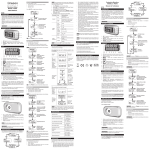
Press the MODE button to browse through the following functions:
• Step counting, STP is shown on the display
• Distance measurement, KM or MIL is shown on the display
• Calorie measurement, CAL is shown on the display
• Step barometer
• Activity timer, TMR is shown on the display. The timer starts
counting when movement is detected.
• Clock
seven day memory
The last seven days in the memory are accessible from the
pedometer (accumulated day-by-day).
Press and hold MODE to enter the memory function.
Press MODE to select the day.
Press SET to toggle between steps, distance and calories on the
selected day.
The data in the memory is stored at midnight every day and the
pedometer is automatically reset.
steP Barometer functIon
In the lower left or higher right part of the display there is a “Step
Barometer Function” that helps you obtain a healthier lifestyle by
walking 10,000 steps per day. This Barometer is based on the last 7
days from the 30 day memory in the pedometer and shows your
daily average on the display. Each box in the barometer is equal to
an average of 1,666 steps.
MEM
DAY
MEM
DAY
MEM
DAY
resettIng the Pedometer
Press and hold the MODE and SET buttons simultaneously to reset
the counter.
Personal settIngs
settIng dIstance and WeIght unIts
The Pedometer’s default setting is metric (Km for distance, cm for
stride length and kg for body weight). This can be changed to
Set the stride length by walking 10 steps and then measure that
distance. Divide the distance by 10 to find your stride length.
settIng strIde length (30-240cm)
The default setting is 75cm (30 inches).
Press MODE until the text KM appears in the display.
Press and hold SET until the current stride length starts to flash.
Press MODE repeatedly to increase the stride length to the desired
value (increases by 1 cm per press, or 1 inch if MIL is selected).
Press and hold MODE and the stride length value will increase
faster.
Once the stride length is set, the pedometer automatically returns
to distance mode after 5 seconds or by pressing SET.
settIng Body WeIght (30-135 kg)
The default setting is 45kg (100lb).
Press MODE repeatedly until CAL is shown on the display.
Press and hold SET and the current body weight will be displayed.
Press MODE repeatedly to increase the body weight to the desired
value (increases by 1 kg per press, or 1 lb if MIL is selected).
Press and hold MODE and the body weight value will increase
faster.
Once the body weight is set, the pedometer automatically returns to
calorie mode after 5 seconds or by pressing SET.
settIng tIme
Correctly setting the time is essential for an accurate memory
function.
Press the MODE button repeatedly until AM or PM is shown on the
display.
Press and hold the SET button until the time flashes.
Press MODE to change from the 12 to 24 hour formats. Press SET
to confirm the time format.
Press MODE to set the hours.
Press SET to switch to minute format and press MODE to change
the minutes.
Press SET or wait 5 seconds to confirm the settings.
specifications
Temperature range Operation: 0 °C to +50 °C
Storage: -10 °C to +60 °C
Battery type: CR-2032
Battery lifetime approx. 6 months at 10 000 steps/day
Protect the environment
All parts included in this product including batteries should be
recycled and must not be thrown away in the regular trash. Dispose
of these items in accordance with applicable local regulations.
Warranty
Silva warrants that, for a period of two (2) years, your Silva Product
will be substantially free of defects in materials and workmanship
under normal use. Silva’s liability under this warranty is limited to
repairing or replacing the product. This limited warranty extends
only to the original purchaser. If the Product proves defective
during the Warranty Period please contact the original place of
purchase. Make sure to have your proof of purchase on hand when
returning the product. Returns cannot be processed without the
original proof of purchase. This warranty does not apply if the
Product has been altered, not been installed, operated, repaired, or
maintained in accordance with instructions supplied by Silva, or
has been subjected to abnormal physical or electrical stress,
misuse, negligence or accident. Neither does the warranty cover
normal wear and tear. Silva is not responsible for any
consequences, direct or indirect, or damage resultant from use of
this product. In no event will Silva’s liability exceed the amount paid
by you for the product. Some jurisdictions do not allow the
exclusion or limitation of incidental or consequential damages, so
the above limitation or exclusion may not apply to you. This
Warranty is valid and may be processed only in the country of
purchase.
For more information please visit www.silva.se
Visit: www.silva/enviroment
for more information about the
Waste Electrical and Electronic
Equipment (WEEE) Directive.