1
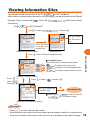
Viewing Information Sites
The EZweb can be accessed from the EZ
(EZ Top Menu).
Many useful and entertaining information sites (programs) can be accessed via the EZweb.
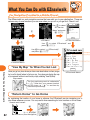
Example: How to access the “
” site in the “
” (Business & News
information)
“EZ
(EZ Top Menu)”
Use j to select “
” and press c.
Image
Image
Use j to select
the information
site.
Press u twice
to select the
shortcut link.
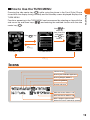
<Genre-based portal screen>
<Shortcut link>
Navigation Area
Portal information is categorized by genre.
Provides timely information.
Introduces au recommended sites.
Introduces categorized information.
Image
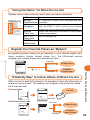
<Category selection screen>
Press j to
Press j to select “
select “
”
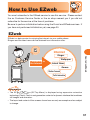
How to Use EZweb
Press d once to select the navigation area.
” and press c.
and press c.
Image
Use j to select the
information site.
c
Information site
Press l or L (
Back
) to return to the EZ
(EZ Top Menu) screen.
<Information site selection screen>
Information
• Press F to return the standby screen.
• Some information sites are pay sites and may require provider charges in addition to a connection fee.
• The layout and content of the screens shown here are only an example and are subject to change.
69