1
DM-D110/D210
User’s Manual . . . . . . . . . 1
用户手册 . . . . . . . . . . . . . . 8
ユーザーズマニュアル . . 15
410809701
English
A
2
1
B
3
6
7
10
8
9
4
5
C
11
E
D
330°
90°
48°
36°
F
12
13
ON
1
2
3 4
5
6
7 8
14
ii DM-D110/D210
English
English
DM-D110/D210
User’s Manual
Illustrations
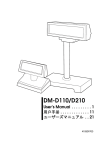
All of the illustrations are at the beginning of this manual. They are identified by letters (A, B, C . . .). Some
of the illustrations have numbers in them. See the list below for the meaning of the numbers.
Illustration A:
1. Screen
2. DM-D110
3. DIP switch (rear side of the
display)
4. POWER switch (bottom of the
display)
5. Stand (DP-110)
Illustration B:
6. Screen
7. DM-D210
8. POWER Switch (bottom side of
the display)
9. Stand (DP-210)
10. DIP Switch (bottom of the
display)
Illustration C:
11. DP-502
Illustration F:
12. DM-D110
13. DM-D210
14. DIP switch
All rights reserved. No part of this publication may be reproduced, stored in a retrieval system, or
transmitted in any form or by any means, electronic, mechanical, photocopying, recording, or otherwise,
without the prior written permission of Seiko Epson Corporation. No patent liability is assumed with
respect to the use of the information contained herein. While every precaution has been taken in the
preparation of this book, Seiko Epson Corporation assumes no responsibility for errors or omissions.
Neither is any liability assumed for damages resulting from the use of the information contained herein.
Neither Seiko Epson Corporation nor its affiliates shall be liable to the purchaser of this product or third
parties for damages, losses, costs, or expenses incurred by purchaser or third parties as a result of:
accident, misuse, or abuse of this product or unauthorized modifications, repairs, or alterations to this
product, or (excluding the U.S.) failure to strictly comply with Seiko Epson Corporation’s operating and
maintenance instructions.
Seiko Epson Corporation shall not be liable against any damages or problems arising from the use of any
options or any consumable products other than those designated as Original Epson Products or Epson
Approved Products by Seiko Epson Corporation.
EPSON and ESC/POS are registered trademarks of Seiko Epson Corporation in the U.S. and other
countries.
NOTICE:
The contents of this manual are subject to change without notice.
Copyright © 2006 by Seiko Epson Corporation, Nagano, Japan.
DM-D110/D210 User’s Manual 1
English
EMC and Safety Standards Applied
EMC and Safety Standards Applied
Product Name:
DM-D110/DM-D210
Model Name:
M58DB/M59DB
The following standards are applied only to the display that is so labeled. (EMC is tested using the
EPSON power supplies.)
Europe:
CE marking
Safety:
EN 60950-1
North America:
EMI:
FCC/ICES-003 Class A
Safety:
UL 90650-1/CSA C22.2
No. 60950-1
Japan:
EMC:
VCCI Class A
Oceania:
EMC:
AS/NZS CISPR22 Class B
WARNING
You are cautioned that changes or modifications not expressly approved by SEIKO EPSON Corporation
could void your authority to operate the equipment.
CE Marking
The display conforms to the following Directives and Norms:
Directive 89/336/EEC
EN 55022 Class B
EN 55024
IEC 61000-4-2
IEC 61000-4-3
IEC 61000-4-4
IEC 61000-4-5
IEC 61000-4-6
IEC 61000-4-11
FCC Compliance Statement For American Users
This equipment has been tested and found to comply with the limits for a Class A digital device, pursuant
to Part 15 of the FCC Rules. These limits are designed to provide reasonable protection against harmful
interference when the equipment is operated in a commercial environment.
This equipment generates, uses, and can radiate radio frequency energy and, if not installed and used in
accordance with the instruction manual, may cause harmful interference to radio communications.
Operation of this equipment in a residential area is likely to cause harmful interference, in which case the
user will be required to correct the interference at his own expense.
FOR CANADIAN USERS
This Class A digital apparatus complies with Canadian ICES-003.
À l'intention des utilisateurs canadiens
Cet appareil numerique de la classe A est conforme a la norme NMB-003 du Canada.
GERAUSCHPEGEL
Gemas der Dritten Verordnung zum Geratesicherheitsgesetz (Maschinenlarminformations- Verordnung3. GSGV) ist der arbeitsplatzbezogene Gerausch-Emissionswert kleiner als 70 dB(A) (basierend auf ISO
7779).
2 DM-D110/D210 User’s Manual
English
Safety Precautions
This section presents important information intended to ensure safe and effective
use of this product. Please read this section carefully and store it in an accessible
location.
WARNING:
Shut down your equipment immediately if it produces smoke, a strange odor, or
unusual noise. Continued use may lead to fire. Immediately unplug the
equipment and contact your dealer or a Seiko Epson service center for advice.
Never attempt to repair this product yourself. Improper repair work can be
dangerous.
Never disassemble or modify this product. Tampering with this product may
result in injury or fire.
Be sure to use the specified power source. Connection to an improper power
source may cause fire.
Do not allow foreign matter to fall into the equipment. Penetration by foreign
objects may lead to fire.
If water or other liquid spills into this equipment, unplug the power cord
immediately, and then contact your dealer or a Seiko Epson service center for
advice. Continued usage may lead to fire.
CAUTION:
Do not connect cables in ways other than those mentioned in this manual.
Different connections may cause equipment damage and burning.
Be sure to set this equipment on a firm, stable, horizontal surface. The product
may break or cause injury if it falls.
Do not use in locations subject to high humidity or dust levels. Excessive humidity
and dust may cause equipment damage or fire.
Do not place heavy objects on top of this product. Never stand or lean on this
product. Equipment may fall or collapse, causing breakage and possible injury.
Do not connect multiple extension struts. If the device topples over, there is a
risk of damage or injury.
The horizontal rotating angle of the screen unit is limited by a stopper. Do not
apply excess force to rotate the screen unit past the limit set by the stopper.
Doing so may cause damage.
When you are attaching and detaching the cable, always check that the
power switches of the customer display and the unit that it is connected to are
turned off.
Take care when handling the customer display not to drop or knock it because
it has a built-in fluorescent display tube.
If you do not use this product for an extended period of time, always
disconnect the power cord for safety. If you move the product, ensure that the
power cord is disconnected and that all of the cables are disconnected before
moving it.
Do not use aerosol sprayers containing flammable gas inside or around this
product. Doing so may cause fire.
DM-D110/D210 User’s Manual 3
English
Part Names
See Illustrations A through C.
Option
Each of the options are used depending on the way the product is installed.
❏ Illustration A
DM-D110+DP-110 (Stand)
❏ Illustration B
DM-D210+DP-210 (Stand)
❏ Illustration C
DM-D110/DM-D210+DP-502
(TM Printer Connection Option)
Unpacking
The following items are included with the standard specification Customer
Display. If any item is damaged, contact your dealer.
❏ Customer Display
DM-D110/DM-D210
❏ User’s Manual
Downloading Drivers, Utilities, and Manuals
Drivers, utilities, and manuals can be downloaded from one of the following
URLs.
For customers in North America, go to the following web site:
http://www.epsonexpert.com/ and follow the on-screen instructions.
For customers in other countries, go to the following web site:
http://www.epson-pos.com/
Select the product name from the “Select any product“ pulldown menu.
Precautions when Installing
❏
❏
Ensure that the power switches of the customer display and the device that it
is connected to are turned off before connecting the cable.
Refer to the DM-D110 Technical Reference Guide or the DM-D210 Technical
Reference Guide for information on how to install the device.
Precautions when Power On
Turn on the power to the customer display before turning on the power of the
computer, printer or other host devices.
Note:
If you are connecting to the USB model of the EPSON TM printer, always ensure that you
turn on the power to the customer display first. If you turn on the power to the customer
display too late, the system may not be able to detect the customer display.
4 DM-D110/D210 User’s Manual
English
Changing the Orientation of the Display Unit
The angle and direction of the display unit can be changed by pressing on the
struts with your hand while moving the display unit. The display unit will move
with only light pressure, so do not apply more pressure once the unit stops
moving. Applying excess force to move the display unit may cause damage.
When installed in the IR-700 or TM printer, there may be situations where the
display unit cannot be turned to the desired direction. In these situations, remove
the customer display and base unit, then adjust the position of the lug in the base
unit before reattaching.
See Illustration D (DM-D110) and Illustration E (DM-D210).
DIP Switches
The DIP switches configure the communication settings and whether a self-test is
required.
CAUTION:
Do not remove the DIP switch cover until after turning the power off. Removing
the cover while the power is turned on may damage the device.
DIP Switch 1 Functions
DSW1 No.
Function
ON
OFF
Default Setting
1-1
Received Error Data
Ignore
“?” Display
OFF
1-2
Receive Data Length
7bit
8bit
OFF
1-3
Parity
With Parity
No Parity
OFF
1-4
Parity Selection
Even
Odd
OFF
1-5
Communication Speed
Switching
1-6
Refer to “Transfer Speed Switching”
1-7
1-8
ON
OFF
ON
Execute Self-Test (*1)
Yes
No
OFF
(*1) Executes the self-test once only when the power is turned on.
Transfer Speed Switching
SW1-5
SW1-6
SW1-7
Transfer Speed
(bps)
2400
ON
ON
ON
OFF
ON
ON
4800
ON
OFF
ON
9600*1
OFF
OFF
ON
19200*2
ON
ON
OFF
38400
OFF
ON
OFF
57600
ON
OFF
OFF
115200
OFF
OFF
OFF
(Reserved)
*1 Default Setting
*2 Setting that is used when connecting to the USB model of the EPSON TM printer.
DM-D110/D210 User’s Manual 5
English
Specifications
DM-D110
Model
DM-D110
DM-D110 + DP110
Display type
Number of characters
displayed
40 characters (20 columns × 2 rows, 5 × 7 dot matrix)
Display color
Green (505 nm)
690 cd/m2
Brightness
Character classes
Alphanumeric: 95 characters
International characters: 37 characters
Graphic characters: 128 characters × 12 pages
Character composition
5 × 7 dot matrix, cursor
Character size
3.5 × 5.0 mm
Character pitch
Interface
5.2 mm
Standard
Connector
RS232C Compliant
RJ-45
D-Sub 25 pin (female)
Reliability
DC 11.4 V ~ 48 V
Power consumption
Approximately 2 W
Display
unit
165 (W) × 50.5 (D) × 69 (H) mm
Base unit
-
165 (W) × 110 (D) ×
63 (H) mm
78 (W) × 164 (D) ×
260 (H) mm
External
165 (W) × 50.5 (D) ×
69 (H) mm
165 (W) × 110 (D) ×
135 (H) mm
165 (W) × 164 (D) ×
331 or 451 (H) mm
Approximately 0.29 kg
Approximately 0.65 kg
Approximately 0.55 kg
Weight
Color
Cool white, Dark gray
Tilt angle
Horizontal rotation angle
Power supply
RJ-45
Lifespan 20,000 hours
Power supply voltage
External
dimensions
DM-D110 + DP502
Fluorescent tube display
Maximum 48° (4 steps)
-
Maximum 90°
Maximum 330°
Supplied by system
PS-180 (Option)
Supplied by TM printer
6 DM-D110/D210 User’s Manual
English
DM-D210
Model
DM-D210
DM-D210 + DP210
Display type
Number of characters
displayed
40 characters (20 columns × 2 rows, 5 × 7 dot matrix)
Display color
Green (505 nm)
700 cd/m2
Brightness
Character classes
Alphanumeric: 95 characters
International characters: 37 characters
Graphic characters: 128 characters × 12 pages
Character composition
5 × 7 dot matrix, comma/period/annunciator
Character size
6.5 × 11.3 mm
Character pitch
Interface
9.9 mm
Standard
Connector
RS232C Compliant
RJ-45
D-Sub 25 pin (female)
Reliability
DC 11.4 V ~ 48 V
Power consumption
Approximately 6 W
Display
unit
260 (W) × 60 (D) × 83 (H) mm
Base unit
-
260 (W) × 110 (D) ×
53 (H) mm
78 (W) × 164 (D) ×
260 (H) mm
External
260 (W) × 60 (D) ×
83 (H) mm
260 (W) × 110 (D) ×
383 or 503 (H) mm
260 (W) × 164 (D) ×
360 or 480 (H) mm
Approximately 0.6 kg
Approximately 0.98 kg
Approximately 0.85 kg
Weight
Color
Cool white, Dark gray
Tilt angle
Maximum 36° (3 steps)
Horizontal rotation angle
Power supply
RJ-45
Lifespan 20,000 hours
Power supply voltage
External
dimensions
DM-D210 + DP502
Fluorescent tube display
Maximum 330°
Supplied from system
PS-180 (Option)
Supplied by TM printer
DM-D110/D210 User’s Manual 7
ºÚÃÂ÷–Œƒ
简体中文
DM-D110/D210
用户手册
图例
所有的图例都位于本手册的开头部分。这些图例都由字母 (A、 B、 C. . .)来标识。某些图例包含有多个数
字。请看以下列表中数字所表达的含意。
图例 A:
1. 屏幕
2. DM-D110
3. DIP 开关 (显示器的背面)
4. 电源开关 (显示器的底部)
5. 支架 (DP-110)
图例 B:
6. 屏幕
7. DM-D210
8. 电源开关 (显示器的底部)
9. 支架 (DP-210)
10. DIP 开关 (显示器的底部)
8 DM-D110/D210 用户手册
图例 C:
11. DP-502
图例 F:
12. DM-D110
13. DM-D210
14. DIP 开关
ºÚÃÂ÷–Œƒ
保留所有权利。在未得到精工爱普生株式会社的书面许可前,不得复制本出版物的任何部分,或者将其存
储到检索系统中,或以任何形式、任何手段 (如电子、机械、影印、记录或其它)进行传播。使用这里的
信息不承担任何专利责任。因为制作本手册时预先已采取了各项预防措施,精工爱普生株式会社对出现的
错误或遗漏不承担任何责任。对因使用此处包含的信息所导致的任何损坏不承担任何责任。
精工爱普生株式会社及其分支机构不对本产品的买方或第三方因意外事故、不当使用或滥用此产品,或未
经授权进行变更、修改或改用此产品,或 (美国除外)没有严格按照精工爱普生株式会社操作和维护说明
所产生的损坏、丢失、费用或开支负责。
精工爱普生株式会社对因使用不是原爱普生产品或爱普生批准的任何选件或任何可消耗产品引起的任何损
坏或问题将不承担任何责任。
EPSON 和 ESC/POS 是精工爱普生株式会社在美国及其它国家的注册商标。
注意:
本手册包含的内容可能随时更改,恕不另行通知。
版权所有 ©2006 日本长野精工爱普生株式会社。
所应用的 EMC 和安全标准
所应用的 EMC 和安全标准
产品名称:
DM-D110/DM-D210
型号名称:
M58DB/M59DB
以下标准仅应用于这样标识的单元。 (使用 EPSON 电源对 EMC 进行测试。)
欧洲:
CE 标记
安全性:
EN 60950-1
北美:
EMI:
FCC/ICES-003 A 级
安全性:
UL 90650-1/CSA C22.2
编号:60950-1
日本:
EMC:
VCCI A 级
大洋洲:
EMC:
AS/NZS CISPR22 B 级
警告
请注意,任何未经精工爱普生株式会社明确批准的变更或修改会使您丧失操作本设备的权利。
CE 标记
本机符合以下指令和标准:
指令 89/336/EEC
EN 55022 B 级
EN 55024
IEC 61000-4-2
IEC 61000-4-3
IEC 61000-4-4
IEC 61000-4-5
IEC 61000-4-6
IEC 61000-4-11
DM-D110/D210 用户手册 9
ºÚÃÂ÷–Œƒ
FCC 美国用户的合规性声明
本设备已经过测试,确定它遵从 A 级数字设备的限制,并与 FCC 规则的第 15 部分相符。当在商业环境中
操作本设备时,这些限制旨在针对有害干扰提供合理保护。
本设备能够生成、利用并传播射频能量,如果不按照说明手册进行安装和使用,可能对无线电通信造成有
害干扰。
在居住区操作此设备容易造成有害干扰,在这种情况下,需要客户自费排除这些干扰。
对于加拿大的用户
此 A 级数字设备符合加拿大 ICES-003。
安全预防措施
本部分介绍专用于确保安全和高效使用本产品的重要信息。请认真阅读本部分,并
将它存放到便于取用的位置。
警告:
如果设备出现冒烟、有异味或异常噪音时,请立即关闭设备。继续使用可能导致火灾。
请立即拔下设备电源线并与您的经销商或精工爱普生服务中心联系以获得建议。
一定不要尝试自行维修本产品。 不当的维修会带来危险。
一定不要拆卸或修改本产品。篡改本产品可能导致人身伤害或火灾。
确保使用指定的电源。电源连接不当可能导致火灾。
不允许异物落入本设备中。异物的渗透可能导致火灾。
如果有水或其它液体渗入本设备,立即拔下设备的电源线,然后联系您的经销商或精工
爱普生服务中心获得建议。继续使用可能导致火灾。
小心:
不要用本手册中指定以外的方法连接电缆。其它连接可能会导致设备损坏和烧坏。
确保将本产品放置在牢固、稳定和水平的表面上。如果本产品跌落可能会破裂或导致损
伤。
不要在潮湿或灰尘多的地方使用本产品。湿度过高或灰尘过多可能会导致设备损坏或火
灾。
不要在本产品的顶部放置沉重物体。一定不要站立或斜靠在本产品上。 设备可能会跌倒
或塌下,从而引起破损或可能的伤害。
不要连接多个伸缩杆。如果设备倒塌,可能会导致设备损坏或人身伤害。
屏幕单元的水平旋转角度受其支杆限制。不要用超过支杆设置的限制力度来旋转屏幕单
元, 否则可能会造成损坏。
连接和断开电缆时,要检查客户显示器的电源开关及与其连接的单元是否关闭。
搬运客户显示器时,小心不要让其掉落或碰撞,因为显示器内置有荧光显示管。
如果您长时间不使用本产品,要断开电源线以确保安全。如果您要移动本产品,请确保
在移动前电源线和所有电缆均已断开。
不要在本产品的内部或周围使用含有可燃性气体的喷雾器。 否则可能会造成火灾。
10 DM-D110/D210 用户手册
ºÚÃÂ÷–Œƒ
部件名称
请参见 A 到 C 的图例。
选件
各个选件的使用取决于本产品的安装方式。
❏ 图例 A
DM-D110+DP-110 (支架)
❏ 图例 B
DM-D210+DP-210 (支架)
❏ 图例 C
DM-D210+DP-502 (TM 打印机连接选件)
解包
以下项目随标准规格的客户显示器一起提供。如果有任何项目受损,请联系您的经
销商。
❏ 客户显示器
DM-D110/DM-D210
❏ 用户手册
下载驱动程序、实用程序及手册
驱动程序、实用程序及手册可以从下列 URL 之一下载。
对于北美的客户,请访问下列网站:
http://www.epsonexpert.com/,然后依照屏幕上的说明操作。
对于其它国家的客户,请访问下列网站:
http://www.epson-pos.com/
请从 “Select any product”下拉菜单中选择产品名。
安装时的预防措施
❏
❏
在连接电缆之前确保关闭客户显示器及与其连接的设备的电源开关。
有关如何安装设备的信息,请参阅 DM-D110 Technical Reference Guide 或
DM-D210 Technical Reference Guide。
安装时的电源开关的开
在打开计算机、打印机或其它主机设备的电源之前,先打开客户显示器的电源。
注意:
如果连接到 EPSON TM 打印机的 USB 型号,要确保先打开客户显示器的电源。如
果太晚打开客户显示器的电源,系统可能无法检测到客户显示器。
更改显示器单元的方向
您可以在移动显示器单元时用手按住支杆,从而改变显示器单元的角度和方向。显
示器单元移动时只需轻轻用力按住,因此显示器单元停止移动后不要用太大的力。
如果移动显示器单元时用力过大,可能会造成损坏。
在 IR-700 或 TM 打印机上进行安装时,可能会出现显示器单元不能转到所需方向
的情况。如果出现这种情况,请卸下客户显示器和底座,然后调整底座上接线片的
位置后再重新安装。
显示器单元的移动范围如下表所示。 (DM-D110:图例 D, DM-D210:图例 E)
DM-D110/D210 用户手册 11
ºÚÃÂ÷–Œƒ
DIP 开关
DIP 开关用于配置通信设置和是否需要自我设置。
小心:
在关闭电源前不要取下 DIP 开关盖。如果在电源打开时取下开关盖,可能会损坏设备。
DIP 开关 1 功能
DSW1 编号
功能
ON
OFF
默认设置
1-1
收到错误数据
忽略
显示 “?”
OFF
1-2
接收数据长度
7bit
8bit
OFF
1-3
奇偶性
有奇偶性
无奇偶性
OFF
1-4
奇偶性选择
偶性
奇性
OFF
1-5
通信速度切换
请参阅 “传输速度切换”
1-6
1-7
1-8
ON
OFF
ON
执行自我测试 (*1)
是
否
(*1)只能在电源打开时执行自我测试一次。
传输速度切换
SW1-5
SW1-6
SW1-7
传输速度 (bps)
ON
ON
ON
2400
OFF
ON
ON
4800
ON
OFF
ON
9600*1
OFF
OFF
ON
19200*2
ON
ON
OFF
38400
OFF
ON
OFF
57600
ON
OFF
OFF
115200
OFF
OFF
OFF
(保留)
*1 默认设置
*2 连接到 EPSON TM 打印机的 USB 型号时所使用的设置。
12 DM-D110/D210 用户手册
OFF
ºÚÃÂ÷–Œƒ
规格
DM-D110
DM-D110
型号
DM-D110 + DP110
显示器类型
显示的字符数
40 个字符 (20 列 × 2 行, 5 × 7 点阵)
显示颜色
绿色 (505 nm)
690 cd/m2
亮度
字符类别
字母数字:95 个字符
国际字符:37 个字符
图形字符:128 个字符 Þ 12 页
字符合成
5 × 7 点阵,游标
字符大小
3.5 × 5.0 mm
5.2 mm
字符间距
接口
标准
接头
RS232C 兼容
RJ-45
寿命 20,000 个小时
DC 11.4 V ~ 48 V
电源电压
电源消耗
重量
大约 2 W
显示单元
165 (W) × 50.5 (D) × 69 (H) mm
底座
-
165 (W) × 110 (D) ×
63 (H) mm
78 (W) × 164 (D) ×
260 (H) mm
外部
165 (W) × 50.5 (D)×
69 (H) mm
165 (W) × 110 (D) ×
135 (H) mm
165 (W) × 164 (D) ×
331 或 451 (H) mm
大约 0.65 kg
大约 0.55 kg
大约 0.29 kg
颜色
冷白色,深灰色
倾斜角度
水平旋转角度
电源
RJ-45
D-Sub 25 pin (母座)
可靠性
外部尺寸
DM-D110 + DP502
荧光管显示器
-
最大 48• (4 步)
最大 90•
最大 330•
由系统供应
PS-180 (选件)
由 TM 打印机供应
DM-D110/D210 用户手册 13
ºÚÃÂ÷–Œƒ
DM-D210
DM-D210
型号
DM-D210 + DP210
显示器类型
DM-D210 + DP502
荧光管显示器
显示的字符数
40 个字符 (20 列 × 2 行, 5 × 7 点阵)
显示颜色
绿色 (505 nm)
700 cd/m2
亮度
字符类别
字母数字: 95 个字符
国际字符: 37 个字符
图形字符: 128 个字符 × 12 页
字符合成
5 × 7 点阵,逗号 / 句号 / 示号器
字符大小
6.5 × 11.3 mm
9.9 mm
字符间距
接口
标准
接头
RS232C 兼容
RJ-45
寿命 20,000 个小时
DC 11.4 V ~ 48 V
电源电压
电源消耗
外部尺寸
重量
大约 6 W
显示单元
260 (W) × 60 (D) × 83 (H) mm
底座
-
260 (W) × 110 (D) ×
53 (H) mm
78 (W) × 164 (D) ×
260 (H) mm
外部
260 (W) × 60 (D) ×
83 (H) mm
260 (W) × 110 (D) ×
383 或 503 (H) mm
260 (W) × 164 (D) ×
360 或 480 (H) mm
大约 0.98 kg
大约 0.85 kg
大约 0.6 kg
颜色
冷白色,深灰色
倾斜角度
最大 36• (3 步)
水平旋转角度
电源
RJ-45
D-Sub 25 pin (母座)
可靠性
最大 330•
由系统供应
14 DM-D110/D210 用户手册
PS-180 (选件)
由 TM 打印机供应
English
日本語
DM-D110/D210
ユーザーズマニュアル
(1) 本書の内容の一部または全部を無断で転載、複写、複製、改ざんすることは固くお断りします。
(2) 本書の内容については、予告なしに変更することがあります。
(3) 本書の内容については、万全を期して作成いたしましたが、万一ご不審な点や誤り、記載もれなど、お気づきの点がありまし
たらご連絡ください。
(4) 運用した結果の影響については、上項にかかわらず責任を負いかねますのでご了承ください。
(5) 本製品がお客様により不適切に使用されたり、本書の内容に従わずに取り扱われたり、またはエプソンおよびエプソン指定の
者以外の第三者により修理・変更されたことなどに起因して生じた損害などにつきましては、責任を負いかねますのでご了承
ください。
(6) エプソン純正品およびエプソン品質認定品以外のオプションまたは消耗品を装着してトラブルが発生した場合には、責任を負
いかねますのでご了承ください。
EPSON® はセイコーエプソン株式会社の登録商標です。
ご使用の前に
ご使用の際は、必ず「ユーザーズマニュアル」をよくお読みのうえ、正しくお使
いください。
「ユーザーズマニュアル」は、不明な点をいつでも解決できるように、すぐ取り出
して見られる場所に保管してください。
安全にお使いいただくために
本書および製品には、製品を安全に正しくお使いいただき、お客様や他の人々へ
の危害や財産への損害を未然に防止するために、以下の記号が使われています。
その意味は次のとおりです。内容をよく理解してから本文をお読みください。
警告:
この表示を無視して、誤った取り扱いをすると、人が死亡または重傷を負う可能
性が想定される内容を示しています。
注意:
この表示を無視して、誤った取り扱いをすると、人が傷害を負う可能性が想定さ
れる内容および物的損害のみの発生が想定される内容を示しています。
DM-D110/D210 ユーザーズマニュアル 15
English
安全上のご注意
警告:
❏ 煙が出たり、変な臭いや音がするなど異常が発生した場合、すぐ
❏
❏
❏
❏
❏
に電源コードを抜いて、販売店またはサービスセンターにご相談
ください。そのまま使用すると、火災の原因となります。
お客様による修理は危険ですから絶対におやめください。
分解や改造はしないでください。けがや火災の恐れがあります。
必ず指定されている電源をお使いください。他の電源を使うと、
火災の恐れがあります。
本製品の内部に異物を入れたり、落としたりしないでください。
火災の恐れがあります。
万一、水などの液体が内部に入った場合は、電源コードを抜き、
販売店またはサービスセンターにご相談ください。そのまま使用
すると、火災の原因となります。
注意:
❏ 各種ケーブルは、本書で指示されている以外の配線はしないでく
❏
❏
❏
❏
❏
❏
❏
ださい。誤った配線をすると、故障や火災の恐れがあります。
不安定な場所(ぐらついた台の上や傾いた所など)に置かないで
ください。落ちたり、倒れたりして、けがをする恐れがありま
す。
湿気やほこりの多い場所に置かないでください。故障や火災の恐
れがあります。
本製品の上に乗ったり、重いものを置かないでください。倒れた
り、こわれたりしてけがをする恐れがあります。
延長支柱の複数接続はしないでください。倒れたりして、破損お
よび怪我をする恐れがあります。
表示部は、水平回転角度がストッパーにより制限されています。
無理な力を加え、ストッパーによる制限を超えて表示部を回転さ
せないでください。破損の原因になります。
ケーブルの取り付け、取り外しを行うときは、必ずカスタマディ
スプレイおよびシステムの電源スイッチが OFF になっているこ
とを確認してください。
DM-D110/D210 には蛍光表示管が内蔵されていますので、落とし
たり、ぶつけたりしないように取り扱いには十分注意してくださ
い。
16 DM-D110/D210 ユーザーズマニュアル
English
❏ 本製品を長期間ご使用にならないときは、安全のため必ず電源
コードを抜いてください。本製品を移動する場合は、電源コード
を抜いて、すべての配線を外したことを確認してから行ってくだ
さい。
❏ 本製品の内部や周囲で可燃性ガスのスプレーを使用しないでくだ
さい。ガスが滞留して引火による火災などの原因となる恐れがあ
ります。
電波障害自主規制について
この装置は、情報処理装置等電波障害自主規制協議会 (VCCI) の基準に基づくク
ラス A 情報技術装置です。この装置を家庭環境で使用すると電波妨害を引き起
こすことがあります。この場合には使用者が適切な対策を講ずるよう要求される
ことがあります。
使用制限
本製品を航空機・列車・船舶・自動車などの運行に直接関わる装置・防災防犯装
置・各種安全装置など機能・精度などにおいて高い信頼性・安全性が必要とされ
る用途に使用される場合は、これらのシステム全体の信頼性および安全維持のた
めにフェールセーフ設計や冗長設計の措置を講じるなど、システム全体の安全設
計にご配慮いただいた上で当社製品をご使用いただくようお願いいたします。
本製品は、航空宇宙機器、幹線通信機器、原子力制御機器、医療機器など、きわ
めて高い信頼性・安全性が必要とされる用途への使用を意図しておりませんの
で、これらの用途には本製品の適合性をお客様において十分ご確認のうえ、ご判
断ください。
DM-D110/D210 ユーザーズマニュアル 17
English
各部名称
DM-D110MJ
DM-D110ST
DM-D110
ディップスイッチ
( 背面 )
画面
電源スイッチ
( 底面 )
DP-502
スタンド
DM-D210ST
DM-D210MJ
画面
DM-D210
電源スイッチ
(底面)
ディップスイッチ
(底面)
スタンド
DP-502
DM-D110/D210 のモデル
DM-D110 はコンパクトサイズのカスタマディスプレイです。取付方法により、以
下のモデルがあります。
❏ DM-D110W/B 表示部です。
❏ DM-D110ST/D110STB
DM-D110 にスタンド (DP-110) が付いています。PC とシリア
ル接続が可能です。
❏ DM-D110MJ
DM-D110 に TM プリンタに固定する金具 (DP-502) が付いたモ
デルです。EPSON の TM プリンタ(DM-D コネクタ付きモ
デル)と接続して使います。
18 DM-D110/D210 ユーザーズマニュアル
English
DM-D210 は表示部が大きくて見やすいカスタマディスプレイです。取付方法によ
り、以下のモデルがあります。
❏ DM-D210/B
表示部です。
❏ DM-D210ST
DM-D210 にスタンド (DP-210) が付いています。PC とシリアル
接続が可能です。
❏ DM-D210MJ
DM-D210 に TM プリンタに固定する金具 (DP-502) が付いたモ
デルです。EPSON の TM プリンタ(DM-D コネクタ付きモ
デル)と接続して使います。
同梱品
下記の同梱品は、標準仕様のものを示しています。万一損傷を受けているものが
ありましたら、お買い求め頂いたお店にお問い合わせください。
❏ カスタマディスプレイ
DM-D110/DM-D210
❏ ユーザーズマニュアル
❏ 保証書
ドライバ、ユーティリティ、マニュアル類のダウンロード
ドライバ、ユーティリティ、マニュアル類は、製品に添付されておりませんの
で、以下の URL からダウンロードしてご使用ください。
http://www.epson.jp/dl-sd/
設置するときのご注意
❏ カスタマディスプレイおよび取り付ける機器の電源スイッチをオフしてか
ら、ケーブルを接続してください。
❏ 設置方法は「DM-D110 詳細取扱説明書」
「DM-D210 詳細取扱説明書」を参照
してください。
電源オンのご注意
コンピュータやプリンタなどのホスト機器の電源をオンする前に、カスタマディ
スプレイの電源をオンしてください。
注記 :
EPSON TM プリンタの USB モデルに接続している場合は、必ず最初にカスタマ
ディスプレイの電源をオンしてください。カスタマディスプレイの電源オンが遅
れると、システムがカスタマディスプレイを認識できないことがあります。
表示部の向きの変更
支柱を手で押さえながら表示部を動かすと、表示部の向きや角度を変えられます。
軽く操作すると動きますので、止まったところでやめてください。無理に動かす
と、故障の原因になります。
SASPORT シリーズや TM プリンタに設置している場合に、
表示部がお好みの方向
に向かないことがあります。その場合は、カスタマディスプレイとベース部を取
り外し、ベース部の突起の位置を変更してから再度取り付けてください。
DM-D110/D210 ユーザーズマニュアル 19
English
表示部の可動範囲は表のようになります。
DM-D110
DM-D210
90°
48°
330°
36°
ディップスイッチ
通信条件と、セルフテストの要否を設定します。
注意:
電源をオフにしてからディップスイッチのカバーを外してください。電源を入れ
たまま操作すると、本製品が故障する可能性があります。
ディップスイッチは以下の位置にあります。
DM-D210
DM-D110
ON
1
2
3 4
5
6
7 8
ディップスイッチカバー
ディップスイッチ 1 の機能
DSW1 No.
機能
ON
OFF
1-1
受信エラーデータ
無視
“ ? ” 表示
OFF
OFF
初期設定
1-2
通信データ長
7 ビット
8 ビット
1-3
パリティの有無
パリティ有り
パリティ無し
OFF
奇数
OFF
1-4
パリティの選択
1-5
通信速度の切り替え
偶数
「通信速度の切替」を参照
1-6
ON
OFF
1-7
ON
1-8
OFF
セルフテスト実行
する
しない
(*1)
(*1) 電源を入れた時に、一度だけセルフテストを実行します。
20 DM-D110/D210 ユーザーズマニュアル
English
通信速度の切替
SW1-5
SW1-6
SW1-7
転送速度 (bps)
ON
OFF
ON
OFF
ON
OFF
ON
OFF
ON
ON
OFF
OFF
ON
ON
OFF
OFF
ON
ON
ON
ON
OFF
OFF
OFF
OFF
2400
4800
9600*1
19200*2
38400
57600
115200
( 予約 )
*1 初期設定
*2 EPSON TM プリンタの USB モデルに接続する際の設定
仕様
DM-D110
DM-D110W/B
型番
表示方式
表示文字数
表示色
輝度
文字種
文字構成
文字サイズ
文字ピッチ
インター
フェース
信頼性
電源電圧
消費電力
外形寸法
DM-D110MJ
蛍光管表示
40 文字(20 桁 x 2 行、5 x 7 ドットマトリクス)
グリーン (505nm)
690cd/m2
規格
コネク
タ
表示部
ベース
部
外形
質量
色
チルト角度
水平回転角度
パワーサプライ
オプション
DM-D110ST/STB
英数字:95 文字
国際文字:37 文字
グラフック文字 128 文字 x 12 ページ
5 x 7 ドットマトリクス、カーソル
3.5 x 5.0mm
5.2mm
RS232C 準拠
RJ-45
RJ-45
D-Sub25 ピン
(メス)
寿命 20000 時間
DC 11.4V ~ 48V
約 2W
165(W) X 50.5(D) X 69(H)mm
165(W) x 110(D) x
78(W) x 164(D) x
63(H)mm
260(H)mm
165(W) x 50.5(D) x
165(W) x 110(D) x
165(W)x 164(D) x
69(H)mm
135(H)mm
331or451(H)mm
約 0.29kg
クールホワイト /
ダークグレー
-
POS 端末より供給
-
約 0.65kg
クールホワイト /
ダークグレー
最大 48°(4 段階)
最大 90°
PS-180 と AC-170
( オプション )
ポールユニット
(DP-105)
約 0.55kg
クールホワイト
最大 330°
TM プリンタより
供給
-
DM-D110/D210 ユーザーズマニュアル 21
English
DM-D210
DM-D210/B
型番
表示方式
表示文字数
表示色
輝度
文字種
文字構成
文字サイズ
文字ピッチ
インタ
フェース
信頼性
電源電圧
消費電力
外形寸法
DM-D210ST
DM-D210MJ
蛍光管表示
40 文字(20 桁 x 2 行、5 x 7 ドットマトリクス)
グリーン (505nm)
700cd/m2
規格
コネクタ
表示部
ベース部
外形
質量
色
チルト角度
水平回転角度
パワーサプライ
英数字:95 文字
国際文字:37 文字
グラフック文字 128 文字 x 12 ページ
5 x 7 ドットマトリクス、コンマ / ピリオド / アナウンシェータ
6.5 x 11.3mm
9.9mm
RS232C 準拠
RJ-45
RJ-45
D-Sub25 ピン
(メス)
寿命 20000 時間
DC 11.4V ~ 48V
約 6W
260(W)x 60(D) x 83(H)mm
260(W) x 110(D) x
78(W) x 164(D) x
-
53(H)mm
260(H)mm
260(W) x 60(D) x
260(W) x 110(D)x
260(W) x 164(D) x
83(H)mm
383or503(H)mm
360or480(H)mm
約 0.6kg
クールホワイト /
ダークグレー
POS 端末より供給
22 DM-D110/D210 ユーザーズマニュアル
約 0.98kg
約 0.85kg
クールホワイト
最大 36°(3 段階)
最大 330°
PS-180 と AC-170
( オプション )
TM プリンタより
供給
2006.09 Printed in Taiwan