1
Model
9610
Model 6301B/ES6300 Optional Mounting Bracket
Model 6301B/ES6300 用 取り付けブラケット
6301B etc.
Owner’s Manual
取扱説明書
9610
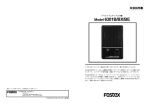
This mounting bracket is designed to be used with the Fostex Models 6301B, 6301BX and
ES6300 powered mini-monitor speaker systems.
Use this mounting bracket to change the angle when setting a speaker system horizontally.
6301B etc.
1
2
3
4
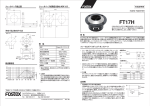
Parts contained in the package
Rubber washers 4 pcs ( ① and ③ )
Bracket
1 pcs ( ② )
Knob bolts
2 pcs ( ④ )
9610
<How to Install>
1.
2.
3.
4.
5.
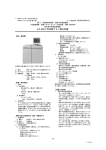
Remove the screws on the top and bottom of the 6301B (X) or ES6300.
Lay the rubber washer ① .
Install the mounting bracket ② upon the rubber washer.
Lay the rubber washer ③ on the mounting bracket.
Rubber washers ① and ③ are identical in shape but the side for installation are symmetrical.
Refer to the drawing for the correct direction in installing the rubber washer.
Finally, tightly screw in the knob bolt ④. Be sure the bolt is sufficiently tight so that the speaker
mounting angle does not shift.
このブラケットは、パワーアンプを搭載したフォステクス ミニ・モニター・スピーカー・システム Model
6301B (AV)、Model 6301B (XAV)、および Model ES6300 専用です。
スピーカー・システムを横置きにして、角度を変えたりする場合にご使用ください。
6301B etc.
1
2
3
4
梱包内訳
スペーサー・ゴム 4 (① と ③)
ブラケット本体
1 (②)
ノブ・ボルト
2 (④)
9610
<取り付け方法>
1.
2.
3.
4.
5.
6301B (AV)、6301B (XAV)またはES6300本体の上面、および底面部に取り付けられているネジを外します。
取り外した部分の凸部に合う向きで、スペーサー・ゴムの凹部をはめ込みます。
スペーサー・ゴムの凸部に、ブラケット本体の穴を合わせます。
ブラケット本体の穴に、スペーサー・ゴムとは反対の向きで、スペーサー・ゴムをはめ込みます。
スペーサー・ゴムとは同じ形状のものですが、図のように取り付ける方向が対称となります。
最後にノブ・ボルトをねじ込んで取り付けます。
ボルトの締め付けが甘いと、使用中ボルトが外れたり、スピーカー本体の角度がしっかり固定されないなどの、
原因となりますのでご注意ください。
FOSTEX CO.
3-2-35, Musashino, Akishima-shi, Tokyo Japan 196-0021
FOSTEX AMERICA
15431 Blackburn Avenue, Norwalk, CA 90650, U. S. A.
フォステクスカンパニー
国内営業・企画販促グループ
〠 196-0021 東京都昭島市武蔵野 3-2-35
☎ 042-546-6355
FAX. 042-546-6067
© PRINTED IN JAPAN FEB. 2005 8288 202 000 FX