1
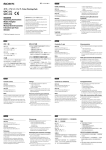
1 クリーニング面 Cleaning surface Face de nettoyage Reinigungsseite Cara limpiadora Superficie di pulizia スタート位置マーク Start position mark Repère indiquant le début Startmarkierung Marca de la posición inicial Contrassegno che indica l’inizio del nastro 2 日本語 給紙トレイ 保護シート印刷面(光沢面) Paper tray Magasin à papier Papierfach bandeja de papel vassoio della carta Printed surface (shiny surface) Face imprimée (face brillante) Bedruckte Seite (glänzende Oberfläche) Cara impresa (cara brillante) Superficie stampata (lucida) Español インクリボン クリーニングシート Cinta de tinta Hoja limpiadora 袋から出し、プリンターにセットする前に、ス 保護シートの裏面(印刷していない面)をクリー タート位置マークが図の位置にくるようにギア ニングシートとして使用します。 Saque la cinta de tinta de la bolsa. Antes de instalarla en la impresora, gire el engranaje en la dirección de la flecha hasta que la marca de la posición inicial sea visible para eliminar las holguras, tal como se muestra. Utilice el dorso (cara no impresa) de la hoja protectora para la limpieza. Este manual describe cómo ajustar la hoja protectora (hoja de limpieza). Para obtener más detalles sobre su utilización, consulte “Limpieza del cabezal térmico y de los rodillos” en el manual de instrucciones suministrado con la impresora. を矢印の方向に回してたるみをとる。 プリント紙 ˎˎプリンターにセットする前にプリント面保護 紙とともに良くさばく。 ˎˎプリント面(文字が印刷されていない面)に 触れないように注意。 ˎˎ折ったり、しわにならないように注意。 本書では保護シート(クリーニングシート)の セット方法を示します。 クリーニング方法については本体の取扱説明書 「感熱ヘッドと内部ローラーのクリーニング」の 項をご覧ください。 1 プリント紙を取り除く。 2 保護シート(クリーニングシート)の印刷面 を下にして給紙トレイにセットする。 English Papel de impresión ˎˎAiree y alinee el papel junto con la hoja de protección antes de colocarlo en la impresora. ˎˎEvite tocar la superficie de impresión (el lado sin letras impresas). ˎˎProcure no doblar ni arrugar el papel. 1 Retire el papel de la bandeja de papel. 2 Coloque la hoja protectora (hoja de limpieza) en la bandeja de papel con la cara impresa hacia abajo. Italiano Ink Ribbon Cleaning Sheet Nastro inchiostrato Foglio di pulizia Take the ink ribbon out of the bag. Before installing it in the printer, remove any slack by winding the gear in the direction of the arrow until the start position mark becomes visible, as illustrated. Use the reverse side (not-printed surface) of the protective sheet for cleaning. This manual describes how to set the protective sheet (cleaning sheet). For detailed information on how to use the cleaning sheet, refer to “Cleaning the thermal head and rollers” described in the Operating Instructions supplied with the printer. Estrarre il nastro inchiostrato dalla confezione. Prima di installarlo nella stampante, rimuovere eventuali allentamenti avvolgendolo in direzione della freccia fino a quando il contrassegno dell’inizio del nastro non diviene visibile, come illustrato. 1 Remove the paper from the paper tray. 2 Place the protective sheet (cleaning sheet) in ˎˎPrima di inserirli nella stampante, sfogliare i fogli e la relative protezione. ˎˎAssicurarsi di non toccare il lato di stampa (lato senza le lettere stampate). ˎˎFare attenzione a non piegare o increspare i fogli. Per la pulizia, utilizzare il lato opposto (superficie non stampata) del foglio protettivo. Nel presente manuale vengono descritte le modalità di collocazione del foglio protettivo (foglio pulente). Per informazioni dettagliate sull’uso del foglio di pulizia, fare riferimento alla sezione “Pulizia della testina termica e dei rulli” contenuta nelle Istruzioni per l’uso in dotazione con la stampante. Print paper ˎˎRiffle the paper along with the protection sheet before setting it in the printer. ˎˎBe sure not to touch the print side (the side without printed letters). ˎˎBe careful not to fold or wrinkle the paper. the paper tray with its printed surface facing down. Français Fogli per la stampa 1 Rimuovere la carta dal vassoio. 2 Posizionare il foglio protettivo (foglio pulente) nel vassoio della carta con la superficie stampata rivolta verso il basso. 中文 Cartouche d’impression Feuille de nettoyage 色带 清洁纸 Retirer la cartouche du sachet. Avant de l’introduire dans l’imprimante, bien tendre le ruban d’impression en tournant la molette dans le sens de la flèche, jusqu’à ce que le repère indiquant le début soit visible, tel qu’indiqué sur l’illustration. Utilisez le verso (face non imprimée) de la feuille de protection pour procéder au nettoyage. Ce manuel décrit comment installer la feuille de protection (feuille de nettoyage). Pour de plus amples informations sur l’utilisation de la feuille de nettoyage, se reporter à la section “Nettoyage de la tête thermique et des rouleaux” du mode d’emploi fourni avec l’imprimante. 从袋中取出色带,在将色带装到打印机上之 前,按照箭头所示方向转动并松开齿轮,直 至使起始位置标记移动至图中所示位置。 使用防护纸的反侧(非印刷表面)进行清 洁。本手册描述了如何对防护纸(清洁纸) 进行设定。 有关如何使用清洁纸的详细信息,请参见与 打印机一起提供的操作指南中的“清洁热敏 头和滚轴”部分。 Papier d’impression ˎˎAérer le papier avec la feuille de protection avant de l’insérer dans l’imprimante. ˎˎVeiller à ne pas toucher la surface d’impression (côté sans caractères imprimés). ˎˎPrendre soin de ne pas plier ni froisser le papier d’impression. 1 Retirer le papier du magasin à papier. 2 Placer la feuille de protection (feuille de nettoyage) dans le magasin à papier, face imprimée vers le bas. 打印纸 装到打印机上之前,将打印机与印相面保 护纸一起理齐。 要注意不得碰触到印相面(无印字面)。 不得弯折和弄皱打印纸。 Deutsch Farbband Reinigungsblatt Nehmen Sie das Farbband aus dem Beutel heraus. Spannen Sie das Band, indem Sie die Spule in Pfeilrichtung drehen, bis die Startmarkierung wie in der Abbildung dargestellt zu sehen ist, bevor Sie das Band in den Drucker einlegen. Verwenden Sie zum Reinigen die Rückseite (nicht bedruckte Seite) des Schutzblattes. In dieser Anleitung wird beschrieben, wie Sie das Schutzblatt (Reinigungsblatt) einlegen. Ausführliche Informationen zum Verwenden des Reinigungsblattes finden Sie unter “Reinigung des Thermodruckkopfs und der Rollen” in der mit dem Drucker gelieferten Bedienungsanleitung. Druckpapier ˎˎFächern Sie das Papier mit der Schutzfolie auf, bevor Sie es in den Drucker einlegen. ˎˎAchten Sie darauf, die Druckoberfläche (die Seite ohne Aufdruck) nicht zu berühren. ˎˎDarauf achten, daß Druckpapier nicht zerknittert. 1 Nehmen Sie das Papier aus dem Papierfach. 2 Legen Sie das Schutzblatt (Reinigungsblatt) 关于旧产品的处理 请不要将旧的产品与一般的生活垃圾一同弃 置。 正确弃置旧的产品有助于避免对环境和人类 健康造成潜在的负面影响。 具体处理方法请遵循当地的规章制度。 mit der bedruckten Seite nach unten ins Papierfach ein. 北京市朝阳区太阳宫中路 12 号楼冠城大厦 701 2011 年 11 月 1 取出打印纸。 2 将防护纸(清洁纸)置于纸托盘中,其打 印面向下放置。