1
MD-ST500
ENGLISH OPERATION MANUAL
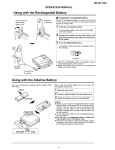
USING WITH THE ALKALINE BATTERY
(page 33)
1. Open the battery case supplied with the unit.
2. Insert the AA size battery [LR6] into the battery
case by matching it + and – terminals to the diagram in the battery case, and then close the
battery case.
3. Align the protuberances on the battery case with
the indentations on the side of the unit.
4. Turn the fixing screw on the battery case toward
the word “LOCK”, and then make sure that the
battery case does not move.
● When using this MD headphone player with an
alkaline battery, keep the rechargeable battery
in the main unit.
● Do not insert a rechargeable battery (such as
nickel-cadmium rechargeable battery) into the
battery case.
CHANGE THE INITIAL SETUP (pages 34-35)
1. Insert a MiniDisc.
2. Hold down the MODE button on the remote control
for 2 seconds or more while in the stop mode.
After “SET UP” is displayed, “BEEP on” or
“BEEP off” will be displayed.
3. Press the
or
button to select the menu
you want to change.
BEEP on
autoPLAY
autoPS
4.Press the MODE button to select the item you
MD-ST500
want to change.
Beep sound
Auto play
Auto power save
Operation indicator
Display on the remote control
Backlight on the remote control
OFF
ON
BEEP on BEEP off
PL off
autoPLAY
PS off
autoPS
See below.
“LIGHTnor”
Operation indicator
Display on the remote control
Backlight on the remote
control
Flashing.
Indicated.
Lit for approx. 10 seconds
when operated.
“LIGHTall”
Operation indicator
Flashing.
Display on the remote control Indicated.
Backlight on the remote control Lit.
“LIGHToff”
Operation indicator
Goes out.(*)
Display on the remote control Indicated for approx.
10 seconds when operated.
Backlight on the remote
Lit for approx. 10 seconds
control
when operated.
(*) ● The indicator blinks for several seconds when
an MD is inserted.
● It does not go out while charging.
5. When the setup is completed, press the button.
LIGHTnor
54
MD-ST500 (J)
TINSJA014AWZZ