1
QCPU 用メモリカード取扱説明書
Memory card manual for QCPU
Q3MEM-4MBS(-SET), Q3MEM-8MBS(-SET)
BCN-P5651-D
1. 注意事項 Precautions
メモリカード本体に記載されている注意事項をよくお読みください。
Please read the precautions printed on the memory card carefully.
2.仕様 Specifications
種類
Type
形名
Model
Q3MEM-□MBS
□=4/8*1
付属品
Accessory
・Q3MEM-BAT バッテリ
Q3MEM-BAT battery
*1□=メモリ容量
・Q3MEM-BAT バッテリ
(単位:M バイト)
Q3MEM-BAT battery
□=Memory capacity
*2
・メモリカード保護カバー
(unit: M byte)
ユニバーサルモデル QCPU 用
(Q3MEM-CV)
*2 Q3MEM-8MBS-SET は,
SRAM カード
ハイパフォーマンスモデル QCPU,プロ
Q3MEM-CV のみ
SRAM card
Q3MEM-□MBS-SET
セス CPU,二重化 CPU 用
The Q3MEM-8MBS-SET
□=4/8*1
(Q3MEM-CV-H)
includes the Q3MEM-CV
Memory card protective cover*2
only.
Q3MEM-CV: for Universal model QCPU,
Q3MEM-CV-H: for High Performance
model QCPU, Process CPU, and
Redundant CPU
仕様の詳細は,QCPU ユーザーズマニュアル(ハードウェア設計・保守点検編)を参照してください。
For details on the specifications, refer to the QCPU User's Manual (Hardware Design, Maintenance and
Inspection).
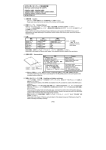
3. 各部の名称 Part Names
3)
1)
・ 取扱いおよびバッテリ交換の詳細は,QCPU ユーザーズマニュアル(ハードウェア設計・保守点検編)を参
照してください。
For more details, refer to the QCPU User's Manual (Hardware Design, Maintenance and Inspection).
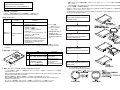
5. バッテリの装着 Installing a Battery
SRAM カードのバッテリは,電池ホルダからはずして出荷されていますので SRAM カードを使用するときは下
記手順によりバッテリをセットしてください。
The SRAM card is shipped without mounting a battery on the holder. To use the SRAM card, set the battery
according to the following procedure.
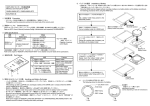
電池ホルダ固定スイッチをRELEASE位置にす
る
Set the battery holder fixing switch to the
RELEASE position.
SRAMカードの電池ホルダをはずす
Pull out the battery holder of the SRAM
card.
バッテリの+面を上に向けて,電池ホルダに
セットする
Set the battery on the holder with the
positive (+) side facing up.
バッテリをセットした電池ホルダをSRAMカー
ドの奥までしっかり挿入する
Place the holder back to the SRAM card.
内容
No.
Description
1) 電池ホルダ部
Battery holder
2) 電池ホルダ固定スイッチ
Battery holder fixing switch.
LOCK:固定,RELEASE:解除 LOCK: locked,
RELEASE: unlocked
3) ライトプロテクトスイッチ
Write protect switch
(factory default: off).
工場出荷時は OFF 設定。
On: read-only,
ON:データの書込み禁止。
Off: read and write enabled
OFF:データの書込み許可。
2)
4. 取扱いおよびバッテリ交換 Handling and Battery Exchange
・ バッテリの交換は,SRAM カードの内容をバックアップしてから,SRAM カードを CPU ユニットに装着し
た状態で行ってください。
Before exchanging the battery of the SRAM card, back up data in the card. Then, exchange the battery with
the card being inserted in the CPU module.
・ 電池ホルダ装着時は,電池ホルダ固定スイッチを必ず LOCK 位置に戻してください。
Set the battery holder fixing switch to the LOCK position after the battery holder (with the battery set) is
attached to the SRAM card.
・ 本メモリカード使用時は,必ずメモリカード保護カバーを CPU ユニットに装着してください。
Attach the memory card protective cover to the CPU module when using the memory card.
電池ホルダ固定スイッチをLOCK位置にする
Set the battery holder fixing switch to the
LOCK position.
*1 バッテリの向きを下記に示します。
The battery has the following information.
6. メモリカードの装着 Inserting a Memory Card
大容量メモリカードの装着手順を下記に示します。
Insert a large-capacity memory card according to the following procedure.
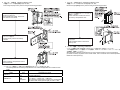
CPU ユニットの電源を OFF して,CPU ユニット
本体のふたを取りはずす
Power off the CPU module, and remove
the cover from the module.
7. メモリカードの取りはずし Removing a Memory Card
大容量メモリカードの取りはずし手順を下記に示します。
Remove a large-capacity memory card according to the following procedure.
CPU ユニットの電源を OFF して,メモリカード
保護カバーをはずす
Power off the CPU module, and remove
the memory card protective cover.
メモリカードを CPU ユニット本体のメモリカー
ドスロットに装着する
Insert a memory card into the memory
card slot.
メモリカード EJECT ボタンを押してメモリカー
ドを引き出す
Press the EJECT button to remove the
memory card.
8. バッテリの廃棄
Disposing of Batteries
バッテリを廃棄する際には各地域にて定められている法令に従い分別を行ってください。
(EU 加盟国内でのバッテリ規制についての詳細は,QCPU ユーザーズマニュアル(ハードウェア設計・保
守点検編)を参照してください。)
When disposing of batteries, separate them from other wastes according to the local regulations.
(For details on battery regulations in EU member states, refer to the QCPU User's Manual (Hardware Design,
Maintenance and Inspection).)
メモリカード保護カバーを CPU ユニットに装着
する
Attach a memory card protective cover to
the CPU module.*1
*1 メモリカード保護カバーの見分け方と装着可能な CPU ユニットを下記に示します。
The following table lists the memory card protective cover models and applicable CPU modules for each
model.
形名(製品前面に表示)
本体色
装着可能な CPU ユニット
Model
Color
Applicable CPU module
グレー
ユニバーサルモデル QCPU
Q3MEM-CV
Gray
Universal model QCPU
シリアル No. の上 5 桁が“16021”以降のハイパフォーマンス
無色
モデル QCPU,プロセス CPU,二重化 CPU
Q3MEM-CV-H
Transparent
High Performance model QCPU, Process CPU, and Redundant
CPU with a serial number (first five digits) of “16021” or later