1
Alarm Setting
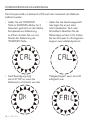
• Press “MODE” button to navigate
to Alarm Time Display (“AL” icon
displays on the LCD). Hold “MODE”
button for 3 seconds to enter alarm
clock setting mode. Press “▼” or
“▲” to change setting, and press
“MODE” button to confirm and
move to next setting.
• The setting sequence is: Hour,
Minute and Alarm ON (
)/
OFF (
).
• When the alarm is on, the symbol
“
” appears and when it is off
the symbol “
” disappears.
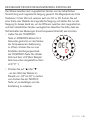
• When alarm goes off “
” will
flash. Press any button (except
SNOOZE/LIGHT button) to stop
the alarm. If no button is pressed
the alarm will automatically stop
after 2 minutes.
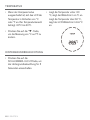
• When alarm is going off, press
“SNOOZE / LIGHT” button to
activate the snooze alarm, (Zzz icon
will flash on screen). The alarm will
snooze for 5 minutes. The snooze
function can be used only 7 times.
Dual Time Setting
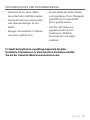
• Press “MODE” button until “DT” is
shown on the screen.
• Hold “MODE” button for 3 seconds
to enter Dual Time setting. The
“Hour” digits flash. Press “▲”or
“▼“ button to adjust the “hour”,
press “MODE” button to confirm
and quit the setting.
ENGLISH I 5