1
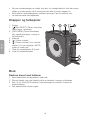
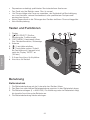
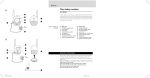
Connect the adaptor to the DC power socket (8) and to an available power point.
Switching the radio on and off
1. Fully extend the FM aerial (4).
2. Press [ DIAL/SELECT ] to turn the radio on. The first time the radio is turned on,
it will perform a full automatic search for DAB stations. “FULL SCAN” is shown
on the display. Once the scan has finished, the radio will select and play the DAB
station that comes first in alphabetical order. Turn [ DIAL/SELECT ] to select
another of the saved stationed. If no DAB stations are found, “NO SERV” will be
shown on the display.
3. Press and hold in [ DIAL/SELECT ] to turn the radio off.
Selecting FM or DAB radio mode
1. Press [ DIAL/SELECT ] to turn the radio on.
2. Press and hold in [ INFO/MENU ] until “DAB/FM” is shown on the display.
3. Press [ DIAL/SELECT ] to change from FM mode to DAB mode or from
DAB mode to FM depending which frequency band is active.
Scanning for DAB stations
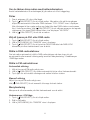
If the radio has not automatically tuned in and saved DAB stations when the radio was
first turned on, an automatic or manual scan can be performed as instructed below in
the Menu navigation - DAB mode sub-menu section.
Scanning for FM stations
Automatic scan
1. Select FM mode as explained above.
2. Press and hold in [ DIAL/SELECT ] until the radio starts scanning the frequency
band automatically.
3. Press the button again to continue the scan once a station has been found.
Manual scan
1. Select FM mode as explained above.
2. Turn [ DIAL/SELECT ] to tune into a favourable station.
Menu navigation
There are a number of sub-menus depending on which frequency band is active.
FM mode sub-menu
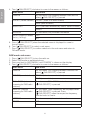
1. Press [ DIAL/SELECT ] to turn the radio on.
2. Select FM mode as explained above.
3. Press and hold in [ INFO/MENU ] until “DAB/FM” is shown on the display.
5
E ngl i sh
Mains adaptor operation