1
Is your amplifier and your mixer properly adjusted?
Have you kept to all instructions given in this manual?
SYMPTOMS
POSSIBLE CAUSES
Device does not react when swit- Connection to mains disrupted.
ching on.
Player does not start operation
CD is badly positioned or dirty
No sound
Does not read the program
Pop noise
Faderstart does not work
SOLUTION
Check
AC
plug
and
AC
connection.
Reposition CD with label atop or
clean with a dry and soft cloth.
Check the mixer and amplifier Possibly exchange connections.
connections
The player is in normal playback Press the Play/Pause-button and
mode
re-program
Mixer or amplifier connections Check cable and jack quality
inapropriate
Missing Audio Out-connection
Connect the Audio Out-sockets
with the Line-input sockets of your
mixer
8. CLEANING AND MAINTENANCE
DANGER TO LIFE!
Disconnect from mains before starting maintenance operation!
We recommend a frequent cleaning of the device. Please use a soft lint-free and moistened cloth. Never use
alcohol or solvents!
There are no servicable parts inside the device. Maintenance and service operations are only to be carried
out by authorized dealers.
Should you need any spare parts, please use genuine parts.
If the power supply cable of this device becomes damaged, it has to be replaced by a special power supply
cable available at your dealer.
Should you have further questions, please contact your dealer.
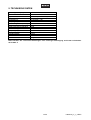
9. TECHNICAL SPECIFICATIONS
Power supply:
Power consumption:
Type:
Available disc:
Quantisation:
Sampler frequency:
Pitch adjustment:
Distortion:
S/N-ratio:
Channel seperation:
Frequency range:
Analogue output:
Output level:
Dimensions:
Weight:
115/230 V AC, 50/60 Hz ~
12 W
Single Compact Disc Player
Standard CDs 8 and 12 cm
D/A-converter: 1 Bit
44.1 kHz
+/- 16 %
0.02 %
88 dB
80 dB
20 - 20,000 Hz; +/- 1 dB
unbalanced via RCA
2 Vrms
220 x 300 x 95 mm
4.4 kg
Please note: Every information is subject to change without prior notice. 03.09.2004 ©
21/39
10602279_V_1_2.DOC